Mycodo
Environmental Regulation System
Latest version: 8.17.0
Mycodo is open source software for the Raspberry Pi that couples inputs and outputs in interesting ways to sense and manipulate the environment.
|Build Status| |Codacy Badge| |Translation Badge| |DOI|
.. contents:: Table of Contents :depth: 1
Quick Install
Prerequisites: Debian-based Linux operating system (tested with Raspberry Pi OS 13 Trixie).
Recommended: Single board computer (SBC) with General-Purpose Input-Output (GPIO) pins.
Install Command:
.. code:: bash
curl -L https://kizniche.github.io/Mycodo/install | bash
See the Install Mycodo __ section for more details.
Support
Documentation
`Mycodo Manual `__

`Mycodo API `__ (Version: v1)

`Mycodo Wiki `__

`Mycodo Custom Module Repository `__

Discussion
~~~~~~~~~~

`Mycodo Issues (Bug Reports/Feature Requests) `__

`Mycodo Forum `__

`Mycodo Discord `__

Bug in the Mycodo Software
If you believe there is a bug in the Mycodo software, first search through the github Issues __ and see if your issue has already recently been discussed or resolved. If your issue is novel or significantly more recent than a similar one, you should create a New Issue __. When creating a new issue, make sure to read all information in the issue template and follow the instructions. Replace the template text with the information being requested (e.g. "step 1" under "Steps to Reproduce the issue" should be replaced with the actual steps to reproduce the issue). The more information you provide, the easier it is to reproduce and diagnose the issue. If the issue is not able to reproduced because not enough information is provided, it may delay or prevent solving the issue.
Donate
I have always made Mycodo free and I don't intend on changing that. However, if you find Mycodo useful and would like to support its continued development, please consider becoming a sponsor at github.com/sponsors/kizniche __ or donate at kylegabriel.com/donate __.
Features
Inputs__ that record measurements from sensors, GPIO pin states, analog-to-digital converters, and more (or create your ownCustom Inputs). See allSupported Inputs.Outputs__ that perform actions such as switching GPIO pins high/low, generating PWM signals, executing shell scripts and Python code, and more (or create your ownCustom Outputs). See allSupported Outputs.Functions__ that perform tasks, such as coupling Inputs and Outputs in interesting ways, such asPID,Conditional,Trigger, to name a few (or create your ownCustom Functions). See allSupported Functions__.Web Interface__ for securely accessing Mycodo using a web browser on your local network or anywhere in the world with an internet connection, to view and configure the system, which includes several light and dark themes.Dashboards__ that display configurable widgets, including interactive live and historical graphs, gauges, output state indicators, measurements, and more (or create your ownCustom Widgets). See allSupported Widgets.Alert Notifications__ to send emails when measurements reach or exceed user-specified thresholds, important for knowing immediately when issues arise.Setpoint Tracking__ for changing a PID controller setpoint over time, for use with things like terrariums, reflow ovens, thermal cyclers, sous-vide cooking, and more.Notes__ to record events, alerts, and other important points in time, which can be overlaid on graphs to visualize events with your measurement data.Cameras__ for remote live streaming, image capture, and time-lapse photography.Energy Usage Measurement__ for calculating and tracking power consumption and cost over time.Upgrade System__ to easily upgrade the Mycodo system to the latest release to get the newest features or restore to a previously-backed up version.Translations__ that enable the web interface to be presented in differentLanguages__.
.. image:: https://kylegabriel.com/projects/wp-content/uploads/sites/3/2020/06/Screenshot_2020-04-25-hydra-Default-Dashboard-Mycodo-8-4-0-dashboard_2.png :target: https://kylegabriel.com/projects/wp-content/uploads/sites/3/2020/06/Screenshot_2020-04-25-hydra-Default-Dashboard-Mycodo-8-4-0-dashboard_2.png
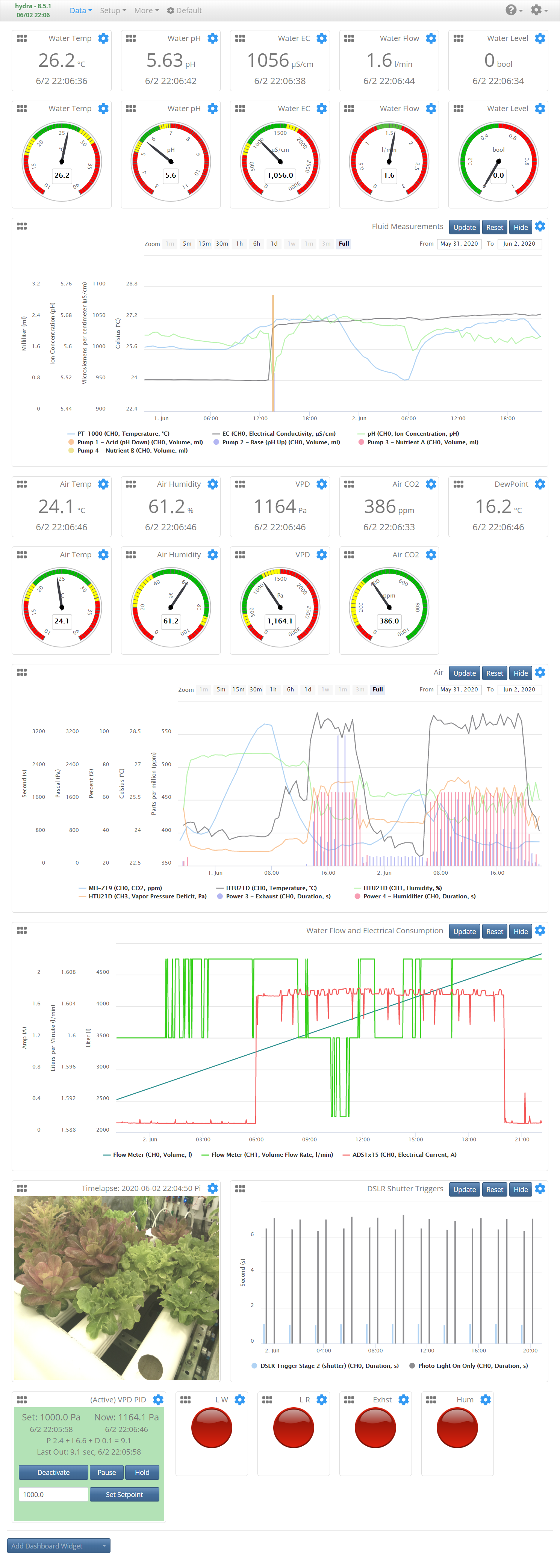
Figure: Automated Hydroponic System Build __
Uses
Originally developed to cultivate edible mushrooms, Mycodo has evolved to do much more. Here are a few things that have been done with Mycodo:
Projects by Kyle Gabriel (core developer)
-  `Mushroom Cultivation Automation `__ (`Archive `__)
-  `Hydroponic System Automation `__ (`Archive `__)
-  `Mushroom cultivation `__ (`Archive `__)
-  `Ground-based plant cultivation `__
-  `Maintaining honey bee apiary homeostasis `__ (`Archive `__)
-  `Maintaining humidity in an underground artificial bat cave `__ (`Archive `__)
-  `Remote radiation monitoring and mapping `__ (`Archive `__)
-  `Cooking sous-vide `__ (`Archive `__)
-  `Maintaining a light schedule and regulating humidity `__, ramping from 90 % to 50 % over a 4 week period to acclimatize micropropagated American chestnut plantlets from laboratory to ambient outdoor conditions (`Archive `__)

Featured Projects
~~~~~~~~~~~~~~~~~

.. image:: https://kylegabriel.com/projects/wp-content/uploads/sites/3/2021/09/MushroomCultivation_512x288.jpg
   :target: https://www.youtube.com/watch?v=z41Wy5ZF4O8

.. image:: https://kylegabriel.com/projects/wp-content/uploads/sites/3/2020/07/VID_PROJ_HYDRO_512x288.jpg
   :target: https://www.youtube.com/watch?v=nyqykZK2Ev4

Projects by Others
~~~~~~~~~~~~~~~~~~

-  Maintaining aquatic systems (e.g. fish, hydroponic, aquaponic)
-  Maintaining terrarium, herpetarium, and vivarium environments
-  Incubating young animals and eggs
-  Aging cheese
-  Dry-aging, curing, and smoking meat (`Link 1 `__ (`Archive `__), `Link 2 `__ (`Archive `__))
-  Fermenting beer, food, and tobacco
-  Controlling reflow ovens
-  Culturing microorganisms
-  `Treating agricultural waste water `__ (`Archive `__, `Publication `__)
-  ...and more

`Let me know `__ how you use Mycodo and I may include it on this list.

Screenshots
-----------

Visit the `Screenshots `__ page of the Wiki.

Install Mycodo
--------------

Prerequisites
~~~~~~~~~~~~~

Required:

-  Debian-based operating system (tested with Raspberry Pi OS 13 Trixie)
-  An active internet connection

Recommended:

-  `Raspberry Pi `__ single-board computer: 3, 4, or 5 (Zero, 1, and 2 are no longer recommended)
-  `Raspberry Pi Operating System `__ flashed to a micro SD card or SSD

Mycodo has been tested to work with Raspberry Pi OS 13 (Trixie release), Lite and Desktop, 32-bit and 64-bit.

Install Command
~~~~~~~~~~~~~~~

Once you have the Raspberry Pi booted, log in and run the following command in a terminal to initiate the Mycodo install to /opt/Mycodo:

.. code:: bash

    curl -L https://kizniche.github.io/Mycodo/install | bash


Install Notes
~~~~~~~~~~~~~

Make sure the install script finishes without errors. A log of the output will be created at ``/opt/Mycodo/install/setup.log``.

If the install is successful, the web user interface should be accessible by navigating a web browser to ``https://127.0.0.1/``, replacing ``127.0.0.1`` with the IP address of the computer you installed on. Upon your first visit, you will be prompted to create an admin user before being redirected to the login page. Once logged in, check that the time is correct at the top left of the page. Incorrect time can cause a number of issues with measurement storage and retrieval in a time-series database. Also ensure the host name and version number at the top left of the page is green, indicating the daemon is running. If it's red, it indicates the daemon is inactive or unresponsive. Last, ensure any java-blocking plugins of your browser are disabled for all parts of the web interface to function properly.

If you receive an error during the install that you believe is preventing your system from operating, please `create an issue `__ with the install log attached. If you would first like to attempt to diagnose the issue yourself, see `Diagnosing Issues `__.

A minimal set of anonymous usage statistics are collected to help improve development. No identifying information is saved from the information that is collected and it is only used to improve Mycodo. No one other than the development team will have access to this information and it will never be sold. The data collected is mainly what and how many features are used, and other similar information. The data that's collected can be viewed from the 'View collected statistics' link in the ``Settings -> General`` page. There is an opt out option on the General Settings page if you want to turn this functionality off.

Measurement Database
~~~~~~~~~~~~~~~~~~~~

Mycodo currently supports InfluxDB as the time-series database used to store measurements. Both versions 1.x (for 32-bit systems) and 2.x (for 64-bit systems) are supported. During the install, you will be prompted to install 1.x, 2.x, or none (if you wish to set up your own, either locally or remotely). The settings for the database can be reconfigured after install.

Docker
~~~~~~

Docker support is experimental, but if you want to try it, read the docker `README.md `__. There is also a `Docker Issue (#637) `__ on github for those that wish to help with development.

REST API
--------

The latest API documentation can be found here: `API Information `__ and `API Endpoint Documentation `__.

About PID Control
-----------------

A `proportional–integral–derivative (PID) controller `__ is a control loop feedback mechanism used throughout industry for controlling systems. It efficiently brings a measurable condition, such as temperature, to a desired state (setpoint). A well-tuned PID controller can raise to a setpoint quickly, have minimal overshoot, and maintain the setpoint with little oscillation.

.. figure:: docs/images/PID-Animation.gif
   :alt: PID Animation


|Mycodo|

The top graph visualizes the regulation of temperature. The red line is the desired temperature (setpoint) that has been configured to change over the course of each day. The blue line is the actual recorded temperature. The green vertical bars represent how long a heater has been activated for every 20-second period. This regulation was achieved with minimal tuning, and already displays a very minimal deviation from the setpoint (±0.5° Celsius). Further tuning would reduce this variability further.

See the `PID Controller `__ and `PID Tuning `__ sections of the manual for more information.

Supported Inputs and Outputs
----------------------------

All supported Inputs, Outputs, and other devices can be found under the `Supported Devices `__ section of the manual.

Custom Inputs, Outputs, Functions, Actions, and Widgets
-------------------------------------------------------

Mycodo supports importing custom Input, Output, Function, Action, and Widget modules. you can find more information about each in the manual under `Custom Inputs `__, `Custom Outputs `__, `Custom Functions `__, `Custom Actions `__, and `Custom Widgets `__.

If you would like to add to the list of supported Inputs, Outputs, Functions, Actions, and Widgets, submit a pull request with the module you created or start a `New Issue `__.

Additionally, I have another github repository devoted to custom modules that do not necessarily fit with the built-in set and are not included by default with Mycodo, but can be imported. These can be found at `kizniche/Mycodo-custom `__.

Links
-----

Thanks for using and supporting Mycodo, however depending where you found this documentation, you may not have the latest version or it may have been altered, if not obtained through an official distribution site. You should be able to find the latest version on github.

https://github.com/kizniche/Mycodo

https://KyleGabriel.com

https://RadicalDIY.com

License
-------

See `License.txt `__

Mycodo is free software: you can redistribute it and/or modify it under the terms of the GNU General Public License as published by the Free Software Foundation, either version 3 of the License, or (at your option) any later version.

Mycodo is distributed in the hope that it will be useful, but WITHOUT ANY WARRANTY; without even the implied warranty of MERCHANTABILITY or FITNESS FOR A PARTICULAR PURPOSE. See the `GNU General Public License `__ for more details.

A full copy of the GNU General Public License can be found at http://www.gnu.org/licenses/gpl-3.0.en.html

This software includes third party open source software components. Please see individual files for license information, if applicable.

Languages
---------

Mycodo has been translated to several languages. Weblate is now used so anyone can contribute to translations. However, due to an increasing number of new languages being added and not translated, only languages that are at least 50% complete will be included in Mycodo as a translation option.

|Translation Table|

-  Native: `English `__
-  `Dutch `__,
   `German `__,
   `French `__,
   `Indonesian `__,
   `Italian `__,
   `Norwegian `__,
   `Polish `__,
   `Portuguese `__,
   `Russian `__,
   `Serbian `__,
   `Spanish `__,
   `Swedish `__,
   `Turkish `__,
   `Chinese `__.

The install script will prompt you to select a language. This will be the set language when you first open the web user interface. You may change this at a later time on the settings page at ``[Gear Icon] -> Configure -> General -> Language``.

If you would like to contribute to the translations, you can do so at `http://translate.kylegabriel.com `__. Please read `How To Contribute to Language Translations in Mycodo `__ for more information.

Thanks
------

Mycodo is made possible, in part, by the many fine open source libraries, below.

-  `Alembic `__
-  `Argparse `__
-  `Bcrypt `__
-  `Bootstrap `__
-  `Daemonize `__
-  `Date Range Picker `__
-  `Distro `__
-  `Email_Validator `__
-  `Filelock `__
-  `Flask `__
-  `Flask_Accept `__
-  `Flask_Babel `__
-  `Flask_Compress `__
-  `Flask_Limiter `__
-  `Flask_Login `__
-  `Flask_Marshmallow `__
-  `Flask_Profiler `__
-  `Flask_RESTX `__
-  `Flask_Session `__
-  `Flask_SQLAlchemy `__
-  `Flask_Talisman `__
-  `Flask_WTF `__
-  `FontAwesome `__
-  `Geocoder `__
-  `gridstack.js `__
-  `Gunicorn `__
-  `Highcharts `__
-  `importlib_metadata `__
-  `InfluxDB `__
-  `influxdb `__
-  `influxdb_client `__
-  `jQuery `__
-  `Marshmallow_SQLAlchemy `__
-  `Pyro5 `__
-  `SQLAlchemy `__
-  `SQLite `__
-  `toastr `__
-  `Werkzeug `__
-  `WTForms `__


.. |Build Status| image:: https://github.com/kizniche/Mycodo/actions/workflows/main.yml/badge.svg
   :target: https://github.com/kizniche/Mycodo/actions/workflows/main.yml
.. |Codacy Badge| image:: https://app.codacy.com/project/badge/Grade/bb5ffc43e4444231b813ca6e81359336
   :target: https://www.codacy.com/gh/kizniche/Mycodo/dashboard?utm_source=github.com&utm_medium=referral&utm_content=kizniche/Mycodo&utm_campaign=Badge_Grade
.. |Translation Badge| image:: https://translate.kylegabriel.com/widget/mycodo/git-translation/svg-badge.svg
   :target: https://translate.kylegabriel.com/engage/mycodo/
.. |Translation Table| image:: https://translate.kylegabriel.com/widget/mycodo/git-translation/multi-auto.svg
   :target: https://translate.kylegabriel.com/engage/mycodo/
.. |DOI| image:: https://zenodo.org/badge/DOI/10.5281/zenodo.824199.svg
   :target: https://doi.org/10.5281/zenodo.824199
.. |Mycodo| image:: https://kylegabriel.com/projects/wp-content/uploads/sites/3/2016/05/Mycodo-3.6.0-tango-Graph-2016-05-21-11-15-26.png
   :target: https://kylegabriel.com/projects/