MangoHud
A Vulkan and OpenGL overlay for monitoring FPS, temperatures, CPU/GPU load and more.
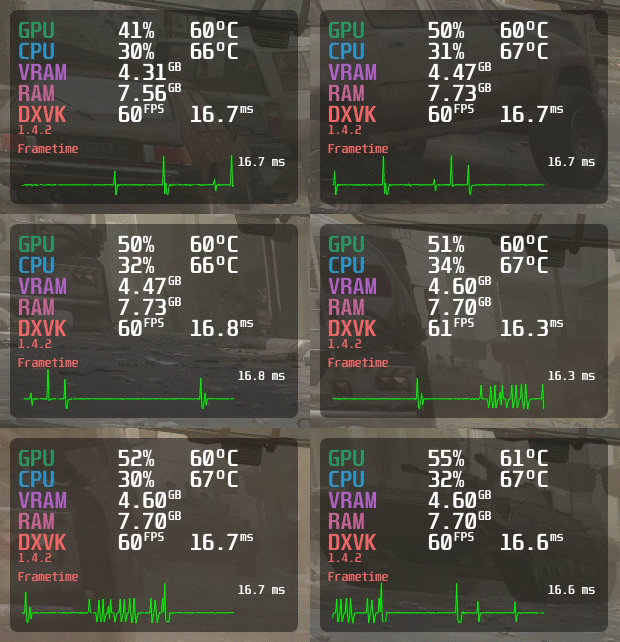
- MangoHud
Installation - Build From Source
If you wish to compile MangoHud to keep up to date with any changes - first clone this repository and cd into it:
git clone --recurse-submodules https://github.com/flightlessmango/MangoHud.git
cd MangoHud
Using meson to install "manually":
meson build
ninja -C build install
By default, meson should install MangoHud to /usr/local. Specify install prefix with --prefix=/usr if desired.
Add -Dappend_libdir_mangohud=false option to meson to not append mangohud to libdir if desired (e.g. /usr/local/lib/mangohud).
To install 32-bit build on 64-bit distro, specify proper libdir: lib32 for Arch, lib/i386-linux-gnu on Debian-based distros. RPM-based distros usually install 32-bit libraries to /usr/lib and 64-bit to /usr/lib64.
You may have to change PKG_CONFIG_PATH to point to correct folders for your distro.
CC="gcc -m32" \
CXX="g++ -m32" \
PKG_CONFIG_PATH="/usr/lib32/pkgconfig:/usr/lib/i386-linux-gnu/pkgconfig:/usr/lib/pkgconfig" \
meson build32 --libdir lib32
ninja -C build32 install
Dependencies
Install necessary development packages.
- gcc, g++
- or gcc-multilib, g++-multilib for 32-bit support
- meson >=0.54
- ninja (ninja-build)
- glslang
- Vulkan loader (libvulkan-dev)
- libGL/libEGL (libglvnd, libgl-dev, libegl-dev, mesa-common-dev, mesa-libGL-devel etc)
- GBM (libgbm-dev)
- libdrm (libdrm-dev)
- libcap (libcap-dev)
- sd-bus (libsystemd-dev, or elogind on non-systemd distributions)
- yaml-cpp (libyaml-cpp-dev)
- X11 (libx11-dev)
- XNVCtrl (libxnvctrl-dev), optional, use
-Dwith_xnvctrl=disabledoption withmesonto disable - D-Bus (libdbus-1-dev), optional, use
-Dwith_dbus=disabledoption withmesonto disable - wayland-client
- xkbcommon
Python 3 libraries:
- Mako (python3-mako or install with
pip)
If distro's packaged meson is too old and gives build errors, install newer version with pip (python3-pip).
Meson options
| Option | Default | Description |
|---|---|---|
| with_nvml | enabled | Required for NVIDIA GPU metrics on wayland |
| with_xnvctrl | enabled | Required for NVIDIA GPU metrics on older GPUs |
| with_x11 | enabled | Required for keybinds on x11 |
| with_wayland | enabled | Required for keybinds on wayland |
| with_dbus | enabled | Required for using the media features |
| mangoapp | false | Includes mangoapp |
| mangohudctl | false | Include mangohudctl |
| tests | auto | Includes tests |
| mangoplot | true | Includes mangoplot |
Building with build script
You can also use build.sh script to do some things automatically like install dependencies, if distro is supported but it usually assumes you are running on x86_64 architecture.
To just build it, execute:
./build.sh build
You can also pass arguments to meson:
./build.sh build -Dwith_xnvctrl=disabled
Resulting files will be install to ./build/release folder.
If you have compiled MangoHud from source, to install it, execute:
./build.sh install
You can then subsequently uninstall MangoHud via the following command
./build.sh uninstall
To tar up the resulting binaries into a package and create a release tar with installer script, execute:
./build.sh package release
or combine the commands, although package should also call build if it doesn't find the built libs:
./build.sh build package release
If you have built MangoHud before and suddenly it fails, you can try cleaning the build folder, execute:
./build.sh clean
Currently it just does rm -fr build and clears subprojects.
NOTE: If you are running an Ubuntu-based, Arch-based, Fedora-based, or openSUSE-based distro, the build script will automatically detect and prompt you to install missing build dependencies. If you run into any issues with this please report them!
Installation - Pre-packaged Binaries
GitHub releases
If you do not wish to compile anything, simply download the file under Releases, extract it, and from within the extracted folder in terminal, execute:
./mangohud-setup.sh install
Arch-based distributions
If you are using an Arch-based distribution, install mangohud and lib32-mangohud from the extra/multilib repository. mangohud-git and lib32-mangohud-git are available on the AUR to be installed via your favourite AUR helper. These can help fix issues with the hud not activating when using stable releases from pacman!
If you are building it by yourself, you need to enable multilib repository, by editing pacman config:
sudo nano /etc/pacman.conf
and uncomment:
#[multilib]
#Include = /etc/pacman.d/mirrorlist
then save the file and execute:
sudo pacman -Syy
Debian, Ubuntu
If you are using Debian 11 (Bullseye) or later, Ubuntu 21.10 (Impish) or later, or distro derived from them, to install the MangoHud package, execute:
sudo apt install mangohud
Optionally, if you also need MangoHud for 32-bit applications, on Debian you can execute:
sudo apt install mangohud:i386
The 32-bit package is not available on Ubuntu.
Fedora
If you are using Fedora, to install the MangoHud package, execute:
sudo dnf install mangohud
Solus
If you are using Solus, to install MangoHud simply execute:
sudo eopkg it mangohud
openSUSE
If you run openSUSE Leap or Tumbleweed you can get Mangohud from the official repositories. There are two packages, mangohud for 64bit and mangohud-32bit for 32bit application support. To have Mangohud working for both 32bit and 64bit applications you need to install both packages even on a 64bit operating system.
sudo zypper in mangohud mangohud-32bit
Leap doesn't seem to have the 32bit package.
Leap 15.2
sudo zypper addrepo -f https://download.opensuse.org/repositories/games:tools/openSUSE_Leap_15.2/games:tools.repo
sudo zypper install mangohud
Leap 15.3
sudo zypper addrepo -f https://download.opensuse.org/repositories/games:tools/openSUSE_Leap_15.3/games:tools.repo
sudo zypper install mangohud
Flatpak
If you are using Flatpaks, you will have to add the Flathub repository for your specific distribution, and then, to install it, execute:
For flatpak:
flatpak install org.freedesktop.Platform.VulkanLayer.MangoHud
To enable MangoHud for all Steam games:
flatpak override --user --env=MANGOHUD=1 com.valvesoftware.Steam
Normal usage
To enable the MangoHud overlay layer for Vulkan and OpenGL, run :
mangohud /path/to/app
For Lutris games, go to the System options in Lutris (make sure that advanced options are enabled) and add this to the Command prefix setting:
mangohud
For Steam games, you can add this as a launch option:
mangohud %command%
Or alternatively, add MANGOHUD=1 to your shell profile (Vulkan only).
OpenGL
OpenGL games may also need dlsym hooking, which is now enabled by default. Set the MANGOHUD_DLSYM env to 0 to disable like MANGOHUD_DLSYM=0 %command% for Steam.
Some Linux native OpenGL games overrides LD_PRELOAD and stops MangoHud from working. You can sometimes fix this by editing LD_PRELOAD in the start script
LD_PRELOAD=/path/to/mangohud/lib/
gamescope
To enable mangohud with gamescope you need to install mangoapp.
gamescope --mangoapp -- %command%
Using normal mangohud with gamescope is not supported.
Hud configuration
MangoHud comes with a config file which can be used to set configuration options globally or per application. Usually it is installed as /usr/share/doc/mangohud/MangoHud.conf.example or get a copy from here.
The priorities of different config files are:
/path/to/application/dir/MangoHud.conf- Per-application configuration in ~/.config/MangoHud:
~/.config/MangoHud/.conffor native applications, where `` is the case sensitive name of the executable~/.config/MangoHud/wine-.conffor wine/proton apps, where `` is the case sensitive name of the executable without the.exeending
~/.config/MangoHud/MangoHud.conf
Example: For Overwatch, this would be wine-Overwatch.conf (even though the executable you run from Lutris is Battle.net.exe, the actual game executable name is Overwatch.exe).
If you start the game from the terminal with MangoHud enabled (for example by starting Lutris from the terminal), MangoHud will print the config file names it is looking for.
You can find an example config in /usr/share/doc/mangohud
GOverlay Qt GUI for configuring MangoHud.
MangoJuice GTK GUI for configuring MangoHud.
Environment Variables
You can also customize the hud by using the MANGOHUD_CONFIG environment variable while separating different options with a comma. This takes priority over any config file.
You can also specify configuration file with MANGOHUD_CONFIGFILE=/path/to/config for applications whose names are hard to guess (java, python etc).
You can also specify presets file with MANGOHUD_PRESETSFILE=/path/to/config. This is especially useful when running mangohud in a sandbox such as flatpak.
You can also specify custom hud libraries for OpenGL using MANGOHUD_OPENGL_LIBS=/path/to/libMangoHud_opengl.so. This is useful for testing MangoHud without modifying the installation on your system.
A partial list of parameters are below. See the config file for a complete list.
Parameters that are enabled by default have to be explicitly disabled. These (currently) are fps, frame_timing, cpu_stats (cpu load), gpu_stats (gpu load), and each can be disabled by setting the corresponding variable to 0 (e.g., fps=0).
| Variable | Description |
|---|---|
af |
Anisotropic filtering level. Improves sharpness of textures viewed at an angle 0-16 |
alpha |
Set the opacity of all text and frametime graph 0.0-1.0 |
arch |
Show if the application is 32- or 64-bit |
autostart_log= |
Starts the log after X seconds from mangohud init |
background_alpha |
Set the opacity of the background 0.0-1.0 |
battery_color |
Change the battery text color |
battery_icon |
Display battery icon instead of percent |
battery_watt |
Display wattage for the battery option |
battery_time |
Display remaining time for battery option |
battery |
Display current battery percent and energy consumption |
benchmark_percentiles |
Configure which framerate percentiles are shown in the logging summary. Default is 97,AVG,1,0.1 |
bicubic |
Force bicubic filtering |
blacklist |
Add a program to the blacklist. e.g blacklist=vkcube,WatchDogs2.exe |
cellpadding_y |
Set the vertical cellpadding, default is -0.085 |
control= |
Sets up a unix socket with a specific name that can be connected to with mangohud-control. I.e. control=mangohud or control=mangohud-%p (%p will be replaced by process id) |
core_load_change |
Change the colors of cpu core loads, uses the same data from cpu_load_value and cpu_load_change |
core_load |
Display load & frequency per core |
core_type |
Display CPU core type per core. For Intel, it shows which cores are performance and efficient cores, for ARM it shows core codenames like A52, A53, A76, etc... |
core_bars |
Change the display of core_load from numbers to vertical bars |
cpu_load_change |
Change the color of the CPU load depending on load |
cpu_load_color |
Set the colors for the gpu load change low, medium and high. e.g cpu_load_color=0000FF,00FFFF,FF00FF |
cpu_load_value |
Set the values for medium and high load e.g cpu_load_value=50,90 |
cpu_mhz |
Show the CPUs current MHz |
cpu_powergpu_power |
Display CPU/GPU draw in watts |
cpu_tempgpu_tempgpu_junction_tempgpu_mem_temp |
Display current CPU/GPU temperature |
cpu_custom_temp_sensor |
Use custom hwmon sensor for cpu temperature. e.g cpu_custom_temp_sensor=cpuss0_2,temp3_input. |
cpu_textgpu_text |
Override CPU and GPU text. gpu_text is a list in case of multiple GPUs |
cpu_efficiency |
Display CPU efficiency in frames per joule |
custom_text_center |
Display a custom text centered useful for a header e.g custom_text_center=FlightLessMango Benchmarks |
custom_text |
Display a custom text e.g custom_text=Fsync enabled |
debug |
Shows the graph of gamescope app frametimes and latency (only on gamescope obviously) |
device_battery_icon |
Display wirless device battery icon. |
device_battery |
Display wireless device battery percent. Currently supported arguments gamepad and mouse e.g device_battery=gamepad,mouse |
display_server |
Display the current display session (e.g. X11 or wayland) |
dynamic_frame_timing |
This changes frame_timing y-axis to correspond with the current maximum and minimum frametime instead of being a static 0-50 |
engine_short_names |
Display a short version of the used engine (e.g. OGL instead of OpenGL) |
engine_version |
Display OpenGL or vulkan and vulkan-based render engine's version |
exec |
Display output of bash command in next column, e.g. custom_text=/home , exec=df -h /home | tail -n 1. Only works with legacy_layout=0 |
exec_name |
Display current exec name |
fan |
Shows the Steam Deck fan rpm |
fcat |
Enables frame capture analysis |
fcat_overlay_width= |
Sets the width of fcat. Default is 24 |
fcat_screen_edge= |
Decides the edge fcat is displayed on. A value between 1 and 4 |
font_file_text |
Change text font. Otherwise font_file is used |
font_file |
Change default font (set location to .TTF/.OTF file) |
font_glyph_ranges |
Specify extra font glyph ranges, comma separated: korean, chinese, chinese_simplified, japanese, cyrillic, thai, vietnamese, latin_ext_a, latin_ext_b. If you experience crashes or text is just squares, reduce font size or glyph ranges |
font_scale= |
Set global font scale. Default is 1.0 |
font_scale_media_player |
Change size of media player text relative to font_size |
font_size= |
Customizable font size. Default is 24 |
font_size_secondary= |
Customizable font size for secondary metrics. Default is 0.55 * font_size, except if no_small_font is set, in which case the default value is font_size |
font_size_text= |
Customizable font size for other text like media metadata. Default is 24 |
fps_color_change |
Change the FPS text color depepending on the FPS value |
fps_color= |
Choose the colors that the fps changes to when fps_color_change is enabled. Corresponds with fps_value. Default is b22222,fdfd09,39f900 |
fps_limit_method |
If FPS limiter should wait before or after presenting a frame. Choose late (default) for the lowest latency or early for the smoothest frametimes |
fps_limit |
Limit the apps framerate. Comma-separated list of one or more FPS values. 0 means unlimited |
fps_only |
Show FPS only. Not meant to be used with other display params |
fps_sampling_period= |
Time interval between two sampling points for gathering the FPS in milliseconds. Default is 500 |
fps_value |
Choose the break points where fps_color_change changes colors between. E.g 60,144, default is 30,60 |
fps_metrics |
Takes a list of decimal values or the value avg, e.g avg,0.001 |
reset_fps_metrics |
Reset fps metrics keybind, default is Shift_R+F9 |
fps_text |
Display custom text for engine name in front of FPS |
frame_count |
Display frame count |
frametime |
Display frametime next to FPS text |
frame_timing_detailed |
Display frame timing in a more detailed chart |
fsr |
Display the status of FSR (only works in gamescope) |
hdr |
Display the status of HDR (only works in gamescope) |
refresh_rate |
Display the current refresh rate (only works in gamescope) |
full |
Enable most of the toggleable parameters (currently excludes histogram) |
gamemode |
Show if GameMode is on |
gpu_colorcpu_colorvram_colorram_colorio_colorengine_colorframetime_colorbackground_colortext_colormedia_player_colornetwork_color |
Change default colors: gpu_color=RRGGBB |
gpu_core_clockgpu_mem_clock |
Display GPU core/memory frequency |
gpu_fan |
GPU fan in RPM, except NVIDIA where it is a percentage |
gpu_load_change |
Change the color of the GPU load depending on load |
gpu_load_color |
Set the colors for the gpu load change low,medium and high. e.g gpu_load_color=0000FF,00FFFF,FF00FF |
gpu_load_value |
Set the values for medium and high load e.g gpu_load_value=50,90 |
gpu_name |
Display GPU name from pci.ids |
gpu_voltage |
Display GPU voltage |
gpu_list |
List GPUs to display gpu_list=0,1 |
gpu_efficiency |
Display GPU efficiency in frames per joule |
gpu_power_limit |
Display GPU power limit |
hide_fsr_sharpness |
Hides the sharpness info for the fsr option (only available in gamescope) |
histogram |
Change FPS graph to histogram |
horizontal |
Display Mangohud in a horizontal position |
horizontal_separator_color |
Set the colors for the horizontal separators (horizontal layout only) |
horizontal_stretch |
Stretches the background to the screens width in horizontal mode |
hud_compact |
Display compact version of MangoHud |
hud_no_margin |
Remove margins around MangoHud |
io_readio_write |
Show non-cached IO read/write, in MiB/s |
log_duration |
Set amount of time the logging will run for (in seconds) |
log_interval |
Change the default log interval in milliseconds. Default is 0 |
log_versioning |
Adds more headers and information such as versioning to the log. This format is not supported on flightlessmango.com (yet) |
media_player_format |
Format media player metadata. Add extra text etc. Semi-colon breaks to new line. Defaults to {title};{artist};{album} |
media_player_name |
Force media player DBus service name without the org.mpris.MediaPlayer2 part, like spotify, vlc, audacious or cantata. If none is set, MangoHud tries to switch between currently playing players |
media_player |
Show media player metadata |
no_display |
Hide the HUD by default |
no_small_font |
Use primary font size for smaller text like units |
offset_x offset_y |
HUD position offsets |
output_file |
Set location and name of the log file |
output_folder |
Set location of the output files (Required for logging) |
pci_dev |
Select GPU device in multi-gpu setups |
permit_upload |
Allow uploading of logs to Flightlessmango.com |
picmip |
Mip-map LoD bias. Negative values will increase texture sharpness (and aliasing). Positive values will increase texture blurriness -16-16 |
position= |
Location of the HUD: top-left (default), top-right, middle-left, middle-right, bottom-left, bottom-right, top-center, bottom-center |
preset= |
Comma separated list of one or more presets. Default is -1,0,1,2,3,4. Available presets:0 (No Hud)1 (FPS Only)2 (Horizontal)3 (Extended)4 (Detailed)User defined presets can be created by using a presets.conf file in ~/.config/MangoHud/. |
procmemprocmem_shared, procmem_virt |
Displays process' memory usage: resident, shared and/or virtual. procmem (resident) also toggles others off if disabled |
proc_vram |
Display process' VRAM usage |
ramvram |
Display system RAM/VRAM usage |
ram_temp |
Display RAM temperature (only supports DDR5 with spd5118 driver) |
read_cfg |
Add to MANGOHUD_CONFIG as first parameter to also load config file. Otherwise only MANGOHUD_CONFIG parameters are used |
reload_cfg= |
Change keybind for reloading the config. Default = Shift_L+F4 |
resolution |
Display the current resolution |
retro |
Disable linear texture filtering. Makes textures look blocky |
round_corners |
Change the amount of roundness of the corners have e.g round_corners=10.0 |
show_fps_limit |
Display the current FPS limit |
swap |
Display swap space usage next to system RAM usage |
table_columns |
Set the number of table columns for ImGui, defaults to 3 |
temp_fahrenheit |
Show temperature in Fahrenheit |
text_outline |
Draw an outline around text for better readability. Enabled by default. |
text_outline_color= |
Set the color of text_outline. Default = 000000 |
text_outline_thickness= |
Set the thickness of text_outline. Default = 1.5 |
throttling_status |
Show if GPU is throttling based on Power, current, temp or "other" (Only shows if throttling is currently happening). Currently disabled by default for Nvidia as it causes lag on 3000 series |
throttling_status_graph |
Same as throttling_status but displays throttling in the frametime graph and only power and temp throttling |
timetime_format=%T |
Display local time. See std::put_time for formatting help. NOTE: Sometimes apps may set TZ (timezone) environment variable to UTC/GMT |
time_no_label |
Remove the label before time |
toggle_fps_limit |
Cycle between FPS limits (needs at least two values set with fps_limit). Defaults to Shift_L+F1 |
toggle_preset |
Cycle between Presets. Defaults to Shift_R+F10 |
toggle_hud=toggle_logging= |
Modifiable toggle hotkeys. Default are Shift_R+F12 and Shift_L+F2, respectively |
toggle_hud_position |
Toggle MangoHud position. Default is R_Shift+F11 |
trilinear |
Force trilinear filtering |
upload_log |
Change keybind for uploading log |
upload_logs |
Enables automatic uploads of logs to flightlessmango.com |
version |
Show current MangoHud version |
vkbasalt |
Show if vkBasalt is on |
vsyncgl_vsync |
Set Vsync for OpenGL or Vulkan |
vulkan_present_mode= |
Override Vulkan present mode using specified mode name (takes precedence over vsync=) |
vulkan_driver |
Display used Vulkan driver (radv/amdgpu-pro/amdvlk) |
width=height= |
Customizable HUD dimensions (in pixels) |
wine_color |
Change color of the wine/proton text |
wine |
Show current Wine or Proton version in use |
winesync |
Show wine sync method in use |
present_mode |
Shows current vulkan present mode or vsync status in opengl |
network |
Show network interfaces tx and rx kb/s. You can specify interface with network=eth0 |
fex_stats |
Show FEX-Emu statistics. Default = status+apptype+hotthreads+jitload+sigbus+smc+softfloat |
ftrace |
Display information about trace events reported through ftrace |
flip_efficiency |
Flips CPU and GPU efficiency to joules per frame |
Example: MANGOHUD_CONFIG=cpu_temp,gpu_temp,position=top-right,height=500,font_size=32
Because comma is also used as option delimiter and needs to be escaped for values with a backslash, you can use + like MANGOHUD_CONFIG=fps_limit=60+30+0 instead.
Note: Width and Height are set automatically based on the font_size, but can be overridden.
Note: RAPL is currently used for Intel and AMD Zen CPUs to show power draw with cpu_power which may be unreadable for non-root users due to vulnerability. The corresponding energy_uj file has to be readable by corresponding user, e.g. by running chmod o+r /sys/class/powercap/intel-rapl\:0/energy_uj as root, else the power shown will be 0 W, though having the file readable may potentially be a security vulnerability persisting until system reboots.
Note: The zenpower3 or zenergy kernel driver must be installed to show the power draw of Ryzen CPUs.
Vsync
OpenGL Vsync
-1= Adaptive sync0= Off1= Onn= Sync to refresh rate / n.
Vulkan Vsync
0= Adaptive VSync (FIFO_RELAXED_KHR)1= Off (IMMEDIATE_KHR)2= Mailbox (VSync with uncapped FPS) (MAILBOX_KHR)3= On (FIFO_KHR)
Not all vulkan vsync options may be supported on your device, you can check what your device supports here vulkan.gpuinfo.org
Keybindings
Shift_L+F2: Toggle LoggingShift_L+F4: Reload ConfigShift_R+F12: Toggle HudShift_R+F9: Reset FPS metrics
Workarounds
Options starting with "gl_*" are for OpenGL.
gl_size_query = viewport: Specify what to use for getting display size. Options are "viewport", "scissorbox" or disabled. Defaults to using glXQueryDrawable.gl_bind_framebuffer = 0..N: (Re)bind given framebuffer before MangoHud gets drawn. Helps with Crusader Kings III.gl_dont_flip = 1: Don't swap origin if using GL_UPPER_LEFT. Helps with Ryujinx.
FPS logging
You must set a valid path for output_folder in your configuration to store logs in.
When you toggle logging (default keybind is Shift_L+F2), a file is created with the game name plus a date & timestamp in your output_folder.
Log files can be visualized with two different tools: online and locally.
Online visualization: FlightlessMango.com
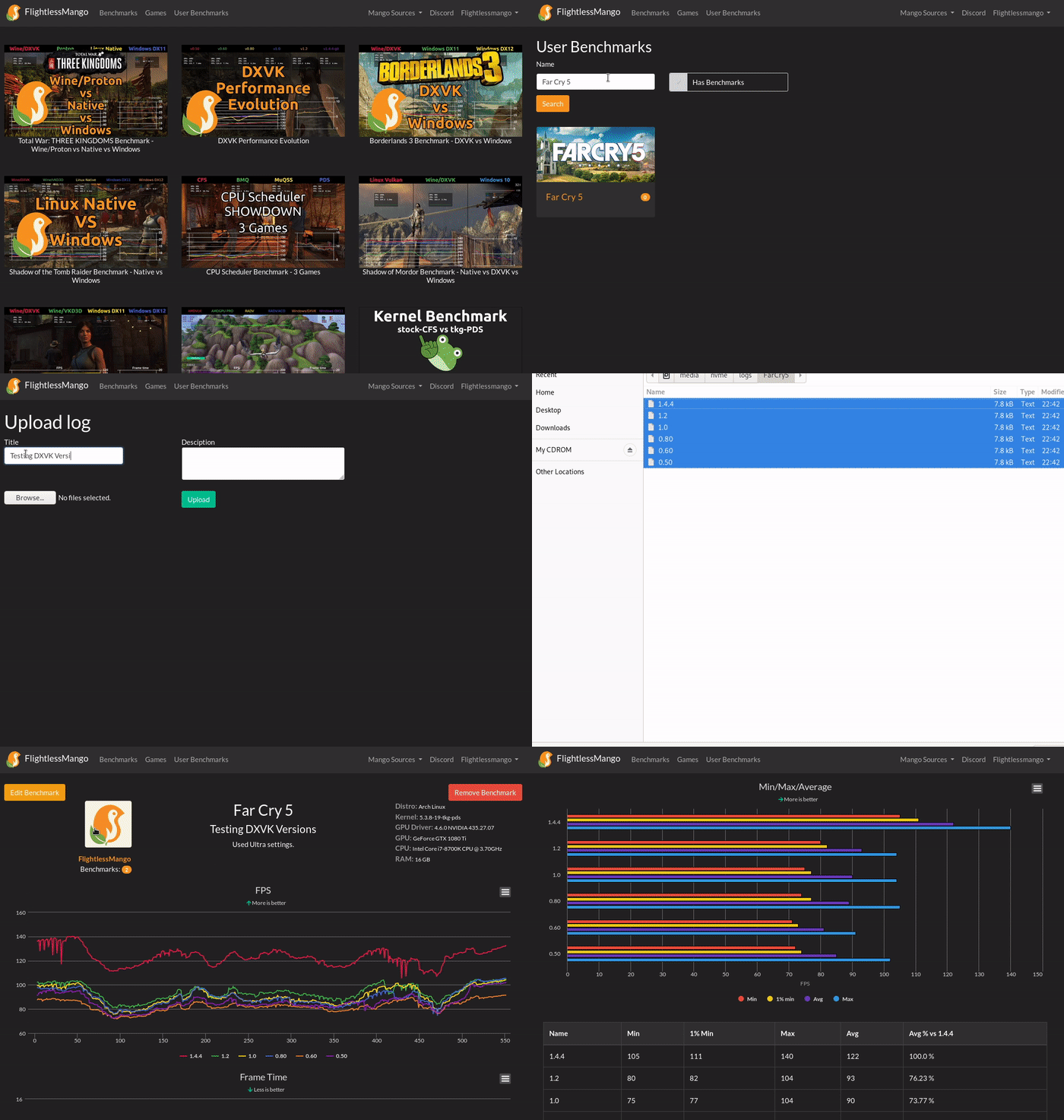
Log files can be (batch) uploaded to FlightlessMango.com, which will then take care of creating a frametime graph and a summary with 1% min / average framerate / 97th percentile in a table form and a horizontal bar chart form.
Notes:
- Uploaded benchmarks are public: you can share them with anyone by simply giving them the link.
- Benchmark filenames are used as legend in the produced tables and graphs, they can be renamed after the upload.
Local visualization: mangoplot
mangoplot is a plotting script that is shipped with MangoHud: on a given folder, it takes each log file, makes a 1D heatmap of its framerates, then stacks the heats maps vertically to form a 2D graph for easy visual comparison between benchmarks.
Example output:
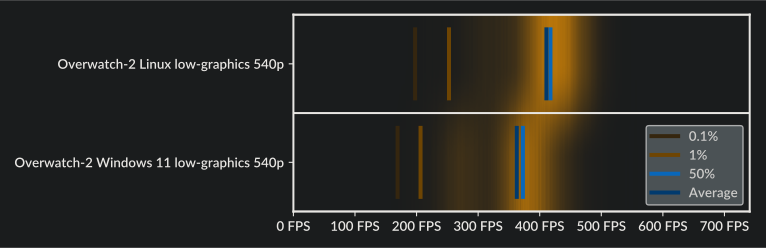
Overwatch 2, 5950X + 5700XT, low graphics preset, FHD, 50% render scale
Metrics support by GPU vendor/driver
| Nvidia | AMD | Intel Discrete | Intel Integrated | Panfrost/Panthor driver | Qualcomm | |||
|---|---|---|---|---|---|---|---|---|
| i915 | xe | i915/xe | msm_drm (kgsl) | msm_dpu | ||||
| Usage% | 🟢 | 🟢 | 🟢 | 🟢 | 🟢 | 🟢 | 🟢 | 🟢 |
| Temperature | 🟢 | 🟢 | 🟢 | 🟢 | 🔴 | 🟢 | 🟢 | 🟢 |
| Junction Temperature | 🔴 | 🟢 | 🔴 | 🔴 | 🔴 | 🔴 | 🔴 | 🔴 |
| Memory Temperature | 🔴 | 🟢 | 🔴 | 🟢 | 🔴 | 🔴 | 🔴 | 🔴 |
| Process VRAM | 🟢 | 🟢 | 🟢 | 🟢 | 🟢 | 🟢 | 🔴 | 🟢 |
| System VRAM | 🟢 | 🟢 | 🔴 | 🔴 | 🔴 | 🔴 | 🔴 | 🔴 |
| Total VRAM | 🟢 | 🟢 | 🟢 | 🟢 | 🔴 | 🔴 | 🔴 | 🔴 |
| Memory Clock | 🟢 | 🟢 | 🔴 | 🔴 | 🔴 | 🔴 | 🔴 | 🔴 |
| Core Clock | 🟢 | 🟢 | 🟢 | 🟢 | 🟢 | 🟢 | 🟢 | 🔴 |
| Power Usage | 🟢 | 🟢 | 🟢 | 🟢 | 🔴 | 🔴 | 🔴 | 🔴 |
| Throttling Status | 🟢 | 🟢 | 🟢 | 🟢 | 🟢 | 🔴 | 🔴 | 🔴 |
| Fan Speed | 🟢 | 🟢 | 🟢 | 🟢 | 🔴 | 🔴 | 🔴 | 🔴 |
| Voltage | 🔴 | 🟢 | 🟢 | 🟢 | 🔴 | 🔴 | 🔴 | 🔴 |
Intel notes
- GPU temperature for
i915requires linux 6.13+ - Fan speed for
i915requires linux 6.12+ - GPU temperature and vram temperature for
xerequires linux 6.15+ - Fan speed for
xerequires linux 6.16+ - GPU usage and memory usage shows usage of current process, not total system usage (it's an issue on intel's side)
- Integrated Intel GPUs are limited due to lack of hwmon interface (it's an issue on intel's side, i915 source, xe source)
Panfrost and Panthor notes
- GPU usage requires
echo N | sudo tee /sys/class/drm/renderD*/device/profiling- Where N is a number, 1 for panfrost and 3 for panthor.
Qualcomm notes
- GPU usage on
msm_dpushows usage of the current process, not total system usage