kubefwd is a free, open source frameworks & platforms project written in Go and released under Apache-2.0. It has 4,169 GitHub stars, 236 forks and 10 open issues, and was last pushed 9 days ago. On this registry it ranks #45 of 69 tracked projects in Frameworks & Platforms, with 5 head-to-head comparisons available.

What is kubefwd?

kubefwd (Kube Forward) is an Apache-2.0 licensed, Go-based command-line utility that bulk port forwards Kubernetes services to a local workstation, giving each service its own unique 127.x.x.x loopback address and a matching /etc/hosts entry so that locally running code can reach cluster services by their in-cluster names, and it is aimed at developers who build and test against a Kubernetes development cluster from their own machine.

What it is

kubefwd is a command-line utility maintained in the txn2 GitHub organisation and listed in the CNCF Landscape. It discovers the services in a Kubernetes namespace, assigns each service its own unique loopback IP in the 127.x.x.x range, updates /etc/hosts with the service names, and establishes port forwards through the Kubernetes API. The result is that services are reachable by name exactly as they would be from inside the cluster, so a developer can run curl http://api-service:8080, mysql -h database -P 3306, or redis-cli -h cache -p 6379 from their own machine.

The concrete problem it solves is environment-specific connection setup during local development. Instead of starting individual forwards, standing up local service instances, writing Docker Compose files, or editing connection strings for each environment, a developer runs one command and existing connection strings keep working. An application that talks to http://api-gateway:8080 in production, or needs a database at db:5432, an auth service at auth:443, and a cache at redis:6379, uses the same addresses on a laptop. In that sense it replaces the manual practice of running a separate kubectl port-forward per service and the ad hoc configuration that usually grows around it.

Key capabilities

  • Bulk forwarding of every service in a namespace with a single command such as kubefwd svc -n my-namespace.
  • A unique loopback IP for each service in the 127.x.x.x range, which eliminates port conflicts between services.
  • An interactive TUI with real-time service monitoring and traffic metrics, where ? opens help and q quits.
  • Automatic reconnection when pods restart or connections drop.
  • Live traffic monitoring showing bytes in and out together with HTTP activity.
  • Pod log streaming, so container logs can be read from within the TUI.
  • A REST API for programmatic control over HTTP endpoints, plus MCP support for integration with AI assistants such as Claude Code and Cursor.

Who uses it and how

  • Developers building a local API that must reach a database at db:5432, an auth service at auth:443, and a cache at redis:6379 in a development cluster.
  • Teams whose application code uses in-cluster hostnames such as api-gateway:8080 in production and who want the same connection strings to work on a laptop without changes.
  • Developers working against a specific Kubernetes namespace, running sudo -E kubefwd svc -n my-namespace --tui to forward the whole namespace at once.
  • Engineers who prefer terminal-based observability, using the TUI to watch per-service traffic and stream pod logs while they work.
  • Tooling and AI-assisted workflows that drive kubefwd through its REST API or its MCP integration with assistants including Claude Code and Cursor.

Getting started

On macOS the documented installation method is brew install kubefwd; on Linux the README points to downloading the .deb, .rpm, or .tar.gz packages from the project's GitHub releases. A typical run is sudo -E kubefwd svc -n my-namespace --tui, with further detail in the Getting Started and User Guide documentation at kubefwd.com.

How it compares

The facts provided do not name any comparable or competing tool, and no list of paid products that kubefwd replaces is given, so on the evidence available it stands alone in this registry. Its distinguishing characteristics as recorded here are its CNCF Landscape listing and the combination of bulk namespace forwarding, a unique loopback IP per service, and an interactive TUI.

When to use it — and when not to

kubefwd requires elevated privileges, since it binds loopback addresses and rewrites /etc/hosts, and it needs working Kubernetes credentials plus access to the target namespace, which makes it a local development tool rather than something to run in production or shared environments. It is a poor fit for anyone who cannot grant sudo on their workstation or who objects to a tool modifying the system hosts file. The documented installation path also differs by platform, with Homebrew on macOS but manual package downloads on Linux, so Linux users should expect to fetch release artefacts rather than run a single package-manager command.

project readme (upstream, from github) — read inline

kubefwd (Kube Forward)


kubefwd - kubernetes bulk port forwarding

CNCF Landscape GitHub license codecov Go Report Card GitHub release GitHub Downloads OpenSSF Scorecard OpenSSF Best Practices SLSA 3

Documentation | Getting Started | User Guide | API Reference | MCP (AI Integration)

Develop Locally, Connect to Kubernetes

kubefwd enables developers to work on their local machine while seamlessly accessing services running in a Kubernetes cluster. If you're building a new API that needs to connect to a database at db:5432, an auth service at auth:443, and a cache at redis:6379, all running in your development cluster, kubefwd makes them available locally by their service names, exactly as they would appear in-cluster. No environment-specific configuration, no local service setup, no Docker Compose files. Just run kubefwd and your application's existing connection strings work.

This is the essential use case: reduce or eliminate environment-specific connection setup and configurations during local development. Your code uses http://api-gateway:8080 in production? It works the same way on your laptop with kubefwd.

Bulk Kubernetes port forwarding with an interactive TUI, unique IPs per service, and automatic reconnection.

kubefwd is a command-line utility that bulk port forwards Kubernetes services to your local workstation. Each service gets its own unique loopback IP (127.x.x.x), eliminating port conflicts and enabling realistic local development with cluster services accessible by name.
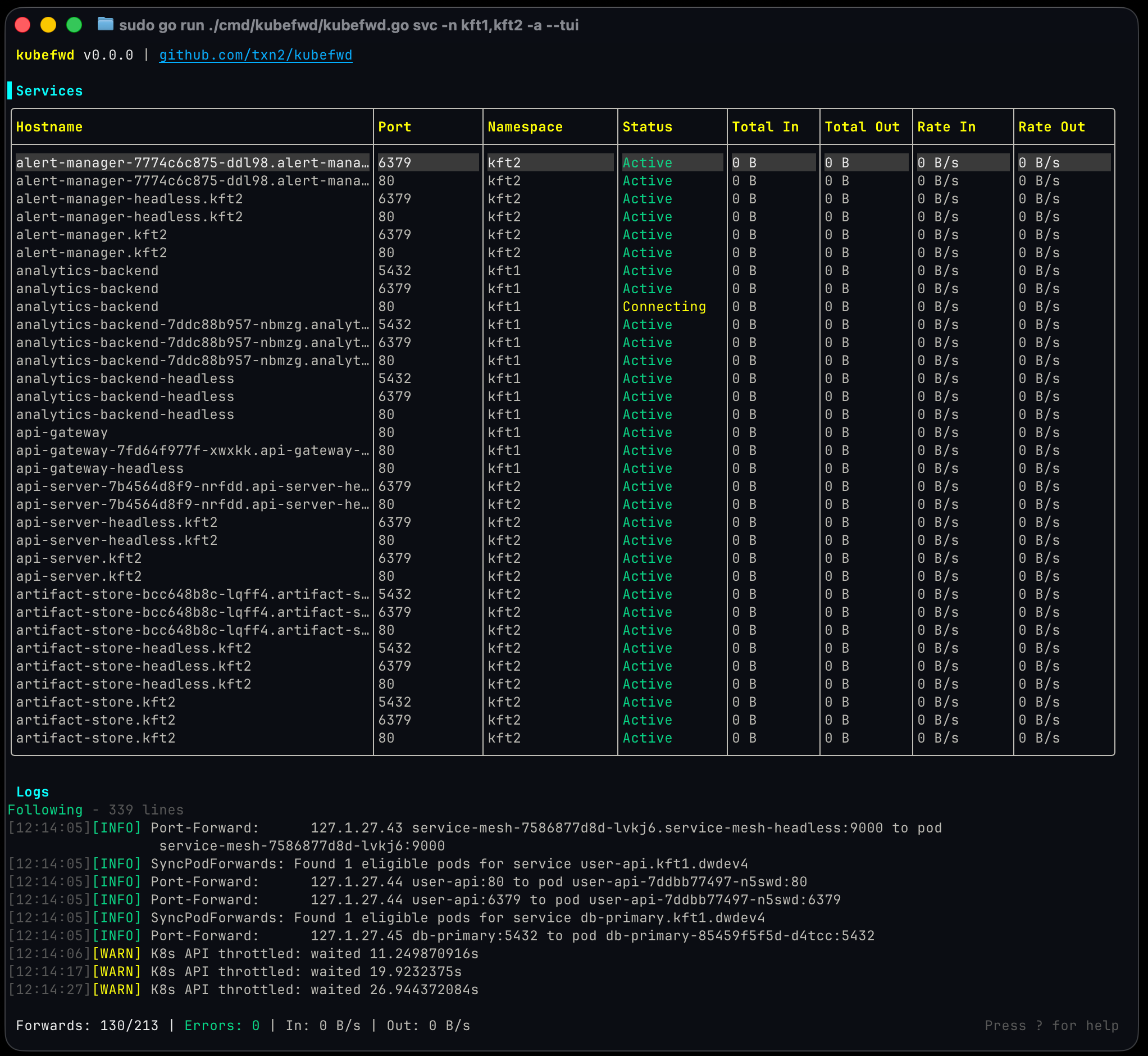
kubefwd TUI - Main View

Quick Start

# Install (macOS)
brew install kubefwd

# Forward all services in a namespace with the interactive TUI
sudo -E kubefwd svc -n my-namespace --tui

Press ? for help, q to quit. See Getting Started for detailed installation and setup.

How It Works
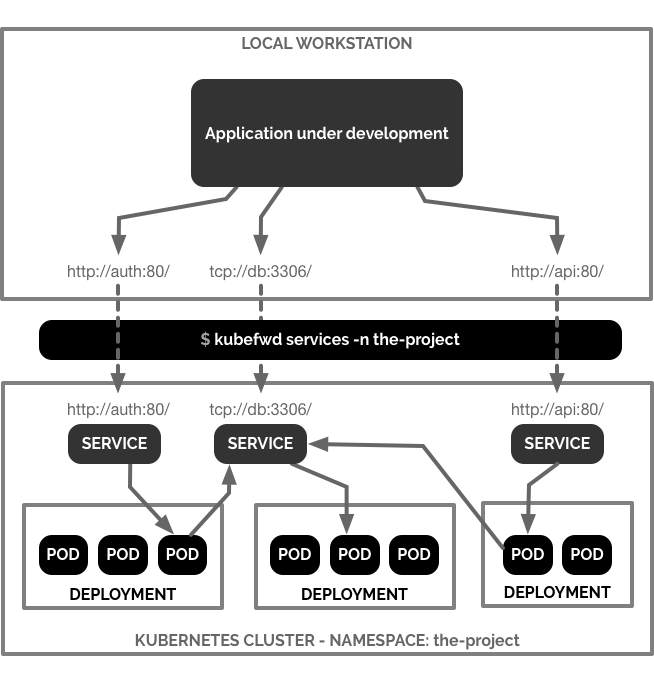
kubefwd - Kubernetes Port Forward Diagram

kubefwd discovers services in your namespace, assigns each a unique loopback IP, updates /etc/hosts with service names, and establishes port forwards through the Kubernetes API. Access services by name just like in-cluster:

curl http://api-service:8080
mysql -h database -P 3306
redis-cli -h cache -p 6379

Features

  • Interactive TUI: Real-time service monitoring with traffic metrics
  • Unique IP per Service: Each service gets its own 127.x.x.x address
  • Auto-Reconnect: Reconnects when pods restart or connections drop
  • Bulk Forwarding: Forward all services in a namespace with one command
  • Live Traffic Monitoring: See bytes in/out and HTTP activity
  • Pod Log Streaming: View container logs in the TUI
  • REST API: Programmatic control via HTTP endpoints
  • MCP Support: Integration with AI assistants (Claude Code, Cursor)

Installation

macOS:

brew install kubefwd

Linux: Download .deb, .rpm, or .tar.gz from releases

Windows:

winget install txn2.kubefwd
# or
scoop install kubefwd

Docker:

docker run -it --rm --privileged \
  -v "$HOME/.kube:/root/.kube:ro" \
  txn2/kubefwd services -n my-namespace --tui

Usage

# Interactive mode (recommended)
sudo -E kubefwd svc -n default --tui

# Multiple namespaces
sudo -E kubefwd svc -n default,staging --tui

# Filter by label
sudo -E kubefwd svc -n default -l app=api --tui

# With REST API enabled
sudo -E kubefwd svc -n default --tui --api

Why kubefwd?

Unlike kubectl port-forward, kubefwd:

Feature kubectl port-forward kubefwd
Services per command One All in namespace
IP allocation localhost only Unique IP per service
Port conflicts Manual management None (unique IPs)
Service name resolution Not supported Automatic (/etc/hosts)
Auto-reconnect No Yes
Real-time monitoring No TUI with metrics

See Comparison for detailed comparisons with Telepresence, mirrord, and other tools.

Documentation

Full documentation at kubefwd.com:

Requirements

  • kubectl configured with cluster access
  • Root/sudo access (for /etc/hosts and network interfaces)

Contributing

We welcome contributions for bug fixes, tests, and documentation. Feature development is limited to maintainers. See CONTRIBUTING.md.

License

Apache License 2.0


Open source by Craig Johnston, sponsored by Deasil Works, Inc.

Frequently asked questions

Is kubefwd free to use?

kubefwd is open source under the Apache-2.0 licence. There is no licence fee and no seat count — you can self-host it or, where the project offers one, pay a vendor for a managed version instead.

What does kubefwd do?

Bulk port forwarding Kubernetes services for local development.

What is kubefwd written in?

kubefwd is primarily written in Go. Its source is publicly available at https://github.com/txn2/kubefwd, and it has 4,169 GitHub stars.



