Kener is a free, open source monitoring & observability project written in TypeScript and released under MIT. It has 5,167 GitHub stars, 300 forks and 65 open issues, and was last pushed 5 days ago. On this registry it ranks #71 of 97 tracked projects in Monitoring & Observability, with 5 head-to-head comparisons available. It gained 5 stars over the last 6 tracked days.

What is Kener?

Kener is an open-source status page system built with SvelteKit and Node.js that lets a team publish a professional, self-hosted status page without writing code.

What it is

Kener is a lightweight status page application written in TypeScript, built on SvelteKit and Node.js, and released under the MIT licence. It sits in Infrastructure and Operations, under Monitoring and Observability, next to the rest of the tooling a team already runs to watch its services. The project describes itself as batteries included: the page, the incident and maintenance presentation layer, and the theme controls ship as one application rather than as parts to assemble. The name comes from the Assamese word "Kene", meaning "how's it going?", with ".ing" appended because that domain was available.

The concrete problem it solves is the gap between having monitoring data and having somewhere to show it. A team running checks and containers often has no public-facing page to tell customers whether things work, and the alternatives are either enterprise platforms or hosted services that keep the incident history on someone else's infrastructure. Kener replaces the hand-rolled static status page with a deployable application: the page, the branding, and the operational surface in a single container. It is not positioned as a replacement for Datadog or Atlassian; the README frames it as the simple option for teams that do not need that class of platform.

Key capabilities

  • Runs from the published images docker.io/rajnandan1/kener:latest and ghcr.io/rajnandan1/kener:latest, with a docker-compose.yml that starts Kener and Redis together.
  • Supports subpath hosting at /status through the latest-status and latest-status-alpine image variants and the KENER_BASE_PATH environment variable.
  • Requires a strong KENER_SECRET_KEY and an ORIGIN public URL to be set before the first start.
  • Builds from local source with docker-compose.dev.yml, used alone or combined with the production compose file.
  • Persists data in a host database directory mounted to /app/database in the container.
  • Uses Redis as a runtime dependency configured by REDIS_URL, and needs Node.js 24.14 or later for the non-Docker path.
  • Offers one-click deploy templates for Railway, Zeabur, Render, and RepoCloud.

Who uses it and how

  • Small and mid-sized engineering teams that want a public status page without operating an enterprise observability suite.
  • Self-hosters who run the container on their own infrastructure and keep the incident record on their own volume.
  • Teams deploying to a managed platform through the Railway, Zeabur, Render, or RepoCloud templates.
  • Organisations that need the page under an existing domain subpath such as /status rather than at the site root.

Getting started

The recommended path is Docker: clone the repository, set KENER_SECRET_KEY and ORIGIN in docker-compose.yml, and run docker compose up -d, which serves the page on port 3000. A Node.js path also exists using npm install, npm run build, and npm run start against a .env file.

How it compares

The README names Datadog and Atlassian, but only to say Kener is not meant to replace them; it targets the simpler end of the market rather than competing on platform breadth. Against those products the axes that matter are licence, self-hosting, and data ownership: Kener is MIT-licensed, runs entirely on infrastructure the operator controls, and stores its data in a mounted directory rather than a vendor cloud. No other comparable self-hosted status page tool is named in the facts.

When to use it — and when not to

A self-hoster must run the application container, a Redis instance, and a persistent volume for the database directory, and must set KENER_SECRET_KEY and ORIGIN correctly before the first start. Teams that want a fully managed service with no operational surface, or the depth of a full observability platform, should look elsewhere. The available material is also thin: the README covers installation well, but the excerpt documents no incident workflow, notification integration, or upgrade path, so read the full documentation site before committing.

project readme (upstream, from github) — read inline

Kener - Stunning Status Pages
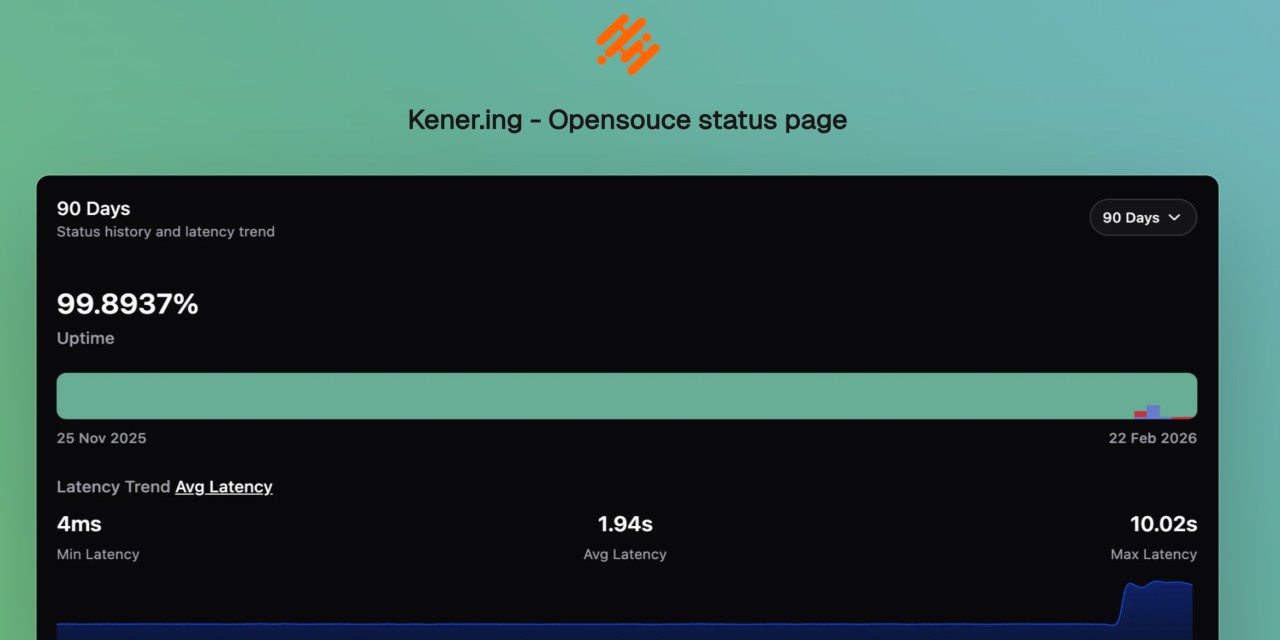

kener example illustration

GitHub Repo stars Awesome status page Awesome self hosted

Docker Kener Docker Image Size Docker Image Size

GitHub Workflow Status GitHub issues Ask DeepWiki

Kener on Product Hunt

🔔🚀🚧

Deploy on Railway Deploy on Zeabur Deploy to Render Deploy on RepoCloud

What is Kener?

Kener is a sleek and lightweight status page system built with SvelteKit and NodeJS. It’s not here to replace heavyweights like Datadog or Atlassian but rather to offer a simple, modern, and hassle-free way to set up a great-looking status page with minimal effort.

Designed with ease of use and customization in mind, Kener provides all the essential features you’d expect from a status page—without unnecessary complexity.

Why Kener?

✅  Minimal overhead – Set up quickly with a clean, modern UI
✅  Customizable – Easily tailor it to match your brand
✅  Open-source & free – Because great tools should be accessible to everyone

What's in a Name?

“Kener” is inspired by the Assamese word “Kene”, meaning “how’s it going?”. The ‘.ing’ was added because, well… that domain was available. 😄

Quick Start

Get Kener running in minutes.

Docker (recommended)

git clone https://github.com/rajnandan1/kener.git
cd kener

# Uses docker-compose.yml (includes Redis + Kener)
# Set a strong KENER_SECRET_KEY and ORIGIN in docker-compose.yml before first run
docker compose up -d

Open http://localhost:3000.

[!IMPORTANT] Set a strong KENER_SECRET_KEY and set ORIGIN to your public URL before starting for the first time.

Use docker-compose.dev.yml when you want to build from local source instead of pulling the published image:

docker compose -f docker-compose.dev.yml up -d --build

Or combine both files to keep base production config while overriding Kener with a local build:

docker compose -f docker-compose.yml -f docker-compose.dev.yml up -d --build

Run pre-built image

You can use either image:

  • docker.io/rajnandan1/kener:latest
  • ghcr.io/rajnandan1/kener:latest

For subpath deployments (/status), use:

  • docker.io/rajnandan1/kener:latest-status
  • docker.io/rajnandan1/kener:latest-status-alpine
  • ghcr.io/rajnandan1/kener:latest-status
  • ghcr.io/rajnandan1/kener:latest-status-alpine
mkdir -p database
docker run -d \
	--name kener \
	-p 3000:3000 \
	-v "$(pwd)/database:/app/database" \
	-e "KENER_SECRET_KEY=replace_with_a_random_string" \
	-e "ORIGIN=http://localhost:3000" \
	-e "REDIS_URL=redis://host.docker.internal:6379" \
	docker.io/rajnandan1/kener:latest

Run pre-built subpath image (/status)

mkdir -p database
docker run -d \
	--name kener-status \
	-p 3000:3000 \
	-v "$(pwd)/database:/app/database" \
	-e "KENER_SECRET_KEY=replace_with_a_random_string" \
	-e "ORIGIN=http://localhost:3000" \
	-e "KENER_BASE_PATH=/status" \
	-e "REDIS_URL=redis://host.docker.internal:6379" \
	docker.io/rajnandan1/kener:latest-status

[!NOTE] For subpath mode, keep ORIGIN as the site origin (http://localhost:3000), not http://localhost:3000/status.

Run without Docker

Requirements:

  • Node.js >= 24.14
  • Redis
git clone https://github.com/rajnandan1/kener.git
cd kener
npm install

# Start Redis (example)
docker run -d --name kener-redis -p 6379:6379 redis:7-alpine

npm run build
npm run start

Create a .env with at least:

KENER_SECRET_KEY=replace_with_a_random_string
ORIGIN=http://localhost:3000
REDIS_URL=redis://localhost:6379
PORT=3000

For the full quick start (including local Docker builds and dev mode), see the docs:

Features

Kener combines public status page essentials with advanced admin workflows.

📊  Monitoring, Reliability, and Communication

  • Monitor API, Ping, TCP, DNS, SSL, SQL, Heartbeat, and GameDig checks
  • Manage incidents with clear timelines, updates, and acknowledgements
  • Schedule maintenance windows and keep users informed throughout
  • Send notifications via Email, Webhook, Slack, and Discord
  • Explore historical monitoring data and uptime trends

🎨  Status Page Experience and Branding

  • Build branded, customizable status pages (logo, colors, CSS, themes)
  • Support light/dark mode, localization, and timezone-aware display
  • Embed status widgets and badges into external sites and portals
  • Provide SEO-friendly public pages for global audiences

🛠️  Operations, Collaboration, and Automation

  • Invite teams with role-based collaboration across workflows
  • Manage multiple status pages from one Kener instance
  • Use trigger-based workflows and template-driven messaging
  • Manage API keys for secure integrations and automations
  • Integrate analytics providers like GA, Plausible, Mixpanel, Umami, and Clarity
  • Access the full REST API for incidents, monitors, and reporting

Technologies Used

Support Me

If you’re enjoying Kener and want to support its development, consider sponsoring me on GitHub or treating me to a coffee. Your support helps keep the project growing! 🚀

readme truncated — read the full docs on github

Frequently asked questions

Is Kener free to use?

Kener is open source under the MIT licence. There is no licence fee and no seat count — you can self-host it or, where the project offers one, pay a vendor for a managed version instead.

What does Kener do?

Deploy a professional status page in minutes, no coding required

What is Kener written in?

Kener is primarily written in TypeScript. Its source is publicly available at https://github.com/rajnandan1/kener, and it has 5,167 GitHub stars.