

joshuto is a free, open source file management & sync project written in Rust and released under LGPL-3.0. It has 3,732 GitHub stars, 165 forks and 102 open issues, and was last pushed 3 days ago. On this registry it ranks #26 of 42 tracked projects in File Management & Sync, with 5 head-to-head comparisons available.

What is joshuto?

Joshuto is a ranger-like terminal file manager written in Rust, intended for keyboard-driven users on Linux and macOS who want a fast, configurable text-interface file browser rather than a graphical one.

What it is

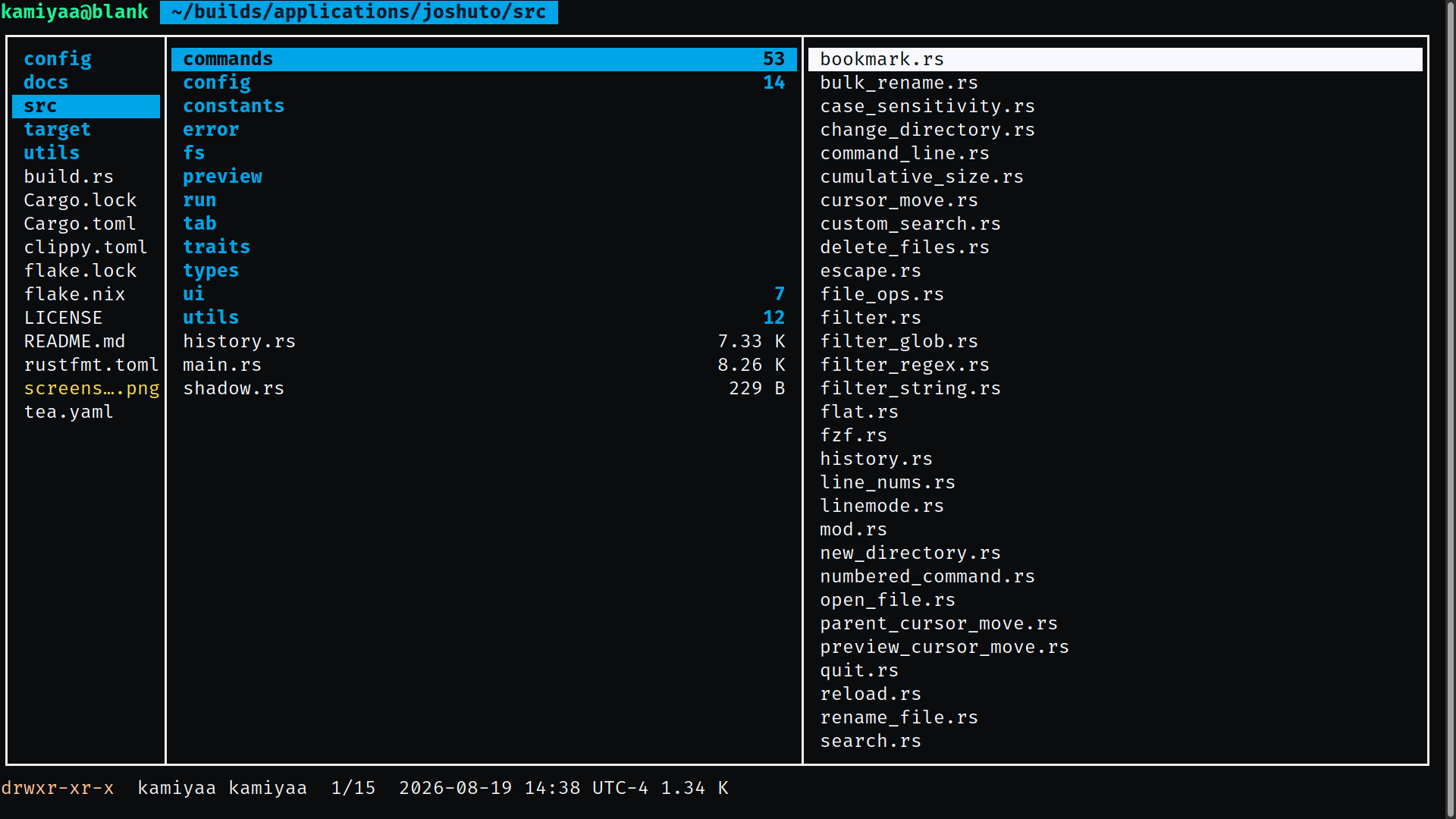
Joshuto is a terminal user interface file manager built in Rust and distributed through crates.io, listed in this registry under Productivity & Utilities / File Management & Sync. It follows the interaction model popularised by ranger: a keyboard-first browser in which navigation, tab handling, and file operations are bound to single keystrokes and prefixes such as g g, d d, y y, and p p. The project is licensed under LGPL-3.0 and carries topics including file-manager, tui, termion, tui-rs, ncurses, clipboard, concurrency, and toml, which reflect both its interface toolkit and its configuration format.

The concrete thing it replaces is ranger itself — or more precisely, the Python implementation of that idea. Someone who likes ranger's vi-inspired keybindings but wants a compiled binary, asynchronous file operations, and a configuration surface written in TOML can install joshuto and keep the workflow. Configuration lives in a set of TOML files: joshuto.toml for general settings, keymap.toml for keybindings, mimetype.toml for opening files with applications, theme.toml for colours, and bookmarks.toml for bookmarks. That makes a configuration portable, diffable, and easy to keep in a dotfiles repository rather than expressed as Python code.

Key capabilities

  • Tab management with ctrl+t to open a new tab, T to open one at the current directory, W or ctrl+w to close it, and tab/backtab to cycle between tabs.
  • Asynchronous file I/O for cut, copy, and paste, driven by d d, y y, p p, and p o for paste with overwrite.
  • Bulk rename across selected files, plus symlink creation with p l for an absolute path and p L for a relative one.
  • File previews, including a documented image preview setup under /docs/image_previews, and devicons in directory listings.
  • Fuzzy search through fzf, with optional integration of zoxide and clipboard access via xsel, xclip, or wl-clipboard.
  • Further affordances including a file chooser, trash support, line numbers, jump to number, toggling hidden files with z h, a task view on w, and exit to current directory.

Who uses it and how

  • Individual users install it for a single account with cargo install --path=. --force, which places the binary in that user's own cargo bin directory.
  • Administrators can install it machine-wide with the --root=/usr/local flag.
  • NixOS users can consume it as a flake input and overlay, adding pkgs.joshuto to environment.systemPackages, or try it without installing by running nix run github:kamiyaa/joshuto.
  • macOS users obtain it through MacPorts with sudo port install joshuto, or through Homebrew with brew install joshuto.
  • Terminal-centric workflows gain from exit-to-current-directory, which lets a shell land in the browsed directory, and from the fzf and zoxide integrations for moving around large trees.

Getting started

Install with cargo using cargo install --git https://github.com/kamiyaa/joshuto.git --force, or use the pre-compiled binary script that installs into $HOME/.local/bin/, or a package manager such as Homebrew or MacPorts. Run it by invoking joshuto.

How it compares

Among the tools named in the project's own facts, ranger is the direct point of comparison: joshuto reproduces its ranger-style, keyboard-driven layout while being written in Rust rather than Python. Where ranger is configured through Python code, joshuto exposes joshuto.toml, keymap.toml, mimetype.toml, theme.toml, and bookmarks.toml for the same purposes.

When to use it — and when not to

Building from source requires cargo and rustc 1.90 or newer, and the optional clipboard, fzf, and zoxide integrations depend on those external programs being installed. Anyone who prefers a graphical file manager, or who needs a finished built-in command line, should look elsewhere for the moment: the README describes that command line as "mostly working" and "kind of janky", with tab autocomplete still in progress, and the repository carries 102 open issues. The licence is LGPL-3.0, which is worth checking against the terms of any redistribution.

project readme (upstream, from github) — read inline

Linux build

MacOS build

joshuto

ranger-like terminal file manager written in Rust.
Alt text

Dependencies

  • cargo >= 1.90
  • rustc >= 1.90
  • xsel/xclip/wl-clipboard (optional, for clipboard support)
  • fzf (optional)
  • zoxide (optional)

Also see Cargo.toml

Building

~$ cargo build

Installation

For single user
~$ cargo install --path=. --force
For single user with cargo
~$ cargo install --git https://github.com/kamiyaa/joshuto.git --force
System wide
~# cargo install --path=. --force --root=/usr/local     # /usr also works
From pre-compiled binary

Dependencies:

  • curl
  • openssl
Latest release

Installs the latest version using the default installation path ($HOME/.local/bin/).

~$ bash <(curl -s https://raw.githubusercontent.com/kamiyaa/joshuto/master/utils/install.sh)
Custom Installation path

Allows you to install Joshuto to a custom directory by setting the INSTALL_PREFIX variable.

~$ INSTALL_PREFIX="$HOME" bash <(curl -s https://raw.githubusercontent.com/kamiyaa/joshuto/master/utils/install.sh)
System wide
~# INSTALL_PREFIX="/usr/local/bin" bash <(curl -s https://raw.githubusercontent.com/kamiyaa/joshuto/master/utils/install.sh)
Specific release

Installs a specific release version of Joshuto by the desired version number.

~$ RELEASE_VER='v0.9.4' bash <(curl -s https://raw.githubusercontent.com/kamiyaa/joshuto/master/utils/install.sh)
Packaging status
Fedora (COPR)
sudo dnf copr enable atim/joshuto -y
sudo dnf install joshuto
Arch (AUR)
[yay/paru] -S joshuto
[yay/paru] -S joshuto-git
Arch (archlinuxcn)
[yay/paru] -S joshuto
[yay/paru] -S joshuto-git
Gentoo (gentoo-zh)
sudo eselect repository enable gentoo-zh
sudo emerge -av app-misc/joshuto
NixOS

Here's an example of using it in a nixos configuration

{
  description = "My configuration";

  inputs = {
    nixpkgs.url = "github:NixOS/nixpkgs/nixos-unstable";
    joshuto.url = "github:kamiyaa/joshuto";
  };

  outputs = { nixpkgs, joshuto, ... }:
    {
      nixosConfigurations = {
        hostname = nixpkgs.lib.nixosSystem
          {
            system = "x86_64-linux";
            modules = [
              {
                nixpkgs.overlays = [ joshuto.overlays.default ];
                environment.systemPackages = with pkgs;[
                  joshuto
                ];
              }
            ];
          };
      };
    };
}

Temporary run, not installed on the system

nix run github:kamiyaa/joshuto
MacOS (MacPorts)
sudo port install joshuto
MacOS/Linux Homebrew
brew install joshuto

Usage

~ $ joshuto
Navigation
  • Move up: arrow_up or k
  • Move down: arrow_down or j
  • Move to parent directory: arrow_left or h
  • Open file or directory: arrow_right or l
  • Go to the top: home or g g
  • Go to the bottom: end or G
  • Page up: page_up or ctrl+u
  • Page down: page_down or ctrl+d
Tab Management
  • Open a new tab: ctrl+t
  • Open a new tab with current directory: T
  • Close the current tab: W or ctrl+w
  • Switch to next tab: \t
  • Switch to previous tab: backtab
File Operations
  • Rename file: a to append or A to prepend
  • Delete file: delete or d d
  • Cut file: d d
  • Copy file: y y
  • Paste file: p p
  • Paste file with overwrite: p o
  • Symlink files: p l for absolute path, p L for relative path
Miscellaneous
  • Toggle hidden files: z h
  • Reload directory list: R
  • Change directory: c d
  • Show tasks: w
  • Set mode: =
  • Enter command mode: :

See docs#quit for exiting into current directory and other usages

Configuration

Check out docs for details and config for examples

joshuto.toml
  • general configurations
keymap.toml
  • for keybindings
mimetype.toml
  • for opening files with applications
theme.toml
  • color customizations
bookmarks.toml
  • bookmarks

Contributing

See docs

Bugs/Feature Request

Please create an issue :)

Features

  • Tabs
  • Devicons
  • Fuzzy search via fzf
  • Ctrl/Shift/Alt support
  • Bulk rename
  • File previews
  • Exit to current directory
  • Asynch File IO (cut/copy/paste)
  • Custom colors/theme
  • Line numbers
    • Jump to number
  • File chooser
  • Trash support

TODOs

  • Built-in command line
    • Mostly working
    • Currently implementation is kind of janky
    • Tab autocomplete (in progress)

Frequently asked questions

Is joshuto free to use?

joshuto is open source under the LGPL-3.0 licence. There is no licence fee and no seat count — you can self-host it or, where the project offers one, pay a vendor for a managed version instead.

What does joshuto do?

ranger-like terminal file manager written in Rust

What is joshuto written in?

joshuto is primarily written in Rust. Its source is publicly available at https://github.com/kamiyaa/joshuto, and it has 3,732 GitHub stars.