jitsi-meet-electron is a free, open source collaboration & communication project written in TypeScript and released under Apache-2.0. It has 1,632 GitHub stars, 510 forks and 0 open issues, and was last pushed 7 days ago. On this registry it ranks #31 of 41 tracked projects in Collaboration & Communication, with 5 head-to-head comparisons available.

What is jitsi-meet-electron?

What it is

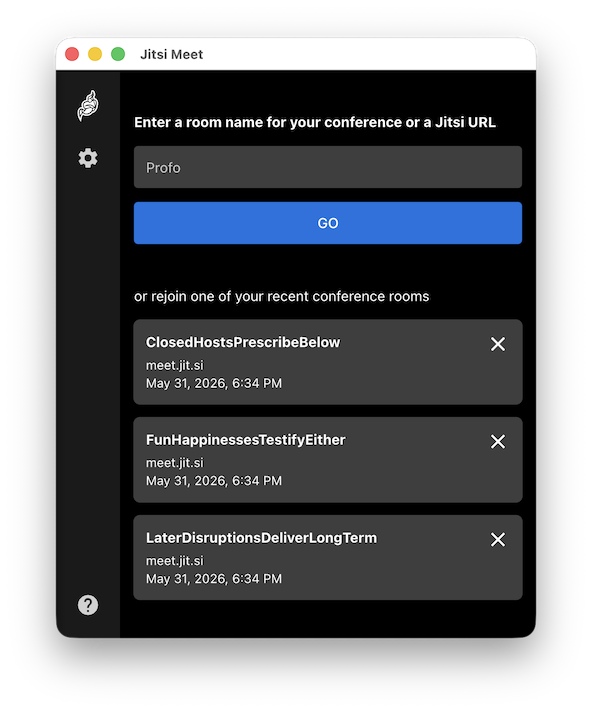
Jitsi Meet Electron is a desktop application for Jitsi Meet, built with Electron and written in TypeScript under the Apache-2.0 license. It lives in the Jitsi ecosystem, which provides open-source video-conferencing software, and it packages the Jitsi Meet client as a desktop window for Windows, macOS, and GNU/Linux. The project addresses the need for a dedicated desktop application that connects to existing Jitsi Meet deployments.

Key capabilities

  • It supports end-to-end encryption in beta, which adds a privacy-focused option for meetings on compatible Jitsi Meet deployments.
  • It works with any Jitsi Meet deployment, so the same client can connect to a configured server or a company instance.
  • It includes built-in auto-updates, which keeps the desktop application current without requiring users to reinstall it for every release.
  • It provides screen sharing and remote control, enabling participants to present content and assist other users during a meeting.
  • It supports deeplinks, including jitsi-meet://myroom and jitsi-meet://jitsi.mycompany.com/myroom, so links can open a room on a configured or specified Jitsi instance.
  • It includes an always-on-top window option, which helps users keep the meeting interface visible while working in other applications.

Who uses it and how

  • Users who connect to Jitsi Meet can use the application as a desktop client for meetings, support sessions, and collaborative discussions.
  • Users who need to present their screen can use screen sharing, and remote control can assist other participants during a meeting.
  • Organizations that use a Jitsi instance can benefit from deeplinks, because meeting links can open the correct room and server directly in the desktop application.
  • Developers can build the application locally with Node.js 22, npm install, npm start, and npm run dist, and they can work with jitsi-meet-electron-sdk for local development.

Getting started

Users install the application by downloading the latest release for Windows, macOS, or GNU/Linux, including AppImage and Deb packages, or by using Homebrew on macOS with brew install --cask jitsi-meet. Developers start by installing Node.js 22, running npm install, and then using npm start for development or npm run dist for a production build.

When to use it — and when not to

Use this project when you need a desktop client for an existing Jitsi Meet deployment and you value screen sharing, remote control, auto-updates, deeplinks, and an always-on-top window. Do not treat it as a standalone conferencing server, because it connects to Jitsi Meet deployments rather than hosting meetings by itself. The limitations are also worth noting: end-to-end encryption is beta, Windows may show an unsigned application warning on first install, and GNU/Linux users may need to make AppImage files executable or clear local cache files after a server upgrade.

project readme (upstream, from github) — read inline

Jitsi Meet Electron

Desktop application for Jitsi Meet built with Electron.
Features

  • End-to-End Encryption support (BETA)
  • Works with any Jitsi Meet deployment
  • Built-in auto-updates
  • Screen sharing
  • Remote control
  • Always-On-Top window
  • Support for deeplinks such as jitsi-meet://myroom (will open myroom on the configured Jitsi instance) or jitsi-meet://jitsi.mycompany.com/myroom (will open myroom on the Jitsi instance running on jitsi.mycompany.com)

Installation

Download our latest release and you're off to the races!

Windows macOS GNU/Linux (AppImage) GNU/Linux (Deb)
Download Download x64_64 arm64 x86_64 arm64

Third-Party builds

Download On Flathub

Homebrew

For macOS users, you can install the application using the following command:

brew install --cask jitsi-meet

Development

If you want to hack on this project, here is how you do it.

Show building instructions
Installing dependencies

Install Node.js 22 first (or if you use nvm, switch to it by running nvm use).

Extra dependencies for Windows
npm install --global --production windows-build-tools
Extra dependencies for GNU/Linux

X11, PNG, and zlib development packages are necessary. On Debian-like systems, they can be installed as follows:

sudo apt install libx11-dev zlib1g-dev libpng-dev libxtst-dev

Install all required packages:

npm install
Starting in development mode
npm start

The debugger tools are available when running in dev mode, and can be activated with keyboard shortcuts as defined here.

They can also be displayed automatically with the application --show-dev-tools command line flag, or with the SHOW_DEV_TOOLS environment variable as shown:

SHOW_DEV_TOOLS=true npm start
Building the production distribution
npm run dist
Working with jitsi-meet-electron-sdk

For instructions on SDK versus electron-app separation and how to set up local development using npm link, please refer to the Contributing and Local Development guide in the Jitsi Handbook.

Publishing
  1. Create release branch: git checkout -b release-1-2-3, replacing 1-2-3 with the desired release version
  2. Increment the version: npm version patch, replacing patch with minor or major as required
  3. Push release branch to github: git push -u origin release-1-2-3
  4. Create PR: gh pr create
  5. Once PR is reviewed and ready to merge, create draft Github release: gh release create v1.2.3 --draft --title 1.2.3, replacing v1.2.3 and 1.2.3 with the desired release version
  6. Merge PR
  7. Github action will build binaries and attach to the draft release
  8. Test binaries from draft release
  9. If all tests are fine, publish draft release

Known issues

Windows

A warning that the app is unsigned will show up upon first install. This is expected.

macOS

None

GNU/Linux

  • If you can't execute the file directly after downloading it, try running chmod u+x ./jitsi-meet-x86_64.AppImage

  • If you experience a blank page after a Jitsi server upgrades, try removing the local cache files:

    rm -rf ~/.config/Jitsi\ Meet/
    

Translations

The JSON files contain all the strings inside the application, and can be translated here.

New translations require the addition of a line in languages.ts.

Localize desktop file on linux requires the addition of a line in package.json. Please search for Comment[hu] as an example to help add your translation of the English string Jitsi Meet Desktop App for your language.

License

Apache License 2.0. See the LICENSE file.

Community

Jitsi is built by a large community of developers. If you want to participate, please join the community forum.

Frequently asked questions

Is jitsi-meet-electron free to use?

jitsi-meet-electron is open source under the Apache-2.0 licence. There is no licence fee and no seat count — you can self-host it or, where the project offers one, pay a vendor for a managed version instead.

What does jitsi-meet-electron do?

Jitsi Meet desktop application powered by :electron:

What is jitsi-meet-electron written in?

jitsi-meet-electron is primarily written in TypeScript. Its source is publicly available at https://github.com/jitsi/jitsi-meet-electron, and it has 1,632 GitHub stars.