




Harden Windows Security | A New Threat to Malware
Harden Windows Safely, Securely, Only With Official Microsoft Methods





How To Use  Related
Trust
Support
Security Recommendations
Resources
License
Wiki
Basic FAQs Roadmap Donation
Related
Trust
Support
Security Recommendations
Resources
License
Wiki
Basic FAQs Roadmap Donation 

[!IMPORTANT]
Here are Quick Access Points to Important Sections of this Repository
Harden System Security App

AppControl Manager App
Application Control for Business Resources

[!NOTE]
This repository only uses the features that have already been implemented by Microsoft in Windows OS to fine-tune it towards the highest security and locked-down state, without relying on any 3rd party component or dependency, using well-documented, supported, recommended and official methods. Continue reading for comprehensive info.
How To Use
 Install the Harden System Security From the Microsoft Store



 Install the AppControl Manager From Microsoft Store
 Rationale
𝐖𝐞𝐥𝐜𝐨𝐦𝐞 to the 𝙷𝚊𝚛𝚍𝚎𝚗 𝚆𝚒𝚗𝚍𝚘𝚠𝚜 𝚂𝚎𝚌𝚞𝚛𝚒𝚝𝚢 𝚁𝚎𝚙𝚘𝚜𝚒𝚝𝚘𝚛𝚢 
This section provides the justification and objective of this GitHub repository and its contents. It outlines how it addresses various threats and how to adjust your expectations for different scenarios and environments. It also supplies lots of useful additional resources.
This repository currently has 2 main products. 
Let's explore each of them in detail below
 Harden System Security App
Use the Harden System Security app to secure your personal and enterprise devices against the majority of advanced threats. The app is suitable to be used by everyone.
If you are a personal user, you can use the Harden System Security to harden your Operating System, remove unnecessary features or apps and gain advanced visibility into the security structure of your system.
If you are an enterprise user or admin, you can use the provided Intune security policies and apply them to all of your workstations using the Harden System Security app. You can then use the app to verify the compliance of the workstations against the applied policies and receive a security score.
It uses the same security features built into your device and Windows operating system to fine-tune it towards the highest security and locked-down state. It does not install any outside components and does not increase your attack surface at all.
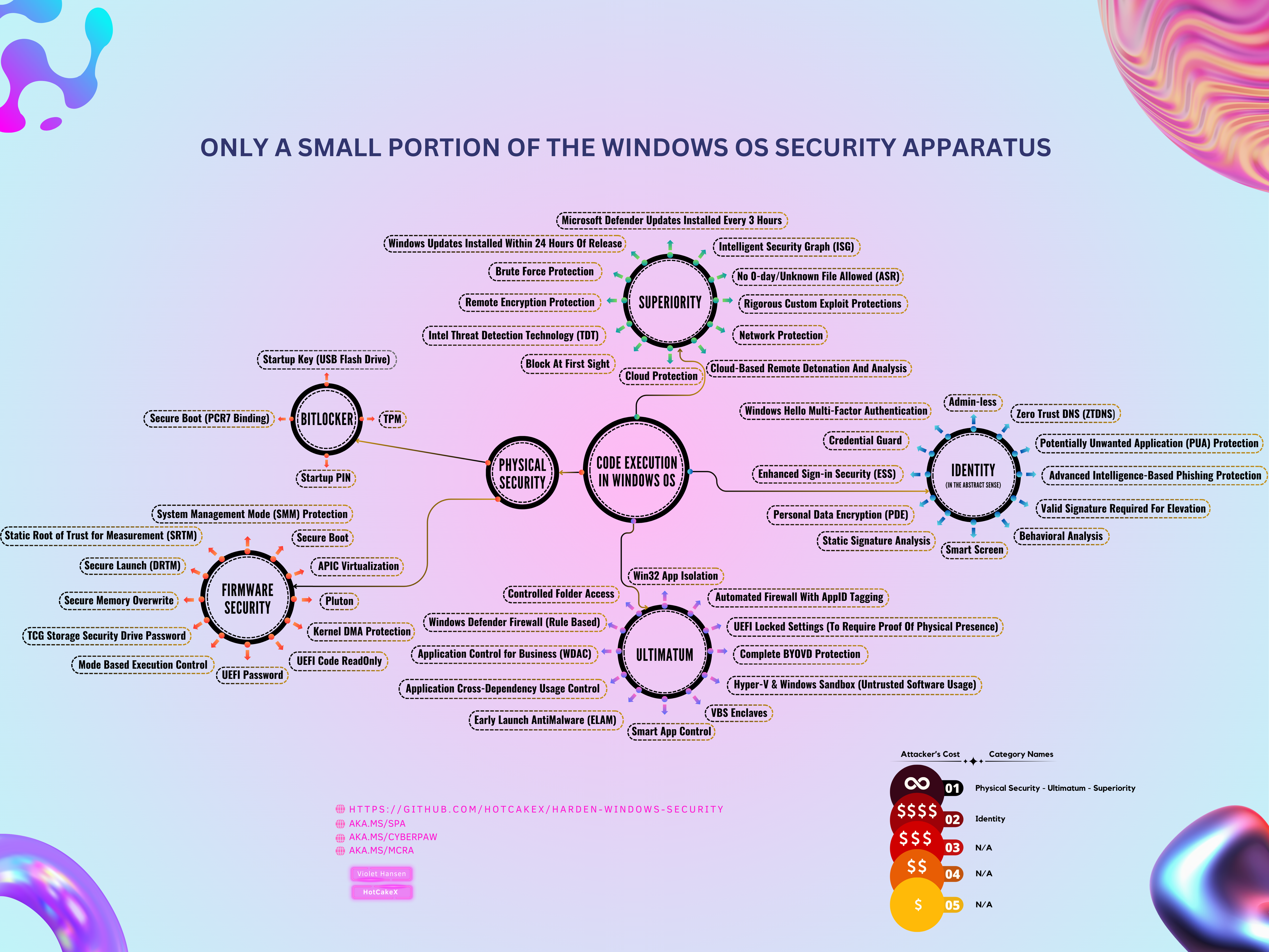
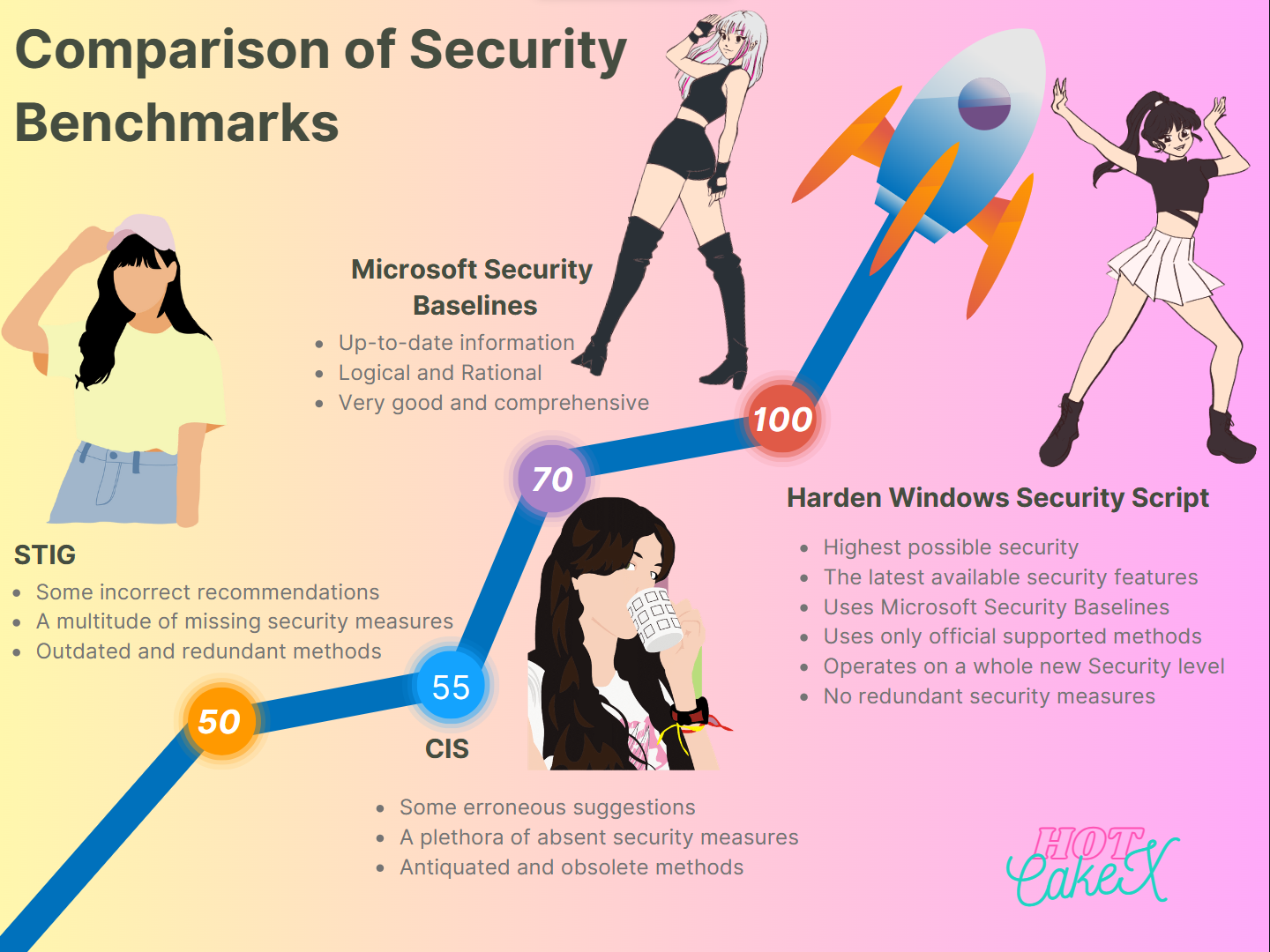
Let's take a look at the infographics below:
 AppControl Manager
AppControl Manager is a secure open-source Windows application designed to help you easily configure Application Control in your system. It is suitable for both personal users as well as enterprises, businesses and highly secure workstations.
[!TIP]
If you aren't familiar with what App Control is, please refer to this article where it's explained in great detail.
Proper usage of Application Control, when coupled with the Harden System Security app's policies, can provide 99% protection from various threats, either from the Internet or physical. It's true that there is no absolute security, but then again there is nothing absolute in the universe either. Everything, even the most fundamental physical laws, are and have been subject to change and conditions.
 How Do You Make the Right Choice?
𝙵𝚒𝚛𝚜𝚝 𝚊𝚗𝚍 𝙵𝚘𝚛𝚎𝚖𝚘𝚜𝚝 use the Harden System Security app to apply the hardening measures it offers, your system will be secure against at least ~98% of the threats when you use Standard (non-Privileged) account for everyday work. These threats aren't the usual computer viruses, they are motivated nation state threat actors.
𝚃𝚑𝚎𝚗 use the AppControl Manager to deploy an App Control policy and have even more control over the operation of the Windows Application Control.
These methods will create multiple layers of security; also known as defense in depth. Additionally, you can create Kernel-level Zero-Trust strategy for your system.
If there will ever be a zero-day vulnerability in one or even some of the security layers at the same time, there will still be enough layers left to protect your device. It's practically impossible to penetrate all of them at once.
Also, zero-day vulnerabilities are patched quickly, so keeping your device and OS up to date, regardless of what OS you use, is one of the most basic security recommendations and best practices you must follow.
 Vulnerabilities Such as Zero-Days Are Disclosed in 3 Different Ways
The vulnerability is disclosed responsibly. It is first communicated privately with the software vendor/developer so they can have the time to fix and issue updates/patches for the vulnerability before it is disclosed publicly. In this way, people are always safe because all that's needed is to keep your OS and software up to date to receive the latest security patches.
The vulnerability is disclosed irresponsibly. It is disclosed publicly, through social media or by creating PoCs (Proof of Concept) so that it can be used and abused by everyone.
The vulnerability is abused by malicious actors. It is exploited by threat actors in cyber attacks and privately. These vulnerabilities are either discovered by the threat actors themselves or bought from security researchers who find them first, all of which is illegal and has consequences.
 What About More Advanced Security at Scale?

To achieve the Highest level of Security at Scale for Businesses, Enterprises and Military scenarios, you can use the following services to create impenetrable devices and environments.
[!IMPORTANT]
The following services must be used in addition to the measures already talked about in this repository, such as proper Application Control policies and the security measures that the Harden System Security app applies. They are not a replacement for them.As an individual user you can still utilize these features and services, they add an additional layer of protection to your security stack.
Microsoft Defender for Endpoint - Discover and secure endpoint devices across your multiplatform enterprise.
Microsoft Security Copilot - Build a defense so automated that even your intern becomes a cybersecurity expert.
Confidential Computing on Azure - Protect your highly sensitive data while it's in use
Confidential AI - Train your data Privately and Securely on the most advanced AI Super computers
Microsoft Entra conditional access - Increase protection without compromising productivity
Microsoft Sentinel - Scalable, cloud-native solution that provides SIEM, SOAR and more!
Key Vault - Safeguard cryptographic keys and other secrets used by cloud apps and services. This Azure service uses the best products in the world for the job, such as Thales HSMs. More info available here.
Microsoft Defender for Cloud - Protect multicloud and hybrid environments with integrated security from code to cloud
Microsoft Defender for Cloud Apps - Modernize how you secure your apps, protect your data, and elevate your app posture with software as a service (SaaS) security.
Microsoft Defender for Identity - Protect your on-premises identities with cloud-powered intelligence.
Passwordless authentication options for Azure Active Directory - Multifactor and Passwordless Authentication, the most secure and convenient way of authentication.
PIM (PAM) - Privileged Access Management
PAW - Privileged Access Workstation
SAW - Secure Admin Workstations
List of all Azure security services for Enterprises, Businesses etc.
 Important Considerations
- Avoid using other 3rd party security solutions when using the Harden System Security app or App Control for Business. Other solutions can be weak, are incompatible and unnecessary, they also increase your attack surface.
[!NOTE]
To understand why this is true, please take the time and read each app's wiki documentation linked above. For further proof, you are always free to code review, do comparison and ask me any follow up questions you might have.
- Use Virtual machines for any questionable or unsafe software. Use Windows Sandbox or Hyper-V VM.
 Which Device to Use ?
Use Microsoft Surface products for the best device and firmware security. They support secured-core PC specifications, the manufacturing process and platform is trusted and secure.
Make sure to use Surface products that support Device Firmware Configuration Interface (DFCI) for extra protection and security. Here is a list of Surface products that support it.
How to use Device Firmware Configuration Interface (DFCI) for Surface Devices with Intune
Among other features, devices set up with DFCI can be set that boot from USB device(s) is disabled and there is no way to bypass the chip level security directly, not even CMOS clear can bypass it, because it uses non-volatile memory aka flash storage. It sets BIOS cert authentication, and the private key is behind the cloud edge inside Intune and not even Microsoft support can get that key.
The list of Surface products supporting DFCI might not get updated quickly in that doc but fear not, this is an active project and all new surface devices have this built in, the docs team might be just a little laggy.
Microsoft Surface devices use Project Mu for the source code of their firmware.
Surface devices can use certificates instead of password for UEFI. They don't have a reset switch like other devices either. You create and install your own certificate using Surface Management Toolkit. You can build a config package that has the certificate in it and install it to the firmware, then the package can't be removed or changed without the signing cert authorizing the change, aka, cert auth, or you can just use DFCI as previously mentioned and not have to worry because the packages are signed with MS's private key and there is no PKI that you have to self host.
Business class Surface devices have dedicated TPM chips.
Check out the Device Guard category about Secured-Core specifications.
Pluton security chip is not a requirement for Secured-Core certification.
Pluton security chip is included in Qualcomm Snapdragon ARM CPUs, AMD and Intel CPUs.
Copilot+ PCs are among the most secure consumer grade devices. They are secured-core and incorporate the Pluton security chip.
[!IMPORTANT]
It is important to be aware of potential hardware backdoors that may compromise the security of your system. Some common OEMs, such as Compaq, Dell, Fujitsu, Hewlett-Packard (HP), Sony, and Samsung, as well as OEMs that use unmodified Insyde H20, or Phoenix firmwares, utilize algorithms based on device serial numbers for password resets. These algorithms allow for master password removal from the firmware, potentially granting unauthorized access to the system.
[!NOTE]
When buying 3rd party devices, make sure they have the Pluton security chip, it addresses security needs like booting an operating system securely even against firmware threats and storing sensitive data safely even against physical attacks.
 Protection against BYOVD (Bring Your Own Vulnerable Driver) attacks
Secured core PCs provide the hardware that is capable of protecting against BYOVD attacks. It is your responsibility to turn the features on, those include App Control for Business, ASR (Attack Surface Reduction) rules, Dynamic/static root of trust and firmware that is extensible for revoking drivers. They are especially useful for drivers not explicitly mentioned in the Microsoft Recommended Driver Block List, which are the more dynamic side of things.
Use Strict Kernel-mode App Control policy for complete BYOVD protection
 What to Do When There Is an Attack ?
You should have an existing Unified Contract with Microsoft (formerly known as Premier Support). Microsoft offers a wide range of services and teams to help you recover from a cyber attack such as:
- GHOST: Global Hunting, Oversight and Strategic Triage
- DART - The Microsoft Detection and Response Team
- CRSP - Global Compromise Recovery Security Practice Team - including Ransomware
After you've got hacked, you should request them by contacting your Customer Success Account Manager and telling them you need the help of one of these teams.
[!TIP]
When getting cyber security insurance for your company or organization, make sure to get one that covers the cost of hiring Microsoft's elite teams such as GHOST/DART, i.e. those Microsoft teams will be in-network for your insurance.
Color breakdown of security teams in organizations
- 🔴 Red - Pen Testers/White Hat Hackers
- 🔵 Blue - SOC/Data Science/Telemetry Analysis/SIEM Junkies
- 🟢 Green - Fixers, takes input from blue and red and builds the fixes that are needed for identified blind spots (blue) or vulnerability/risk (red)
- 🟡 Yellow - Tooling, SWE to build new stuff for all of the above to operate faster and more effectively
 For Penetration testing and benchmarking
How to properly perform a pentest and benchmark a system hardened by this repository and make it as close to a real-world scenario as possible:
Use a physical machine if possible, it should have Windows 11 certified hardware, Standard user account.
- If you can't use a physical machine, use Hyper-V hypervisor. Your host (aka physical machine) must have Windows 11 certified hardware and meet all the hardware and UEFI security requirements explained in the Readme. VMs however are prone to side channel attacks, so don't use that attack vector in pentests if you want more realistic results.
First apply the Harden System Security app (All categories of it) and then use the AppControl Manager to deploy a suitable Signed App Control policy.
[!IMPORTANT]
Always pay attention to the Microsoft Security Servicing Criteria for Windows, especially the security boundaries. There is no security boundary between Administrator to Kernel.Some penetration testers overlook this fact, assuming it is a vulnerability that they can perform administrative tasks such as disabling security features as Administrator. This is an expected behavior. Administrators have the power to control the security of a device and can disable security features at their discretion. This is why you need to use a Standard user account when performing a realistic penetration test.
Another aspect to consider is the ambiguity in the word "Admin". There are at least two distinct types of Admins: Local Admin and Cloud Admin. For instance, when you are penetration testing a system that leverages enterprise cloud security solution such as Microsoft Defender for Endpoint (MDE), Admin access should be regarded as Cloud Admin since those devices use Microsoft Entra ID and lack Local Admin. In this situation, Cloud Admin can effortlessly disable security features as expected, rendering a pentest using Local Admin access utterly pointless. Conversely, when pentesting a system that only relies on personal security features such as Microsoft Defender, then Admin should be treated as Local Admin. In this case, the Admin can also disable any security feature for the same reasons stated above.
Of course, Microsoft employs additional security measures such as Protected Process Light (PPL) for Defense in Depth strategies, but they do not alter the facts stated above. The goal is to always hope for the best, plan for the worst.
 Any questions or suggestions?
Please open a new issue or discussion in the repository.
Related

 Azure DevOps Repository (mirror)
Harden Windows Security website
Official global IANA IP block for each country
Privacy, Anonymity and Compartmentalization
Trust

This repository uses effective methods that make it easy to verify:
Artifact attestations are used to establish provenance for builds. They guarantee that the packages are 100% created from the source code that exist in this repository.
SBOMs (Software Bill of Materials) are generated for the entire repository to comply with data protection standards and providing transparency. Together with attestation and isolation they provide SLSA L3 security level for the build process.
You can open the files in Visual Studio Code / Visual Studio Code Web / GitHub CodeSpace, and view them in a nice and easy to read environment, they are well formatted, commented and indented.
Commits and Tags are verified either with my GPG key or SSH key and Vigilant mode is turned on in my GitHub account.
You can fork this repository, verify it until that point in time, then verify any subsequent changes/updates I push to this repository, at your own pace (using
Sync forkandCompareoptions on your fork), and if you are happy with the changes, allow it to be merged with your own copy/fork on your GitHub account.All of the apps offered in this repository are signed and available in the Microsoft Store.
[!TIP]
All files in this repository are zipped and automatically submitted to VirusTotal for scanning. Any available packages in the last release is also directly uploaded for scanning. It is done through a GitHub Action that is triggered every time a release is made or a PR is merged. Find the history of the uploaded files in my VirusTotal profile.


[!WARNING]
For your own security, exercise caution when considering any other 3rd-party tools, programs, or scripts claiming to harden or modify Windows OS in any way. Verify their legitimacy thoroughly before use and after each release. Avoid blind trust in 3rd party Internet sources. Additionally, if they don't adhere to the same high standards as this repository's offerings, they can cause system damage, unknown issues, and bugs.
Support

 If you have any questions, requests, suggestions etc. about this GitHub repository and its content, please open a new discussion or Issue.
 Reporting a vulnerability on this GitHub repository.
 I can also be reached privately at: spynetgirl@outlook.com
Security Recommendations

 Always download your operating system from official Microsoft websites. Right now, Windows 11 is the latest version of Windows, its ISO file can be downloaded from this official Microsoft server. One of the worst things you can do to your own security and privacy is downloading your OS, which is the root of all the active and passive security measures, from a 3rd party website claiming they have the official unmodified files. There are countless bad things that can happen as the result of it such as threat actors embedding malware or backdoors inside the customized OS, or pre-installing customized root CA certificates in your OS so that they can perform TLS termination and view all of your HTTPS and encrypted Internet data in plain clear text, even if you use VPN. Having a poisoned and compromised certificate store is the endgame for you, and that's just the tip of the iceberg.
- Refer to Wiki to see how to create Bootable USB flash drive with no 3rd party tools
- Whenever you want to install a program or app, first use the Microsoft Store or Winget, if the program or app you are looking for isn't available in there, then download it from its official website. Consider using the WinGet Management Page in the Harden System Security app to manage or install your programs or apps. Using Winget or Microsoft store provides many benefits:
Microsoft store UWP apps are secure in nature, digitally signed, in MSIX format. That means, installing and uninstalling them is guaranteed and there won't be any leftovers after uninstalling.
Microsoft store has Win32 apps too, they are traditional
.exeinstallers that we are all familiar with. The store has a library feature that makes it easy to find the apps you previously installed.Both Microsoft and Winget check the hash of the files by default, if a program or file is tampered, they will warn you and block the installation, whereas when you manually download a program from a website, you will have to manually verify the file hash with the hash shown on the website, if any.
- Use Secure DNS; Windows 11 natively supports DNS over HTTPS and DNS over TLS.
- Use my WinSecureDNSMgr module to easily configure DNS over HTTPS in Windows
- Only use Microsoft Edge for browser; It has the Highest-rated protection against phishing and malware, available by default on Windows OS, has tightly integrated valuable Security features such as Microsoft Defender Application Guard, Microsoft Defender SmartScreen, Hardware Enforced Stack Protection, Arbitrary Code Guard (ACG), Control Flow Guard (CFG), Tracking Prevention and Trusted built-in Secure Network feature from Cloudflare just to name a few.
- Always enable Two-Factor/Multi-Factor Authentication on websites, apps and services that you use. Preferably, use Microsoft Authenticator app which has backup and restore feature, so you never lose access to your TOTPs (Time-Based One-Time Passwords) even if you lose your phone. Available for Android and IOS.
- Make sure OneDrive backup for important folders (Desktop/Documents/Pictures) is enabled. It is fast, secure and works in any network condition and since it's x64 (64-bit), it can handle a Lot of small and large files simultaneously.
- When considering the use of a VPN, it is crucial to exercise discernment and only resort to it when absolutely necessary. A VPN can be a vital tool if you reside in a totalitarian, communist, or dictatorial regime, or in a nation where democratic principles are not upheld. However, if you live in a country that does not fall into these categories, it may be wise to reconsider the necessity of using a VPN. Your local ISP (Internet Service Provider) is likely more trustworthy than the ISP associated with a remote VPN server. By using a VPN, you are merely transferring the trust you place in your local ISP to an unknown entity—the ISP utilized by the VPN provider. It is important not to be swayed by the deceptive marketing tactics employed by VPN companies. The true identities, political affiliations, backgrounds, and loyalties of those behind these services often remain shrouded in mystery. In the permissive and open societies of the Western world, it is conceivable that a VPN service could be established by entities with questionable intentions, including state sponsors of terrorism or other hostile actors. Such services could be utilized to gather intelligence, conduct data mining, and track users, posing significant risks to your privacy and security.
- There are situations where using VPN can provide security and privacy. For example, when using a public WiFi hotspot or basically any network that you don't have control over. In such cases, use Cloudflare WARP which uses WireGuard protocol, or as mentioned, use Secure Network in Edge browser that utilizes the same secure Cloudflare network. It's free, it's from an American company that has global radar and lots of insight about countries in the world in real-time, at least 19.7% of all websites use it (2022). Safe to say it's one of the backbones of the Internet.
- Go passwordless with your Microsoft account and use Windows Hello authentication. In your Microsoft account which has Outlook service, you can create up to 10 Email aliases in addition to the 1 Email address you get when you made your Microsoft account, that means without creating a new account, you can have 11 Email addresses all of which will use the same inbox and account. You can specify which one of those Email aliases can be used to sign into your account, in the sign in preferences of your Microsoft account settings. So for example, when going passwordless, if you need you can give one of your Email aliases to others for communication or add it to a public profile of yours, then block sign in using that Email alias so nobody can send you authenticator notifications by entering that Email alias in the sign in page, and use the other 10 aliases that are private to sign into your Microsoft account with peace of mind. You can create a rule in your Outlook so that all of the Emails sent to your public Email alias will be stored in a different folder, apart from your other inbox emails. All of this can be done using free Microsoft account and Outlook webapp.
- Set a strong password for the UEFI firmware of your device so that it will ask for password before allowing any changes to be made to firmware. You can also configure the password to be required on startup.
- Use NTFS (which is the default Filesystem in Windows) or ReFS (Resilient File System, newer). In addition to all their benefits, they support
Mark Of The Web(MOTW) orzone.identifier. When a file is downloaded to a device running Windows, Mark of the Web is added to the file, identifying its source as being from the internet. You can read all the information about it in here. If your USB flash drive is formatted asFAT32, change it toNTFS, becauseFAT32does not keep theMOTWof the files. If the file you are downloading is compressed in.zipformat, make sure you open/extract it using Windows built-in support for.zipfiles because it keeps the MOTW of the files. If the compressed file you downloaded is in other formats such as.7zipor.rar, make sure you use an archive program that supports keeping the mark of the Web of files after extraction. One of those programs is NanaZip which is a fork of 7zip, available in Microsoft Store and GitHub, compared to 7zip, it has better and modern GUI, and the application is digitally signed. After installation, open it, navigate toToolsat the top then selectOptions, setPropagate zone.id streamtoYes. You can use this PowerShell command to find all the info about the Zone Identifier of the files you downloaded from the Internet.
Get-Content <Path-To-File> -stream zone.identifier
- When using Xbox, make sure you configure sign-in preference and set it to either
Ask for my PINorLock it down. The latter is the most secure option because it requires authentication using the Microsoft Authenticator app.Ask for my PINis recommended for most people because it only requires entering a PIN with a controller.
- A few reminders about open source programs:
Unless you are a skilled programmer who can understand and verify every line of code in the source, and spends time to personally build the software from the source, and repeats all the aforementioned tasks for each subsequent version, then seeing the source code won't have any effect on you because you aren't able to understand nor verify it.
Do not assume that the entire Open Source community audits and verifies every line of code just because the source code is available, as we've seen in the XZ utility's backdoor by state sponsored actors, they can have backdoors implanted in them in broad daylight and nobody might notice it for a long time.
The majority of open source programs are unsigned, meaning they don't have a digital signature, their developers haven't bought and used a code signing certificate to sign their program. Among other problems, this might pose a danger to the end-users by making it harder to create trust for those programs in security solutions such as Application Control or App Whitelisting, and makes it hard to authenticate them. Read Microsoft's Introduction to Code Signing. Use Azure Trusted Signing which is affordable.
- Use Microsoft account (MSA) or Microsoft Entra ID to sign into Windows. Never use local administrators. Real security is achieved when there is no local administrator and identities are managed using Entra ID. You will be able to enforce [Multi-factor unlock](https://learn.microsoft.com/windows/security/identity-pr