Halcyon Video — walk your media library





The video store you remember, stocked with what you can watch.
Halcyon Video turns movie night into a visit to the video store. Glide down real 3D aisles, pick up a VHS or DVD case, flip it to read the back, and take your choice to the counter — right down to the glossy rental bag.
Start with streaming services, or bring your own Jellyfin, Plex, or Emby library. Add RomM for a games department. Halcyon gives those catalogs a place you can explore with a keyboard, gamepad, TV remote, or phone.

Launch the hosted demo — no signup, media server, or API key required. It opens directly into a stocked store; streaming titles link out to their services, while playback stays disabled in the public demo.
Need help or want to show your store? Join the
Discord community for setup help, release
notes, and the #your-store gallery.
A media library you can walk through
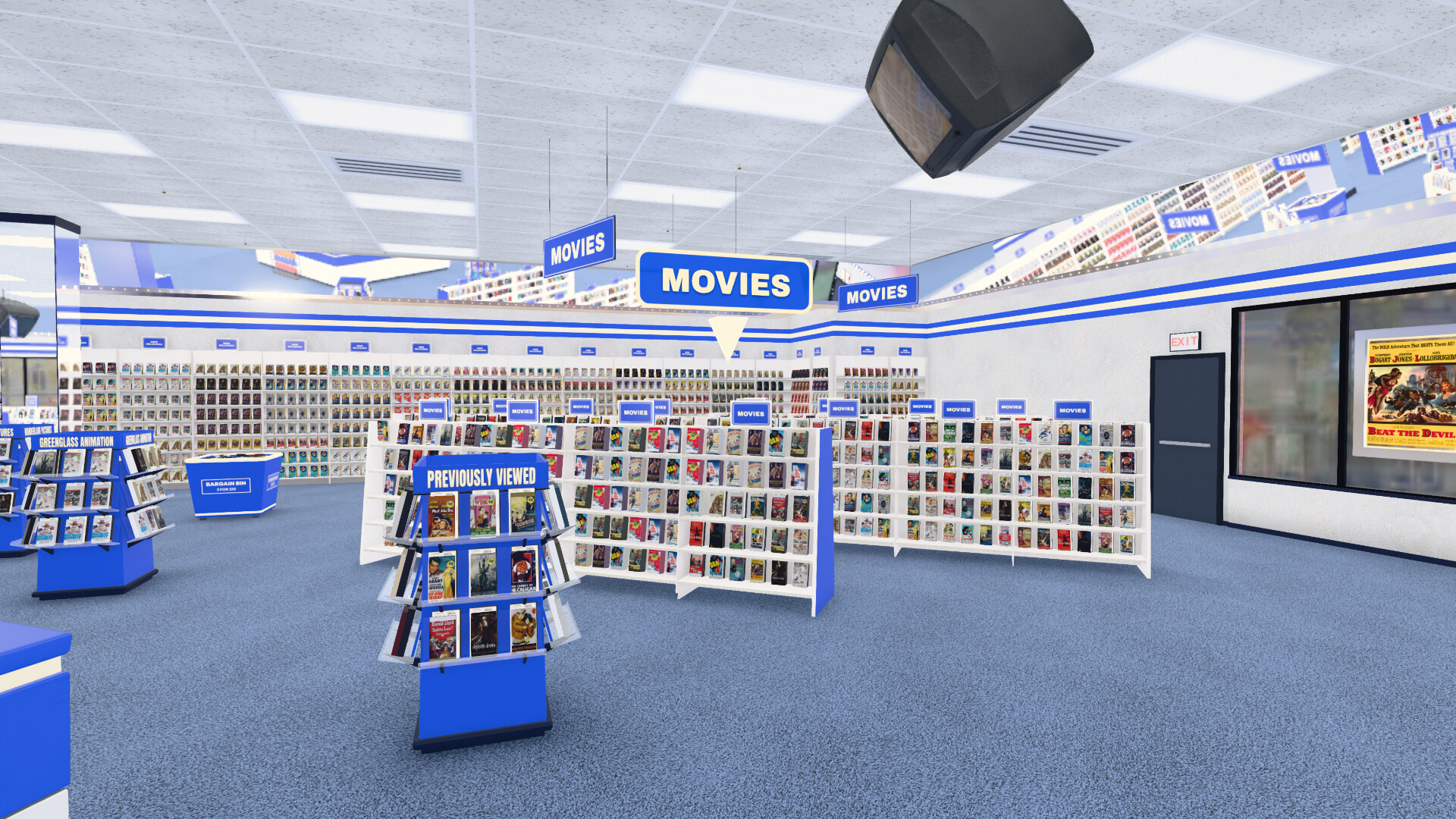
The room is built from your catalog. Libraries become aisles, genres become sections, popular titles get deeper stock, and multiple quality versions collapse into one box. Choose VHS or DVD cases, three shelf arrangements, four period fit-outs, day through night lighting, and one of several modeled storefronts without changing the library underneath.
Halcyon is meant to be used from the couch. A keyboard, gamepad, TV remote, or phone can drive the same remote-first interface. First-person walk mode adds mouse look and WebXR when a headset is available.
A store worth spending time in
Let it take you on a tour. Attract mode moves from the storefront into the aisles, past the counter, and across the sales floor. Touch a control to return to browsing. The store remains a working place throughout the tour.
Choose the store you remember. Build a spacious chain-style store or a compact independent shop with wood shelves and a lower ceiling. Switch between modeled building facades, and see the windows and exterior in daylight, at sunset, or after dark.
Choose when it is. The manager terminal's media release-date pin limits the shelves to titles released by your chosen store date. That date advances with real time; an optional setting also matches the store's era to it. Your underlying media library stays intact.
The parts that make it feel like a store
Browse, inspect, and search

Shelf browsing moves case by case without duplicate dead ends. Pick up a title to see its real cover on a correctly proportioned rental shell, then flip it for synopsis, cast, runtime, ratings, and a technical table generated from the file's media streams. TV seasons use box sets, and the clerk's CRT searches by title, director, or genre.

Rent it, return it, or take it home

Carry several tapes to the counter and the clerk bags them in soft-body plastic that deforms around the cases. The checkout sequence ends in a living room with the rentals and receipt on the coffee table, ready for the VCR. Optional rental mode adds period due dates and a lockout until the tapes are returned through the counter chute.
A clerk who knows the shelves
The clerk is rendered from an original Blender character model into a directional sprite atlas. She walks the actual floor plan, restocks, works the terminal, and comes to recommendation clasps around the store. Her reasons come from the catalog and watch history — collections, directors, actors, studios, and genres — rather than generated copy.
Connect Jellyseerr or Overseerr and she can also surface gaps in a collection, shelve discovery titles as request cases, and place an order without leaving the store.
A real games department
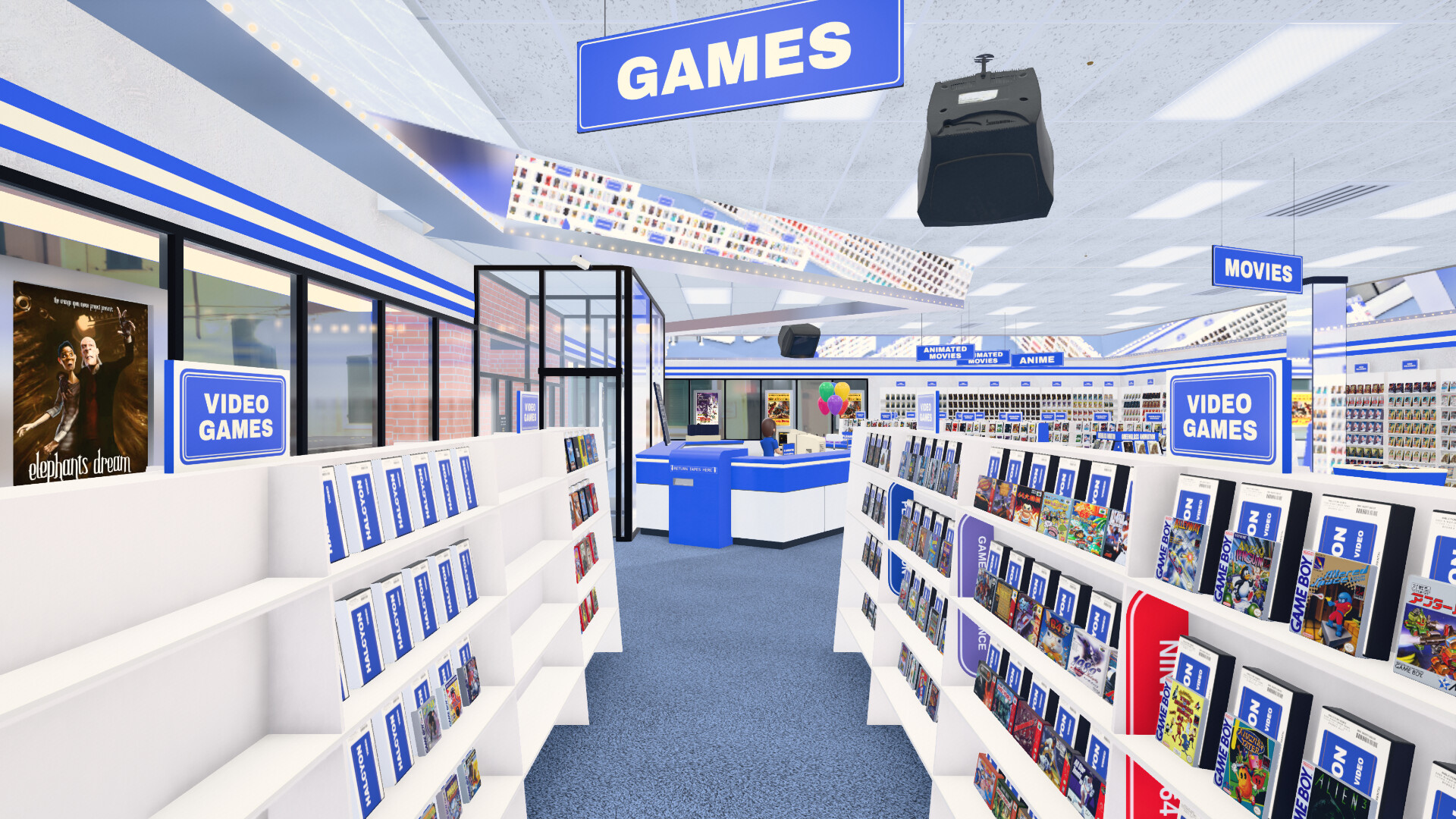
Point Halcyon at RomM and enabled platforms become a dedicated department. Cardboard cartons, clamshells, and jewel cases use platform-specific proportions; native builds can hand a selected game to an emulator.
Make the store yours

The fictional Halcyon identity is data, not hard-coded scenery. Build an emblem from editable layers in Emblem Studio, then see that same mark on the storefront, cases, aisle signs, counters, and checkout bags. Change the name, colors, and typeface in the live Brand Editor to repaint the store's livery together — from burgundy and cream to green and gold. The carpet can follow either brand color through Store Look's Carpet Colour setting.
The default Halcyon identity uses white lettering and trim on a blue, rounded rectangle, with the board and lettering level across the store.
An SVG or transparent PNG can replace the emblem entirely. The store name and subtitle are editable too: make it your video shop, entertainment store, or games destination.
For a larger conversion, a brand pack can supply per-era palettes, fonts,
surfaces, and scanned wraps. Local assets live in the git-ignored
public/user-assets/ directory, so a private store identity cannot wander
into a commit.
What can stock the shelves?
| Source | What Halcyon does with it |
|---|---|
| Jellyfin | Movies, series, art, versions, playback, resume points, and watch history |
| Plex | The same core store through Plex code sign-in and server discovery |
| Emby | Direct server sign-in, member cards, movies, series, artwork, playback, resume points, and saved store settings |
| Streaming services | Zero-setup browsing, service choice at checkout, and a link to that service |
| Jellyseerr / Overseerr | Collection gaps, discovery stock, requests, and staff picks |
| RomM | Platform bays, game packaging, cover scans, and optional emulator launch |
| Nothing yet | A working opening-day store locally, or the stocked hosted demo |
Streaming aisles do not require Jellyfin, Plex, Jellyseerr, or a TMDB key. The setup terminal asks which services you use and stocks the store from a bundled snapshot. Browse the films first; checkout reveals the available services so you can choose one before the handoff. A configured TMDB or Jellyseerr source can refresh that data later. There is no built-in folder scanner; shelving personal files requires Jellyfin, Plex, or Emby.
Watching something
Three routes cover three kinds of deployment:
- Browser player: direct streams when the browser can decode the file, HLS fallback when it cannot, audio and subtitle selection, resume points, and automatic next episodes.
- HTPC with mpv: a server running on the same machine can launch the local file in mpv for HDR, lossless audio, and native display handling.
- Streaming aisle: titles hand off to the provider's search or watch page; Halcyon does not impersonate a streaming player.
Quick start
Try it before installing
Open the hosted demo. It scales the demo catalog to the browser's measured GPU headroom, from a smaller phone store to the full layout on a discrete GPU.
Local launchers
Clone the repository, then run the launcher for your platform. It checks Node, installs dependencies on first use, builds the app, serves it on port 1420, and opens a browser.
| Platform | Launcher |
|---|---|
| Windows | start.cmd |
| macOS | start.command |
| Linux | ./start.sh |
Pass demo to open the bundled catalog or dev for hot reload. The manual
equivalent is:
git clone https://github.com/halcyon-video/halcyon-video
cd halcyon-video
npm install
npm run dev
The opening-day terminal can connect Jellyfin, Plex, or Emby, select streaming services, or open the store empty and configure it later at the manager CRT.
Docker
Use the published image:
docker run -d --name halcyon --network host --restart unless-stopped \
  ghcr.io/halcyon-video/halcyon-video
Or build from a clone with docker compose up -d --build. Host networking lets
WebRTC advertise an address other devices can reach; ordinary browser-only use
can publish port 1420 instead. The compose file documents GPU, allowed-host,
and optional shared-service settings.
Prefill Jellyfin for visitors (Docker)
Set HALCYON_JELLYFIN_URL when starting the published container. No source
checkout, build arguments, or custom image is needed:
services:
  halcyon:
    image: ghcr.io/halcyon-video/halcyon-video:latest
    ports:
      - "1420:1420"
    restart: unless-stopped
    environment:
      HALCYON_JELLYFIN_URL: https://jellyfin.example.com
This example uses ordinary browser rendering. For Remote Play, use the host
networking and other options in the repository's compose file; replace its
build: . with image: to use the published image.
Use an address reachable from visitors' browsers, including Jellyfin's base
path if needed, and HTTPS when Halcyon uses HTTPS. It prefills the Jellyfin
login field; visitors still sign in with their own accounts and can edit the
address. Their saved server takes priority. Do not include credentials, query
strings, or fragments in the address. Runtime VITE_JELLYFIN_URL is also
accepted as an alias; HALCYON_JELLYFIN_URL takes precedence. Runtime username
and password variables are never exposed by this configuration endpoint.
Update with the same compose file:
docker compose pull
docker compose up -d
The replacement container keeps the configured address without rebuilding.
To change it, edit the environment setting and run docker compose up -d
again. Existing visitors' saved server choices are preserved.
HTPC kiosk
./launch.sh
./deploy/install.sh
sudo loginctl enable-linger $USER
The kiosk service restarts after crashes, reloads for maintenance while idle, and renders nothing when the store is still. Halcyon is designed to remain on for days rather than burn the GPU behind an unchanged frame.
TV, phone, and low-power screens
Remote Play streams the live canvas and audio over WebRTC while control returns through the same connection. A shared mirror follows the living-room store; private instances give remote visitors their own browser-rendered store. Off-LAN sessions can use Halcyon's optional TURN relay. Read the wire protocol and deployment notes.
Android TV and Fire TV can use the native launcher in android-tv. Apple TV has a documented native-client plan but is not shipped. Roku is not supported.
For hardware that should not render the 3D room, 2.5D mode presents the same libraries and cases as HTML and CSS. It is the practical Raspberry Pi and older-browser route, not a separate catalog.
Updating
| Installation | Update command |
|---|---|
| Clone and launcher | git pull, then run the launcher again |
| Clone and npm | git pull && npm install && npm run build |
| Compose from this repository | git pull && docker compose up -d --build |
| Published image in Compose | docker compose pull && docker compose up -d |
| Published container with docker run | Pull the new image and recreate the container with the same environment and volumes |
This repository's compose file builds from the clone. docker compose pull
alone therefore does not fetch new application code.
Privacy and network access
Halcyon is local-first. Your media-server login, library, watch history, and private brand assets remain on your devices. Fonts, core textures, models, and the streaming fallback snapshot ship with the app.
Optional features reach outside the local network only when used:
- streaming discovery may contact TMDB or Jellyseerr and load poster art;
- Remote Play performs WebRTC discovery and may use your TURN relay;
- streaming titles open their provider in a new page.
Server operators can provide RomM or Jellyseerr defaults through HALCYON_*
environment variables. Those credentials stay server-side and are injected
only into the small set of allowed proxy requests. Do not put shared secrets
in VITE_* variables on a public deployment; Vite embeds them in downloaded
JavaScript.
Frequently asked questions
Do I need a gaming PC?
No. The renderer scales to the hardware and idles on a held frame. Low-end devices can use 2.5D mode, while Remote Play lets a stronger machine render for a phone or television.
Can I use only streaming subscriptions?
Yes. Select the services at opening day and the store stocks their aisles from the bundled snapshot. A media server is needed only for personal files and in-app playback.
Can I make it look like the store I remember?
Yes. Era, shelving, media format, facade, lighting, signage, fixtures, brand, and case art are independent layers. The public project ships only its original fictional identity; private reference-derived art stays in local user assets.
Does Plex work?
Yes. Choose Plex at the terminal, enter the short code at plex.tv/link, and select a server. Shelves, playback, collections, resume points, and watch history work through the Plex provider. Plex membership cards and cast-photo wall decor are omitted because Plex does not expose those lists efficiently.
Does Emby work?
Yes. Choose Emby at the opening-day terminal or Connection Center, enter your server address, and select your member card or sign in with your Emby server username and password. Pick the libraries to put on the shelves. Halcyon remembers the connection and keeps playback progress on that server; Emby can also be combined with Jellyfin and Plex sources in the same store.
Use a server address reachable from the device running Halcyon, including any
reverse-proxy base path. An existing trailing /emby is accepted. HTTPS pages
need an HTTPS server address; a local Halcyon install can reach HTTP servers.
This is direct server sign-in, not Emby Connect. Verified with Emby Server
4.10.0.40, including direct video, HLS, artwork and account settings; available
transcoding still depends on the server's configuration and permissions.
What is not shipped yet?
A published desktop bundle and the Apple TV client remain on the roadmap. The source tree contains the Tauri shell and tvOS groundwork, but neither is presented here as a finished download.
Support and project policy
If Halcyon made you grin, the in-store tip jar links to Ko-fi. It is optional, switchable in Store Look, and never gates a feature.
Bug reports are welcome. The project does not accept pull requests: it is a single-owner product shared under an open license, not a design-by-committee project. See CONTRIBUTING.md before filing.
Development builds must pass npm run build; the complete unit suite is
npm test.
License
Halcyon Video is licensed under GPL-3.0. Fork it, modify it, and ship your own store, while keeping distributed derivatives open under the same license.
Halcyon Video is an original fictional brand. This repository contains no real
video-rental chain's name, logo, trade dress, or typefaces. Demo movie art is
public-domain or CC-licensed and credited in
public/demo-posters/ATTRIBUTION.md.
Screenshots of the games department use metadata from the author's private
RomM library. The project is not affiliated with any past or present rental
company.
The bundled streaming snapshot and live TMDB or Jellyseerr lookups contain title data and poster art, not streaming-service logos. This product uses the TMDB API but is not endorsed or certified by TMDB.