🏠 GPT Home 🤖💬





ChatGPT at home! Basically a better Google Nest Hub or Amazon Alexa home assistant. Built on the Raspberry P iusing LiteLLM and LangGraph.
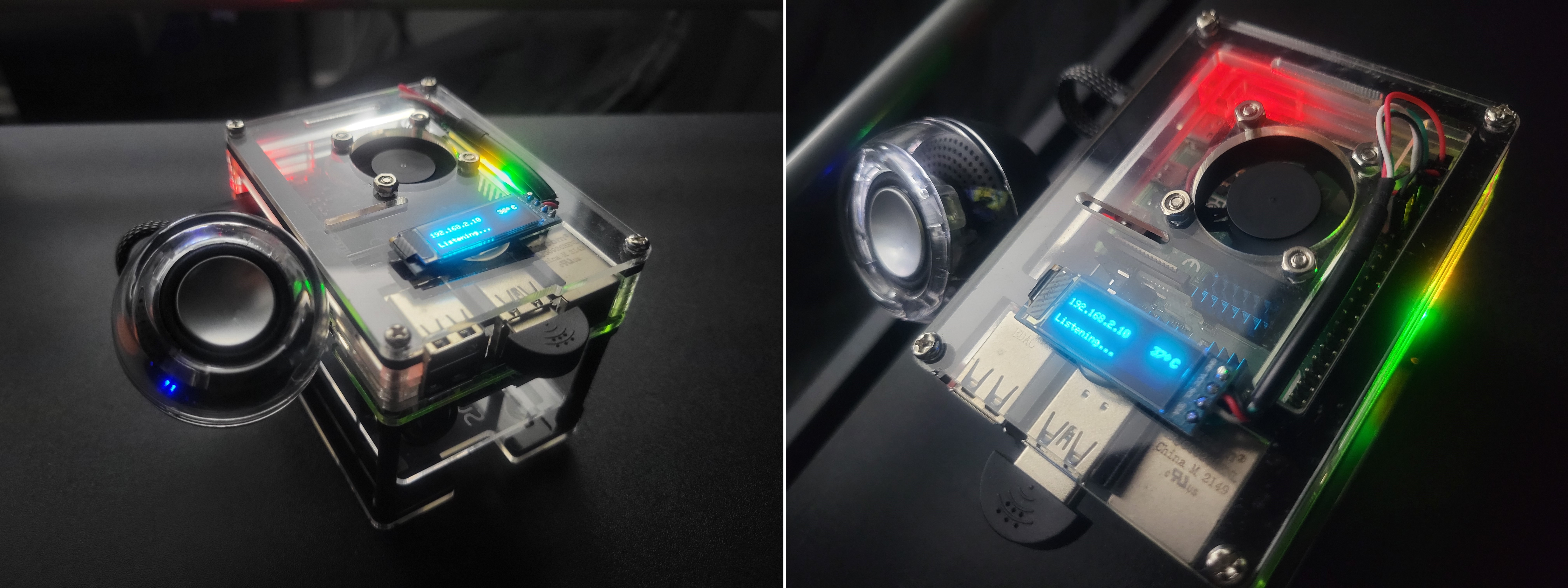
This guide will explain how to build your own. It's pretty straight forward. You can also use this as a reference for building other projects on the Raspberry Pi.
- Theoretically, the app should run on any linux system thanks to docker, but I can only vouch for the versions listed in the compatibility table. You should be able use any plug-and-play USB/3.5mm speaker or microphone as long as it's supported by ALSA or PortAudio.
|
|
||||||||
📖 Developer Documentation: For in-depth technical documentation, architecture details, and API references, visit the GPT Home Wiki.
🚀 TL;DR
Production (Raspberry Pi)
- Run the setup script:
curl -s https://raw.githubusercontent.com/judahpaul16/gpt-home/main/contrib/setup.sh | \
    bash -s -- --no-build
- Required: Set your API key. Copy the example config and add your key. GPT Home uses LiteLLM which supports 100+ providers (OpenAI, Anthropic, Google, Cohere, etc.):
cd ~/gpt-home
cp .env.example .env
sed -i 's/^LITELLM_API_KEY=$/LITELLM_API_KEY=your-api-key-here/' .env
docker compose down && docker compose up -d
Tip: You can also set the API key via the web interface at
gpt-home.local/settings. See LiteLLM docs for all supported providers.
- Optional: To view the logs and verify the assistant is running:
docker compose logs -f
Development (Any Machine)
git clone https://github.com/judahpaul16/gpt-home.git
cd gpt-home
cp .env.example .env
# Edit .env with your API keys
nano .env
# Start dev environment with hot reload
COMPOSE_PROFILES=dev docker compose up
# or
docker compose --profile dev up
Access at http://localhost (nginx routes to frontend and API).
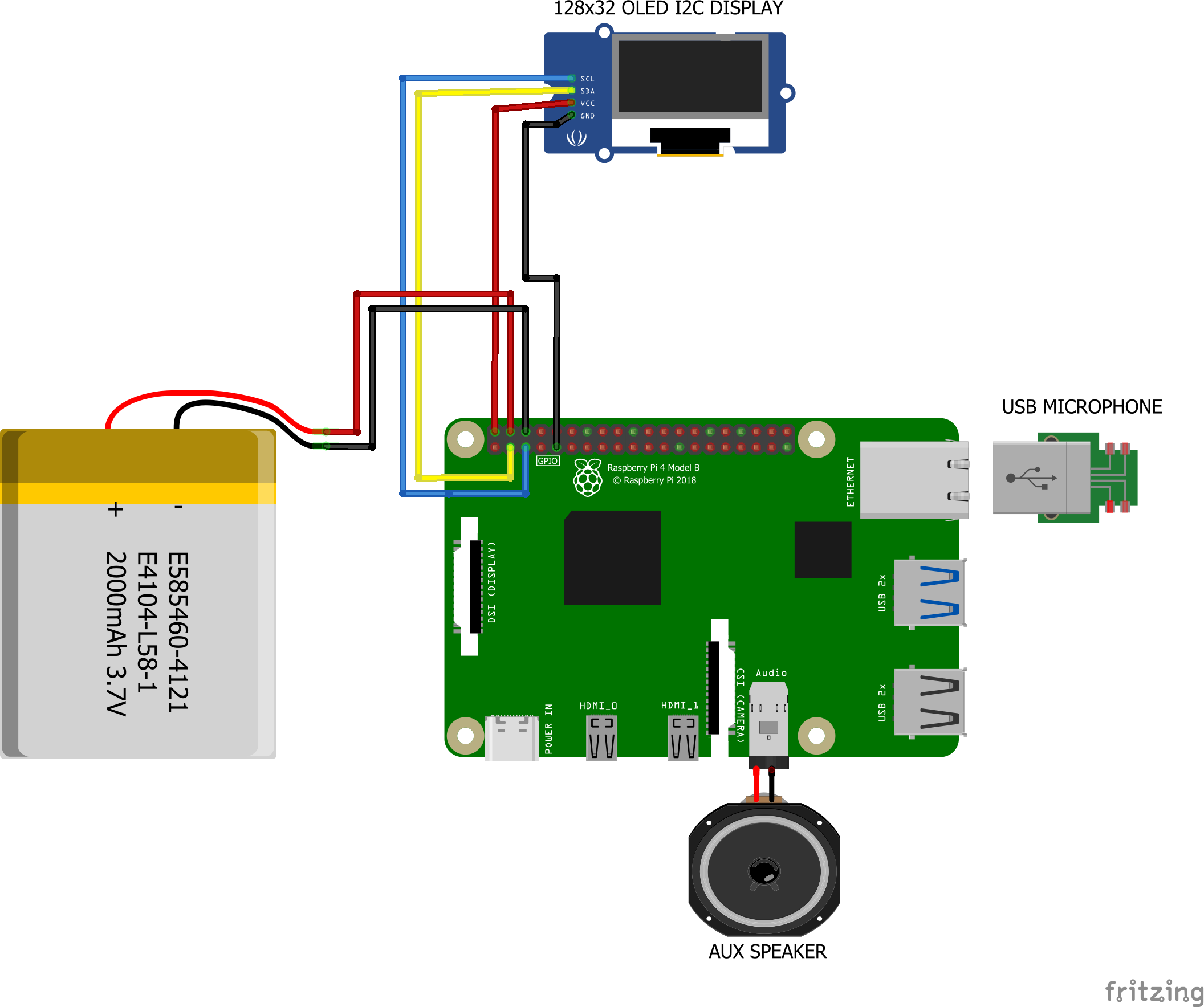
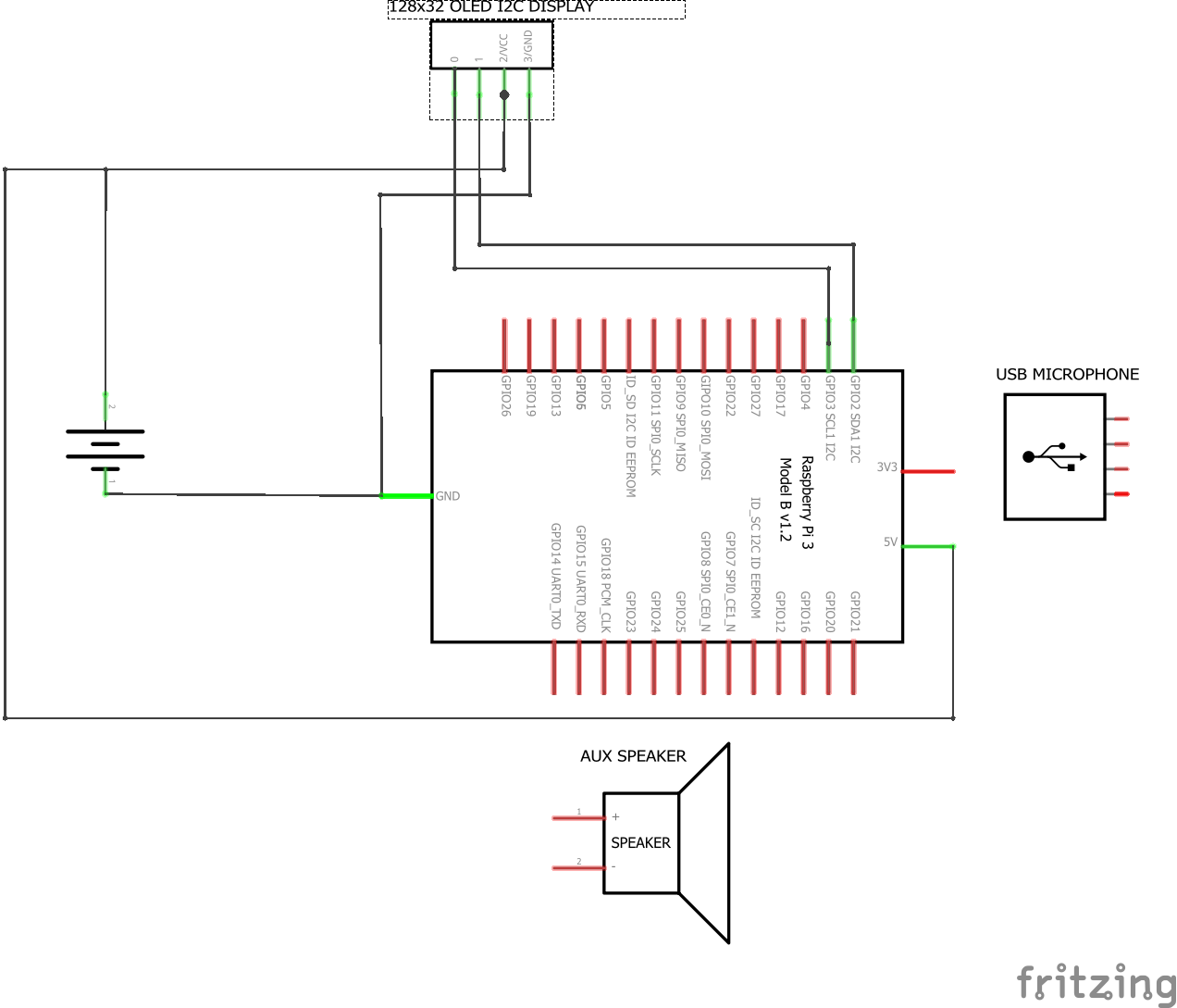
🔌 Schematics
⚠️ Caution: Battery Connection
IMPORTANT: The image on the left is for illustration purposes. Do not connect the battery directly to the Raspberry Pi. Use a UPS or power supply with a battery like this one. Connecting the battery directly to the Raspberry Pi can cause damage to the board from voltage fluctuations.
Before connecting the battery, ensure that the polarity is correct to avoid damage to your Raspberry Pi or other components. Disconnect power sources before making changes.
 |
 |
📋 Specifications
| Minimum | Recommended | |
|---|---|---|
| Board | Raspberry Pi Zero 2 W | Raspberry Pi 4B / 5 |
| CPU | Quad-core ARM Cortex-A53 @ 1GHz | Quad-core ARM Cortex-A72 @ 1.5GHz+ |
| RAM | 512MB | 1GB+ |
| Storage | 16GB microSD | 32GB+ microSD |
| OS | Raspberry Pi OS Lite (64-bit) | Ubuntu Server (64-bit) |
All system dependencies (Docker, time sync, etc.) are installed automatically by the setup script.
🛠 My Parts List
This is the list of parts I used to build my first GPT Home. You can use this as a reference for building your own. I've also included optional parts that you can add to enhance your setup. To be clear you can use any system that runs Linux.
👈 View My Parts List
Core Components
- Raspberry Pi 4B: Link - $50-$70
- Mini Speaker: Link - $18
- 128 GB MicroSD card: Link - $13
- USB 2.0 Mini Microphone: Link - $8
Alternative Boards
Audio HATs
- Whisplay HAT (audio + display expansion for Pi Zero): Link - ~$36
- RaspiAudio Ultra++ (DAC + speaker + mic, all Pi models): Link - ~$35
Optional Components
- 128x32 I2C Display: Link - $13-$14
- 3.5" PiScreen Display (480x320): Link - $15-$20 (SPI, ILI9486) — auto-detected by setup script
- 7" HDMI Touchscreen: Link - $40-$60 (1024x600)
- PiSugar2 Battery (1200mAh UPS for Pi Zero): Link - ~$36
- Standoff Spacer Column M3x40mm: Link - $14
- M1.4 M1.7 M2 M2.5 M3 Screw Kit: Link - $15
- Raspberry Pi UPS Power Supply with Battery: Link - $30
- Cool Case for Raspberry Pi 4B: Link - $16
📶 Configuring Wi-Fi
If your Pi isn't connected via Ethernet, use the included Wi-Fi setup script. It configures wpa_supplicant + systemd-networkd, disables NetworkManager (which can interfere), sets up DNS, and disables Wi-Fi power saving:
curl -s https://raw.githubusercontent.com/judahpaul16/gpt-home/main/contrib/wifi-setup.sh | \
    sudo WIFI_SSID="your-ssid" WIFI_PSK="your-password" bash
Or run it interactively (prompts for SSID and password):
curl -s https://raw.githubusercontent.com/judahpaul16/gpt-home/main/contrib/wifi-setup.sh | \
    sudo bash
You can also set WIFI_IFACE (default: wlan0) and WIFI_COUNTRY (default: US) if needed.
👈 Other methods
NetworkManager (Ubuntu, Armbian, some Raspberry Pi OS images):
sudo nmcli dev wifi connect "your-ssid" password "your-password"
To list available networks: nmcli dev wifi list
raspi-config (Raspberry Pi OS):
sudo raspi-config
Navigate to System Options > Wireless LAN and enter your SSID and password.
Ethernet: If Wi-Fi is unreliable, a wired Ethernet connection is always the most stable option and requires no configuration.
🐳 Building the Docker Container
Note: GPT Home uses LiteLLM which supports 100+ LLM providers. Set your LITELLM_API_KEY in the .env file or via the web interface at gpt-home.local/settings. See the LiteLLM docs for supported providers.
Optional: Add these aliases to your .bashrc file for easier management.
# Set working directory
alias gpt-home="cd ~/gpt-home"

# Manage all services
alias gpt-up="cd ~/gpt-home && docker compose up -d"
alias gpt-down="cd ~/gpt-home && docker compose down"
alias gpt-restart="cd ~/gpt-home && docker compose restart"
alias gpt-logs="cd ~/gpt-home && docker compose logs -f"
alias gpt-status="cd ~/gpt-home && docker compose ps"

# Manage individual services
alias gpt-backend-logs="cd ~/gpt-home && docker compose logs -f backend"
alias gpt-backend-restart="cd ~/gpt-home && docker compose restart backend"
alias gpt-backend-shell="cd ~/gpt-home && docker compose exec backend bash"

alias gpt-frontend-logs="cd ~/gpt-home && docker compose logs -f frontend"
alias gpt-frontend-restart="cd ~/gpt-home && docker compose restart frontend"

alias gpt-nginx-logs="cd ~/gpt-home && docker compose logs -f nginx"
alias gpt-nginx-restart="cd ~/gpt-home && docker compose restart nginx"

alias gpt-spotify-logs="cd ~/gpt-home && docker compose logs -f spotify"
alias gpt-spotify-restart="cd ~/gpt-home && docker compose restart spotify"

# Development mode (hot reload)
alias gpt-dev="cd ~/gpt-home && docker compose --profile dev up"
Run source ~/.bashrc to apply the changes to your current terminal session.
The setup script will take quite a while to run (900.0s+ to build and setup dependencies on my quad-core Raspberry Pi 4B w/ 1G RAM). It will install all the dependencies and build the Docker containers. However, you can skip the build process by passing the --no-build flag to the script; it will install the dependencies, set up the firewall, and pull the containers from Docker Hub and run them.
curl -s https://raw.githubusercontent.com/judahpaul16/gpt-home/main/contrib/setup.sh | \
    bash -s -- --no-build
Alternatively, for development purposes, running setup.sh without the --no-build flag builds all the service images locally. This is useful for testing changes to the codebase.
curl -s https://raw.githubusercontent.com/judahpaul16/gpt-home/main/contrib/setup.sh | \
    bash -s
You can also access a shell inside a running container for debugging:
docker compose exec backend bash   # Voice assistant container
docker compose exec frontend bash  # Web server container
docker compose exec nginx sh       # NGINX container
Explanation of Docker Compose Configuration
The docker-compose.yml configures six services:
services:
  db:
    # PostgreSQL with pgvector for persistent memory storage
    image: pgvector/pgvector:0.8.1-pg18-trixie
    volumes:
      - postgres-data:/var/lib/postgresql/data

  nginx:
    # Reverse proxy - routes /api, /logs, /settings to backend; static to frontend
    image: nginx:alpine
    ports: ["80:80"]
    depends_on: [backend]

  backend:
    # Voice assistant (app.py) + FastAPI backend (backend.py) on :8000
    image: judahpaul/gpt-home-backend:latest
    privileged: true
    expose: ["8000"]
    devices: ["/dev/snd:/dev/snd", "/dev/i2c-1:/dev/i2c-1", "/dev/dri:/dev/dri"]

  frontend:             # Production (profile: prod)
    # Multi-stage build: React static files served by nginx
    image: judahpaul/gpt-home-frontend:latest
    expose: ["80"]

  frontend-dev:         # Development (profile: dev)
    # React dev server with hot reload
    build: compose/web/Dockerfile.dev
    expose: ["80"]
    volumes:
      - ./src/frontend:/app  # Hot reload

  spotify:
    # Spotify Connect + Avahi mDNS
    image: judahpaul/gpt-home-spotify:latest
    network_mode: host  # Required for mDNS discovery
Profiles: By default,
COMPOSE_PROFILES=prodis set in.env, sofrontendruns. For development with hot reload, usedocker compose --profile dev up.
Setup Script Flags
The setup.sh script supports the following flags:
| Flag | Description |
|---|---|
--no-build |
Skip building and pull the pre-built image from Docker Hub instead |
--no-cache |
Build without using Docker's cache (forces fresh build) |
--prune |
Prune Docker system and volumes before building (cleans up disk space) |
Examples:
# Default build (uses cache, no prune)
./setup.sh

# Pull from Docker Hub without building
./setup.sh --no-build

# Fresh build without cache
./setup.sh --no-cache

# Full cleanup and fresh build
./setup.sh --prune --no-cache
✅ Compatibility
|
|
|
|
||||||||||||||||||||||||||||||||||||||||||||||||||||||||||||||||
📚 Useful Documentation

🤝 Contributing
Contributions are certainly welcome! Please read the contributing guidelines for more information on how to contribute.
📜 License
This project is licensed under the GNU GPL v3.0 License - see the LICENSE file for details.
🌟 Star History
Frequently asked questions
Is gpt-home free to use?
gpt-home is open source under the GPL-3.0 licence. There is no licence fee and no seat count — you can self-host it or, where the project offers one, pay a vendor for a managed version instead.
What does gpt-home do?
ChatGPT at home! A better alternative to commercial smart home assistants, built on the Raspberry Pi using LiteLLM and LangGraph.
What is gpt-home written in?
gpt-home is primarily written in Python. Its source is publicly available at https://github.com/judahpaul16/gpt-home, and it has 652 GitHub stars.