ChatGPT Conversation Toolkit 🧰✨
简体中文 | English
适用于 ChatGPT Web 的浏览器插件,主要解决导出、搜索、Prompt 管理、时间线定位、对话文件夹管理和多语言界面切换问题 🚀
当前活跃维护者:bujue3709(主要 / 唯一活跃维护者)
当前版本:v1.4.3
v1.4.3 更新内容(2026-09-17)🆕
- 新增
.png长图导出。 - PNG 基于完整会话导出数据生成,不依赖当前视口 DOM;API 不可用时仍会明确提示仅包含当前可获得的已加载/缓存消息。
- 固定
1080px白底阅读版式,保留标题、段落、标题、粗体、行内代码、代码块、引用、列表、分隔线和基础表格可读性。 - 超长会话会在消息之间优先自动分页;单条超长消息才会按内容结构拆分,并使用
User · continued/ChatGPT · continued标记续页。 - 多页文件按
part-01、part-02顺序生成并下载;每次只创建一张大 Canvas,转为 PNG Blob 后立即释放,再处理下一页。 - 增加生成进度、重复任务锁和数据获取/图片渲染/内容过大/未知错误分类提示。
ChatGPT 虚拟化列表影响说明(重要)
从近期版本开始,ChatGPT Web 在会话主区采用“虚拟化列表”渲染:
- 浏览器中只保留当前视口附近的一部分消息 DOM。
- 早期消息会在你滚动时按需加载,离开视口后可能再次被卸载。
这会对依赖完整 DOM 的插件功能产生直接影响:
- 搜索和时间线的数据源会优先使用 API 会话数据,因此可以覆盖更完整的会话内容。
- 搜索和时间线跳转会使用统一的虚拟化跳转逻辑:先定位目标消息,再等待 ChatGPT 挂载目标 DOM,最后用消息 ID 或文本片段确认目标节点。
- 旧版“长会话优化 / 长会话折叠”功能已经废弃:ChatGPT Web 自身的虚拟化列表已经会按需卸载远离视口的消息,通常不再需要插件额外隐藏旧消息;额外折叠反而可能干扰搜索、时间线定位和原页面交互。
当前支持站点 🌐
https://chat.openai.com/*💬https://chatgpt.com/*🤖
浏览器支持(当前) 🧭
- ✅
Microsoft Edge(正式支持) - ✅
Google Chrome(正式支持) - ⚠️
Firefox(可临时加载,后续做正式适配) - ⚠️
Safari (macOS)(评估中)
功能概览 ✨
- 🧹 长会话优化:旧版折叠能力已废弃。ChatGPT Web 的虚拟化列表已经会自动控制 DOM 规模,不再需要插件额外隐藏旧消息。
- 📦 灵活导出:将全部或选定问答回合导出为
.json、.txt、.md或自动分页的.png长图,并可只保留 GPT 回答。 - 🔍 消息搜索:按关键词搜索当前对话内容,支持高亮和前后跳转;深层消息会通过虚拟化跳转逻辑定位。
- 📚 Prompt 指令库:支持新增、删除、搜索、分类、排序、导入 JSON、导出 JSON、单击复制。
- ⚙️ 常用配置:提供原生独立设置弹窗,支持可视化无缝调节各项运行参数并自动持久化。
- ∑ LaTeX 公式复制:鼠标移入渲染公式可一键复制 LaTeX 源码。
- 🕒 对话时间线:基于 API 会话数据生成用户消息时间节点,支持预览、节点计数、显示/隐藏、拖拽移动和远端节点跳转。
- 📁 对话文件夹:在“你的聊天”上方提供极简文件夹管理条,支持新建、重命名、删除、折叠/展开、拖拽归类、移回未分组,并保留原生会话菜单能力。
- 🌐 多语言支持:当前支持中文和英文,默认跟随浏览器语言自动匹配;若没有匹配项则回退到英文,并支持在工具栏中手动切换。
- 🎨 主题同步:工具栏、时间线、Prompt 弹窗和导出选择页跟随 ChatGPT 明暗主题。
- 🧲 拖拽浮层:工具栏最小化按钮和时间线组件都支持拖拽移动。
安装方式 🧩
Chrome 🌈
- 打开
chrome://extensions/ - 打开右上角“开发者模式”
- 点击“加载已解压的扩展程序”
- 选择当前项目根目录
Edge 🌐
- 打开
edge://extensions/ - 打开右上角“开发人员模式”
- 点击“加载已解压的扩展”
- 选择当前项目根目录
Firefox 🦊
- 打开
about:debugging#/runtime/this-firefox - 点击“临时载入附加组件”
- 选择当前项目根目录下的 manifest.json
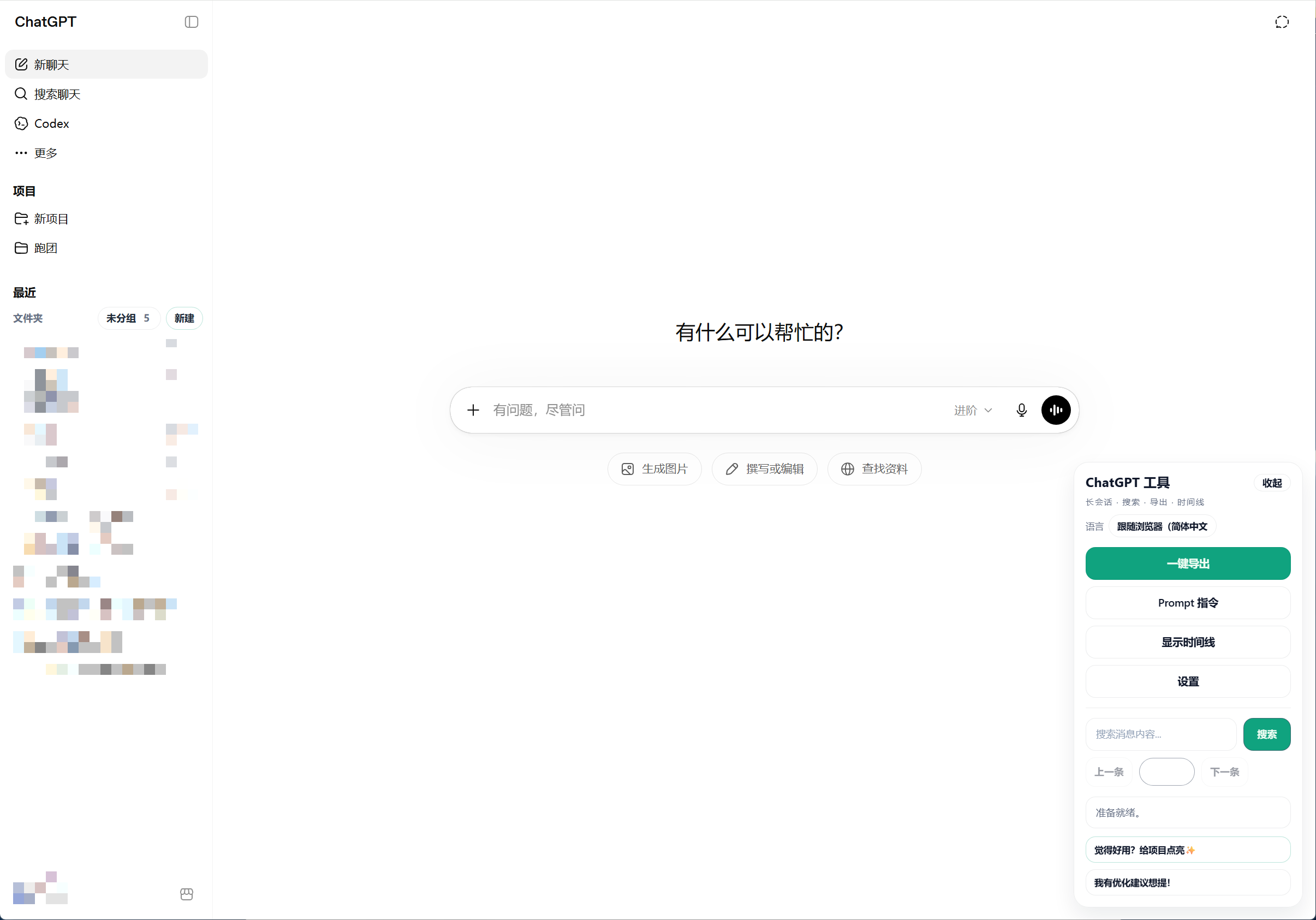
界面示意 🖼️
使用说明 ▶️
1. 工具栏 🧰
页面加载后,右下角会显示“ChatGPT 工具”浮层。
可直接执行的操作包括:
优化长会话🧹(旧版功能,已废弃,不再推荐)恢复隐藏消息♻️导出(支持全部/指定回合与仅 GPT 回答)📦Prompt 指令📚显示/隐藏时间线🕒搜索消息🔍常用配置⚙️语言切换🌐
点击“收起”后,工具栏会变成圆形按钮。圆形按钮支持拖拽,拖拽结束后自动贴边,单击可恢复展开 🧲
工具栏底部还提供两个轻量入口:
觉得好用?给项目点亮✨我有优化建议想提!
1.1 多语言 🌐
- 插件启动时会优先读取用户浏览器语言,并自动匹配当前可用语言。
- 当前内置语言为:
简体中文English
- 若浏览器语言没有匹配项,插件会默认使用
English。 - 工具栏头部提供语言切换菜单,可手动选择:
跟随浏览器English简体中文
- 手动切换后会立即刷新工具栏、时间线、Prompt 指令库、文件夹管理和状态提示文案,并自动保存你的语言选择 💾
2. 长会话优化(已废弃)🧹
- 旧版“优化长会话”会通过隐藏较早消息来减少页面 DOM 数量。
- 现在 ChatGPT Web 已经使用虚拟化列表,远离视口的消息会由原页面按需挂载和卸载,因此不再需要插件额外折叠长会话。
- 该功能已废弃,不再作为推荐工作流维护;长会话浏览、搜索和时间线定位应优先使用当前的 API 会话数据与虚拟化跳转逻辑。
- 如果历史会话曾经被旧版功能隐藏过消息,可使用“恢复隐藏消息”清理旧折叠状态。
3. 导出 📦
- 点击“导出”可选择全部会话或指定问答回合,并可切换为仅导出 GPT 回答。
- 指定回合模式支持全选、反选、清空、
Shift连续选择和分页浏览;选择状态会跨页保留。 - 底部会实时显示本次包含的回合数和消息数,没有可导出消息时会禁用导出按钮。
- 可在“常用配置 / 设置”中选择默认导出格式和默认导出内容;格式支持
.json、.txt、.md、.png。 - 导出优先使用 API 会话数据,即使页面当前只挂载了部分虚拟化 DOM,也会尽量导出完整会话 ✅
- API 数据不可用时会降级为已加载/缓存内容,并在选择页显示不完整提示。
4. 搜索 🔍
- 在工具栏搜索框输入关键词后按回车,或点击搜索按钮开始搜索。
- 搜索结果会高亮显示 ✨
- 可以通过“上一条 / 下一条”在匹配结果间跳转。
- 搜索可命中 API 会话数据中的深层消息;跳转时会等待 ChatGPT 挂载目标 DOM,并用消息 ID 或文本片段确认目标节点。
- 如果历史会话曾经被旧版长会话折叠隐藏过消息,建议先恢复隐藏消息再搜索。
5. 时间线 🕒
- 时间线位于对话区域左侧。
- 时间线优先使用 API 会话数据生成用户消息节点,不再只依赖当前 DOM 中已加载的消息。
- 节点计数格式为:
当前节点/总用户节点数 - 鼠标移入节点可预览消息内容 👁️
- 点击节点会跳转到对应消息;深层节点、首尾节点会通过虚拟化跳转逻辑等待目标 DOM 挂载后再高亮。
- 页面滚动时,会同步激活当前视口附近的时间节点。
- 鼠标滚轮可以滚动时间线。
- 时间线头部支持拖拽移动 🧲
- 滚动到顶部但没有更多可见消息时:
- 若消息已经全部可见,提示
已经没有消息了 - 若旧版折叠状态仍存在,提示
请恢复隐藏消息
- 若消息已经全部可见,提示
6. Prompt 指令库 📚
- 点击“Prompt 指令”打开弹窗。
- 支持:
- 搜索标题 / 分类 / 内容 🔎
- 按分类筛选 🗂️
- 按更新时间、标题、分类排序 ↕️
- 新增 Prompt ➕
- 删除 Prompt 🗑️
- 导入 JSON 📥
- 导出 JSON 📤
- 单击复制内容 📋
- 复制成功后会显示提示 ✅
7. LaTeX 公式复制 ∑
- 鼠标移入“渲染后的公式”时,会在公式附近出现
复制 LaTeX按钮。 - 点击按钮可复制该公式的 LaTeX 源码(不是渲染后的普通文本)。
- 可在“常用配置”中选择复制格式:纯 LaTeX、Markdown 行内
$...$、Markdown 块级$$...$$、LaTeX 行内\(...\)或 LaTeX 展示\[...\]。 - 粘贴到 Obsidian 等 Markdown 编辑器时,推荐选择 Markdown 块级格式;默认格式仍为纯 LaTeX。
- 复制后会在工具栏状态区显示成功/失败提示。
- 对于
LaTeX代码块,建议优先使用 ChatGPT 原生代码块右侧复制按钮。
8. 对话文件夹 📁
- 文件夹管理条会显示在侧边栏“你的聊天”标题上方。
- 支持点击
新建创建文件夹。 - 点击文件夹头可折叠 / 展开当前文件夹下的会话。
- 点击文件夹右侧菜单可进行:
- 重命名 ✏️
- 删除 🗑️
- 支持把未分组会话拖到某个文件夹中。
- 支持把文件夹内会话拖回
未分组。 - 拖拽命中范围包括:
- 文件夹头
- 文件夹内会话区域
- 文件夹管理的可见会话段空白区域
- 原生的重命名、归档、更多菜单仍然可用 ✅
- 文件夹、归类关系和折叠状态会自动持久化,刷新页面后恢复 💾
9. 常用配置 ⚙️
- 工具栏提供“常用配置”入口,点击可唤出原生风格独立设置弹窗。
- 支持设置聊天记录导出格式:
.json.txt.md.png长图
- 支持设置默认导出内容:
用户提问 + GPT 回答仅 GPT 回答
- 支持设置公式复制格式,默认使用纯 LaTeX,并可切换 Markdown 或 LaTeX 定界符包装格式。
- 修改并点击“保存”后无需刷新页面,配置会即刻生效并自动写入本地存储进行持久化 💾
- 弹窗原生支持随 ChatGPT 明暗主题动态无缝切换 🎨
请作者喝杯奶茶 🧋
如果这个插件对你有用,欢迎顺手点个 Star ⭐,真的非常感谢!

项目结构 🏗️
当前项目已经完成基础模块拆分,manifest.json 会按顺序注入以下脚本:
core/
  state.js
  i18n.js

features/
  collapse.js
  export.js
  export-selection.js
  export-png-renderer.js
  folders.js
  search.js
  latex-copy.js
  timeline.js
  prompt-library.js

ui/
  theme.js
  toolbar.js

utils/
  dom.js
  storage.js

contentScript.js
styles.css
manifest.json
模块职责 🧭
- core/state.js
- 全局常量、运行时状态、基础配置 🧠
- core/i18n.js
- 多语言字典、语言检测、语言切换与界面刷新 🌐
- utils/dom.js
- DOM 读取、消息节点识别、通用拖拽调度 🧩
- utils/storage.js
- 本地持久化、位置和显示状态保存 💾
- ui/theme.js
- ChatGPT 明暗主题识别与同步 🎨
- ui/toolbar.js
- 工具栏、最小化按钮、拖拽交互 🧰
- features/collapse.js
- 旧版长会话折叠与恢复逻辑,当前已废弃,仅作为兼容历史折叠状态保留 🧹
- features/export.js
- 会话导出 📦
- features/export-selection.js
- 问答回合选择、角色筛选与分页导出 📋
- features/export-png-renderer.js
- 固定宽度 PNG 阅读版式、结构化分页与逐页低内存下载 🖼️
- features/folders.js
- 侧边栏对话文件夹管理、拖拽归类、本地持久化恢复 📁
- features/search.js
- 消息搜索与跳转 🔍
- features/latex-copy.js
- 渲染公式悬浮按钮、一键复制 LaTeX 源码 ∑
- features/timeline.js
- 时间线渲染、预览、滚动、拖拽、节点同步 🕒
- features/prompt-library.js
- Prompt 指令库读写、筛选、复制、导入导出 📚
- contentScript.js
- 启动入口、初始化、DOM 观察器 🚦
- styles.css
- 工具栏、时间线、Prompt 弹窗样式 🎨
可调整配置 ⚙️
常用配置位于 core/state.js。
例如:
const TIMELINE_VISIBLE_NODE_CAPACITY = 10;
const TIMELINE_MAX_NODES = 20;
const COLLAPSE_AUTO_REOPTIMIZE_BUFFER = 10;

const state = {
  isCollapsed: false,
  isMinimized: false,
  keepLatest: 20,
  collapsedNodes: [],
  cachedNodes: [],
};
字段说明 📝
keepLatest:旧版长会话折叠保留的最新消息数量;该折叠功能已废弃COLLAPSE_AUTO_REOPTIMIZE_BUFFER:旧版自动再优化缓冲数量;该折叠功能已废弃TIMELINE_VISIBLE_NODE_CAPACITY:时间线单屏大致可容纳的节点数TIMELINE_MAX_NODES:时间线最大采样节点数exportFormat:默认导出格式,支持json、txt、md、pngexportRole:默认导出内容,支持all或assistantlatexCopyFormat:公式复制格式,支持raw、markdown-inline、markdown-block、latex-inline、latex-display
导出的会话 JSON 格式 📦
{
  "exportedAt": "2026-03-13T08:30:00.000Z",
  "url": "https://chatgpt.com/c/xxxxxxxx",
  "exportScope": "all",
  "roleFilter": "all",
  "sourceMessageCount": 2,
  "selectedTurnCount": 1,
  "messageCount": 2,
  "messages": [
    {
      "index": 1,
      "role": "user",
      "text": "你的消息"
    },
    {
      "index": 2,
      "role": "assistant",
      "text": "ChatGPT 的消息"
    }
  ]
}
字段说明 🧾
exportedAt:导出时间,ISO 8601 格式url:当前会话页面地址messageCount:导出的消息数量messages:消息数组messages[].index:消息顺序messages[].role:消息角色,通常为user或assistantmessages[].text:消息文本内容exportScope:导出范围,all或selectedroleFilter:角色筛选,all或assistantsourceMessageCount:筛选前的消息数量selectedTurnCount:本次包含的问答回合数messages[].sourceIndex:部分导出时,消息在原会话中的顺序
Prompt 指令库 JSON 格式 📚
Prompt 指令库导出为对象格式:
{
  "version": 1,
  "updatedAt": "2026-03-13T08:30:00.000Z",
  "prompts": [
    {
      "id": "c94f7299-40f3-4f95-a9f7-0ff93029a3f8",
      "title": "日报总结",
      "category": "办公",
      "content": "请将今天工作整理为日报,按完成项、风险、计划输出。",
      "createdAt": 1741576200000,
      "updatedAt": 1741576200000
    }
  ]
}
字段说明 🧾
version:格式版本,当前为1updatedAt:整个 Prompt 库的更新时间prompts:Prompt 数组prompts[].id:唯一 IDprompts[].title:标题prompts[].category:分类prompts[].content:正文prompts[].createdAt:创建时间戳prompts[].updatedAt:更新时间戳
导入兼容格式 🔄
支持两种格式:
1. 对象格式 ✅
{
  "prompts": [
    {
      "title": "代码评审",
      "category": "开发",
      "content": "请按严重级别列出问题并给修复建议。"
    }
  ]
}
2. 数组格式 ✅
[
  {
    "title": "需求拆解",
    "category": "产品",
    "content": "请拆解为任务并给出优先级和验收标准。"
  }
]
导入规则 📥
content为空的记录会被忽略title为空时会自动根据正文生成标题category为空时自动归类为未分类- 重复项按
title + category + content去重,比较时不区分大小写
开发说明 🛠️
- 当前项目不依赖打包器。
- 修改脚本后,浏览器扩展页重新加载插件即可生效。
- 内容脚本的执行顺序由 manifest.json 中
content_scripts.js数组控制。
已知限制 ⚠️
- 时间线和搜索优先使用 API 会话数据,因此可以覆盖更完整的会话内容。
- 跳转仍依赖 ChatGPT Web 虚拟化列表最终挂载目标 DOM;插件会自动重试定位,但如果 ChatGPT 页面结构大幅变更,可能需要重新适配。
- 旧版长会话折叠已废弃;若历史折叠状态仍存在,需要先恢复隐藏消息再执行页面内定位。
- LaTeX 复制功能主要针对渲染后的公式节点;
LaTeX代码块复制建议使用 ChatGPT 原生复制按钮。 - 文件夹管理基于当前 ChatGPT 侧边栏 DOM 结构实现,本地保存分类关系,不会同步到 ChatGPT 服务端。
- 不同 ChatGPT 页面版本可能调整 DOM 结构,少数选择器可能需要跟进适配。
License 📄
本项目采用 MIT License。
这意味着你可以在遵守 MIT 许可证文本保留要求的前提下,自由使用、复制、修改、发布、分发,且允许商业使用与再分发。
非许可说明 🏷️
为避免误导,请不要错误表示原项目名称、作者身份或品牌归属;如果你分发的是修改版或非官方版本,建议明确标注。此说明仅用于避免误导,不构成额外的许可证限制。