gost, short for GO Simple Tunnel, is an MIT-licensed tunnelling tool written in Go that unifies forward proxying, TCP/UDP port forwarding and reverse-proxy tunnelling in a single binary, intended for network and infrastructure engineers who need to connect segmented networks, expose internal services, or route traffic through intermediaries without assembling several single-purpose programs.
What it is
gost is a network tunnelling program written in Go and distributed as a standalone binary, as DEB and RPM system packages, and as a Docker image. It is documented at gost.run and sits in the Go networking ecosystem, where it handles a broad set of transport and proxy protocols including HTTP, HTTPS, HTTP/2, HTTP/3, gRPC, QUIC, KCP, DTLS, DNS and ICMP tunnelling. The project describes three principal modes of use: acting as a forward proxy to reach a network, forwarding a port on one service to a port on another, and operating as a reverse proxy that uses tunnels and intranet penetration to expose an internal service to the public internet.
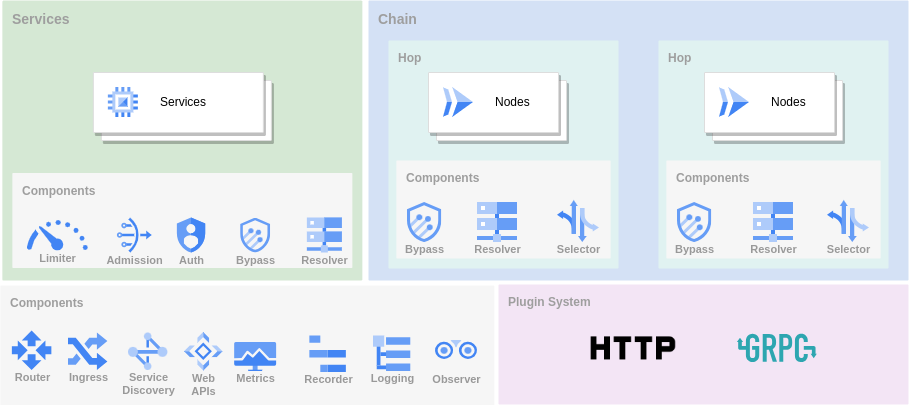
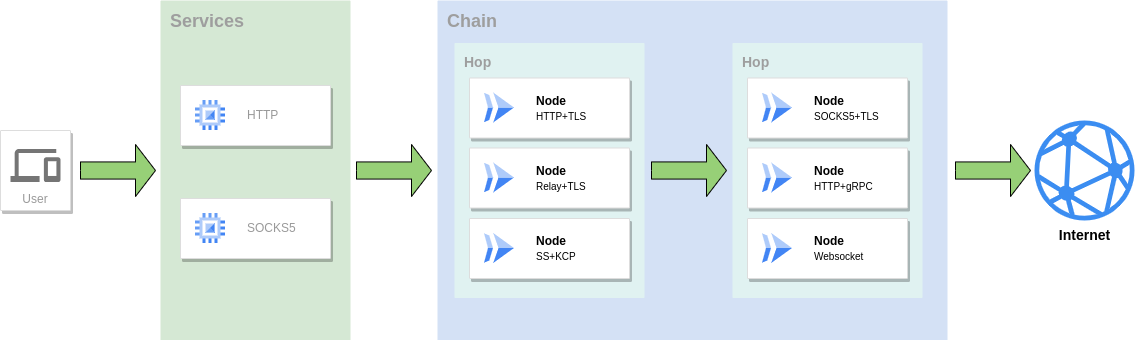
The concrete problem it addresses is fragmentation. Rather than running one tool for forward proxying, a second for port mapping and a third for reverse tunnelling and intranet penetration, gost covers all three roles from one program, and it allows multiple protocols to be combined at multiple levels into a forwarding chain. Beyond the three modes, it handles DNS resolution and DNS proxying, TUN/TAP virtual devices and TUN2SOCKS conversion, TCP and UDP transparent proxying, load balancing, routing control, admission control, rate limiting, and a plugin system, with Prometheus metrics, dynamic configuration and a Web API for managing running instances.
Key capabilities
- Multi-port listening and multi-level forwarding chains that combine protocols such as HTTP, HTTPS, HTTP/2, HTTP/3, gRPC, QUIC, KCP and DTLS in a single path.
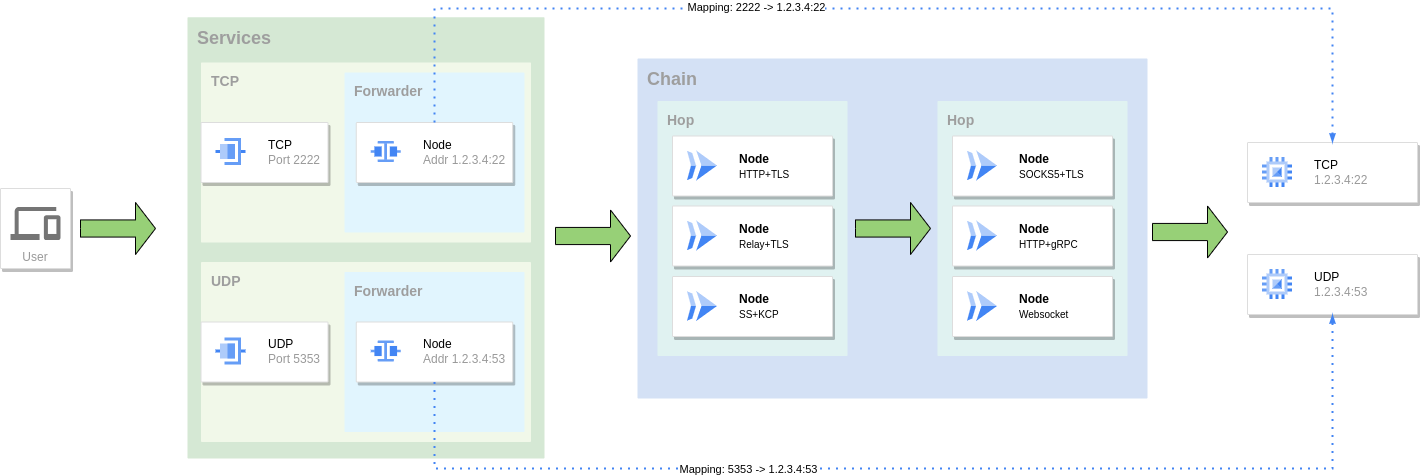
- TCP and UDP port forwarding, alongside TCP and UDP transparent proxy operation using redirect.
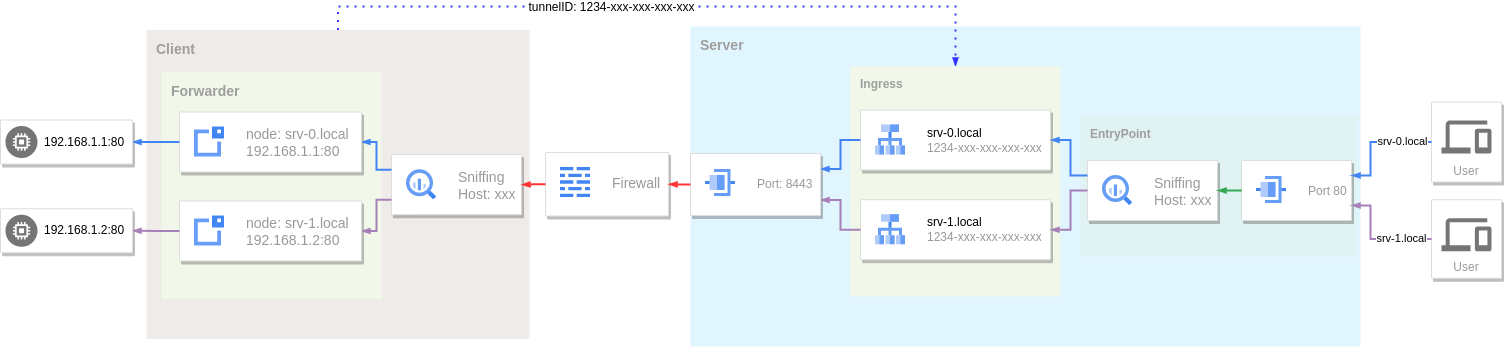
- Reverse proxy and tunnelling for exposing internal services, including intranet penetration scenarios.
- DNS resolution through a configurable resolver and DNS proxying for forwarded traffic.
- TUN/TAP device support and TUN2SOCKS conversion on top of the tunnel.
- Traffic policy controls covering load balancing through selectors, routing control with bypass rules, admission control, and rate and connection limiting.
- Operational interfaces including a plugin system, Prometheus monitoring metrics, dynamic configuration over a Web API, and the separate gostctl GUI and gost-ui WebUI projects.
Who uses it and how
- Teams that need to publish an internal service to the public internet use the reverse proxy mode with tunnels and intranet penetration rather than opening inbound firewall rules.
- Engineers reaching a network from outside use the forward proxy mode, chaining several protocols across multiple hops to build the forwarding path.
- Operators mapping one service's port onto another use port forwarding, optionally wrapping it in the same protocol chain used for proxying.
- Hosts that must intercept traffic without client reconfiguration use transparent proxy in TCP or UDP mode.
- Administrators running the packaged installs manage a systemd unit, write
/etc/gost/gost.yml from the example at /usr/share/doc/gost/examples/gost.yml, and enable it with sudo systemctl enable --now gost.
Getting started
Prebuilt binaries and amd64, amd64v3 and arm64 DEB/RPM packages are published on the GitHub Releases page, and an install script is available via bash <(curl -fsSL https://github.com/go-gost/gost/raw/master/install.sh) --install; a Docker image is published as gogost/gost, runnable with docker run --rm gogost/gost -V. Source builds are made from the cmd/gost directory after cloning the repository, and the amd64v3 package requires a CPU supporting AVX2 (x86-64-v3).
How it compares
No paid products that gost replaces are named in the facts for this entry, and no directly comparable tunnelling tools are named either, so on the evidence available it stands alone in this registry. Readers looking for head-to-head comparisons should treat the absence of named alternatives here as a gap in this listing rather than as a claim about the wider tooling landscape.
When to use it — and when not to
gost suits operators who are comfortable writing and maintaining a YAML configuration and, on the packaged installs, managing a systemd unit themselves; the packages deliberately ship the service disabled and skip it rather than fail when no configuration file is present. It is a poor fit for anyone who wants a fully managed or hosted tunnel, since this is a self-operated binary and the project provides no hosted service, and the default README is in Chinese, with the fuller documentation living on the external gost.run site, so readers who need English material must follow the separate English README link. The repository carries 101 open issues, which is worth weighing when planning support expectations for a production deployment.