GoAccess 

What is it?
GoAccess is an open source, real-time web log analyzer and interactive viewer that runs in a terminal on *nix systems or directly in your browser. Designed with system administrators, DevOps engineers, and security professionals in mind, it delivers fast, actionable HTTP statistics and visual server reports on the fly. GoAccess parses your web server logs in real time and presents the data directly in the terminal or via a live HTML dashboard, making it easy to monitor traffic, detect anomalies, and troubleshoot issues instantly.
More info at: https://goaccess.io.
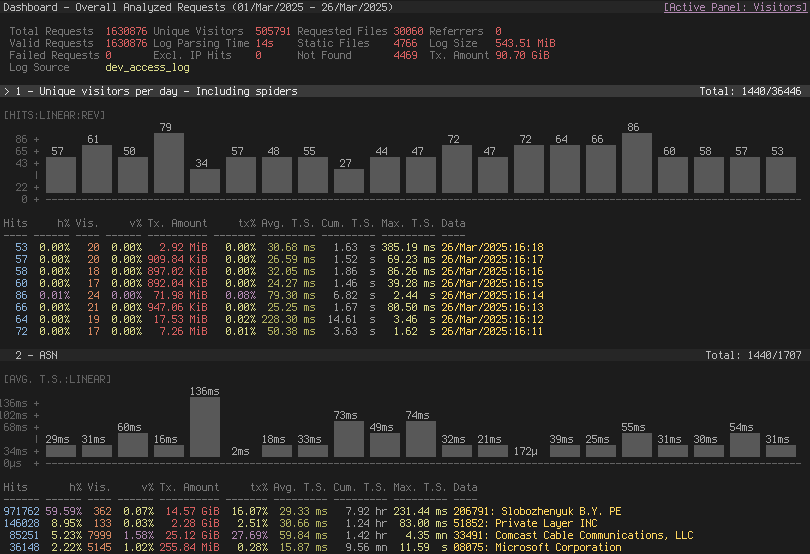
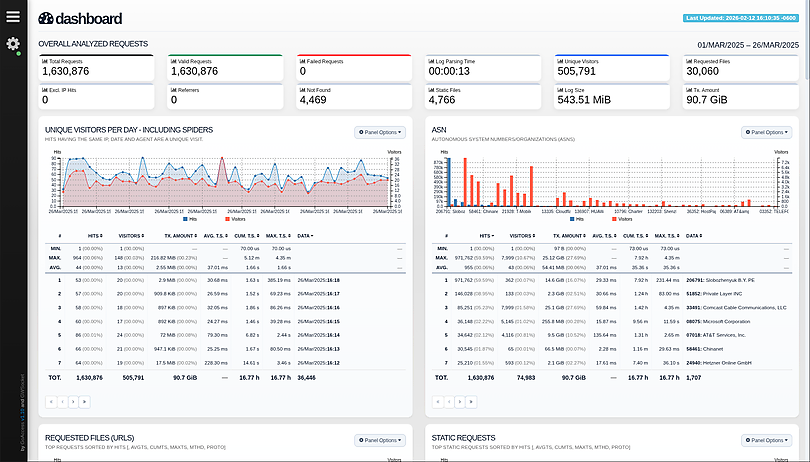
Features
GoAccess parses the specified web log file and outputs the data to the X terminal. Features include:
Completely Real Time
All panels and metrics are timed to be updated every 200 ms on the terminal output and every second on the HTML output.Minimal Configuration needed
You can just run it against your access log file, pick the log format and let GoAccess parse the access log and show you the stats.Track Application Response Time
Track the time taken to serve the request. Extremely useful if you want to track pages that are slowing down your site.WebSocket Authentication:
GoAccess offers enhanced WebSocket authentication, supporting local and external JWT verification, with secure token refresh capabilities and seamless integration with external authentication systems.Nearly All Web Log Formats
GoAccess allows any custom log format string. Predefined options include, Apache, Nginx, Amazon S3, Elastic Load Balancing, CloudFront, etc.Incremental Log Processing
Need data persistence? GoAccess has the ability to process logs incrementally through the on-disk persistence options.Only one dependency
GoAccess is written in C. To run it, you only need ncurses as a dependency. That's it. It even features its own Web Socket server — http://gwsocket.io/.Visitors
Determine the amount of hits, visitors, bandwidth, and metrics for slowest running requests by the hour, or date.Metrics per Virtual Host
Have multiple Virtual Hosts (Server Blocks)? It features a panel that displays which virtual host is consuming most of the web server resources.ASN (Autonomous System Number mapping)
Great for detecting malicious traffic patterns and block them accordingly.Color Scheme Customizable
Tailor GoAccess to suit your own color taste/schemes. Either through the terminal, or by simply applying the stylesheet on the HTML output.Support for Large Datasets
GoAccess features the ability to parse large logs due to its optimized in-memory hash tables. It has very good memory usage and pretty good performance. This storage has support for on-disk persistence as well.Docker Support
Ability to build GoAccess' Docker image from upstream. You can still fully configure it, by using Volume mapping and editinggoaccess.conf. See Docker section below. There is also documentation how to use docker-compose.
Nearly all web log formats...
GoAccess allows any custom log format string. Predefined options include, but not limited to:
- Amazon CloudFront standard logs (legacy fixed schema).
- Amazon Simple Storage Service (S3)
- AWS Elastic Load Balancing
- Combined Log Format (XLF/ELF) Apache | Nginx
- Common Log Format (CLF) Apache
- Google Cloud Storage.
- Apache virtual hosts
- Squid Native Format.
- W3C format (IIS).
- Caddy's JSON Structured format.
- Traefik's CLF flavor
Why GoAccess?
GoAccess was designed to be a fast, terminal-based log analyzer. Its core idea is to quickly analyze and view web server statistics in real time without needing to use your browser (great if you want to do a quick analysis of your access log via SSH, or if you simply love working in the terminal).
It also serves as a practical tool for security monitoring, making it easy to spot suspicious activity, unusual traffic patterns, brute-force attempts, scanners, bots, and anomalous requests directly from your logs.
While the terminal output is the default output, it has the capability to
generate a complete, self-contained, real-time HTML
report, as well as a JSON, and
CSV report.
You can see it more of a monitor command tool than anything else.
Installation

Build from release
GoAccess can be compiled and used on *nix systems.
Download, extract and compile GoAccess with:
$ wget https://tar.goaccess.io/goaccess-1.11.tar.gz
$ tar -xzvf goaccess-1.11.tar.gz
$ cd goaccess-1.11/
$ ./configure --enable-utf8 --enable-geoip=mmdb --with-zlib
$ make
# make install
Build from GitHub (Development)
$ git clone https://github.com/allinurl/goaccess.git
$ cd goaccess
$ autoreconf -fiv
$ ./configure --enable-utf8 --enable-geoip=mmdb
$ make
# make install
Distributions
It is easiest to install GoAccess on GNU+Linux using the preferred package manager of your GNU+Linux distribution. Please note that not all distributions will have the latest version of GoAccess available.
Debian/Ubuntu
# apt-get install goaccess
Note: It is likely this will install an outdated version of GoAccess. To make sure that you're running the latest stable version of GoAccess see alternative option below.
Official GoAccess Debian & Ubuntu repository
$ wget -O - https://deb.goaccess.io/gnugpg.key | gpg --dearmor | sudo tee /usr/share/keyrings/goaccess.gpg >/dev/null
$ echo "deb [signed-by=/usr/share/keyrings/goaccess.gpg arch=$(dpkg --print-architecture)] https://deb.goaccess.io/ $(lsb_release -cs) main" | sudo tee /etc/apt/sources.list.d/goaccess.list
$ sudo apt-get update
$ sudo apt-get install goaccess
Note:
.debpackages in the official repo are available through HTTPS as well. You may need to installapt-transport-https.
Fedora
# yum install goaccess
Arch
# pacman -S goaccess
Gentoo
# emerge net-analyzer/goaccess
OS X / Homebrew
# brew install goaccess
FreeBSD
# cd /usr/ports/sysutils/goaccess/ && make install clean
# pkg install sysutils/goaccess
OpenBSD
# cd /usr/ports/www/goaccess && make install clean
# pkg_add goaccess
openSUSE
# zypper ar -f obs://server:http http
# zypper in goaccess
OpenIndiana
# pkg install goaccess
pkgsrc (NetBSD, Solaris, SmartOS, ...)
# pkgin install goaccess
Windows
GoAccess can be used in Windows through Cygwin. See Cygwin's packages. Or through the GNU+Linux Subsystem on Windows 10.
Docker
A Docker image has been updated, capable of directing output from an access log. If you only want to output a report, you can pipe a log from the external environment to a Docker-based process:
touch report.html
cat access.log | docker run --rm -i -v ./report.html:/report.html -e LANG=$LANG allinurl/goaccess -a -o report.html --log-format COMBINED -
OR real-time
tail -F access.log | docker run -p 7890:7890 --rm -i -e LANG=$LANG allinurl/goaccess -a -o report.html --log-format COMBINED --real-time-html -
There is also documentation how to use docker-compose.
Build in isolated container
You can also build the binary for Debian based systems in an isolated container environment to prevent cluttering your local system with the development libraries:
$ curl -L "https://github.com/allinurl/goaccess/archive/refs/heads/master.tar.gz" | tar -xz && cd goaccess-master
$ docker build -t goaccess/build.debian-12 -f Dockerfile.debian-12 .
$ docker run -i --rm -v $PWD:/goaccess goaccess/build.debian-12 > goaccess
You can read more about using the docker image in DOCKER.md.
Distribution Packages
GoAccess has minimal requirements, it's written in C and requires only ncurses. However, below is a table of some optional dependencies in some distros to build GoAccess from source.
| Distro | NCurses | GeoIP (opt) | GeoIP2 (opt) | OpenSSL (opt) |
|---|---|---|---|---|
| Ubuntu/Debian | libncurses-dev | libgeoip-dev | libmaxminddb-dev | libssl-dev |
| RHEL/CentOS | ncurses-devel | geoip-devel | libmaxminddb-devel | openssl-devel |
| Arch | ncurses | geoip | libmaxminddb | openssl |
| Gentoo | sys-libs/ncurses | dev-libs/geoip | dev-libs/libmaxminddb | dev-libs/openssl |
| Slackware | ncurses | GeoIP | libmaxminddb | openssl |
Note: You may need to install build tools like gcc, autoconf,
gettext, autopoint etc. for compiling/building software from source. e.g.,
base-devel, build-essential, "Development Tools".
Storage
Default Hash Tables
In-memory storage provides better performance at the cost of limiting the dataset size to the amount of available physical memory. GoAccess uses in-memory hash tables. It has very good memory usage and pretty good performance. This storage has support for on-disk persistence as well.
Command Line / Config Options
See options that can be supplied to the command or
specified in the configuration file. If specified in the configuration file, long
options need to be used without prepending --.
Usage / Examples
Note: Piping data into GoAccess won't prompt a log/date/time configuration dialog, you will need to previously define it in your configuration file or in the command line.
Getting Started
To output to a terminal and generate an interactive report:
# goaccess access.log
To generate an HTML report:
# goaccess access.log -a > report.html
To generate a JSON report file:
# goaccess access.log -a -d -o report.json
To generate a CSV report to stdout:
# goaccess access.log --no-csv-summary -o csv
GoAccess also allows great flexibility for real-time filtering and parsing. For instance, to quickly diagnose issues by monitoring logs since goaccess was started:
# tail -f access.log | goaccess -
And even better, to filter while maintaining opened a pipe to preserve
real-time analysis, we can make use of tail -f and a matching pattern tool
such as grep, awk, sed, etc.:
# tail -f access.log | grep -i --line-buffered 'firefox' | goaccess --log-format=COMBINED -
or to parse from the beginning of the file while maintaining the pipe opened and applying a filter
# tail -f -n +0 access.log | grep -i --line-buffered 'firefox' | goaccess -o report.html --real-time-html -
Multiple Log files
There are several ways to parse multiple logs with GoAccess. The simplest is to pass multiple log files to the command line:
# goaccess access.log access.log.1
It's even possible to parse files from a pipe while reading regular files:
# cat access.log.2 | goaccess access.log access.log.1 -
Note: the single dash is appended to the command line to let GoAccess know that it should read from the pipe.
Now if we want to add more flexibility to GoAccess, we can use zcat --force
to read compressed and uncompressed files. For instance, if we would
like to process all log files access.log*, we can do:
# zcat --force access.log* | goaccess -
Note: On Mac OS X, use gunzip -c instead of zcat.
Multi-thread Support
Use --jobs= (or -j) to enable multi-thread parsing. For example:
# goaccess access.log -o report.html -j 4
And use --chunk-size= to adjust chunk size, the default chunk size is 1024. For example:
# goaccess access.log -o report.html -j 4 --chunk-size=8192
Real-time HTML outputs
GoAccess has the ability the output real-time data in the HTML report. You can even email the HTML file since it is composed of a single file with no external file dependencies, how neat is that!
The process of generating a real-time HTML report is very similar to the
process of creating a static report. Only --real-time-html is needed to make
it real-time.
The General panel displays Total Requests / Req/s while following live logs.
The request rate is sampled once per second from changes in Total Requests and
starts after the initial import, so historical parsing speed is not reported as
live traffic. --html-refresh controls how often those samples reach the
browser, not the sampling window itself.
# goaccess access.log -o /usr/share/nginx/html/your_site/report.html --real-time-html
To view the report you can navigate to http://your_site/report.html.
By default, GoAccess will use the host name of the generated report. Optionally, you can specify the URL to which the client's browser will connect to. See FAQ for a more detailed example.
# goaccess access.log -o report.html --real-time-html --ws-url=goaccess.io
By default, GoAccess listens on port 7890, to use a different port other than 7890, you can specify it as (make sure the port is opened):
# goaccess access.log -o report.html --real-time-html --port=9870
And to bind the WebSocket server to a different address other than 0.0.0.0, you can specify it as:
# goaccess access.log -o report.html --real-time-html --addr=127.0.0.1
Note: To output real time data over a TLS/SSL connection, you need to use
--ssl-cert= and --ssl-key=.
Filtering
Working with dates
Another useful pipe would be filtering dates out of the web log
The following will get all HTTP requests starting on 05/Dec/2010 until the
end of the file.
# sed -n '/05\/Dec\/2010/,$ p' access.log | goaccess -a -
or using relative dates such as yesterdays or tomorrows day:
# sed -n '/'$(date '+%d\/%b\/%Y' -d '1 week ago')'/,$ p' access.log | goaccess -a -
If we want to parse only a certain time-frame from DATE a to DATE b, we can do:
# sed -n '/5\/Nov\/2010/,/5\/Dec\/2010/ p' access.log | goaccess -a -
If we want to preserve only certain amount of data and recycle storage, we can keep only a certain number of days. For instance to keep & show the last 5 days:
# goaccess access.log --keep-last=5
Virtual hosts
Assuming your log contains the virtual host field. For instance:
vhost.io:80 8.8.4.4 - - [02/Mar/2016:08:14:04 -0600] "GET /shop HTTP/1.1" 200 615 "-" "Googlebot-Image/1.0"
And you would like to append the virtual host to the request in order to see which virtual host the top urls belong to:
awk '$8=$1$8' access.log | goaccess -a -
To do the same, but also use real-time filtering and parsing:
tail -f access.log | unbuffer -p awk '$8=$1$8' | goaccess -a -
To exclude a list of virtual hosts you can do the following:
# grep -v "`cat exclude_vhost_list_file`" vhost_access.log | goaccess -
Files, status codes and bots
To parse specific pages, e.g., page views, html, htm, php, etc. within a
request:
# awk '$7~/\.html|\.htm|\.php/' access.log | goaccess -
Note, $7 is the request field for the common and combined log format,
(without Virtual Host), if your log includes Virtual Host, then you probably
want to use $8 instead. It's best to check which field you are shooting for,
e.g.:
# tail -10 access.log | awk '{print $8}'
Or to parse a specific status code, e.g., 500 (Internal Server Error):
# awk '$9~/500/' access.log | goaccess -
Or multiple status codes, e.g., all 3xx and 5xx:
# tail -f -n +0 access.log | awk '$9~/3[0-9]{2}|5[0-9]{2}/' | goaccess -o out.html -
And to get an estimated overview of how many bots (crawlers) are hitting your server:
# tail -F -n +0 access.log | grep -i --line-buffered 'bot' | goaccess -
Tips
Also, it is worth pointing out that if we want to run GoAccess at lower priority, we can run it as:
# nice -n 19 goaccess -f access.log -a
and if you don't want to install it on your server, you can still run it from your local machine!
# ssh -n root@server 'tail -f /var/log/apache2/access.log' | goaccess - --log-format=COMBINED
Note: SSH requires -n so GoAccess can read from stdin. Also, make sure to
use SSH keys for authentication as it won't work if a passphrase is required.
Troubleshooting
We receive many questions and issues that have been answered previously.
- Date/time matching problems? Check that your log format and the system locale in which you run GoAccess match. See #1571
- Problems with pattern matching? Spaces are often a problem, see for instance #136, #1579
- Other issues matching log entries: See >200 closed issues regarding log/date/time formats
- Problems with log processing? See >111 issues regarding log processing
Incremental log processing
GoAccess has the ability to process logs incrementally through its internal storage and dump its data to disk. It works in the following way:
- A dataset must be persisted first with
--persist, then the same dataset can be loaded with. --restore. If new data is passed (piped or through a log file), it will append it to the original dataset.
The --http-method and --http-protocol settings must match those used to
create the database because they determine how request keys are grouped.
NOTES
GoAccess keeps track of inodes of all the files processed (assuming files will
stay on the same partition), in addition, it extracts a snippet of data from
the log along with the last line parsed of each file and the timestamp of the
last line parsed. e.g., inode:29627417|line:20012|ts:20171231235059
First, it compares if the snippet matches the log being parsed, if it does, it assumes the log hasn't changed drastically, e.g., hasn't been truncated. If the inode does not match the current file, it parses all lines. If the current file matches the inode, it then reads the remaining lines and updates the count of lines parsed and the timestamp. As an extra precaution, it won't parse log lines with a timestamp ≤ than the one stored.
Piped data works based off the timestamp of the last line read. For instance, it will parse and discard all incoming entries until it finds a timestamp >= than the one stored.
Examples
// last month access log
# goaccess access.log.1 --persist
then, load it with
// append this month access log, and preserve new data
# goaccess access.log --restore --persist
To read persisted data only (without parsing new data)
# goaccess --restore
Contributing
Any help on GoAccess is welcome. The most helpful way is to try it out and give feedback. Feel free to use the GitHub issue tracker and pull requests to discuss and submit code changes.
You can contribute to our translations by editing the .po files direct on GitHub or using the visual interface inlang.com
Enjoy!