GitButler is a free, open source version control & collaboration project written in Rust and released under a custom open-source licence. It has 21,668 GitHub stars, 1,013 forks and 439 open issues, and was last pushed 10 hours ago. On this registry it ranks #7 of 30 tracked projects in Version Control & Collaboration, with 5 head-to-head comparisons available. It gained 13 stars over the last 6 tracked days.

What is GitButler?

What it is

GitButler is a Git-based version control client with a graphical interface and a command-line interface. It is built for AI-powered workflows and described as a drop-in Git user interface replacement for people and agents. The project lives in the Git and GitHub ecosystem, and it is built as a Tauri desktop application using Rust, Svelte, and TypeScript.

It solves the problem of managing many related changes in Git without constantly switching branches or using low-level rebase commands. The README says it works instantly in any existing Git repository and adds stacked branches, parallel branches, unlimited undo, easy commit mutations, and forge integrations. This gives developers a higher-level workflow layer over Git while preserving existing repositories and remote forges.

Key capabilities

  • Stacked branches let users create branches on top of other branches, then amend or edit commits with automatic restacking.
  • Parallel branches let users organize work on multiple branches at once instead of constantly switching branches.
  • Commit management supports uncommit, reword, amend, move, split, and squash operations through drag-and-drop or CLI commands.
  • The undo timeline logs operations and changes, and it lets users undo or revert prior actions.
  • Conflict handling is first class: rebases always succeed, and commits can be marked conflicted and resolved later.
  • Forge integration lets users authenticate to GitHub, GitLab, or Bitbucket to open pull requests, list branches, and get CI statuses.
  • AI tooling provides handlers for commit messages, branch names, and pull request descriptions, and supports hooks or skills for agent systems.

Who uses it and how

  • Developers use GitButler as a GUI or CLI over existing Git repositories to manage branches and commits without interactive rebases.
  • Teams using GitHub, GitLab, or Bitbucket can open pull requests, list branches, and view CI statuses from the client.
  • AI-assisted workflows can use built-in AI handlers, hooks, or skills to manage Git operations through agents.
  • Users with several active changes can use parallel branches to work on multiple branches simultaneously.
  • Maintainers can inspect the undo timeline to restore or revert prior operations when a change goes wrong.

Getting started

Users can install GitButler from the Downloads section of the project website and follow the Docs for GUI or CLI use. The desktop app is a Tauri-based application, and the README also describes a CLI.

When to use it — and when not to

Use GitButler when you want a Git client that combines stacked branches, parallel branches, commit mutation, undo history, and forge integration in one tool. It is not a hosted forge, because GitHub, GitLab, and Bitbucket remain the remote services for repositories and pull requests. The provided metadata lists the license as NOASSERTION and 439 open issues, so teams with strict licensing or support requirements should review those details before adopting it.

project readme (upstream, from github) — read inline
GitButler logo

GitButler

Git, but better.
GitButler is a modern Git-based version control interface with both a GUI and CLI built from the ground up for AI-powered workflows.

Website   •   Blog   •   Docs   •   Downloads
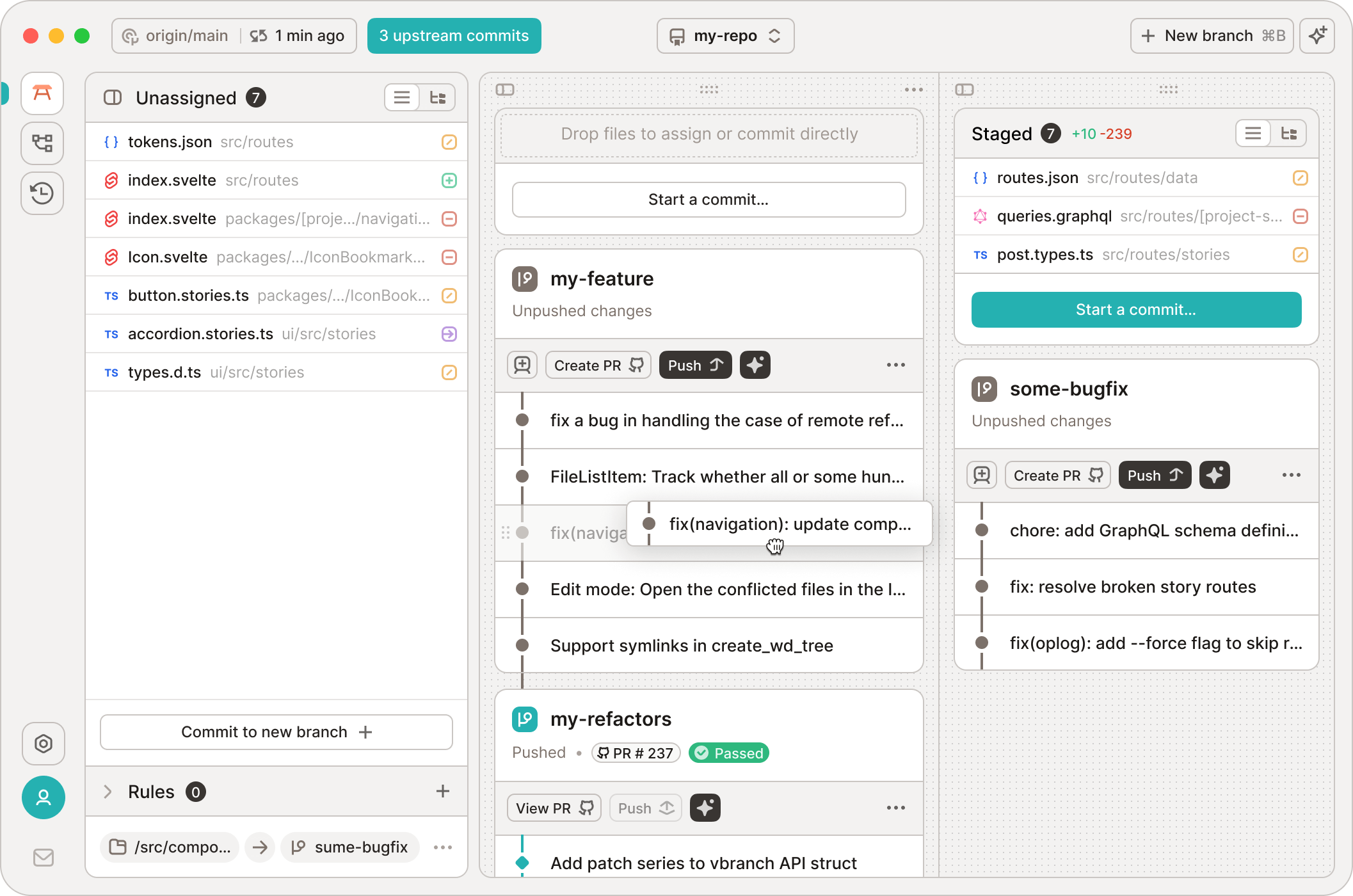

GitButler desktop app preview

Our beautiful GUI

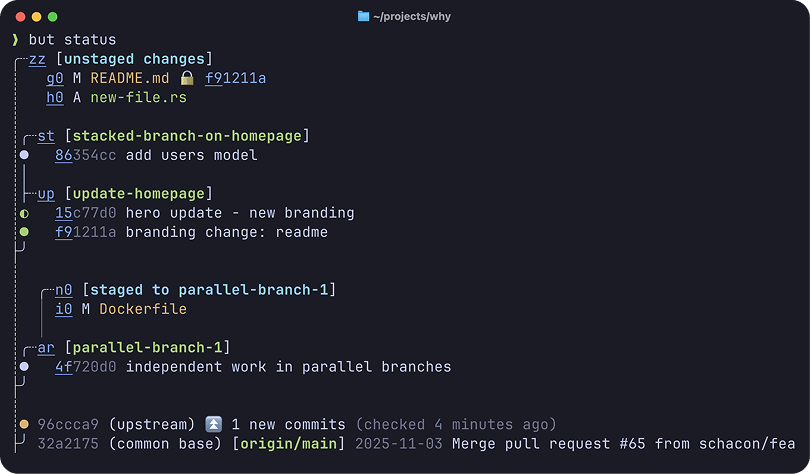
GitButler CLI preview

Our amazing but CLI


TWEET BLUESKY DISCORD

CI INSTA YOUTUBE DEEPWIKI


GitButler is a powerful new Git-based version control system, designed from scratch to be simple, powerful and flexible. It is designed for ease of use and modern agentic workflows.

It features stacked branches, parallel branches, unlimited undo, easy commit mutations, forge integrations and more.

Works instantly in any existing Git repo as a friendlier and more powerful drop-in Git user interface replacement - for you and your agents.

Main Features

Why use GitButler instead of vanilla Git? What a great question.

  • Stacked Branches (gui, cli)
    • Effortlessly create branches stacked on other branches. Amend or edit any commit easily with automatic restacking.
  • Parallel Branches (gui, cli)
    • Organize work on multiple branches simultaneously, rather than constantly switching branches.
  • Easy Commit Management (gui, cli)
    • Uncommit, reword, amend, move, split and squash commits by dragging and dropping or simple CLI commands. Forget about rebase -i, you don't need it anymore.
  • Undo Timeline (gui, cli)
    • Logs all operations and changes and allows you to easily undo or revert any operation.
  • First Class Conflicts (gui, cli)
    • Rebases always succeed. Commits can be marked as conflicted and resolved at any time, in any order.
  • Forge Integration (gui, cli)
    • Authenticate to GitHub, GitLab, or Bitbucket to easily open and update Pull Requests, list branches, get CI statuses and more. No other tools required.
  • AI Tooling (gui, cli)
    • Use built-in AI handlers to help create commit messages, branch names, PR descriptions and more.
    • Easily install hooks or skills for all modern agent systems to level up their Git management.

Tech

The GitButler desktop app is a Tauri-based application. Its UI is written in Svelte using TypeScript and its backend is written in Rust.

The but CLI is the same Rust backend engine with a Rust command line UI.

Documentation

You can find our end user documentation at:

Bugs and Feature Requests

If you have a bug or feature request, feel free to open an issue, or join our Discord server.

License

The TLDR is that GitButler is under a Fair Source software license, meaning that you can use it, view the source, contribute, etc. You just can't build a competitor with it. It also becomes MIT after 2 years. So, MIT with an expiring non-compete clause.

Contributing

So you want to help out? Please check out the CONTRIBUTING.md document.

If you want to skip right to getting the code to actually compile, take a look at the DEVELOPMENT.md file.

Contributors

Frequently asked questions

Is GitButler free to use?

GitButler is open source. There is no licence fee and no seat count — you can self-host it or, where the project offers one, pay a vendor for a managed version instead.

What does GitButler do?

Revolutionize your Git workflow with simultaneous branches

What is GitButler written in?

GitButler is primarily written in Rust. Its source is publicly available at https://github.com/gitbutlerapp/gitbutler, and it has 21,668 GitHub stars.