FLUJO
Build private AI agents visually. Run them your way.
Connect your AIs and apps, build an agent, then talk to it, automate it, or call it from other software.
FLUJO is open-source and local-first. Start with the guided setup, build agents as simple step-by-step recipes or expert visual flows, inspect every run, and expose the same agents through OpenAI-compatible and MCP endpoints — while your keys and data stay under your control.
Simple + visual builders · MCP-native · Multi-model · Built-in debugger · Automation
Visit flujo.com.co → · Watch the 2:28 product film → · Install FLUJO ↓ · Explore features ↓ · Try FLUJO online →


FLUJO is too complicated? You are missing a feature or are stuck on something?Hop into the Discord, or create an Issue on Github! We can only improve if we know what's wrong.It really helps a lot!

Click the preview to see FLUJO in motion.
⚡ Quick Install (recommended)
The installer sets up everything FLUJO needs (Git, Node.js, Python, uv, ripgrep), clones FLUJO, builds it, and creates a global flujo command. This is the recommended way to run FLUJO — MCP servers get all their runtimes too.
Windows installer (recommended) — click below to download the latest flujo-setup.exe:
Windows PowerShell — alternatively, press Start, type powershell, press Enter, copy & paste the command below and press Enter again:
irm https://raw.githubusercontent.com/mario-andreschak/FLUJO/main/scripts/install.ps1 | iex
Linux / macOS — paste into a terminal:
curl -fsSL https://raw.githubusercontent.com/mario-andreschak/FLUJO/main/scripts/install.sh | bash
Already have Node.js? You can also skip installation entirely and run a prebuilt FLUJO straight from npm — fastest start, but MCP servers may still need git / python / uv on your PATH (see Run via npx):
npx flujo-ai
Prefer to set it up manually? See Getting Started. To remove FLUJO later, see Uninstalling.
[!TIP] Stuck on MCP installation, the app, or anything else? Open a GitHub issue or join the Discord. I read every message and will do my best to get back to you within a day.
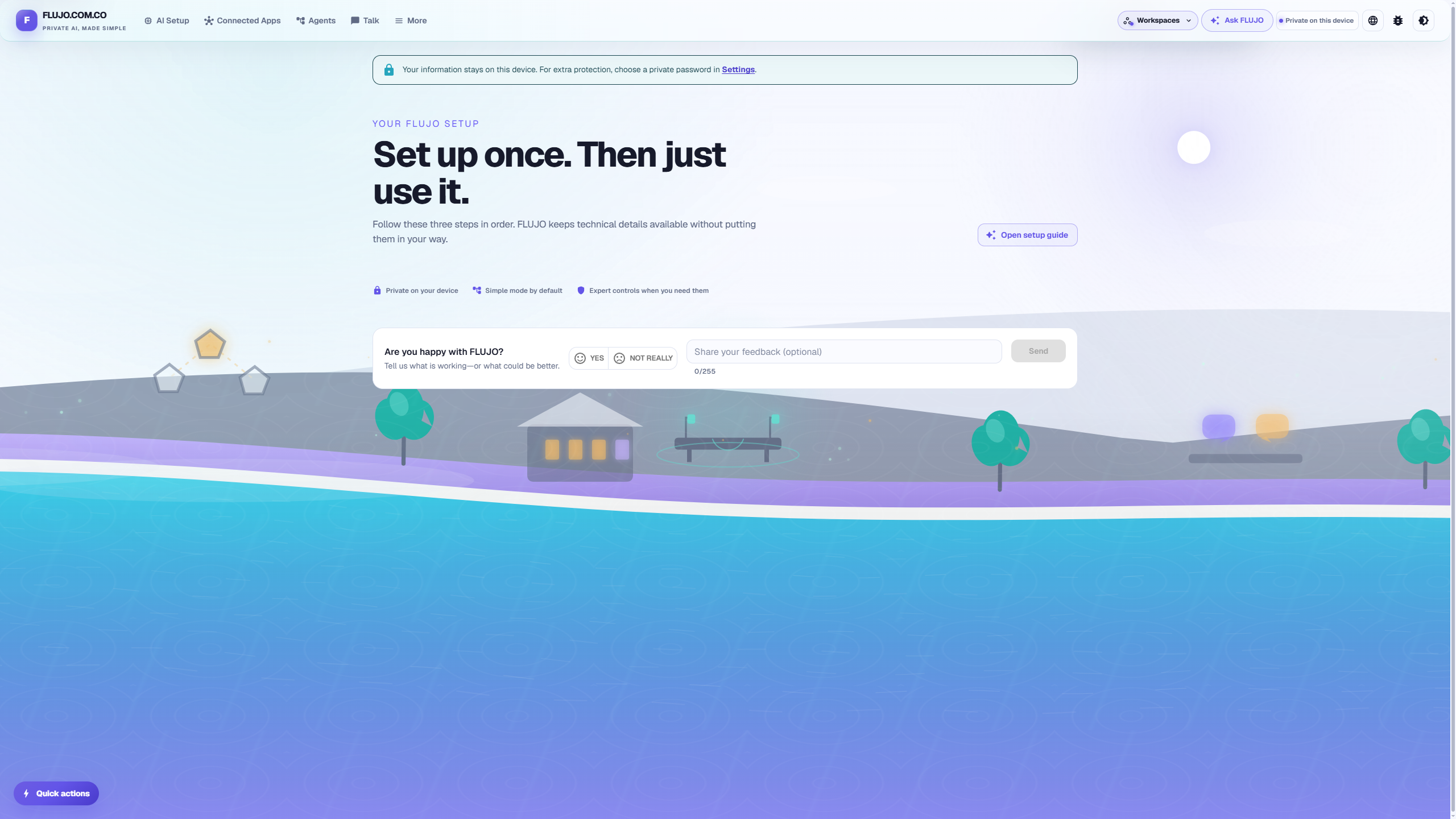
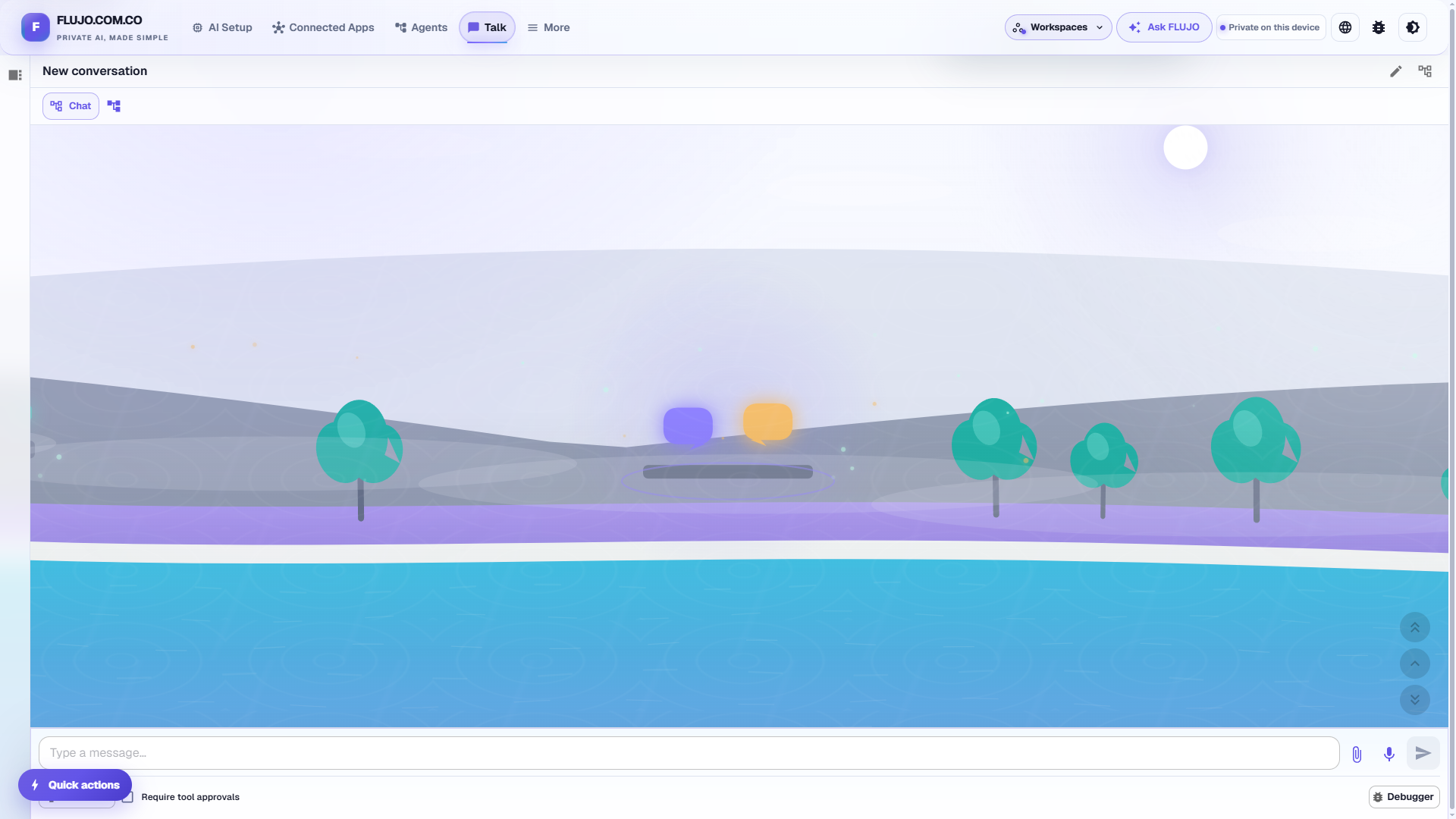
The FLUJO home screen: connect once, then use your private AI workspace.
FLUJO is powered by the PocketFlow Framework and built with Cline, Claude Code, and a lot of love.
🌟 Key Features
🔐 Local-first Security & Workspace Controls
- Local-first by default: keep FLUJO on localhost, allow devices on your private network, or configure it for a public deployment
- Encrypted at rest: API keys and other secrets are encrypted in local storage, with an optional custom encryption password for extra protection
- Never sent to the browser: secrets stay server-side — the frontend only ever sees a masked placeholder, even in your own DevTools
- Reusable global variables: define a key once and bind it into any AI or connected-app configuration instead of pasting it repeatedly
- Backup & restore your encrypted workspace from Settings
🤖 AI Setup
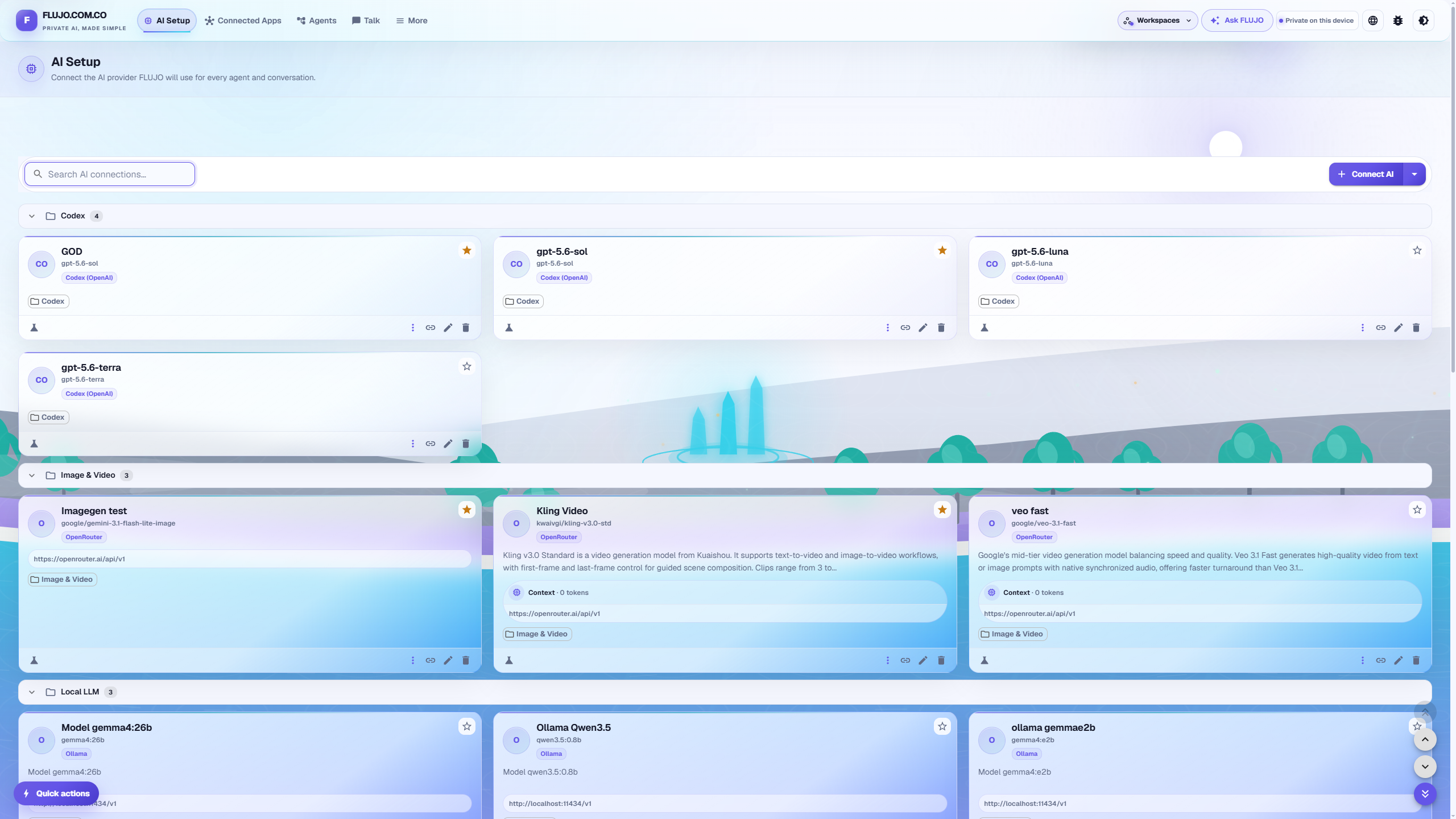
- Multiple providers: OpenAI, Azure OpenAI, Anthropic (native or OpenAI-compatible), Google Gemini, X.ai (Grok), OpenRouter, Codex, and local models via Ollama
- Guided or expert setup: choose a gentle walkthrough, a faster guided path, or the complete configuration form
- Claude Subscription: use your Claude Pro/Max plan directly (via the Claude Agent SDK) instead of a metered API key
- Reusable connections: organize configured AIs into folders, mark favorites, and reuse them across agents and conversations
🔌 Connected Apps (MCP)
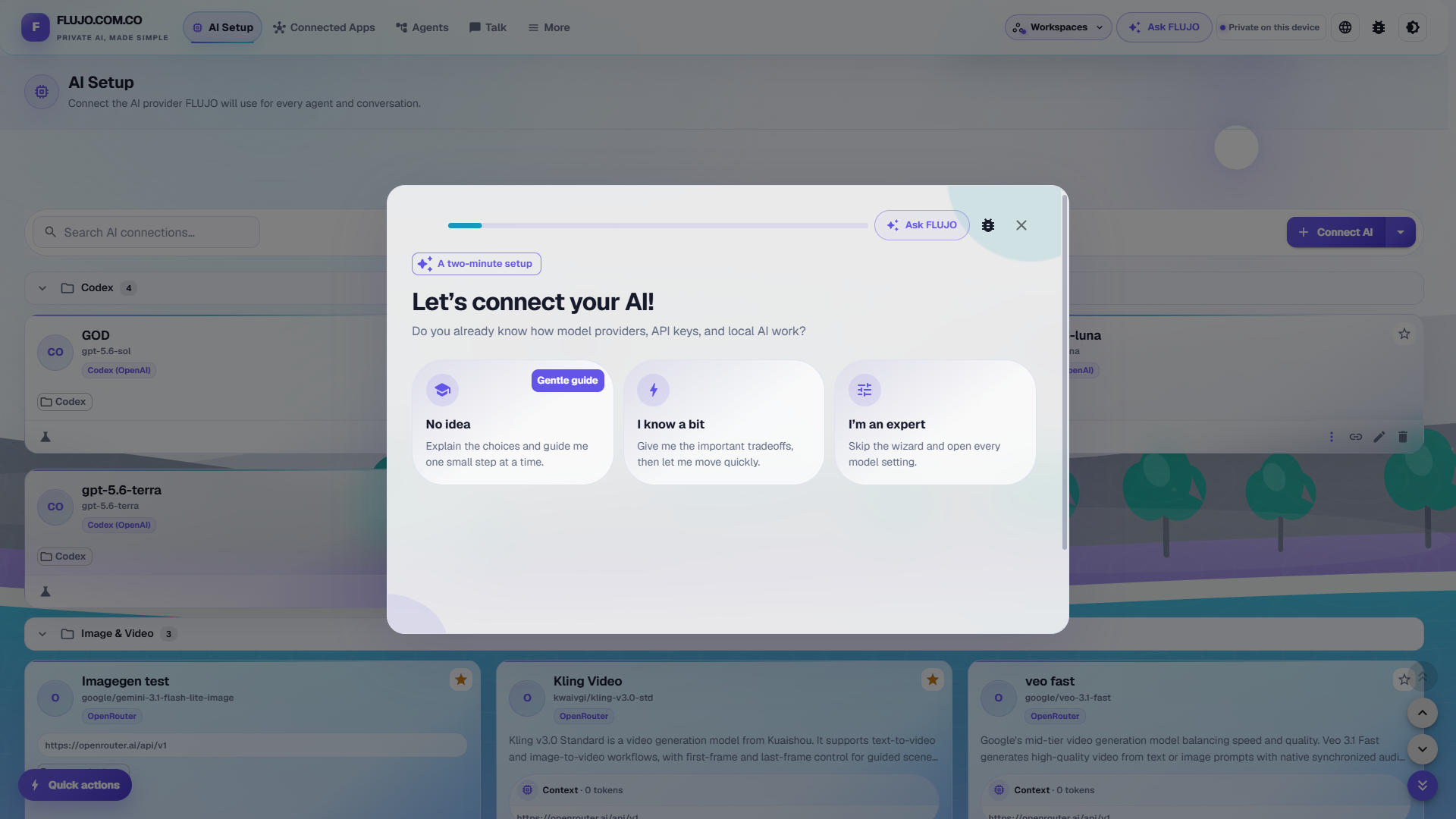
- Guided connection: let FLUJO research an app, choose from curated options, or enter a remote URL, GitHub repository, or local command yourself
- Install from anywhere: search the official MCP Registry, use curated servers verified with FLUJO, or install manually from a GitHub repo / local folder
- Full MCP capability support: tools, resources, prompts, roots (workspace folders), and sampling (let a server borrow one of your models under a trust policy you control)
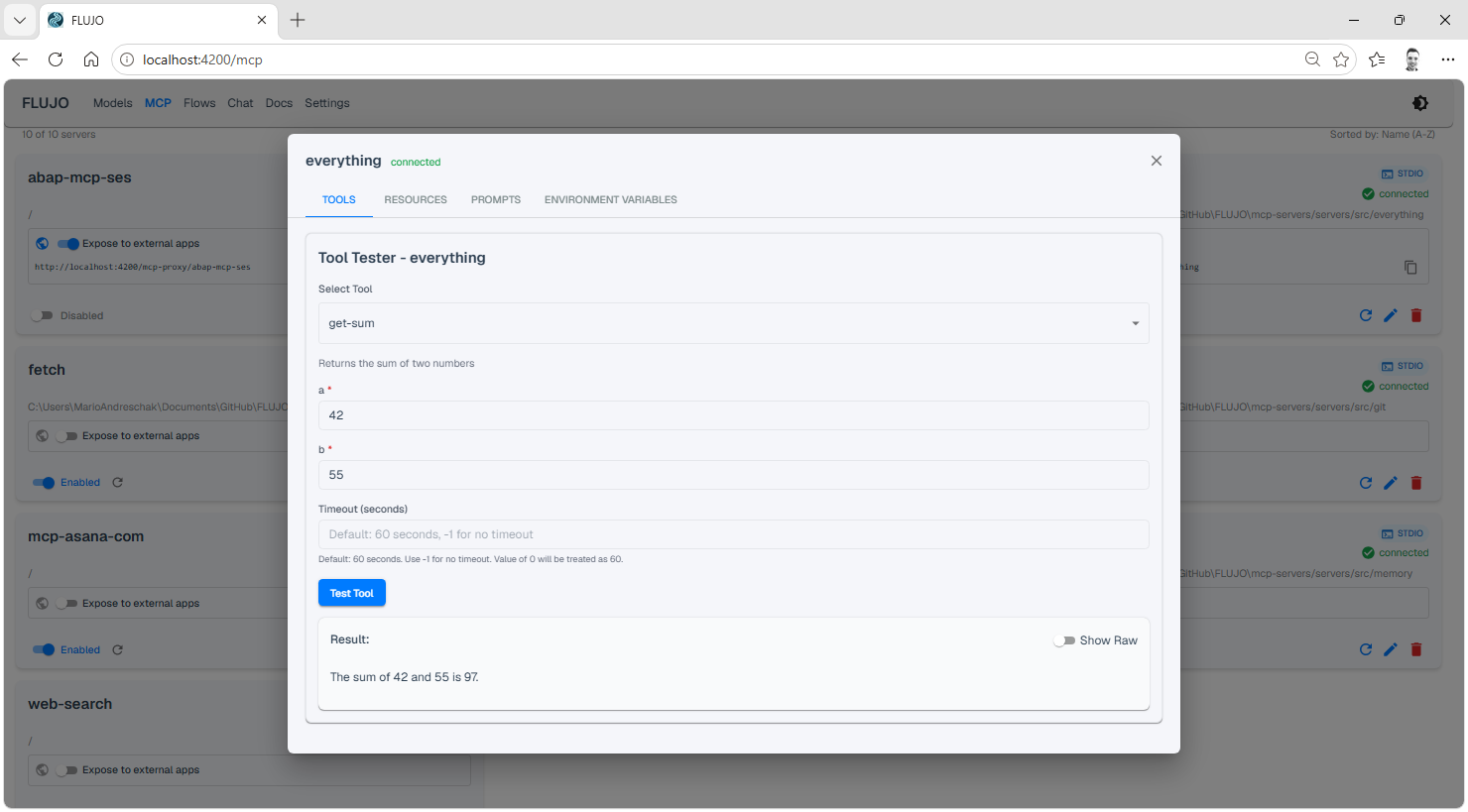
- Tool inspection & testing: browse and call a server's tools, resources, and prompts straight from its detail view
- FLUJO as an MCP proxy: re-expose any server you've configured in FLUJO to other MCP clients (Claude Desktop, Cursor, Cline, …) over Streamable HTTP — configure a server once, use it everywhere
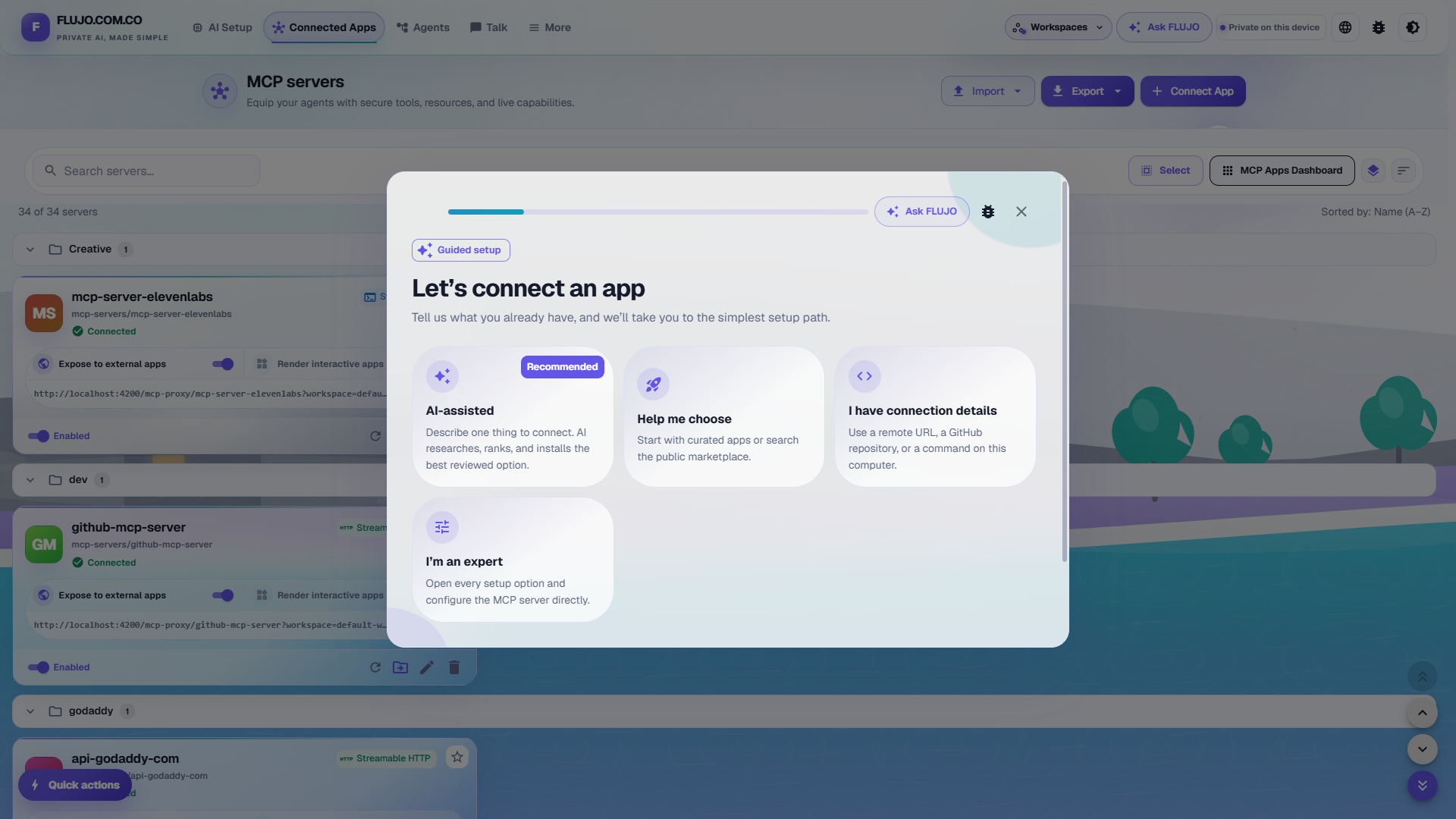
Configuring a server is a guided, three-step form (define it → install & build → define how to run it) with a one-click connection test before you save:
Every connected server gets a detail view to browse and test its tools, resources, and prompts directly:
🧩 Agent Builder
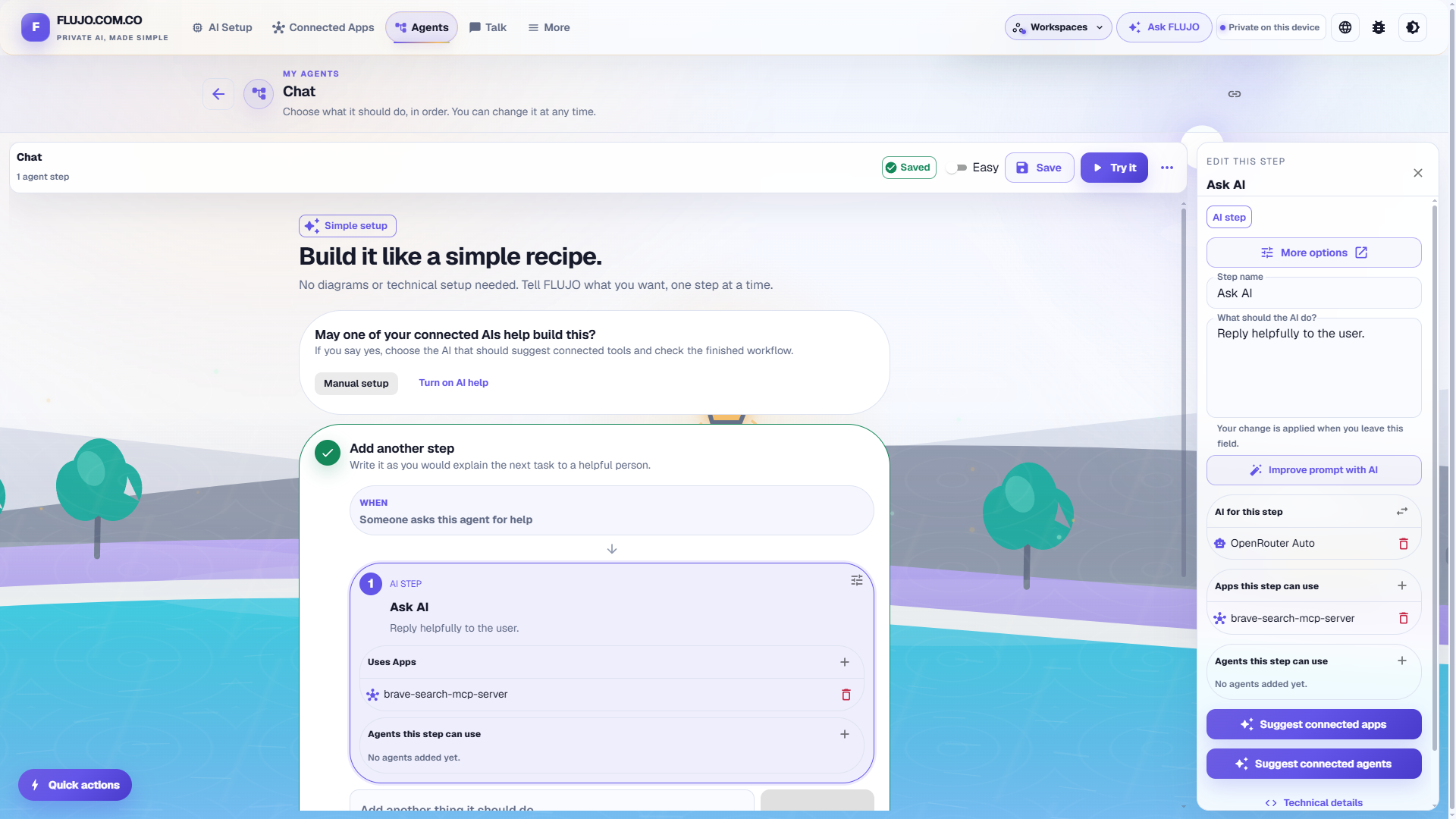
- Simple mode: build an agent like a recipe, one plain-language step at a time, without touching a diagram
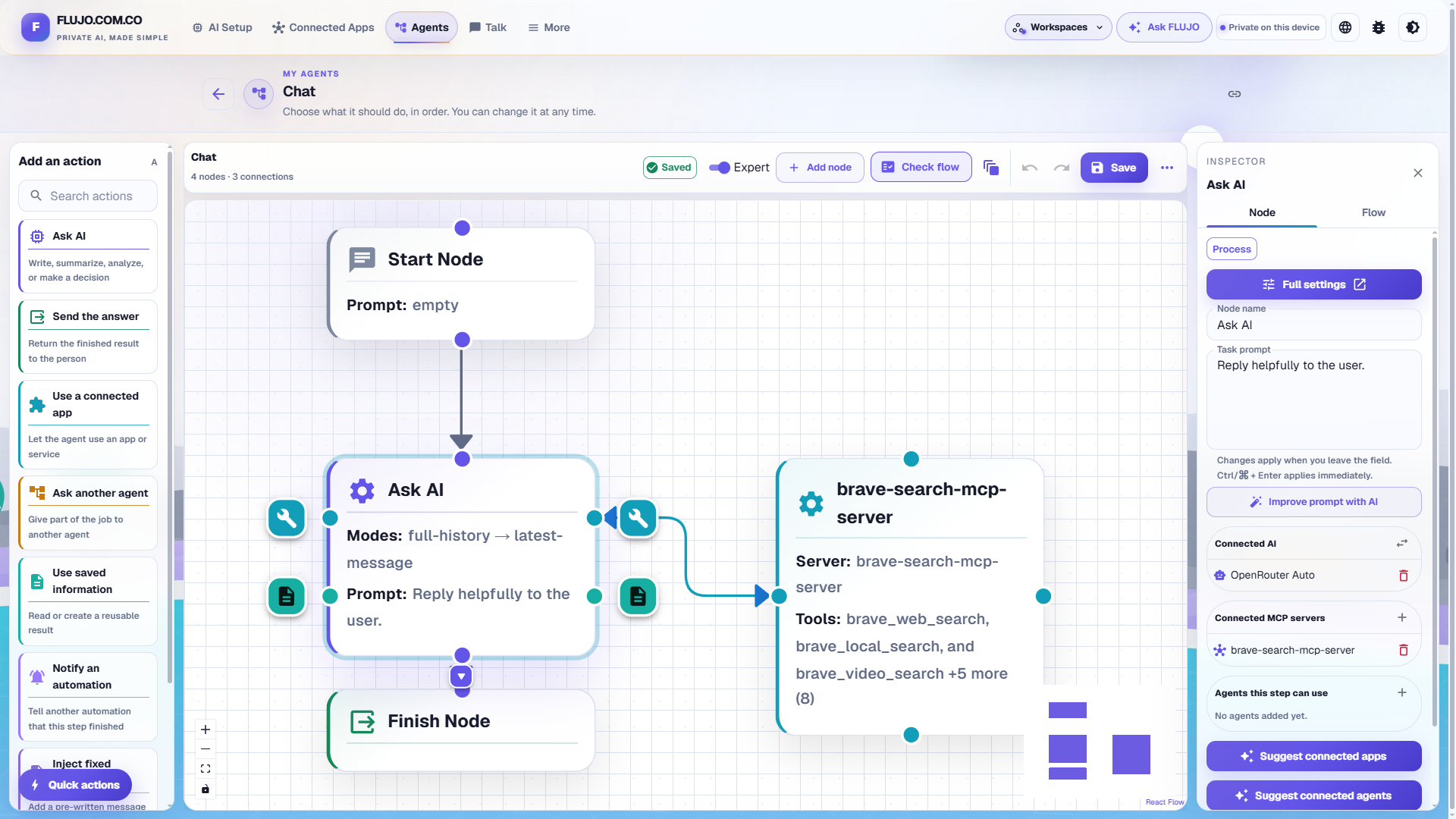
- Expert visual mode: connect Start, AI, connected-app, subflow, and Finish nodes in a drag-and-drop graph
- Branching & handoff: let a model hand off to another node/agent based on the conversation, build loops, or fan out into multiple specialists
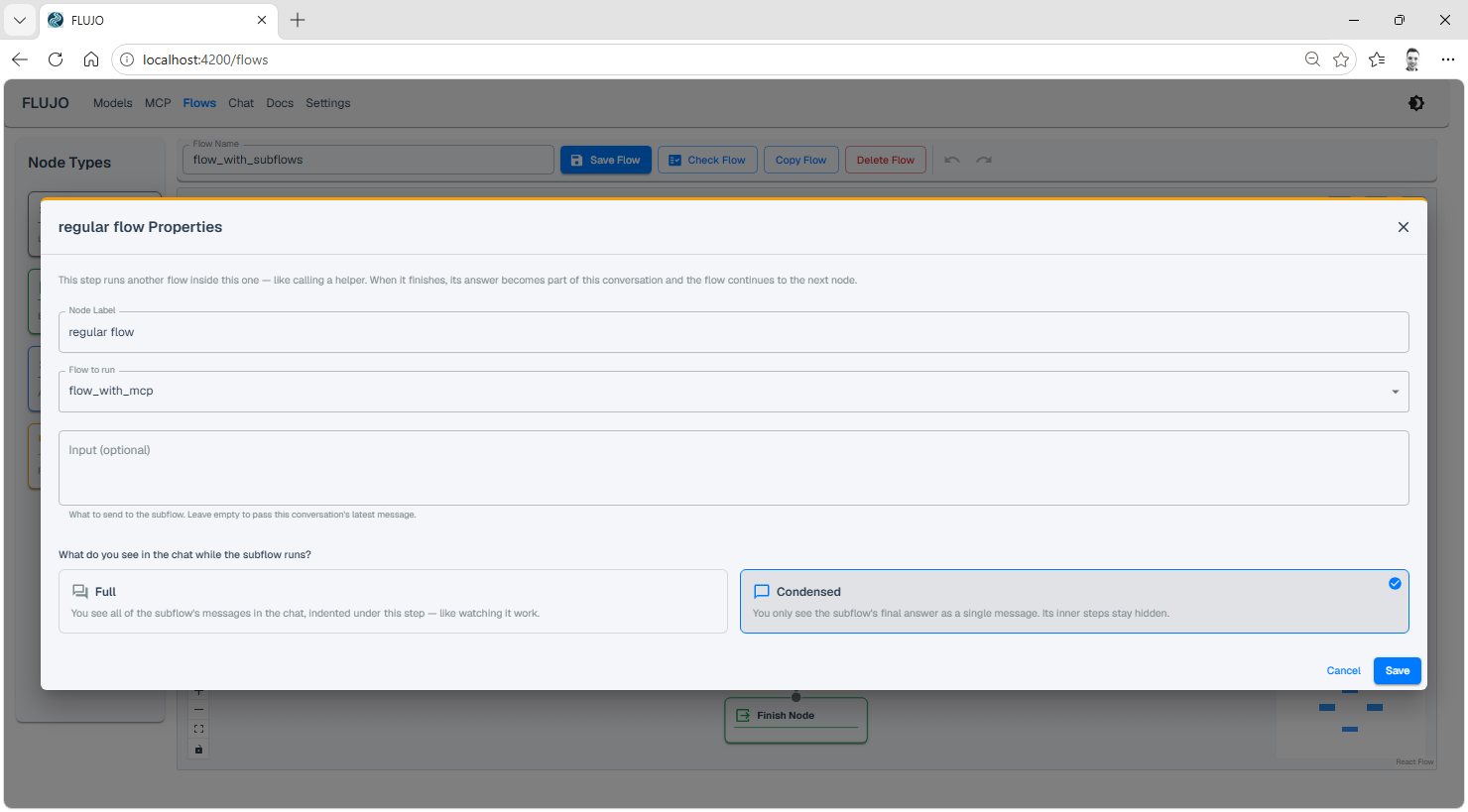
- Subflows: call another flow as a single step, with its own isolated state — reuse a flow like a function
- Per-node tool & prompt scoping: decide exactly which tools, resources, and system-prompt fragments each node can see
Branching & handoff
Connect one node to several successors, then tell the model when to use each handoff tool from the "Agent Tools" tab of its Process Node:
Loops
Connect a node back to a previous one the same way to build a loop:
Orchestration & Subflows
Combine multiple handoffs and loops to build an orchestrator, or drop in a Subflow node to run another flow as a single, reusable step with its own isolated state:
💬 Talk
- One place to talk to every agent: select an agent and start a conversation from the Talk page
- Live execution view: watch a run progress step-by-step in real time, with token usage and a context-window meter per conversation
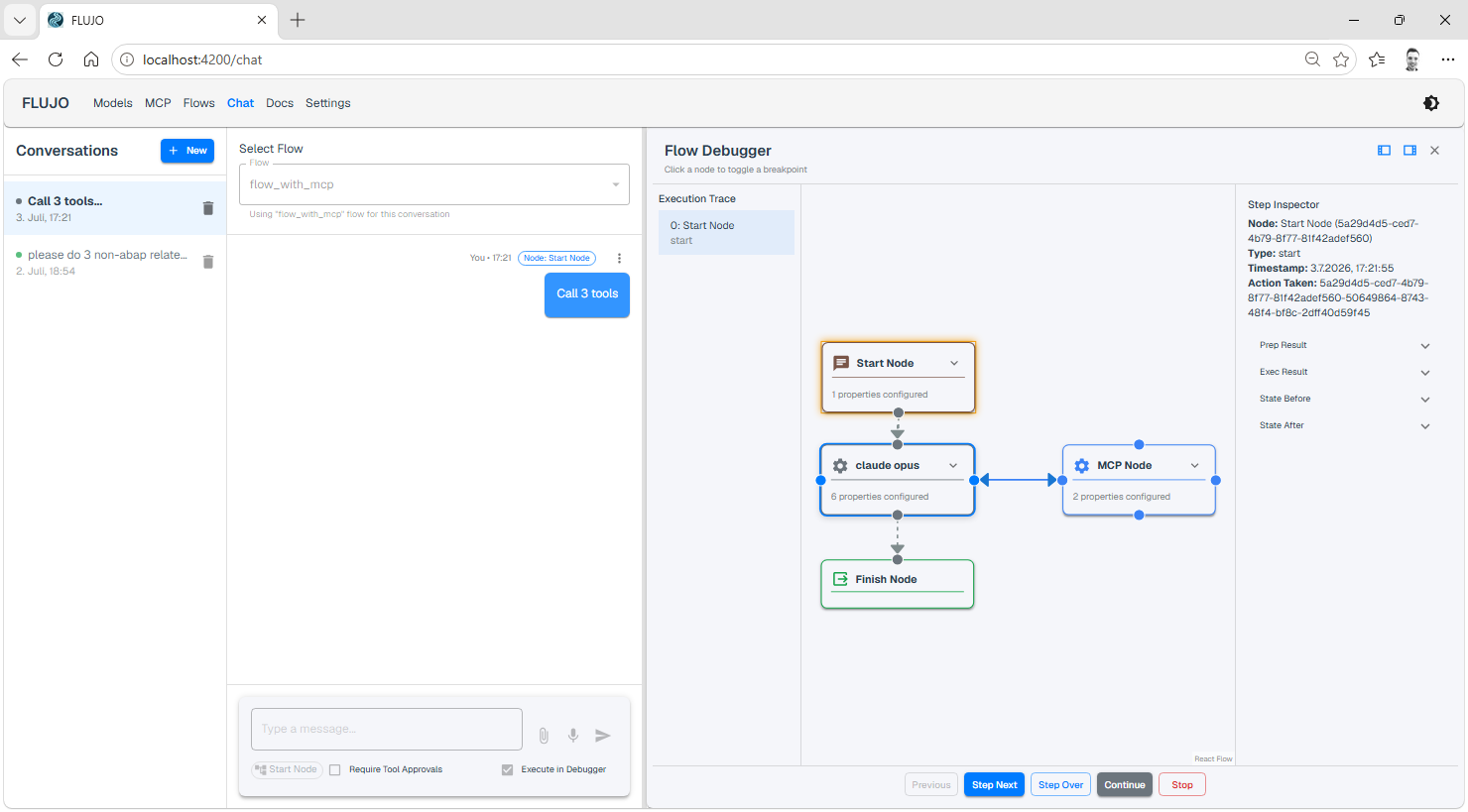
- Visual debugger: set breakpoints, step through a run node-by-node, and inspect state before/after each step
- Human-in-the-loop tool approval: optionally require approval before any tool call executes, for any provider (including Claude Subscription's agentic tool use)
- File & audio attachments, message editing, and conversation branching
Step through a run node-by-node with the visual debugger, inspecting prep/exec state at every stop:
⏱️ Automations — Triggers
Run your flows automatically — on a schedule or when something happens — without opening the chat. FLUJO just needs to be running for triggers to fire.
- Schedule: cron-style recurring runs (with second-level precision and catch-up for missed runs)
- Webhook: trigger a flow via an authenticated HTTP call
- File watch: fire when files change under a folder
- MCP tool polling: periodically call a tool and fire on change, on new items, or let a model/checker-flow decide
- URL watch: fire when a fetched page's content changes
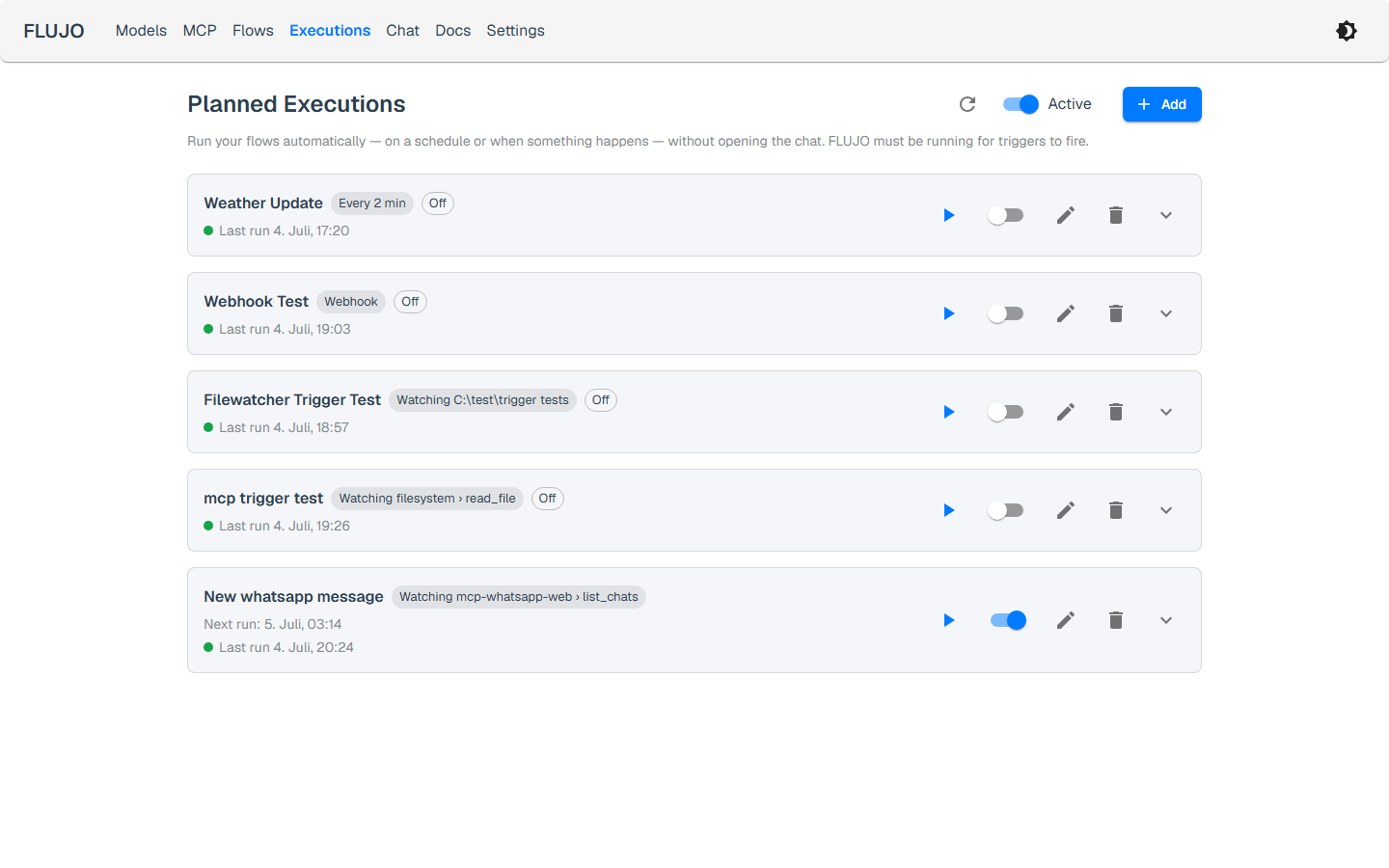
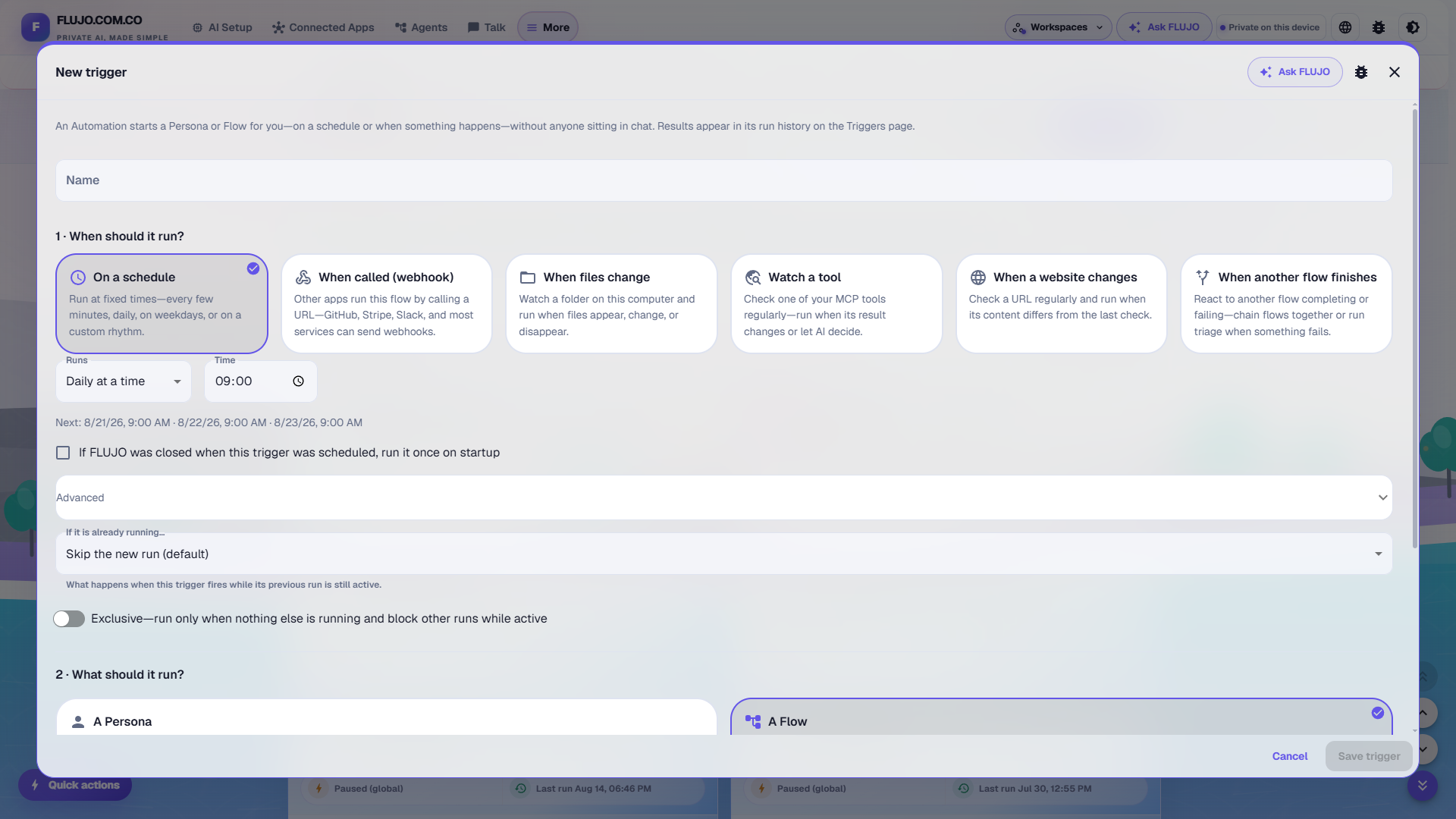
Run history is kept per trigger, with the full output of every run one click away:
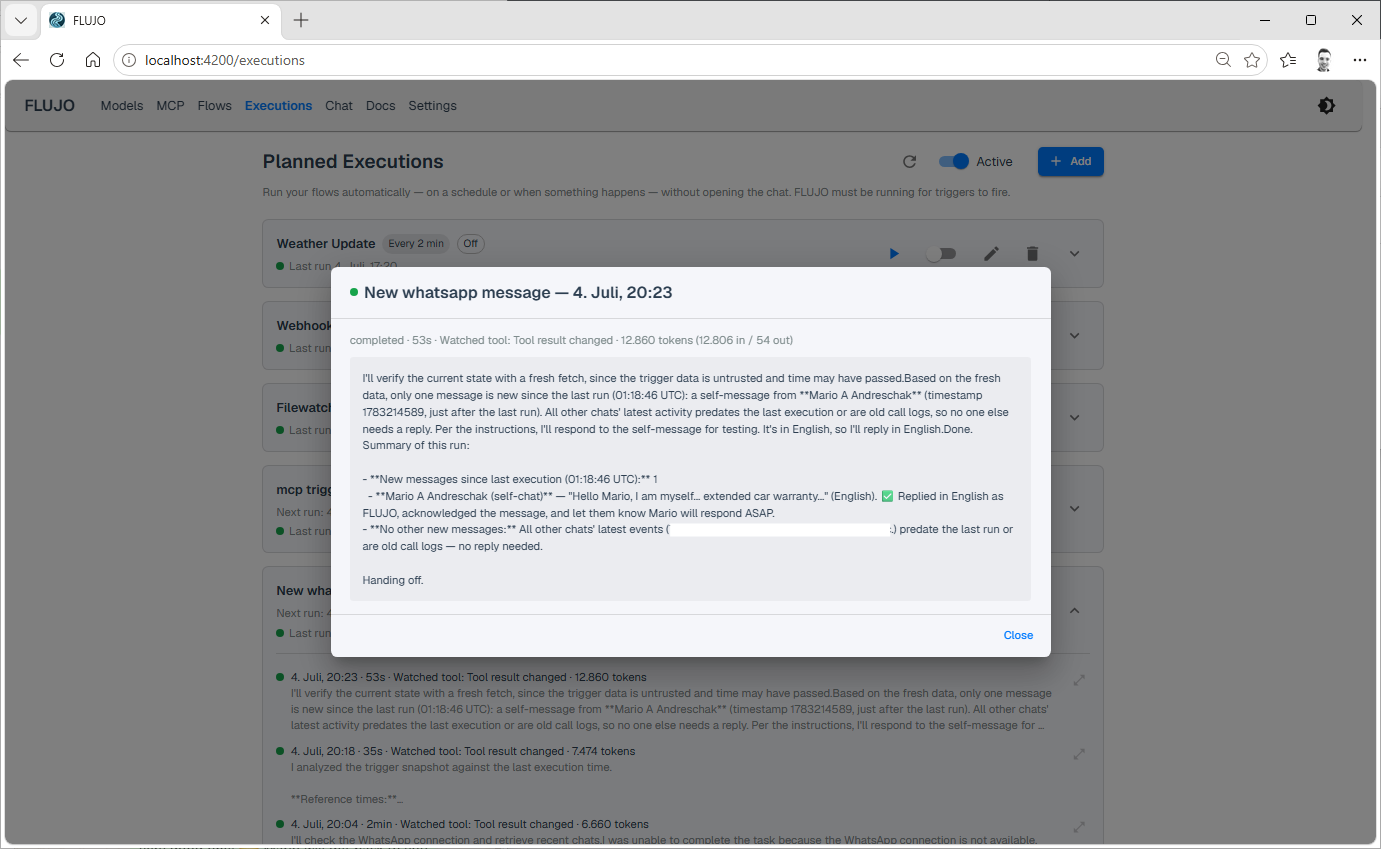
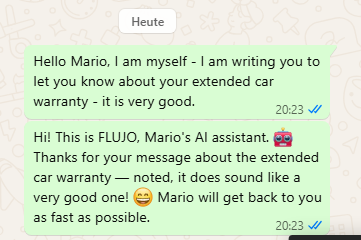
As an example, a "watch a tool" trigger polling a WhatsApp MCP server can turn FLUJO into an autonomous auto-responder:
Meetings
- Put multiple Agents into a shared conversation, so they can work on a task together
🔄 External Tool Integration
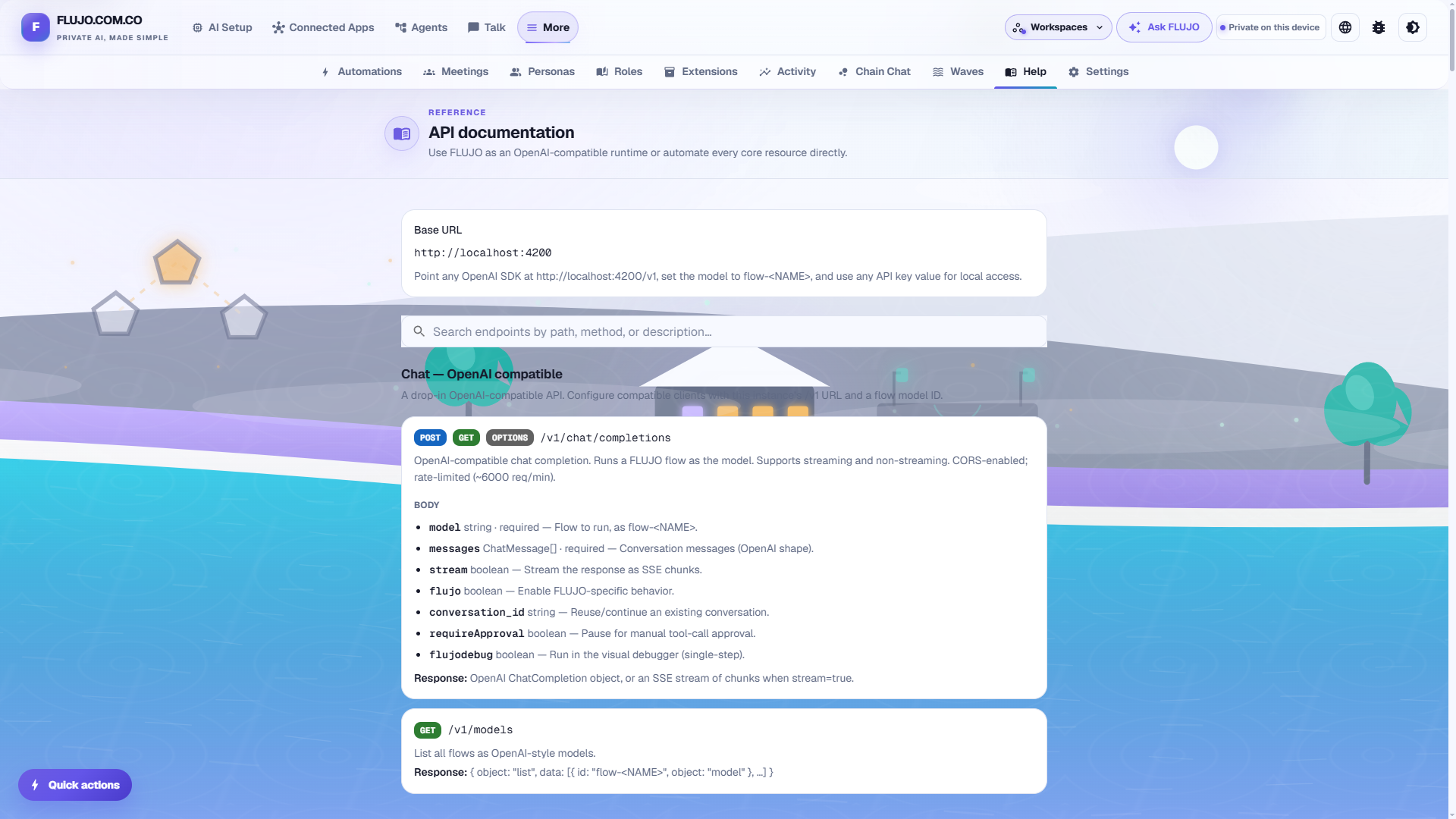
- OpenAI-compatible endpoint: point Cline, Roo Code, Cursor, or any OpenAI-SDK client at
http://localhost:4200/v1, use any API key value, and pick a model namedflow- - FLUJO as an MCP server (proxy): point an external MCP client at
http://localhost:4200/mcp-proxy/to reuse a server you configured once in FLUJO (localhost-only in the current version)
Note: FLUJO does not expose an Ollama-compatible server endpoint — use the OpenAI-compatible provider above to consume flows from other apps. (Connecting FLUJO to a local Ollama instance as a model provider is a separate, supported feature.)
📖 Built-in API Documentation
A searchable /docs page inside the app documents every REST endpoint FLUJO exposes (chat, conversations, models, flows, MCP, planned executions, env/encryption, backups) — useful when integrating FLUJO into your own tooling.
🚀 Getting Started
Manual installation:
Prerequisites
- Node.js (v18 or higher)
- claude code (optional, if you want to use Anthropic Subscription)
- python (optional, if you want to use python-based MCP servers)
- pip (optional, if you want to use python-based MCP servers that build with pip)
- uv and/or yarn (optional, if you prefer these over npm or pip)
- ripgrep (optional filesystem-search acceleration; the installer adds it automatically)
Installation
Clone the repository:
git clone https://github.com/mario-andreschak/FLUJO.git
cd FLUJO
Install dependencies:
npm install
# or
yarn install
Start the development server:
npm run dev
# or
yarn dev
Open your browser and navigate to:
http://localhost:4200FLUJO feels and works best if you run it compiled:
npm run build
npm start
Run with Docker
On any machine with Docker, start FLUJO with one command:
docker compose up --build
Then open http://localhost:4200.
Use
--build(not a baredocker compose up). The default compose file builds the image locally from this repo. A plaindocker compose uponly builds when no image exists yet — after you update the code it silently reuses the previously built image and runs the old version.--buildrebuilds when the source changed and is a fast no-op when it hasn't.
- Your data persists in
flujo-workspaces(the workspace namespace and all non-default workspace data), plus the existingflujo-dbandflujo-mcp-serversvolumes mounted insidedefault-workspace. Reusing those two established volume names makes an upgrade retain existing flows, models, encrypted keys, chats, MCP configs, and installed server clones while every newly created workspace also survivesdocker compose down/up. - Updating: use
git pull && docker compose up --buildinstead of the in-app updater. FLUJO detects it is running in a container and shows this in the update settings. (docker compose pullonly helps if you switched the service to a publishedimage:— the default builds locally.) - Private/corporate CA for HTTPS MCP servers: mount your CA file and set
FLUJO_EXTRA_CA_CERTSto its path (see the commentedenvironment:block indocker-compose.yml). - Claude Subscription in-container: generate a token on your host with
claude setup-tokenand pass it asCLAUDE_CODE_OAUTH_TOKEN. - fileWatch triggers: bind-mount the host folder you want to watch into the
container (see the commented volume example in
docker-compose.yml). - MCP Apps: Compose also publishes the shared sandbox listener on port
4201, loopback-only. Each App is loaded through its ownhttp://.localhost:4201browser origin. Keep both port mappings when using interactive MCP Apps.
⚠️ Security: FLUJO has no authentication layer and its git API runs commands on the server, so the port is bound to localhost only by default. Do not expose it on
0.0.0.0/ publish it publicly unless it sits behind your own authenticating reverse proxy on a trusted network.
Network exposure
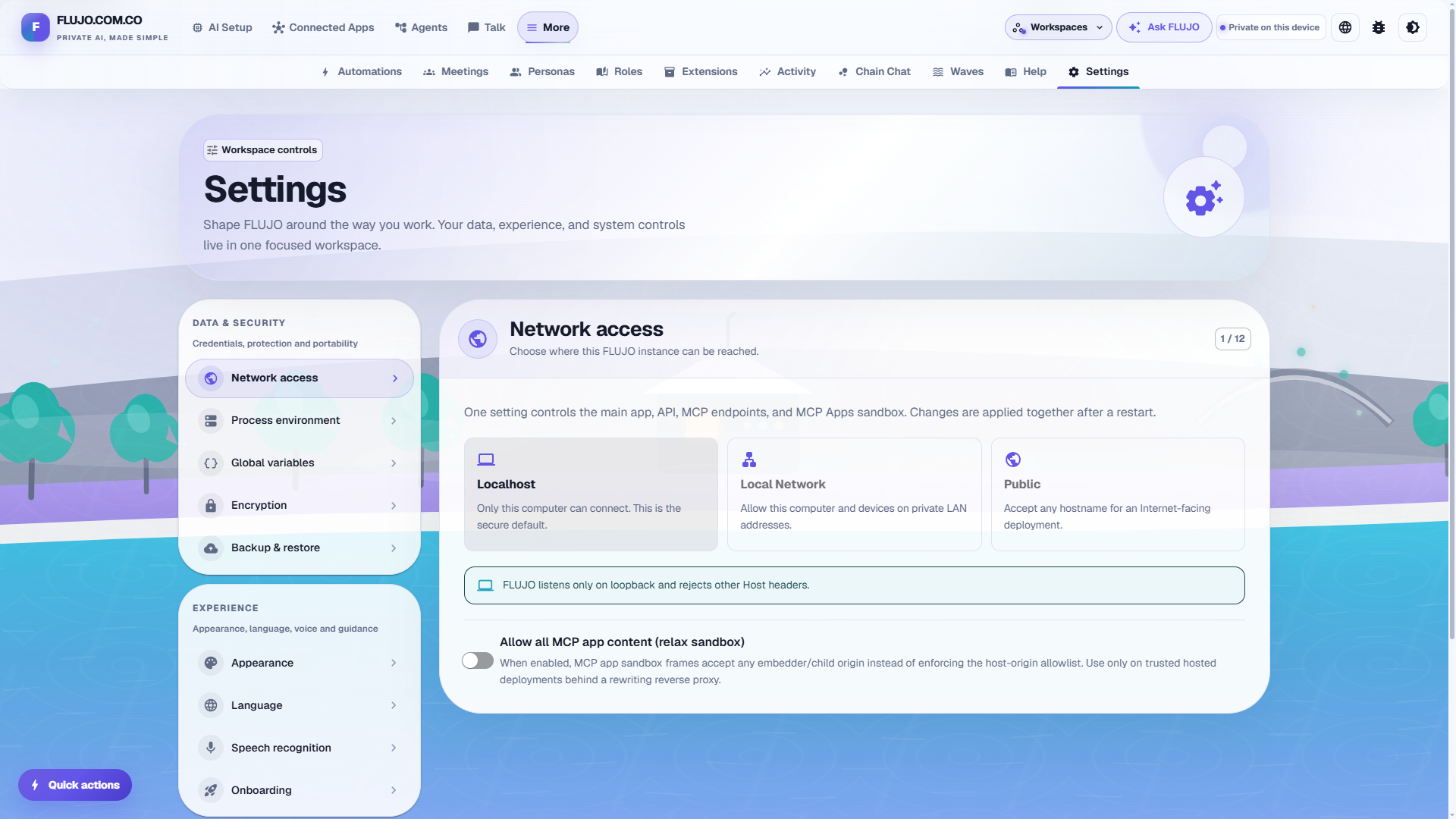
Use Settings → Network access to choose one deployment posture:
- Localhost (default) — only this computer; both listeners bind loopback.
- Local Network — listen on all interfaces and accept private LAN addresses and this machine's hostnames.
- Public — accept any hostname. FLUJO has no built-in authentication, so use this only behind an authenticating HTTPS reverse proxy.
The one setting controls the UI, API, OpenAI/MCP endpoints, Host/Origin guard, and MCP Apps sandbox binding together. Restart FLUJO after changing it.
MCP Apps require no additional configuration on localhost or a plain-HTTP Local
Network install. FLUJO discovers the browser-visible host automatically and uses
port 4201 for the sandbox. Hosted HTTPS deployments can optionally configure
FLUJO_MCP_APP_SANDBOX_PUBLIC_URL with {app} as one complete hostname label,
for example https://{app}.sandbox.example.com/sandbox.html, and proxy those
wildcard hostnames to FLUJO's plain HTTP port 4201. Without wildcard
DNS/TLS, set the same variable to a single shared sandbox origin instead
(for example https://sandbox.example.com); the App key then travels in the
authenticated sandbox URL. Preserve the browser's
Host and Referer headers through the proxy. Docker Compose publishes both
listener ports to host loopback by default; change those mappings when other LAN
devices or a reverse proxy need to reach them.
See MCP Apps host support for protocol behavior, security guarantees, display modes, compatibility limits, and the versioned compliance matrix.
Run via npx (npm package)
npx flujo-ai
This runs a prebuilt FLUJO with no git clone or local build. Your data lives in
~/.flujo by default (override with FLUJO_DATA_DIR); the port defaults to 4200
(--port / FLUJO_PORT), and the browser opens automatically unless you pass
--no-open. MCP servers may still need git, python/uv, or Node on your
PATH. To update, just rerun with npx flujo-ai@latest. (The npm package is
flujo-ai — the name flujo is blocked by npm's similarity rules — but the
installed command is still flujo.)
One-line install (Windows)
On a fresh Windows machine you can install everything (Git, Node.js, Python, uv, ripgrep), clone FLUJO, build it, and optionally start it with a single PowerShell command:
irm https://raw.githubusercontent.com/mario-andreschak/FLUJO/main/scripts/install.ps1 | iex
By default FLUJO is installed into %LOCALAPPDATA%\FLUJO. To customise the install
without the interactive prompt, set environment variables first, e.g.:
$env:FLUJO_DIR = "D:\Apps\FLUJO"; $env:FLUJO_START = "1"; irm https://raw.githubusercontent.com/mario-andreschak/FLUJO/main/scripts/install.ps1 | iex
See scripts/install.ps1 for all options.
Prefer a graphical installer? Download flujo-setup.exe from the
latest release — it's a
wizard around the same install.ps1 script above (see
installer/flujo-setup.iss).
The Windows installer is a networked bootstrapper, not an offline file-copy
package. It requires Windows App Installer (winget) and access to GitHub, the
winget catalog, npm, and Python package sources. Missing Git, Node.js, Python,
uv, and ripgrep are installed through winget; Ollama is optional. The installer also
installs the Claude Code CLI used by the optional Claude Subscription provider.
Running the installer again against an existing FLUJO Git checkout updates and
rebuilds that checkout. For safety, an existing target that is not a Git checkout
is rejected before registration or cloning.
Corporate proxy and custom CA
Both one-line installers and flujo-setup.exe are network bootstrappers. They require Node.js 22 or newer and may contact GitHub/raw.githubusercontent.com, the OS package manager, the npm registry, and Patchright 1.61.1's managed-browser mirrors at cdn.playwright.dev and playwright.download.prss.microsoft.com. Ask your network administrator to allow those services or provide an approved mirror.
Prefer your organization's approved OS trust configuration. If that is unavailable, set an explicit proxy and readable PEM CA bundle for the installer session. The FLUJO_* aliases are mapped only into installer child processes; they do not change global npm/Git configuration, the certificate store, or persistent environment variables.
Windows PowerShell:
$env:FLUJO_HTTPS_PROXY = "https://proxy-user:proxy-password@proxy.example.test:8443"
$env:FLUJO_NO_PROXY = "localhost,127.0.0.1,.example.test"
$env:FLUJO_EXTRA_CA_CERTS = "C:\Certificates\corporate-root.pem"
$env:FLUJO_PLAYWRIGHT_DOWNLOAD_CONNECTION_TIMEOUT = "120000"
irm https://raw.githubusercontent.com/mario-andreschak/FLUJO/main/scripts/install.ps1 | iex
Linux/macOS:
export FLUJO_HTTPS_PROXY='https://proxy-user:proxy-password@proxy.example.test:8443'
export FLUJO_NO_PROXY='localhost,127.0.0.1,.example.test'
export FLUJO_EXTRA_CA_CERTS='/path/to/corporate-root.pem'
export FLUJO_PLAYWRIGHT_DOWNLOAD_CONNECTION_TIMEOUT='120000'
curl -fsSL https://raw.githubusercontent.com/mario-andreschak/FLUJO/main/scripts/install.sh | bash
The initial irm/curl request must itself be able to reach GitHub, so configure the shell or OS proxy first if required. Optional FLUJO_HTTP_PROXY, FLUJO_PLAYWRIGHT_DOWNLOAD_HOST, and standard HTTP_PROXY/HTTPS_PROXY/NO_PROXY, NODE_EXTRA_CA_CERTS, npm_config_cafile, PLAYWRIGHT_DOWNLOAD_HOST, and PLAYWRIGHT_DOWNLOAD_CONNECTION_TIMEOUT values are also honored. Proxy URLs may contain credentials; do not paste them into issue reports. Installer logs redact known secret forms and are saved under the FLUJO CLI metadata directory.
Managed Chromium is installed as the named patchright-chromium stage. After correcting a proxy, CA, DNS, or timeout problem, retry only that version-matched browser download from the FLUJO directory:
node mcp-servers/browser/scripts/install-browser.mjs
On Ubuntu/Debian, the Unix installer also installs Chromium's Linux libraries
and fonts in the patchright-system-dependencies stage, then checks a real
headless browser launch in patchright-verification. After updating FLUJO, retry
a failed browser setup from the FLUJO directory:
sudo "$(command -v node)" mcp-servers/browser/scripts/install-browser.mjs --install-deps
node mcp-servers/browser/scripts/install-browser.mjs --verify
The dependency step requires root (omit sudo when already root); browser
verification runs as your regular user. Production builds use tsconfig.build.json
to check application code; npm run typecheck still checks the full test suite.
Never use NODE_TLS_REJECT_UNAUTHORIZED=0, npm strict-ssl=false, or another TLS-verification bypass. The installers ignore an inherited Node TLS bypass and direct you to secure proxy/CA configuration instead.
One-line install (Linux / macOS)
The same for Linux and macOS — installs the prerequisites (Git, Node.js, Python,
uv, ripgrep) via your package manager (or Homebrew on macOS), clones FLUJO, builds it, and
registers the flujo command:
curl -fsSL https://raw.githubusercontent.com/mario-andreschak/FLUJO/main/scripts/install.sh | bash
By default FLUJO is installed into ~/FLUJO. To customise without the
interactive prompts, set environment variables first, e.g.:
curl -fsSL https://raw.githubusercontent.com/mario-andreschak/FLUJO/main/scripts/install.sh | FLUJO_DIR="$HOME/apps/FLUJO" FLUJO_START=1 bash
See scripts/install.sh for all options.
Uninstalling (Windows)
To remove FLUJO, run the uninstaller:
irm https://raw.githubusercontent.com/mario-andreschak/FLUJO/main/scripts/uninstall.ps1 | iex
or, from inside your install folder:
powershell -ExecutionPolicy Bypass -File scripts\uninstall.ps1
It asks, per prerequisite (Git, Node.js, Python, uv, ripgrep, and optional Ollama), whether
to remove it — defaulting to yes for ones FLUJO installed and no for ones
that were already on your system — then removes the flujo command and the FLUJO
folder. These ownership decisions come from
%LOCALAPPDATA%\FLUJO-cli\install-manifest.json; without a readable manifest,
all detected prerequisites default to keep. The graphical bootstrapper is
intentionally not registered in Windows Apps, so this direct PowerShell command
is the supported uninstall entry point.
⚠️ This permanently deletes your data. All workspace data—including flows, encrypted API keys, MCP server configs, chat history, user files and runtime artifacts—lives below
\workspaces\\and is removed with the installation/data folder. Use FLUJO's built-in backup/export first if you want to keep it.
Installs created before this feature have no manifest; the uninstaller then defaults every
prerequisite to keep (it can't tell which FLUJO installed). Re-running the installer
once writes the manifest for future uninstalls. See
scripts/uninstall.ps1 for details.
📖 Usage
Saving API keys and shared values
- Open More → Settings → Global variables
- Save the API key or shared value once
- Bind that variable when configuring an AI or connected app
Connecting AI
- Open AI Setup
- Click Connect AI
- Choose the gentle guide, the faster guided path, or the expert form
- Select a provider, enter its credentials, and save the connection
Connecting Apps and MCP Servers
- Open Connected Apps
- Click Connect App
- Let AI help, browse curated apps, or provide a remote URL, GitHub repository, or local command
- Configure any required environment variables and test the connection
- Open the connected app to browse and test its tools, resources, and prompts
Building Agents
- Open Agents and create an agent
- Stay in Simple mode to add plain-language steps, or switch to Expert for the visual graph
- Connect an AI, apps, or other agents to each step
- Check the agent, save it, and click Try it
For branching, loops, and subflows, see Orchestration & Subflows above.
Automating Agents
- Go to More → Automations → Triggers
- Click "Add trigger" and choose a trigger: Schedule, Webhook, File Watch, MCP Tool Polling, or URL Watch
- Pick the agent or flow to run and configure the trigger-specific options
- Save — FLUJO runs it in the background while the app is open and keeps the run history on the Triggers page
Talking to an Agent
- Open Talk
- Select an agent
- Start chatting — enable the debugger or tool approvals from the input bar when you want more control over the run
📄 License
FLUJO is licensed under the MIT License.
🚀 Roadmap
Most of the original roadmap has shipped: MCP resources/prompts/roots/sampling, the MCP Marketplace & Spotlight, subflows, the visual debugger, and Automation triggers (scheduled/triggered headless runs) are all in. The main thing left on the list is AI-assisted flow generation — describe what you want and have FLUJO draft the flow for you.
Beyond that, ideas we're keeping an eye on:
- Real-time voice input/output
- Deeper MCP roots support (checkpoints/restore)
- Edge-device-friendly builds
Have a feature request? Open a GitHub issue or drop it on Discord.
🤝 Contributing
Contributions are welcome! Feel free to open issues or submit pull requests.
- Fork the repository
- Create your feature branch (
git checkout -b feature/amazing-feature) - Commit your changes (
git commit -m 'Add some amazing feature') - Push to the branch (
git push origin feature/amazing-feature) - Open a Pull Request
📬 Contact
- GitHub: mario-andreschak
- LinkedIn: https://www.linkedin.com/in/mario-andreschak-674033299/
Bonus: “A sad song about MCP”
Privacy & usage
FLUJO shares one anonymous daily-active pulse by default. The payload is limited
to the app version, platform, install method, UTC date, and a random identifier
that changes every day; it contains no flows, prompts, models, keys, filenames,
account details, or permanent installation identifier. A daily in-app notice
discloses the check. Sharing and the notice can be controlled independently
under Settings → Privacy & Usage. Set FLUJO_TELEMETRY_URL to point at a
self-hosted compatible collector.
Notes:
- You can add ~FLUJO=HTML, ~FLUJO=MARKDOWN, ~FLUJO=JSON, ~FLUJO=TEXT in your message to format the response, this will give varying results in different tools where you integrate FLUJO.
- You can add ~FLUJOEXPAND=1 or ~FLUJODEBUG=1 somewhere in your message to show more details
- in config/features.ts you can change the Logging-level for the whole application
FLUJO - Empowering your AI workflows with open-source orchestration.
Ecosystem