






Modular logistics and supply chain operating system
Documentation
·
API Reference
·
Cloud Version
·
Book a Demo
·
Discord
What is Fleetbase?
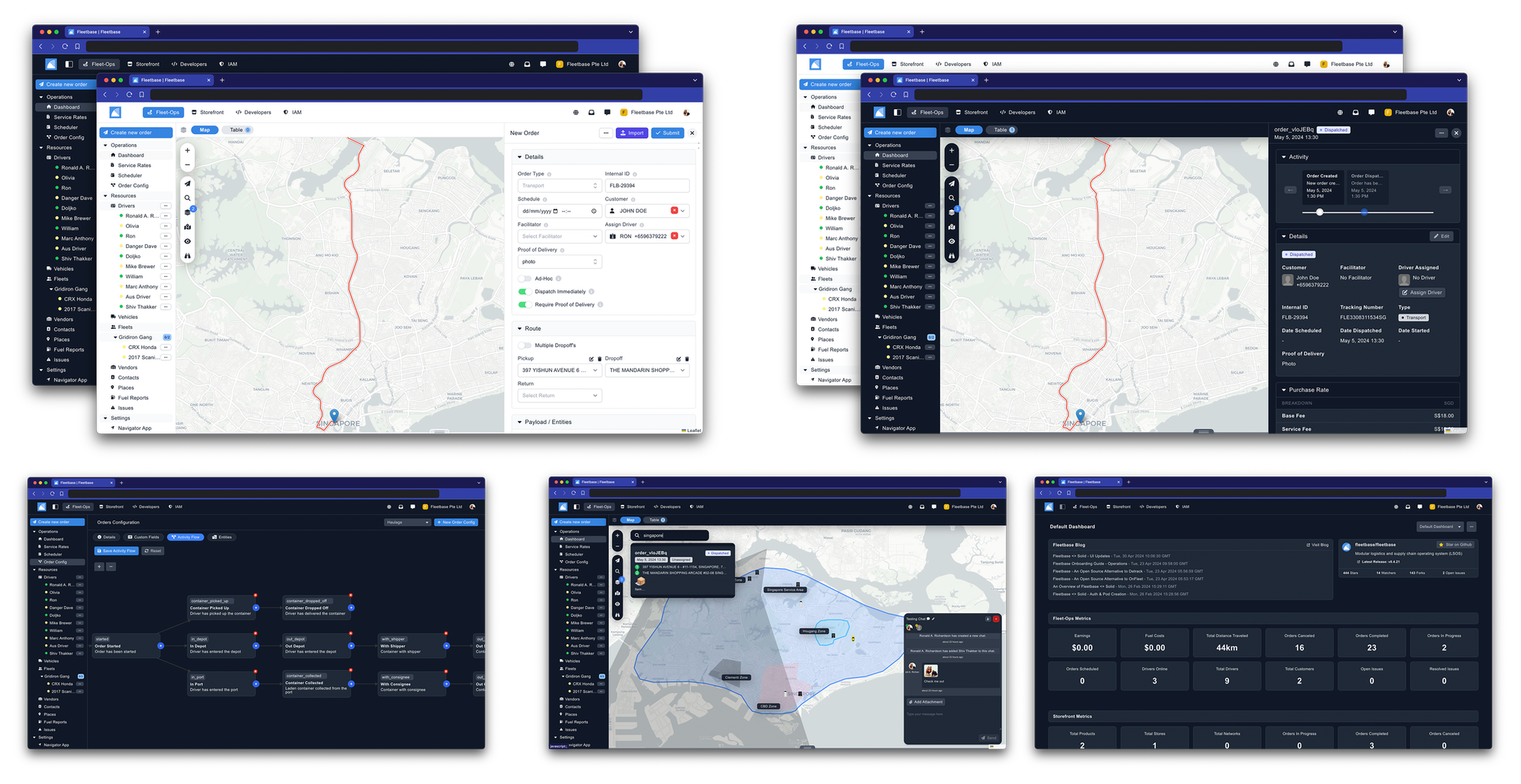
Fleetbase is a modular logistics and supply chain operating system designed to streamline management, planning, optimization, and operational control across various sectors of the supply chain industry.
🎯 Who Is Fleetbase For?
Fleetbase is designed for organizations that need powerful logistics and supply chain management:
- E-commerce & Retail - Manage deliveries, track orders, and optimize last-mile logistics
- Food & Beverage - Coordinate restaurant deliveries, manage drivers, and track real-time orders
- Courier Services - Dispatch drivers, optimize routes, and provide customer tracking
- Field Services - Schedule technicians, manage service areas, and track job completion
- Enterprise Logistics - Build custom supply chain solutions with full API access
- Developers - Extend and customize with a modular architecture and comprehensive API
Visual Feature Showcase
| Feature | Screenshot | Description |
|---|---|---|
| Order Board | 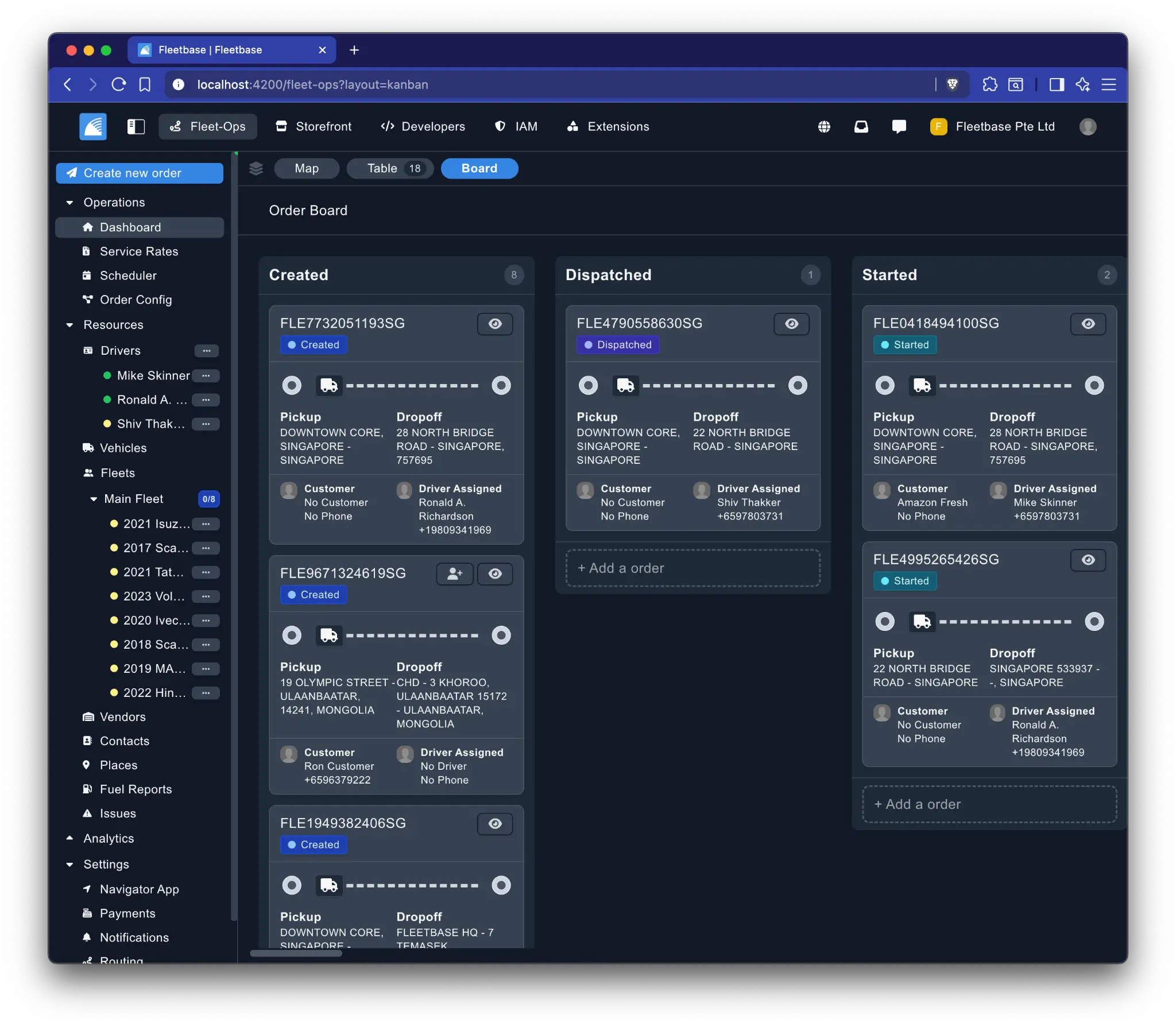 |
Visualize and manage your orders with a dynamic Kanban board. |
| Order Config | 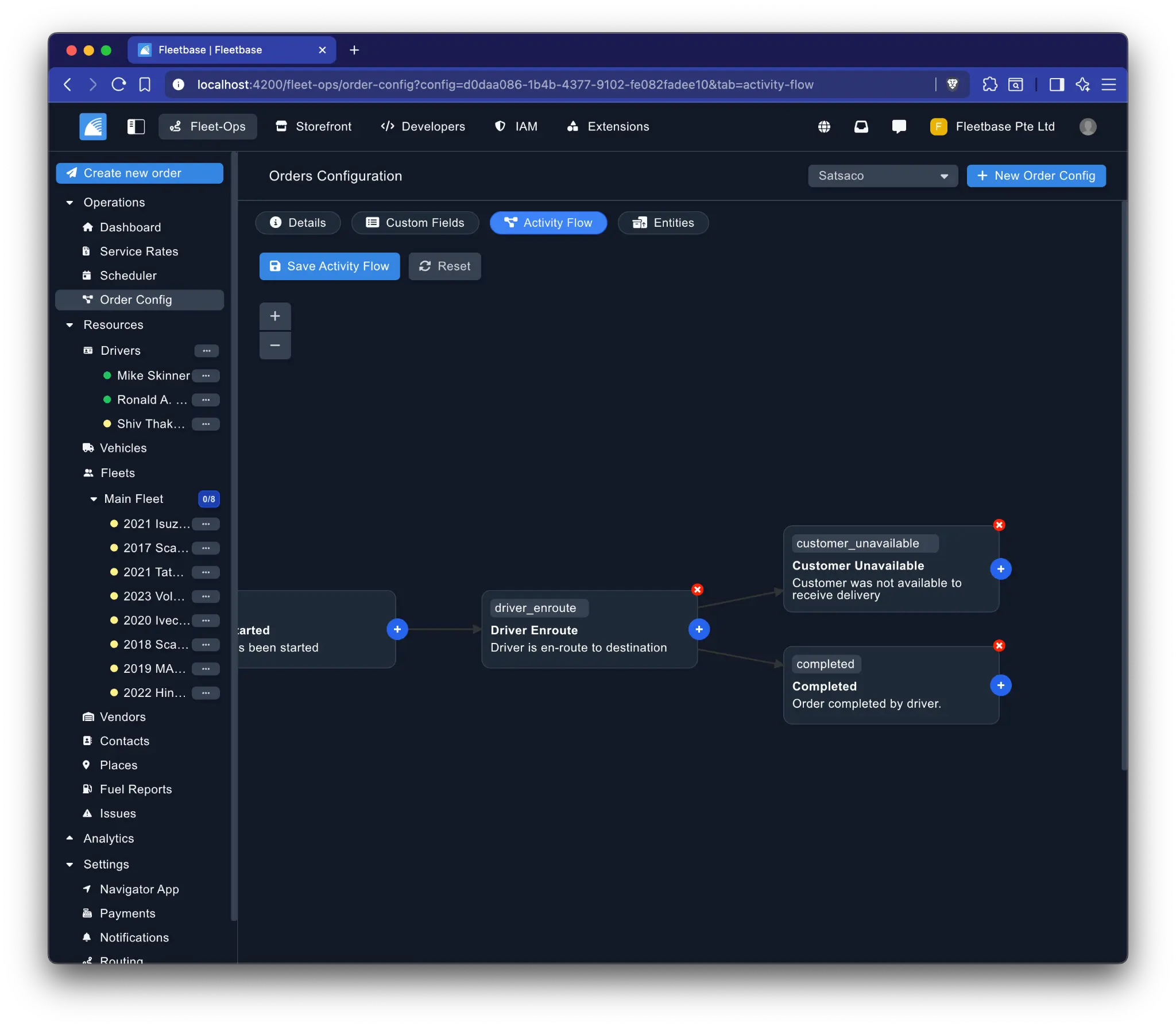 |
Create custom order configurations with logic, rules, automation, activity flows, and custom fields. |
| Order Tracking | 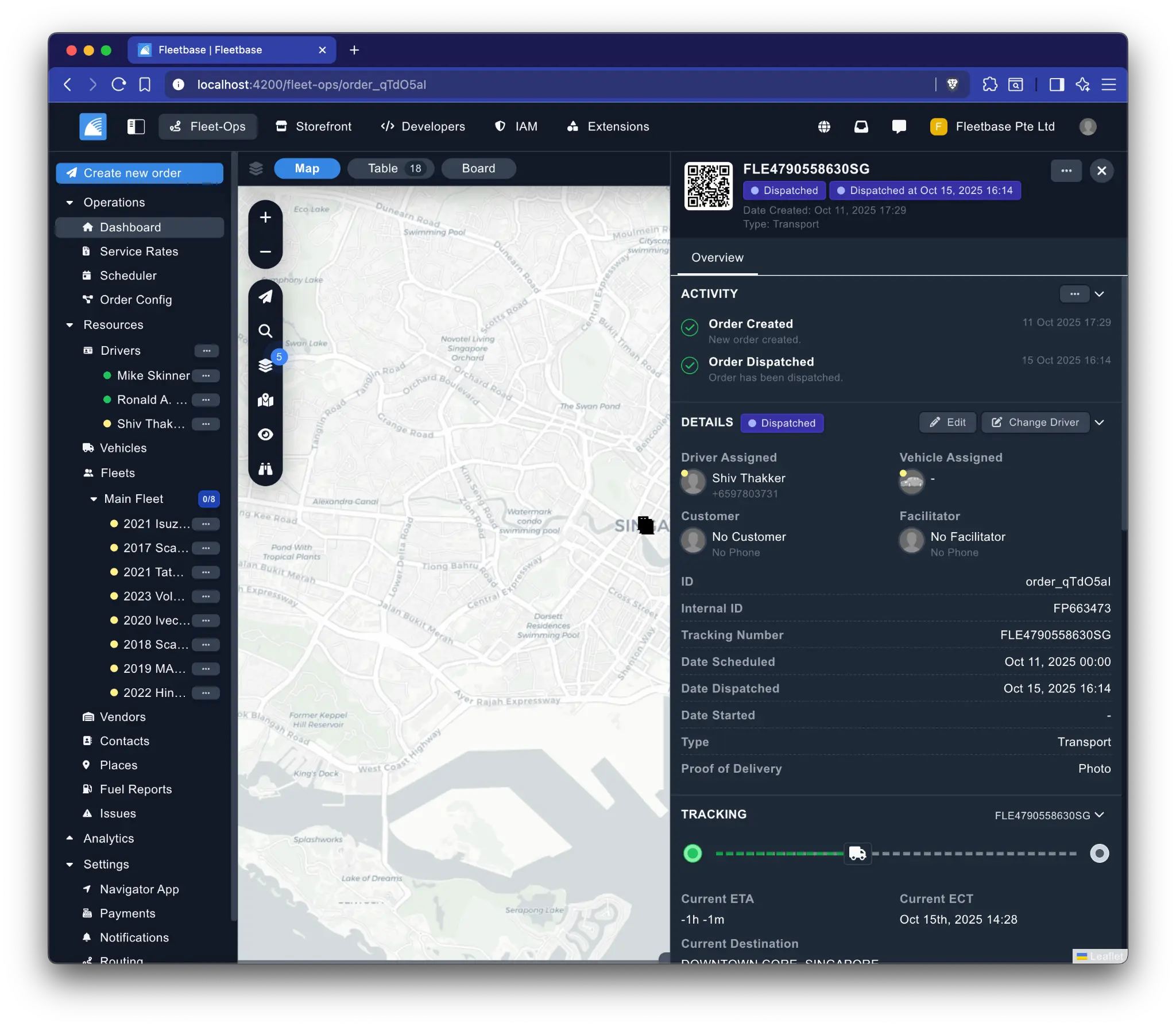 |
Track individual orders in real-time on an interactive map. |
| Live Fleet Map | 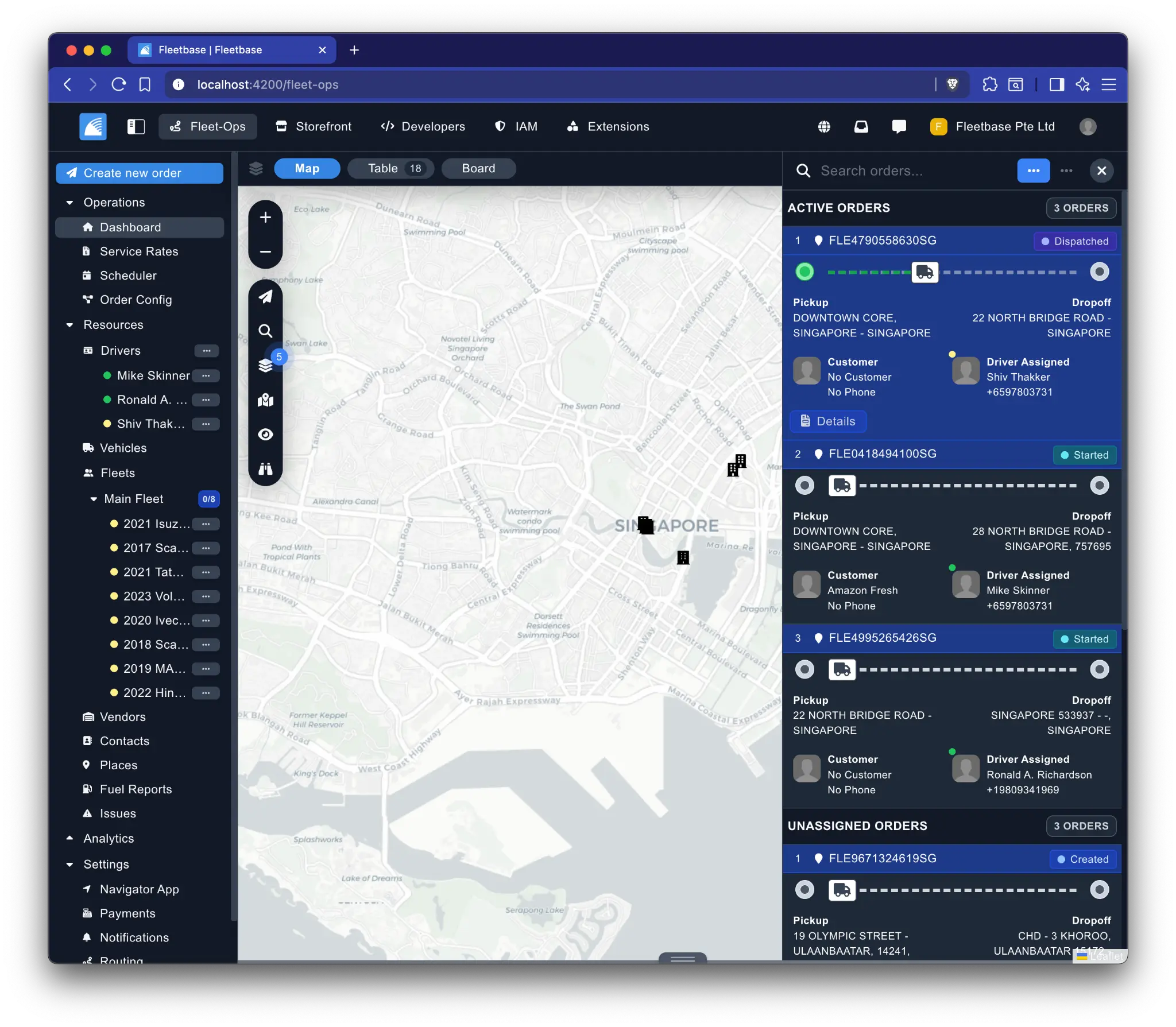 |
Get a complete overview of your fleet and active orders on a live map. |
| Service Zones | 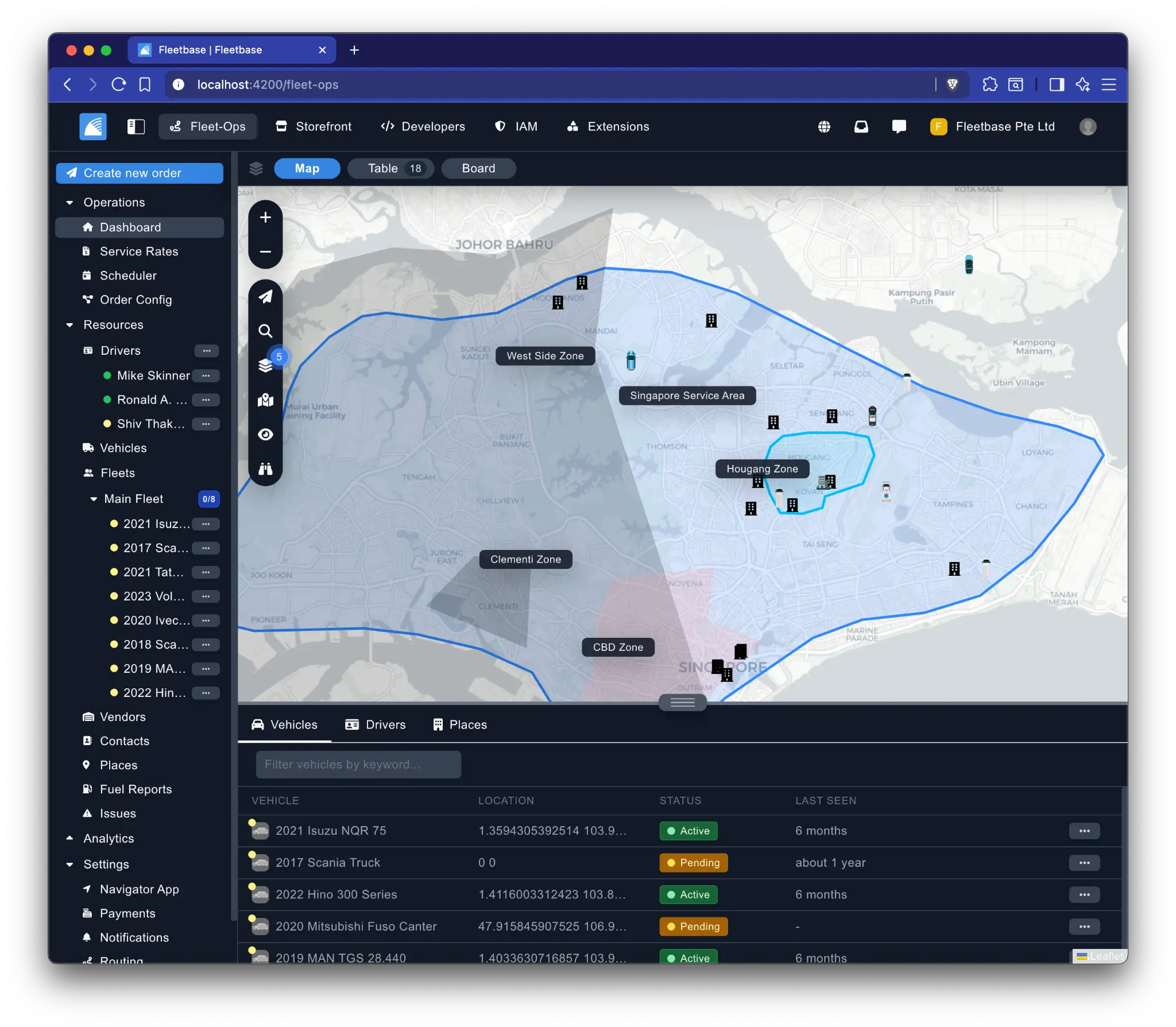 |
Define and manage service areas and zones for your fleet. |
Quickstart
npm install -g @fleetbase/cli
flb install-fleetbase
📖 Table of contents
- Features
- Install
- Extensions
- Apps
- Roadmap
- Deployment Options
- Bugs and Feature Requests
- Documentation
- Contributing
- Community
- Creators
- License & Copyright
📦 Features
| Feature | Description |
|---|---|
| 🔌 Extensible | Build installable extensions and additional functionality directly into the OS via modular architecture. |
| 👨💻 Developer Friendly | RESTful API, socket, and webhooks to seamlessly integrate with external systems or develop custom applications. |
| 📱 Native Apps | Collection of open-source and native apps designed for operations and customer facing. |
| 🤝 Collaboration | Dedicated chat and comments system for collaboration across your organization. |
| 🔒 Security | Secure data encryption, adherence to industry-standard security practices, and a comprehensive dynamic Identity and Access Management (IAM) system. |
| 📡 Telematics | Integrate and connect to hardware devices and sensors to provide more feedback and visibility into operations. |
| 🌐 Internationalized | Translate into multiple languages to accommodate diverse user bases and global operations. |
| ⚙️ Framework | PHP core built around logistics and supply chain abstractions to streamline extension development. |
| 🔄 Dynamic | Configurable rules, flows and logic to enable automation and customization. |
| 🎨 UI/UX | Clean, responsive user-friendly interface for efficient management and operations from desktop or mobile. |
| 📊 Dashboards | Create custom dashboards and widgets to get full visibility into operations. |
| 📈 Scalability | Uninterrupted growth with scalable infrastructure and design, capable of handling increasing data volume and user demand as your business expands. |
| 🔄 Continuous Improvements | Commitment to continuous improvement, providing regular updates that seamlessly introduce optimizations, new features, and overall enhancements to the OS. |
| 🌍 Open Source | Deploy it either on-premise or in the cloud according to your organization's needs and preferences. |
💾 Install
The easiest way to get started with Fleetbase is using the Fleetbase CLI, which automates the entire Docker-based installation process. For local setup options, read the running locally quickstart in the Fleetbase documentation.
Prerequisites
- Node.js v22
- Docker and Docker Compose
- Git
Quick Install with CLI
# Install the Fleetbase CLI globally
npm install -g @fleetbase/cli

# Run the interactive installer
flb install-fleetbase
Alternative Install Script
You can also use the install script directly:
git clone git@github.com:fleetbase/fleetbase.git
cd fleetbase && ./scripts/docker-install.sh
Accessing Fleetbase
Once successfully installed and running you can then access the Fleetbase console on port 4200 and the API will be accessible from port 8000.
Fleetbase Console: http://localhost:4200 Fleetbase API: http://localhost:8000
Additional Configurations
CORS: If you're installing directly on a server you will need to configure the environment variables to the application container:
CONSOLE_HOST=http://{yourhost}:4200
If you have additional applications or frontends you can use the environment variable FRONTEND_HOSTS to add a comma delimited list of additional frontend hosts.
Application Key If you get an issue about a missing application key just run:
docker compose exec application bash -c "php artisan key:generate --show"
Next copy this value to the APP_KEY environment variable in the application container and restart.
Routing: Fleetbase ships with a default OSRM server hosted by router.project-osrm.org but you're able to use your own or any other OSRM compatible server. You can modify this in the console/environments directory by modifying the .env file of the environment you're deploying and setting the OSRM_HOST to the OSRM server for Fleetbase to use.
Services: There are a few environment variables which need to be set for Fleetbase to function with full features. If you're deploying with docker then it's easiest to just create a docker-compose.override.yml and supply the environment variables in this file.
version: "3.8"
services:
  application:
    environment:
      CONSOLE_HOST: http://localhost:4200
      MAIL_MAILER: (ses, smtp, mailgun, postmark, sendgrid)
      OSRM_HOST: https://router.project-osrm.org
      IPINFO_API_KEY:
      GOOGLE_MAPS_API_KEY:
      GOOGLE_MAPS_LOCALE: us
      TWILIO_SID:
      TWILIO_TOKEN:
      TWILIO_FROM:

  socket:
    environment:
      # IMPORTANT: Configure WebSocket origins for security
      # Development (localhost only - include WebSocket protocols):
      SOCKETCLUSTER_OPTIONS: '{"origins":"http://localhost:*,https://localhost:*,ws://localhost:*,wss://localhost:*"}'
      # Production (replace with your actual domain):
      # SOCKETCLUSTER_OPTIONS: '{"origins":"https://yourdomain.com:*,wss://yourdomain.com:*"}'
WebSocket Security: The SOCKETCLUSTER_OPTIONS environment variable controls which domains can connect to the WebSocket server. Always restrict origins to your specific domains in production to prevent security vulnerabilities.
You can learn more about local installation and configuration in the official documentation.
⌨️ Fleetbase CLI
The Fleetbase CLI is a powerful tool for managing your Fleetbase instance. It simplifies installation, extension management, authentication, and development workflows.
Install the CLI globally with npm:
npm install -g @fleetbase/cli
Available Commands
| Command | Description |
|---|---|
flb install-fleetbase |
Install Fleetbase using Docker with interactive setup |
flb set-auth |
Set your registry authentication token for installing extensions |
flb search [query] |
Search and browse available extensions |
flb install |
Install an extension to your Fleetbase instance |
flb uninstall |
Uninstall an extension from your instance |
flb register |
Register a Registry Developer Account |
flb verify |
Verify your developer account email |
flb login |
Authenticate with the registry (for publishing extensions) |
flb scaffold |
Scaffold a new extension for development |
flb publish |
Publish an extension to the registry |
flb generate-token |
Generate or regenerate your registry authentication token |
🧩 Extensions
Extensions are modular components that enhance the functionality of your Fleetbase instance. They allow you to add new features, customize existing behavior, or integrate with external systems.
Browsing Extensions
flb search              # list all extensions
flb search fleet        # search by keyword
flb search --category logistics
flb search --free
flb search --json       # machine-readable output
Installing Extensions
To install extensions on a self-hosted instance:
# 1. Register an account (one-time)
flb register

# 2. Verify your email (one-time)
flb verify -e your-email@example.com -c verification-code

# 3. Generate your registry token
flb generate-token -e your-email@example.com

# 4. Set your authentication token
flb set-auth your-registry-token-here

# 5. Install an extension
flb install <extension>
Example:
flb install fleetbase/pallet
flb install fleetbase/fleetops
Developing Extensions
You can develop and publish your own extensions to extend Fleetbase's functionality or monetize through the marketplace. Learn more in the extension development quickstart.
# 1. Register a developer account (one-time)
flb register

# 2. Verify your email
flb verify -e your-email@example.com -c verification-code

# 3. Scaffold a new extension
flb scaffold

# 4. Authenticate for publishing
flb login -u your-username -p your-password -e your-email@example.com

# 5. Publish to the registry
flb publish
📱 Apps
Fleetbase offers open-source mobile apps that can be customized and deployed:
| App | Description | Platform | Repository |
|---|---|---|---|
| Storefront App | E-commerce/on-demand app for launching your own shop or marketplace | iOS & Android | GitHub |
| Navigator App | Driver app for managing orders with real-time location tracking | iOS & Android | GitHub |
🛣️ Roadmap
| Feature | Status | Expected Release | Description |
|---|---|---|---|
| Pallet (WMS) | 🚧 In Development | Q2 2026 | Inventory and Warehouse Management extension |
| Dynamic Rules | 📋 Planned | 2027 | Rule builder to trigger events, tasks, and jobs |
Want to influence our roadmap? Join the discussion
🚀 Deployment Options
| Option | Best For | Setup Time | Maintenance |
|---|---|---|---|
| Docker (Local) | Development & Testing | 5 minutes | Self-managed |
| On-Premise | Production on your own infrastructure | 30-60 minutes | Self-managed |
| Cloud Self-Hosted | Production (AWS, GCP, Azure) | 30-60 minutes | Self-managed |
| Fleetbase Cloud | Quick start, no DevOps | Instant | Fully managed |
View the cloud deployment guide →
🐛 Bugs and 💡 Feature Requests
Have a bug or a feature request? Please check the issue tracker and search for existing and closed issues. If your problem or idea is not addressed yet, please open a new issue.
📄 Documentation
Fleetbase has comprehensive documentation to help you get started and make the most of the platform:
- Getting Started: Run Fleetbase locally
- API Reference: API Documentation
- Developer Console: API keys and integration setup
- Extension Development: Extension quickstart
- Deployment: Deploy Fleetbase in the cloud
🤝 Contributing
We welcome contributions from the community! Here's how you can help:
- Report Bugs: Open an issue
- Suggest Features: Start a discussion
- Submit PRs: Read our Contributing Guide
- Write Documentation: Help improve our docs
- Build Extensions: Create and share extensions
Development Setup: See our Development Setup Guide for detailed instructions on setting up your local development environment.
👥 Community
Get updates on Fleetbase's development and chat with the project maintainers and community members by joining our Discord.
- Follow @fleetbase_io on X.
- Read and subscribe to The Official Fleetbase Blog.
- Ask and explore our GitHub Discussions.
See the Releases section of our GitHub project for changelogs for each release version of Fleetbase.
Release announcement posts on the official Fleetbase blog contain summaries of the most noteworthy changes made in each release.
Creators

Ronald A. Richardson Co-founder & CTO GitHub | LinkedIn |

Shiv Thakker Co-founder & CEO GitHub | LinkedIn |
License & Copyright
Fleetbase is available under a dual-licensing model to accommodate both open-source community users and commercial enterprises:
Open Source License (AGPL-3.0)
By default, Fleetbase is licensed under the GNU Affero General Public License v3.0 (AGPL-3.0). This license allows you to use, modify, and distribute Fleetbase freely, provided that:
- Any modifications or derivative works are also made available under AGPL-3.0
- If you run a modified version as a network service, you must make the source code available to users
The AGPL-3.0 is ideal for open-source projects, academic research, and organizations committed to sharing their improvements with the community.
Commercial License (FCL)
For organizations that require more flexibility, Fleetbase offers a Fleetbase Commercial License (FCL) that provides:
- Freedom from AGPL obligations – Deploy and modify Fleetbase without source code disclosure requirements
- Proprietary integrations – Build closed-source extensions and integrations
- Commercial protections – Warranties, indemnities, and legal assurances not provided under AGPL
- Derivative work ownership – Retain full ownership of your modifications and customizations
- Flexible licensing options – Choose from annual, monthly, or perpetual license models
Commercial License Options
| License Type | Price | Support & Updates | Best For |
|---|---|---|---|
| Annual License | $25,000/year | ✅ All upgrades & Business Support included | Organizations requiring continuous updates and support |
| Monthly License | $2,500/month | ✅ All upgrades & Business Support included | Pilot projects and short-term deployments |
| Major Version License | $25,000 (one-time) | ❌ No ongoing support | Stable deployments on a single major version |
| Minor Version License | $15,000 (one-time) | ❌ No ongoing support | Locked version deployments |
When You Need a Commercial License
You should consider a commercial license if you:
- Want to build proprietary extensions or integrations without open-sourcing them
- Need to embed Fleetbase in a commercial product without AGPL obligations
- Require enterprise-grade support, SLAs, and legal protections
- Plan to modify Fleetbase without sharing your changes publicly
Get a Commercial License
For more information about commercial licensing options, please contact us:
- Email: hello@fleetbase.io
- Website: fleetbase.io
Copyright © 2026 Fleetbase Pte. Ltd. All rights reserved.