Framelink MCP for Figma is a Model Context Protocol server that gives AI coding agents such as Cursor access to Figma file, frame, and group layout data, so the agent can implement designs directly in code instead of guessing from a screenshot.
What it is
Framelink MCP for Figma is a TypeScript Model Context Protocol server written for the MCP ecosystem and distributed on npm as figma-developer-mcp. It sits between an AI coding client and the Figma API: the client asks for design context, the server fetches the relevant Figma metadata, and the model receives layout and styling information it can turn into code. It runs over stdio (--stdio) or as a port-bound process via the PORT environment variable, and it is configured through the MCP server block that editors such as Cursor read from a configuration file.
The concrete problem it solves is context quality. Pasting a screenshot into a chat gives the model pixels and no structure, and returning the raw Figma API response gives the model far more data than it needs. This server simplifies and translates the Figma API response so only the most relevant layout and styling information reaches the model. Reducing that context makes the agent more accurate and its answers more relevant, which is the difference between a rough approximation of a design and a one-shot implementation in any framework.
Key capabilities
- Runs as an MCP server through
npx -y figma-developer-mcp, with --stdio for stdio transport or a PORT value for a bound port.
- Accepts a link to a Figma file, frame, or group pasted into the IDE chat, and pulls the matching metadata from the Figma API.
- Simplifies and translates the Figma API response before returning it, so only layout and styling data relevant to the request is sent.
- Authenticates with a Figma personal access token supplied as
--figma-api-key=YOUR-KEY or through the FIGMA_API_KEY environment variable.
- Configures through the
mcpServers entry in an editor configuration file, with separate documented forms for MacOS and Linux (npx) and for Windows (cmd /c npx).
- Implements the Model Context Protocol so MCP-aware editors and AI clients beyond Cursor can connect to it.
Who uses it and how
- Cursor users working in agent mode, who paste a Figma link and ask the agent to implement the design, after which Cursor fetches the metadata and writes the code.
- Frontend and full-stack developers implementing designs in any framework, since the server returns framework-neutral layout and styling information rather than generated markup.
- Teams that manage MCP servers through a shared editor configuration file and want Figma access available to every developer without per-project setup.
- Developers who currently paste screenshots into chat and want more accurate one-shot implementations of the same designs.
Getting started
Add the server to the mcpServers block of the editor configuration file with npx -y figma-developer-mcp --figma-api-key=YOUR-KEY --stdio, using the cmd /c wrapper on Windows. A Figma personal access token is required before startup, and the Framelink docs cover the full configuration.
How it compares
The facts provided do not list any paid products this project replaces, and they name no comparable MCP design servers. It stands alone in this registry as a Figma-to-agent bridge. Its only stated point of contrast is the screenshot-pasting approach, which it claims produces less accurate one-shot results.
When to use it — and when not to
A self-hoster must run Node to execute npx, hold a Figma personal access token, and edit an MCP server configuration file for each client; nothing in the facts indicates a database, object storage, or SMTP dependency. Teams without Figma designs, or editors that do not speak MCP, gain nothing here, and the server is explicitly designed for Cursor use. The README is thin: no build, test, or self-host deployment guidance is documented, so anyone needing to modify or operate it beyond the published npx path is working without a map.
project readme (upstream, from github) — read inline

Framelink MCP for Figma
Give your coding agent access to your Figma data.
Implement designs in any framework in one-shot.



Give Cursor and other AI-powered coding tools access to your Figma files with this Model Context Protocol server.
When Cursor has access to Figma design data, it's way better at one-shotting designs accurately than alternative approaches like pasting screenshots.
Demo
Watch a demo of building a UI in Cursor with Figma design data

How it works
- Open your IDE's chat (e.g. agent mode in Cursor).
- Paste a link to a Figma file, frame, or group.
- Ask Cursor to do something with the Figma file—e.g. implement the design.
- Cursor will fetch the relevant metadata from Figma and use it to write your code.
This MCP server is specifically designed for use with Cursor. Before responding with context from the Figma API, it simplifies and translates the response so only the most relevant layout and styling information is provided to the model.
Reducing the amount of context provided to the model helps make the AI more accurate and the responses more relevant.
Getting Started
Many code editors and other AI clients use a configuration file to manage MCP servers.
The figma-developer-mcp server can be configured by adding the following to your configuration file.
NOTE: You will need to create a Figma access token to use this server. Instructions on how to create a Figma API access token can be found here.
MacOS / Linux
{
  "mcpServers": {
    "Framelink MCP for Figma": {
      "command": "npx",
      "args": ["-y", "figma-developer-mcp", "--figma-api-key=YOUR-KEY", "--stdio"]
    }
  }
}
Windows
{
  "mcpServers": {
    "Framelink MCP for Figma": {
      "command": "cmd",
      "args": ["/c", "npx", "-y", "figma-developer-mcp", "--figma-api-key=YOUR-KEY", "--stdio"]
    }
  }
}
Or you can set FIGMA_API_KEY and PORT in the env field.
If you need more information on how to configure the Framelink MCP for Figma, see the Framelink docs.
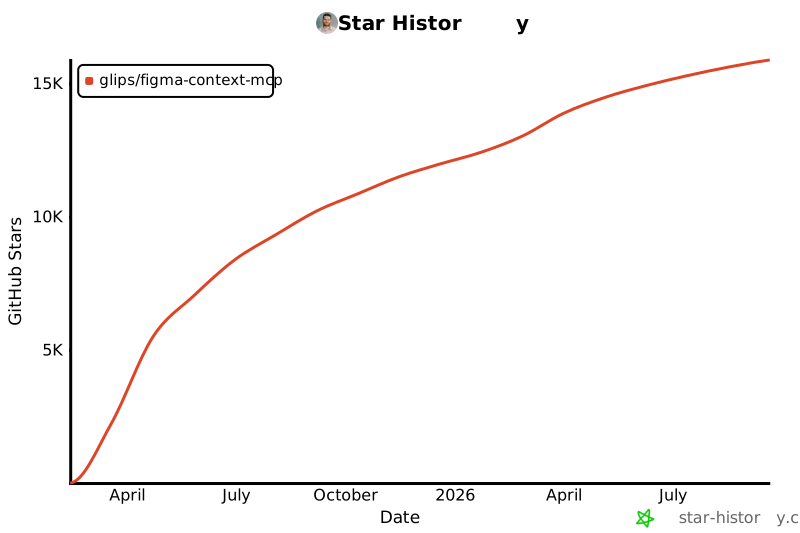
Star History
Learn More
The Framelink MCP for Figma is simple but powerful. Get the most out of it by learning more at the Framelink site.