00 is a self hostable SES dashboard for sending and monitoring emails with AWS.
SES is an incredibly affordable way to build an email heavy application.
However monitoring the emails is a bit of a nightmare, and often requires custom infrastructure. Even setting up the SES -> SNS -> SQS pipeline is a headache for developers unfamiliar with AWS. And when that is done your still left with hooking in or building custom some dashboard for viewing bounces and all the vital information you care about.
00 provides an SST configuration step to set up the SES -> SNS -> SQS pipeline, so you can just run a command and let SST do the rest.
If you would also like to deploy the container with SST follow this guide.
Then 00 provides you that dashboard for viewing the information you care about.
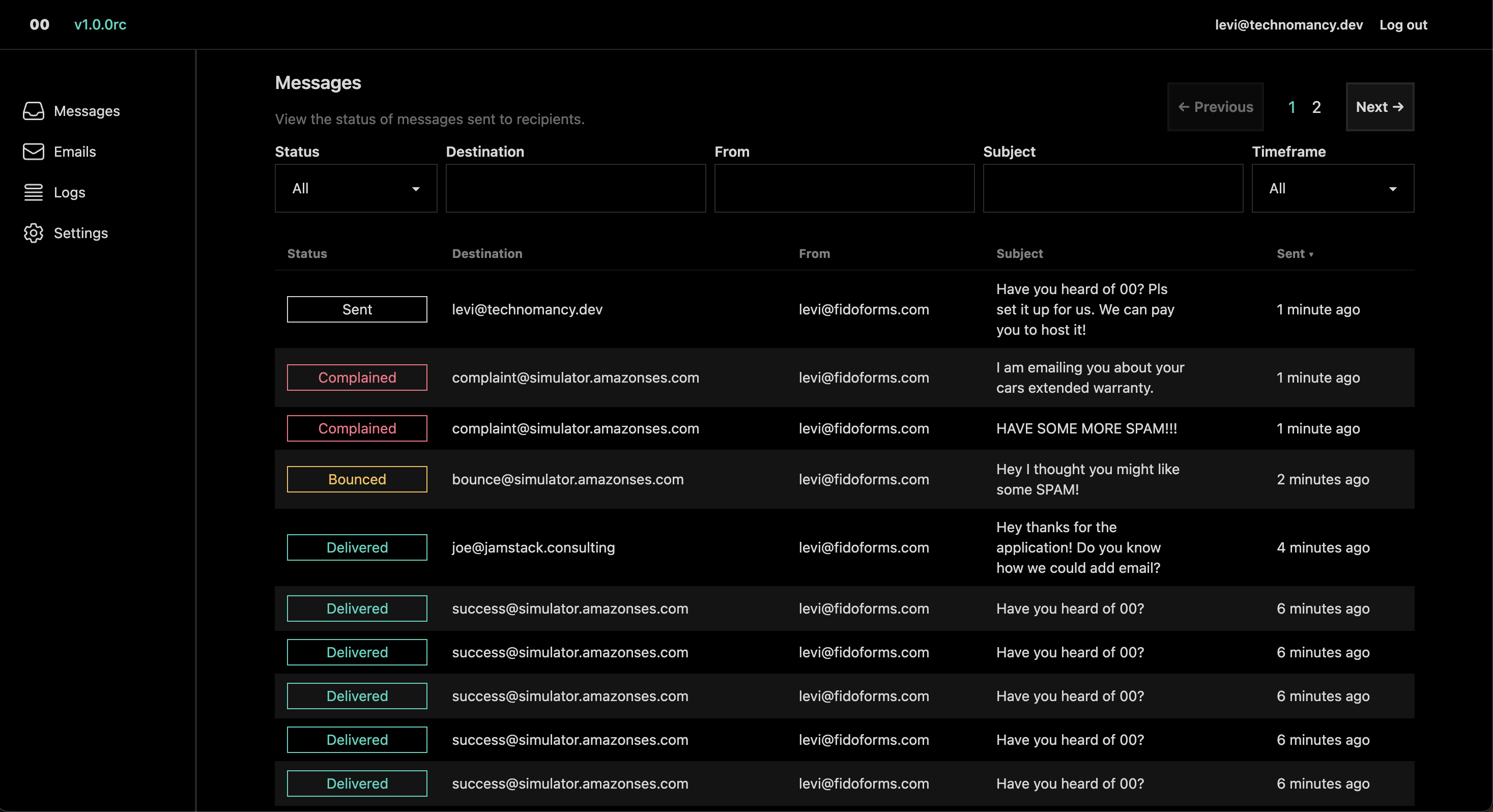
Some key features include:
- Run SST to configure AWS for you.
- The ability to send emails by sending a
POSTrequest to/api/emails. - Monitor email status (with multi-recipient tracking).
- Search emails and messages (a message is created for every recipient).
- View email body.
- Log tracking for requests and queue.
Getting started
If you like video walkthroughs Web Dev Cody made a fantastic one.
Configure AWS
The quickest way to get started is to clone this repo and run sst deploy in it. Make sure to set the EMAIL_IDENTITY env variable first, this will be the email or domain you wish to send from.
Using SST is easy, and you can find the steps to do so here and learn how to configure your credentials here
If you would like to avoid using SST you must manually configure AWS. You need to set up a configuration set to write to an SQS queue via SNS. You can configure it however you want, but the more events you send to the queue the more 00 will be able to track (obviously).
If you know what you are doing and you want to configiure AWS manually, you can follow this guide.
Either option will give you an SQS url which we need, along with several other environment variables.
Currently SST does NOT deploy the container for you. It just sets up the needed SES pipeline.
In the near future you will pass a variable to SST to tell it wether it should host the container for you.
Setup the Docker Container
We publish a docker image to the registery
Simply run docker pull liltechnomancer/double-zero
Then run your docker container with the following environment variables set. Exposing port 4000.
Example docker run -it --env-file .env -p 4000:4000 "liltechnomancer/double-zero"
AWS_SECRET_ACCESS_KEY=
AWS_ACCESS_KEY_ID=
AWS_REGION= # Ex: us-east-1
SQS_URL=  # Ex: https://sqs.us-east-1.amazonaws.com/${id}

SYSTEM_EMAIL= # For sending stuff like password resets. Ex: test@example.com should be able to send from SES.

SECRET_KEY_BASE= # A long secret. at least 64 characters. Can be made with mix phx.gen.secret or however you generate safe keys.

DATABASE_PATH= # Path to SQLite database Ex: 00.db
PHX_HOST= #  URL or IP of where this service is running. Ex: example.com
Now visit your url (whatever you set PHX_HOST to) and register your user.
Verify your Domain
After you have configured SES, with sst or manually, you have to verify that you own your domain.
- Log into the AWS management Console
- Navigate to your SES Identities in the region you setup SES.
- Select the Domain you want to verify
- Scroll down to DomainKeys Identified Mail (DKIM) and open the Publish DNS records dropdown.
- You will see three DNS records
- Head over to your domain provider and add these DNS records to your Domain.
After you published these DNS records to you domain it can take up to 72h to verify your domain according to AWS. But realisticly it will be verified in less than 12h.
Send an EMail
Register an API Key
- Log into your double-zero instance.
- Navigate to Settings
- Enter a unique name into the Token Name field
- Click on Create New API Token`
- You will now be shown the API-Key. Save it and treat it like a password, you can´t view this key anymore after closing the pop-up.
Make an API Request
You can now make requests to your double-zero instance.
To send an email you have to hit the endpoint on yourdomain.com/api/emails.
Use you favorite libary in your preferred language that can do https requests.
- Set the
AuthorizationHeader toBearer yourapikeyhere - Add a json body representing your email
- Send a
POSTrequest to the endpoint
The response of an successful request looks like this.
{
    "data": {
        "id": "51c2df38-0e3d-458b-9aff-3bf872868695", //This id is unique for every request
        "message": "Your email has successfully been queued.",
        "success": true
    }
}
Body parameters
The request body has to be json with these parameters
| Param | Type | Required | Notes | Example |
|---|---|---|---|---|
| markdown | string | no | For the email body. Either markdown or html can be used. |
{"markdown":"Some Text"} |
| html | string | no | For the email body. Either markdown or html can be used. |
{"html":"<h1>Some HTML</h1>"} |
| subject | string | no | The email`s subject field | {"subject":"Some Subject"} |
| from | string | yes | The email address from which the email is sent. Must be something@yourdomain.com. The the domain has to be added to SES and be verified. |
{"from":"noreply@yourdomain.com"} |
| to | string/string[] | yes | The emails recipient(s) | {"to":"joe@somedomain.com"} or {"to": ["joe@somedomain.com", "jane@somedomain.com"]} |
| cc | string | no | "The email address to which a copy of the email will be sent.". | {"cc":"cc_address@yourdomain.com"} |
| reply_to | string | no | The email address from which the reply will be sent. | {"reply_to":"reply@yourdomain.com"} |
| headers | object | no | An object containing key/value pairs of headers | {"headers": {"X-Entity-Ref-ID": "00"}} |
| provider_options | object | no | An object containing key/value pairs of provider options | {"provider_options": {"tags": [{"name": "tag-name", "value": "some-value"}]}} |
| attachments | array | no | An array containing attachments | {"attachments": [{"filename": "invoice.txt", "content": "pewp", "content_type": "text/plain"}]} |
Example
{
  "html": "<h1>Hello world!</h1>",
  "subject": "Can your email service track multiple recipients?",
  "from": "levi@fidoforms.com",
  "to": ["levi@technomancy.dev", "complaint@simulator.amazonses.com"]
}
Support
Stuck? Tell me about it on Discord and lets unstick you!
Pro + support open source.
If you are eager to support this project you can pre-order a pro version for you to self host.
Planned pro features include
- Multiple Users
- Teams
- Advanced Analytics
- Track email history
- Possibly more, we will see.