 Donetick
Simplify Tasks & Chores, Together!
Donetick is an open-source, user-friendly app designed to help you organize tasks and chores effectively. featuring customizable options to help you and others stay organized
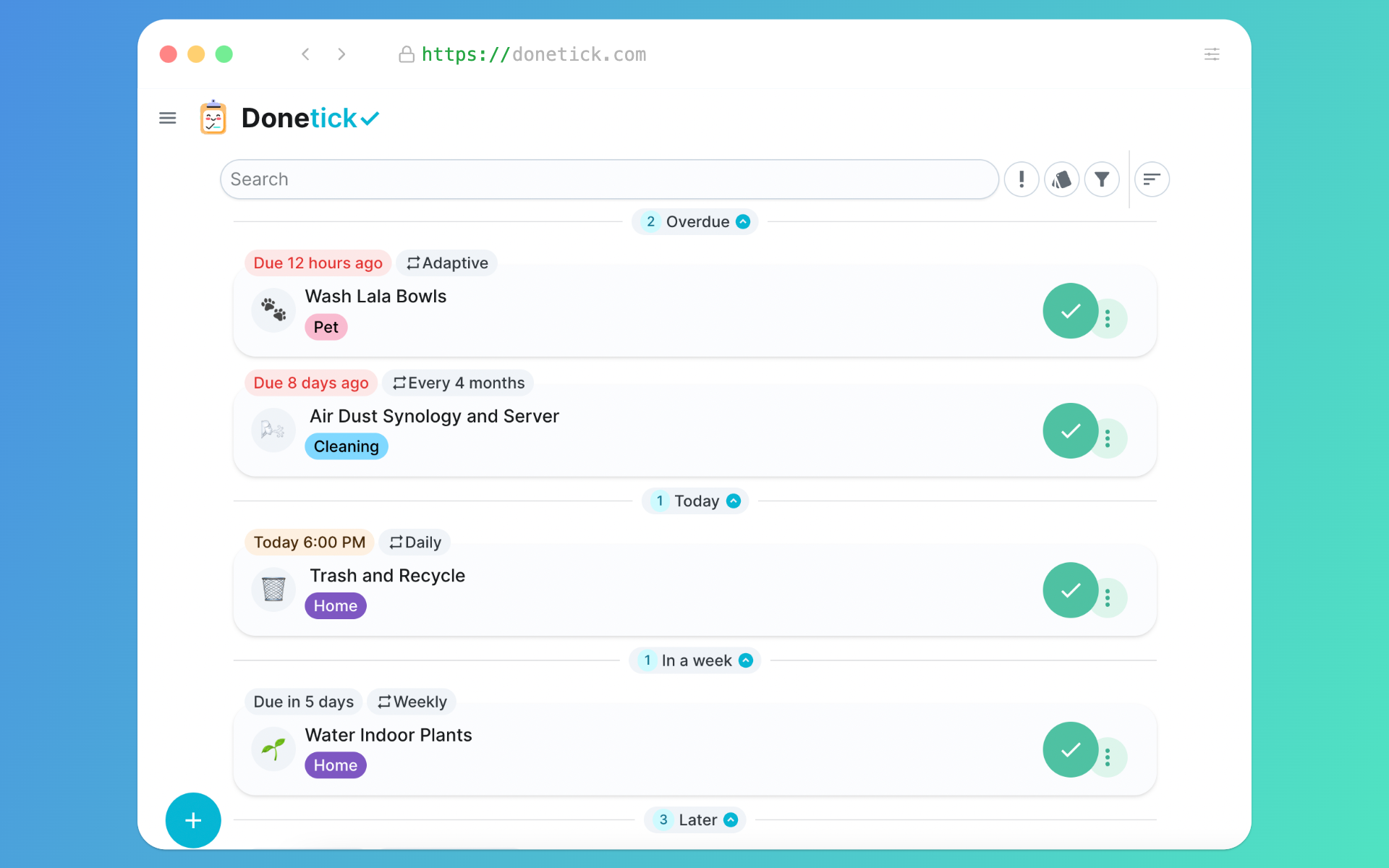



Features
Task & Chore Management
Collaborative: Create and manage tasks either solo or with family and friends. You can create a group and share or assign some of the tasks or chores with others.
Natural Language Task Creation: Describe what you need to do in plain English. Donetick automatically extracts dates, times, and recurrence patterns from phrases like “Change water filter every 6 months” or “Take the trash out every Monday and Tuesday at 6:15 pm.”
Task Advanced Scheduling:
- Supports flexible scheduling: daily, weekly, monthly, yearly, specific months, specific days of the week, or even adaptive scheduling — where Donetick learns from historical completions to suggest due dates automatically.
- Due Date vs Completion Date Based Recurrence: Choose whether recurring tasks should be scheduled from the previous due date (ideal for a consistent cadence) or from the actual completion date (useful when tasks are often delayed).
- Assignee Rotation: Automatically rotate task assignments based on who has completed the fewest tasks, randomly, or in turns(round-robin) order.
- Time Tracking & Session Insights: Track how much time you spend on a task whether in a single session or across multiple.
Subtasks with Smart Reset: Break tasks into smaller steps with subtasks, each trackable on its own. For recurring tasks, subtasks automatically reset when the main task is completed. subtasks can be nested as well!
Organize with Priorities and Labels: Organize everything using custom labels and priorities. Labels can be shared across your group, making it easy to filter and sort tasks by category. Priorities help you stay focused Donetick supports five levels: P1, P2, P3, P4, and No Priority.
Add Photos: Attach photos directly to tasks. Supports local storage (WIP) or cloud providers including AWS S3, Cloudflare R2, MinIO, and other S3-compatible services.
Things: A unique feature in Donetick. “Things” let you track data that isn’t a task. A Thing can be a number, boolean (true/false), or plain text. You can also mark tasks as done automatically when a Thing changes to a certain value.
NFC Tag Support: Create physical triggers by writing NFC tags that instantly mark tasks as complete when scanned.
Gamification & Progress
Points System: Built-in points system that rewards task completion and tracks your progress over time.
Completion Restrictions : You can restrict task completion until a certain time, for example, make a task completable only within the last X hours before its due date. This helps prevent marking tasks as "done" too early.
Comprehensive Analytics: See task breakdowns by label, completion status, and other helpful graphs.
Security & Authentication
Multi-Factor Authentication: Supports TOTP-based MFA.
Multiple Sign-In Options: Choose from local accounts or any OAuth2 provider that supports OIDC, like Keycloak, Authentik, Authelia, etc. (Tested with Authentik.)
Notifications & Integrations
Dashboard View: If you’re on a larger screen (like a laptop or tablet) and logged in as an admin, Donetick shows a mount-friendly dashboard layout. a full task list, calendar, and recent activity all in one place. Perfect for wall-mounted displays or shared tablets. With the ability for any user to pick their account and complete a task on the go!
Realtime Sync: Enable realtime sync to instantly reflect task changes across all connected devices and users. whether you are adding, editing, or completing a task. It reflects immediately on enabled devices!
Offline Support: You can access donetick if you lose connection and navigate some areas, but this is very limited functionality at the moment.
Multi-Platform Notifications: Get reminders through the mobile app (we have an alpha iOS app on TestFlight, and the Android APK is available in releases), as well as via Telegram, Discord, or Pushover.
Home Assistant Integration: Manage and view tasks directly within Home Assistant using the official integration. It creates separate to-do lists for each Donetick user. Donetick Home Assistant Integration
Developer & API Features
REST API: Full access to Donetick’s features through a REST API, great for custom automations and integrations. (For external use, we recommend using the eAPI, which offers limited access intended for long-lived access tokens.)
Webhook System: Connect Donetick to external systems using flexible webhook support good for custom notification flows or automations.
Quick Start
[!NOTE] Before running the application, ensure you have a valid
selfhosted.yamlconfiguration file. If you don't have one, create aselfhosted.yamlfile based on the example provided here. Place theselfhosted.yamlfile in the/configdirectory within your application's root directory
Using Docker
- Pull the latest image:
docker pull donetick/donetick - Run the container: Replace
/path/to/host/dataand/path/to/host/config:docker run \ -v /path/to/host/data:/donetick-data \ -v /path/to/host/config:/config \ -p 2021:2021 \ -e DT_ENV=selfhosted \ -e DT_SQLITE_PATH=/donetick-data/donetick.db \ -e TZ=Etc/UTC \ --health-cmd "wget --no-verbose --tries=1 --spider http://localhost:2021/api/v1/health || exit 1" \ --health-start-period 1m \ --health-timeout 5s \ --health-interval 1m \ --health-retries 3 \ donetick/donetick
Using Docker Compose
Use this template to set up Donetick with Docker Compose:
services:
  donetick:
    image: donetick/donetick
    container_name: donetick
    restart: unless-stopped
    ports:
      - 2021:2021
    volumes:
      - ./data:/donetick-data
      - ./config:/config
    environment:
      - DT_ENV=selfhosted
      - DT_SQLITE_PATH=/donetick-data/donetick.db
      - TZ=Etc/UTC
    healthcheck:
      test: wget --no-verbose --tries=1 --spider http://localhost:2021/api/v1/health || exit 1
      start_period: 1m
      timeout: 5s
      interval: 1m
      retries: 3
Using the Binary
- Download the latest release from the Releases page.
- Extract the file and navigate to the folder:
cd path/to/extracted-folder - Run Donetick:
DT_ENV=selfhosted ./donetick
Development Environment
Build the frontend
- Clone the frontend repository:
git clone https://github.com/donetick/frontend.git donetick-frontend - Navigate to the frontend directory:
cd donetick-frontend - Install dependencies:
npm install - Build the frontend:
npm run build-selfhosted - If you want to work on the frontend you can run:
npm start
Build the application
- Clone the repository:
git clone https://github.com/donetick/donetick.git - Navigate to the project directory:
cd donetick - Install dependencies:
go mod download - Copy the frontend build to the application:
rm -rf ./frontend/dist cp -r ../donetick-frontend/dist ./frontend - Set a valid JWT secret in
config/selfhosted.yaml. It must be a 32 characters long string. - Run the app locally:
Or build the application:go run .go build -o donetick .
Build the development Docker image
Make sure to build the frontend and the app first before building the Docker image.
- Build the Docker image:
docker build -t donetick/donetick -f Dockerfile.dev .
Single-Circle Instance Mode & OIDC Group-Based Roles
These features are designed for self-hosted single-household deployments where circle management should be hidden from end users and roles should be managed via your OIDC identity provider.
Environment Variables
| Variable | Type | Default | Description |
|---|---|---|---|
DT_SINGLE_CIRCLE_INSTANCE |
bool | false |
Hides circle-management UI and disables join/leave/delete-member/accept-request endpoints. New OIDC users are added to a shared household circle (ID 1) instead of getting a personal circle. |
DT_OAUTH2_ADMIN_GROUPS |
comma-separated strings | (empty) | OIDC group names that grant the admin role. |
DT_OAUTH2_MANAGER_GROUPS |
comma-separated strings | (empty) | OIDC group names that grant the manager role. |
DT_DISABLE_PASSWORD_AUTH |
bool | false |
SSO-only: disables password login. |
Role Resolution Rules
Role sync runs on every OIDC login (not just first-time user creation), so your IdP is the source of truth. Removing someone from the admin group in your IdP will demote them on their next login.
- If user is in any admin group ->
admin(admin takes priority over manager) - Else if user is in any manager group ->
manager - Else ->
member - If neither
DT_OAUTH2_ADMIN_GROUPSnorDT_OAUTH2_MANAGER_GROUPSis configured, roles are not modified at all (preserves existing behavior).
Group matching is exact-string and case-sensitive.
Example: Authentik Configuration
- Create groups in Authentik (e.g.,
donetick-admins,donetick-managers). - Ensure your Authentik OAuth2 provider includes the
groupsscope and that thegroupsclaim is returned in the userinfo endpoint. - Set the environment variables:
environment:
  - DT_SINGLE_CIRCLE_INSTANCE=true
  - DT_OAUTH2_ADMIN_GROUPS=donetick-admins
  - DT_OAUTH2_MANAGER_GROUPS=donetick-managers
  - DT_DISABLE_PASSWORD_AUTH=true
Contributing
Contributions are welcome! If you want to work on something that is not already listed as an open, tagged issue, please open a Discussion or reach out on Discord first to ensure it aligns with our goals and to avoid any unnecessary effort.
Please note: Pull Requests that are submitted without prior discussion or do not address an existing tagged issue will be deprioritized in the review queue.
Code Formatting and Linting
We use golangci-lint and ruleguard for linting and formatting. CI enforces lint checks on all pull requests.
To run lint checks locally, install the pinned version:
go install github.com/golangci/golangci-lint/cmd/golangci-lint@v1.64.8
go install github.com/quasilyte/go-ruleguard/cmd/ruleguard@v0.4.5
Run lint checks:
golangci-lint run
Apply safe fixes:
golangci-lint run --fix
License
This project is licensed under the AGPLv3. See the LICENSE file for more details.
Join the Discussion
For ideas or feature requests, please use GitHub Discussions. We also have a Discord server and a subreddit for those who prefer those platforms!

Support Donetick
If you find it helpful, consider supporting us by starring the repository, contributing code, or sharing feedback!