简介




DoKit诞生于滴滴城运服体验技术部,是一款面向泛前端产品研发全生命周期的效率平台。经过两年的发展,当前DoKit已经发展成了一个相对完整的生态,比如DoKit For Android、DoKit For iOS、DoKit For 小程序、DoKit For Flutter、DoKit For Web。同时我们的项目被BAT以及滴滴、字节、快手、京东等等头部独角兽企业广泛使用并获得良好的口碑。随着dokit.cn平台端的推出,标志着DoKit已经从单纯的效率工具正式进入了效率工具平台的阶段。与此同时我们一直都未停下持续探索的精神,积极地在更多平台领域进行尝试,不给自己设限。我们相信DoKit的未来充满无限可能。
领域生态
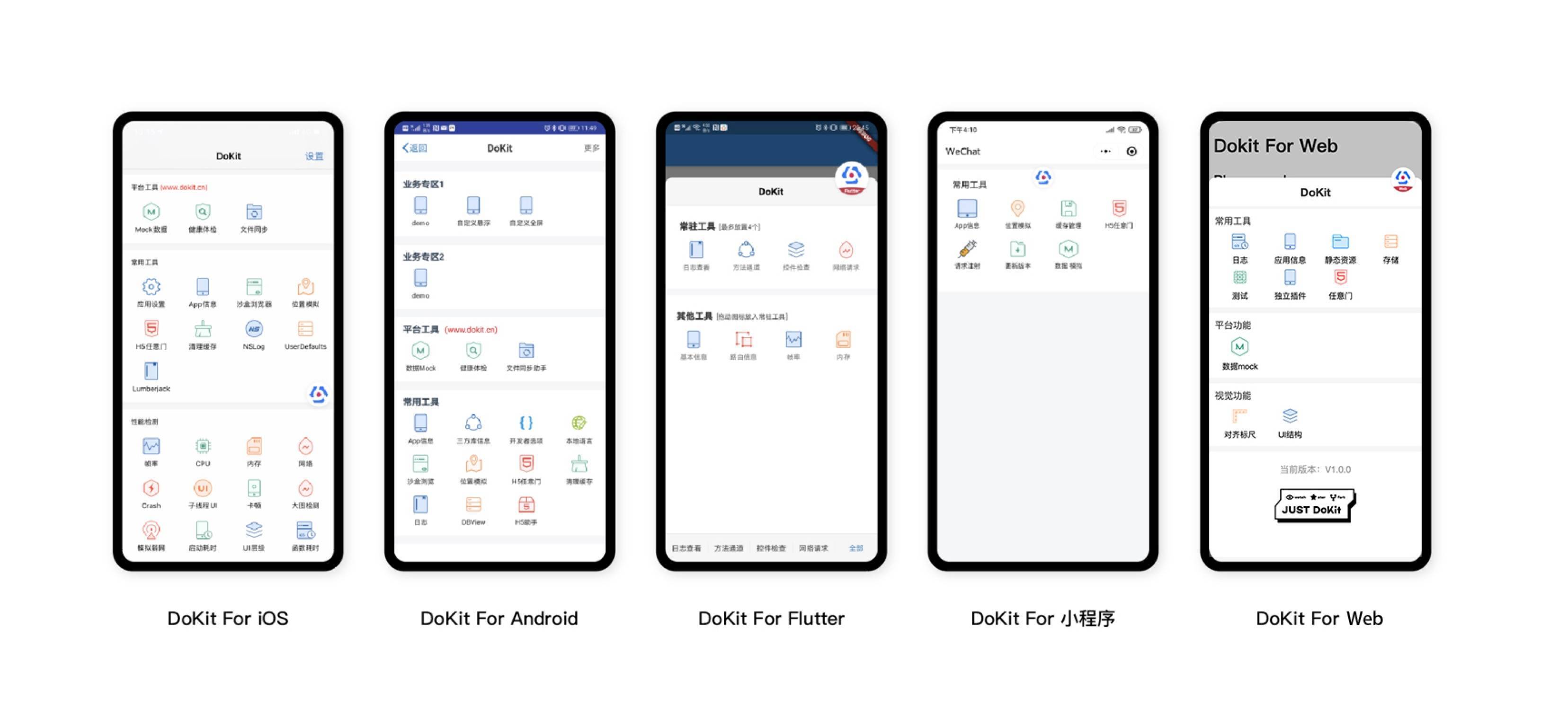
使用手册
温馨提示:当前DoKit的所有功能都只针对Debug环境,Release环境未经过实际验证,所以请大家严格按照官方文档来集成,也不建议大家在Release环境上使用DoKit的任何功能。如果大家一定要在Release环境上使用,请自行进行充分的测试和验证,DoKit官方将不承担任何责任和损失。
更新日志
社区活动
DoKit调研问卷 亲爱的DoKit用户,动动你的小手指参与一下我们的官方调研活动吧。我们极度渴望听到你们的声音:
链接:https://page.juyanwenjuan.com/jy_0CMpJzlu.html

开发背景
每一个稍微有点规模的 App,总会自带一些线下的测试功能代码,比如环境切换功能、帧率查看功能等等,这些功能的切换入口往往放在各式各样的入口中,比如一些特殊的手势,双击 statusBar,双击某一个功能区块,或者新建一个 keyWindow 始终至于 App 最上方等等,而且每一个 App 里面的线下附带功能模块很多是相似的,比如帧率查看、内存和 CPU 监控等等,但是现在基本上都是每个 App 都是自己实现了一份,经历了以上的问题之后,DoKit 就有了它存在的意义。
DoKit 是一个功能平台,能够让每一个 App 快速接入一些常用的或者你没有实现的一些辅助开发工具、测试效率工具、视觉辅助工具,而且能够完美在 Doraemon 面板中接入你已经实现的与业务紧密耦合的一些非通有的辅助工具,并搭配我们的dokit平台,让功能得到延伸,接入方便,便于扩展。
简单总结
1、DoKit 能够快速让你的业务测试代码能够在这里统一管理,统一收口;
2、DoKit 内置很多常用的工具,避免重复实现,一次接入,你将会拥有强大的工具集合;
3、搭配dokit平台,借助接口Mock、健康体检、文件同步助手、一机多控让你方便和他人协同,极大的提升研发过程中的效率。
功能模块
一、平台工具(www.dokit.cn)
- 【数据Mock】 App接口Mock解决方案,提供一套基于App网络拦截的接口Mock方案,无需修改代码即可完成对于接口数据的Mock。
- 【健康体检】 一键式操作,整合DoKit多项工具,数据可视化,快速准确定位问题,让你对app的性能了如指掌。
- 【文件同步助手】 通过终端服务,让你的终端空间在平台端完整的展现并提供强大的文件以及数据库操作能力。
- 【一机多控】 主从同步,释放人力,让研发测试效率提升看得见
二、常用工具
- 【App 信息查看】 快速查看手机信息,App 基础信息、签名相关、权限信息的渠道,避免去手机设置查找或者查看项目源代码的麻烦;
- 【开发者选项 Android特有】 一键跳转开发者选项,避免安卓由于平台差异导致的入口不一致
- 【本地语言】 一键跳转本地语言,避免安卓由于平台差异导致的入口不一致
- 【沙盒浏览】 App 内部文件浏览的功能,支持删除和预览, 并且能通过 AirDrop 或者其他分享方式上传到 PC 中,进行更加细致的操作;
- 【MockGPS】 App 能定位到全国各地,支持地图地位和手动输入经纬度;
- 【H5任意门】 开发测试同学可以快速输入 H5 页面地址,查看该页面效果;
- 【Crash查看】 方便本地打印出出现 Crash 的堆栈;
- 【子线程UI】 快速定位哪一些 UI 操作在非主线程中进行渲染,避免不必要的问题;(iOS独有)
- 【清除本地数据】 一键删除沙盒中所有数据;
- 【NSLog】 把所有 NSLog 信息打印到UI界面,避免没有开发证书无法调试的尴尬;
- 【Lumberjack】 每一条 CocoaLumberjack 的日志信息,都在在 App 的界面中显示出来,再也不需要导出日志这么麻烦;(iOS独有)
- 【DBView】 通过网页方便快捷的操作应用内数据库,让数据库的调试变得非常优雅;
- 【模拟弱网】 限制网速,模拟弱网环境下App的运行情况;(android独有)
- 【JS脚本】 在指定WebView运行JS脚本。(iOS独有)
三、性能检测
- 【帧率】 App 帧率信息提供波形图查看功能,让帧率监控的趋势更加明显;
- 【CPU】 App CPU 使用率信息提供波形图查看功能,让 CPU 监控的趋势更加形象;
- 【内存】 App 内存使用量信息提供波形图查看功能,让内存监控的趋势更加鲜明;
- 【流量监控】 拦截 App 内部流量信息,提供波形图展示、流量概要展示、流量列表展示、流量筛选、流量详情,对流量信息统一拦截,成为我们 App 中自带的 "Charles";
- 【卡顿】 锁定 App 出现卡顿的时刻,打印出对应的代码调用堆栈;
- 【大图检测】 通过流量监测,找出所有的大小超标的图片,避免下载大图造成的流量浪费和渲染大图带来的CPU消耗。
- 【启动耗时】 无侵入的统计出App启动过程的总共耗时;
- 【UI层级检查】 检查出每一个页面中层级最深的元素;
- 【函数耗时】 从函数级别分析app性能瓶颈;
- 【Load】 找出所有的Load方法,并给出耗时分析;(iOS独有)
- 【内存泄漏】 找出App中所有的内存泄漏的问题。
四、视觉工具
- 【颜色吸管】 方便设计师 UI 捉虫的时候,查看每一个组件的颜色值是否设置正确;
- 【组件检查】 可以抓取任意一个UI控件,查看它们的详细信息,包括控件名称、控件位置、背景色、字体颜色、字体大小;
- 【对齐标尺】 参考 Android 系统自带测试工具,能够实时捕获屏幕坐标,并且可以查看组件是否对齐;
- 【元素边框线】 绘制出每一个 UI 组件的边框,对于组件布局有一定的参考意义。
五、Weex专项工具(CML专项工具)
- 【console日志查看】 方便在端上查看每一个Weex文件中的console日志,提供分级和搜索功能;
- 【storage缓存查看】 将Weex中的storage模块的本地缓存数据可视化展示;
- 【容器信息】 查看每一个打开的Weex页面的基本信息和性能数据;
- 【DevTool】 快速开启Weex DevTool的扫码入口。
tips : 如果使用我们滴滴优秀的开源跨端方案 chameleon 也可以集成该工具集合
六、支持自定义的业务工具集成到面板中
统一维护和管理所有的测试模块,详见接入手册
七、微信小程序专项工具
详见 Doraemon mini program debugger
相关文档
- iOS 研发助手 DoKit 技术实现(一)
- iOS 研发助手 DoKit 技术实现(二)
- DoKit支持iOS本地crash查看功能
- 开源组件 DoKit 之 Android 版本技术实现(一)
- 开源组件 DoKit 之 Android 版本技术实现(二)
- DoKit支持Activity启动耗时统计方案
- DoKit 微信小程序SDK对外发布
- 滴滴DoKit2.0 - 泛前端开发者的百宝箱
- 滴滴正式发布开源客户端研发助手 DoKit 3.0,新特性解读
- 滴滴DoKit Android核心原理揭秘之函数耗时
- 滴滴DoKit Android核心原理揭秘之AOP字节码实现
QQ 技术交流群

项目成员
创始人 yixiangboy(易翔) 负责人 小枫
内部核心成员 小枫 、 ChasonTang 、 AdamCaoQAQ 、 fangyeqing123 、 RealOnlyone 、 HeyCFarmer 、 yFeii 、 卡布达 、 maxiee 、 zhugeafanti
贡献者榜单 yixiangboy(易翔)、 jtsky(金台) 、 LinJZong 、 wanglikun7342 、 jayconscious 、 jellybean 、 linusflow 、 wangzhipeng、 BzCoder 、 changzuozhen、 momoxiangbei、 wenquanlebao 、 hiXgb 、 Chinnko 、 y644938647 、 wm219、 goolong 、 miracle9312 、 lwhsgz123、 huakucha 、 HuginChen 、 feng562925462 、 azhon 、 rex26 、 csc-EricWu 、 xiandanin 、 0xd-cc 、 k373379320 、 fabcz 、 y500 、 Knight-ZXW 、 boai 、 klone1127 、 DeveloperLY 、 sagdragon 、 ccworld1000 、 HDB-Li、 yu-jianfeng、 ydlsl
如何成为外部贡献者? 提交有意义的PR,并被采纳。
使用提醒
因为SDK目前会配合dokit.cn平台, 会产生一些网络数据,这些信息我们收集绝不用于任何恶意用途。
以下为所有涉及到网络请求的部分
统计有多少用户集成了dokit
Android : DoraemonStatisticsUtil#uploadUserInfo
iOS : DoraemonStatisticsUtil#upLoadUserInfo
统计每个内置kit的使用情况
Android : DataPickManager#realPost
iOS : DoraemonBuriedPointManager#uploadData
上传健康体检的相关数据
Android : AppHealthInfoUtil#post
iOS : DoraemonHealthManager#upLoadData
数据mock的相关网络请求
Android : NetWorkMockFragment 里涉及到接口mock的相关网络请求
iOS : DoraemonMockManager#queryMockData&uploadSaveData
敬请各位用户知晓。
友情链接
Hummer,Hummer 是一套高性能高可用的跨端开发框架,一套代码可以同时支持开发 Android 和 iOS 应用。现已经支持 Vue/TypeScript/JavaScript 三种语法,面向大前端开发人员,总有一款适合你。
Chameleon,简写CML,中文意思变色龙,意味着就像变色龙一样能适应不同环境的跨端整体解决方案,达到真正意义上"一套代码,多端运行"的终极目标
Booster 是一款专门为移动应用设计的易用、轻量级且可扩展的质量优化框架,其目标主要是为了解决随着 APP 复杂度的提升而带来的性能、稳定性、包体积等一系列质量问题。Booster 提供了性能检测、多线程优化、资源索引内联、资源去冗余、资源压缩、系统 Bug 修复等一系列功能模块,可以使得稳定性能够提升 15% ~ 25%,包体积可以减小 1MB ~ 10MB。同时DoKit插件的底层也是基于Booster进行开发的。
AoE,一个终端侧AI集成运行时环境
Mand Mobile 一款优秀的面向金融场景的 移动端UI组件库
我们团队的技术公众号【滴滴OrangeLab】,欢迎关注,我们会在这里持续输出团队内部比较有深度的技术沉淀和经验分享,欢迎一起交流。

协议

DoKit 基于 Apache-2.0 协议进行分发和使用,更多信息参见 协议文件。