What it is
Django Ninja is a web framework for building APIs with Django and Python 3.6+ type hints. It lives in the Python ecosystem and the Django ecosystem specifically, and it is distributed under the MIT license. The framework is designed around type hints, Pydantic, and async support, and it generates API schemas from the open standards for APIs: OpenAPI (previously known as Swagger) and JSON Schema. A NinjaAPI instance is declared next to the existing Django url configuration and mounted as a normal URL pattern, so the project sits alongside Django rather than replacing any part of it.
The concrete problem it solves is the gap between the plain Django view layer and the typed, self-documenting API surface that modern clients expect. Django ships with a solid ORM, routing, and admin, but it does not derive request and response schemas from Python type annotations and it does not emit interactive OpenAPI documentation on its own. Django Ninja closes that gap inside the same project: the developer writes a function with typed parameters, and the framework handles validation, serialization, and the published schema. Because it is based on OpenAPI and JSON Schema, the resulting definition can be consumed by the tooling that already speaks those standards.
Key capabilities
- Declares API endpoints with Python type hints, so request parameters and response shapes are validated from the annotations.
- Generates OpenAPI schemas automatically from the declared operations and models.
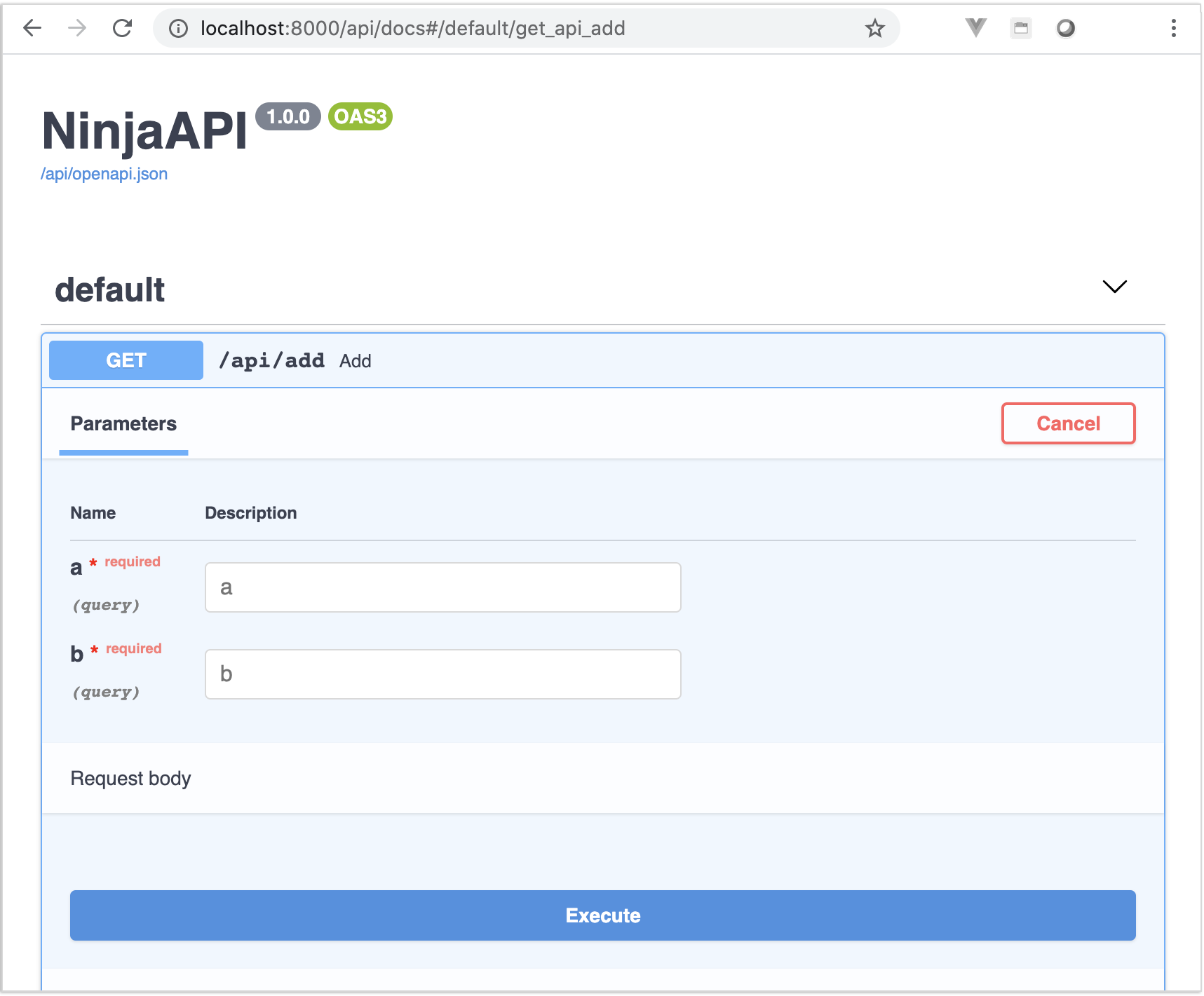
- Serves interactive API documentation through Swagger UI or Redoc at the mounted API path.
- Supports async execution, in addition to synchronous handlers.
- Uses Pydantic for data validation and serialization.
- Integrates with Django core and the Django ORM, allowing existing models and project structure to be reused.
- Describes itself as production ready, with reported use by multiple companies on live projects.
Who uses it and how
- Django teams adding a typed REST API to a project that already has models, migrations, and an admin.
- Developers who want to keep one codebase rather than run a separate API service beside Django.
- Teams that need a published OpenAPI definition for client generation and third-party integration.
- Projects that expose an interactive documentation page for internal or external API consumers.
- Applications that require async request handling under load.
Getting started
Install with pip install django-ninja. Then create an api.py file next to urls.py, define a NinjaAPI() instance with decorated handlers, and mount it in urlpatterns with a path such as path("api/", api.urls). The interactive documentation is then available under that prefix.
When to use it — and when not to
Django Ninja fits projects that are already committed to Django and want type-driven APIs with generated OpenAPI documentation and async support. A self-hoster operates the standard Django stack, and anything the API needs beyond that — database, storage, SMTP — remains the host's responsibility. The facts show no hosted option and no stated comparison to paid products; note too that the project carries 224 open issues at the time of writing, so the review of its tracker before adoption is reasonable.
project readme (upstream, from github) — read inline

^ Please read ^

Fast to learn, fast to code, fast to run




Django Ninja - Fast Django REST Framework
Django Ninja is a web framework for building APIs with Django and Python 3.6+ type hints.
Key features:
- Easy: Designed to be easy to use and intuitive.
- FAST execution: Very high performance thanks to Pydantic and async support.
- Fast to code: Type hints and automatic docs lets you focus only on business logic.
- Standards-based: Based on the open standards for APIs: OpenAPI (previously known as Swagger) and JSON Schema.
- Django friendly: (obviously) has good integration with the Django core and ORM.
- Production ready: Used by multiple companies on live projects (If you use django-ninja and would like to publish your feedback, please email ppr.vitaly@gmail.com).
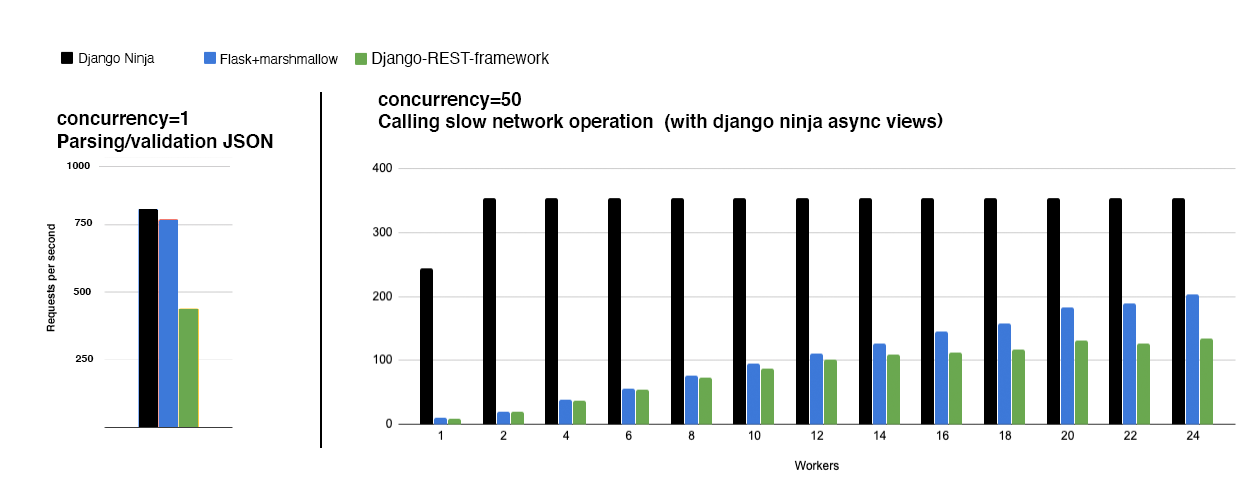
Documentation: https://django-ninja.dev
Installation
pip install django-ninja
Usage
In your django project next to urls.py create new api.py file:
from ninja import NinjaAPI

api = NinjaAPI()


@api.get("/add")
def add(request, a: int, b: int):
    return {"result": a + b}
Now go to urls.py and add the following:
...
from .api import api

urlpatterns = [
    path("admin/", admin.site.urls),
    path("api/", api.urls),  # <---------- !
]
That's it !
Now you've just created an API that:
- receives an HTTP GET request at
/api/add
- takes, validates and type-casts GET parameters
a and b
- decodes the result to JSON
- generates an OpenAPI schema for defined operation
Interactive API docs
Now go to http://127.0.0.1:8000/api/docs
You will see the automatic interactive API documentation (provided by Swagger UI or Redoc):
Sponsors

Become a sponsor
What next?