
cwe_checker




What is cwe_checker?
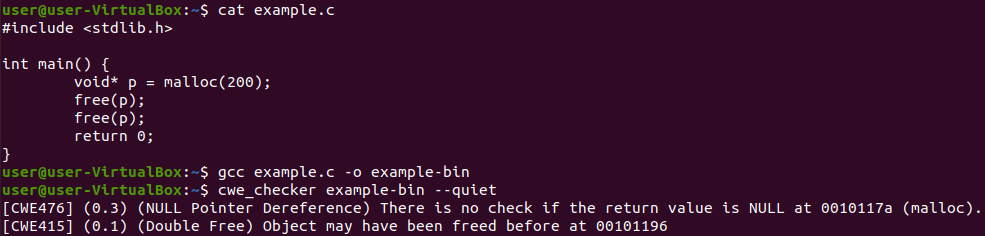
cwe_checker is a suite of checks to detect common bug classes such as Null pointer dereferences and buffer overflows. These bug classes are formally known as Common Weakness Enumerations (CWEs). The checks are based on a variety of anaylsis techniques ranging from simple heuristics to abstract interpretation-based data-flow analysis. Its main goal is to aid analysts to quickly find potentially vulnerable code paths.
Its main focus are ELF binaries that are commonly found on Linux and Unix operating systems. The cwe_checker uses Ghidra to disassemble binaries into one common intermediate representation and implements its own analyses on this IR. Hence, the analyses can be run on most CPU architectures that Ghidra can disassemble, which makes the cwe_checker a valuable tool for firmware analysis.
The following arguments should convince you to give cwe_checker a try:
- it is very easy to set up, just build the Docker container!
- it analyzes ELF binaries of several CPU architectures including x86, ARM, MIPS, and PPC
- it is extensible due to its plugin-based architecture
- it is configurable, e.g. apply analyses to new APIs
- view results annotated in Ghidra
- cwe_checker can be integrated as a plugin into FACT
Installation
Using the docker image
The simplest way is to pull the latest Docker image from the Github container registry:
docker pull ghcr.io/fkie-cad/cwe_checker:latestyields an image based on the current master branch.docker pull ghcr.io/fkie-cad/cwe_checker:stableyields an image based on the latest stable release version.docker pull ghcr.io/fkie-cad/cwe_checker:v0.9yields an image based on the v0.9 stable release version. However, it is recommended to switch to newer stable releases as soon as they get published, since improvements between stable versions can be quite significant.
If you want to build the docker image yourself, just run
docker build -t cwe_checker .
This way you can also build native Docker images for ARM-based PCs (e.g. newer Apple Macs). The prebuilt Docker images are currently only x86-based.
Local installation
The following dependencies must be installed in order to build and install the cwe_checker locally:
Run make all GHIDRA_PATH=/path/to/ghidra_folder (with the correct path to the local Ghidra installation inserted) to compile and install the cwe_checker.
If you omit the GHIDRA_PATH argument the installer will search your file system for a local installation of Ghidra.
Usage
The cwe_checker takes a binary as input, runs several checks based on static analysis on the binary and then outputs a list of CWE warnings that have been found during the analysis.
If you use the official docker image, just run
docker run --rm -v /PATH/TO/BINARY:/input ghcr.io/fkie-cad/cwe_checker /input
If you installed the cwe_checker locally, run
cwe_checker BINARY
If you use nix flakes, run
nix run github:fkie-cad/cwe_checker -- BINARY
You can adjust the behavior of most checks via a configuration file located at src/config.json.
If you modify it, add the command line flag --config=src/config.json to tell the cwe_checker to use the modified file.
For information about other available command line flags you can pass the --help flag to the cwe_checker.
There is experimental support for the analysis of Linux loadable kernel modules (LKMs). cwe_checker will recognize if you pass an LKM and will execute a subset of the CWE checks available for user-space programs. Analyses are configurable via a separate configuration file.
If you use the stable version, you can also look at the online documentation for more information.
For Bare-Metal Binaries
The cwe_checker offers experimental support for analyzing bare-metal binaries.
For that one needs to provide a bare metal configuration file via the --bare-metal-config command line option.
An example for such a configuration file can be found at bare_metal/stm32f407vg.json
(which was created and tested for an STM32F407VG MCU).
For more information take a look at the online documentation.
Documentation and Tests
The test binaries for our test suite can be built with make compile_test_files (needs Docker to be installed!). The test suite can then be run with make test.
Source code documentation can be built with make documentation. For the stable version, the documentation can be found here.
Implemented Checks
So far the following analyses are implemented:
- CWE-78: OS Command Injection (currently disabled on standard runs)
- CWE-119 and its variants CWE-125 and CWE-787: Buffer Overflow
- CWE-134: Use of Externally-Controlled Format String
- CWE-190: Integer Overflow or Wraparound
- CWE-215: Information Exposure Through Debug Information
- CWE-243: Creation of chroot Jail Without Changing Working Directory
- CWE-332: Insufficient Entropy in PRNG
- CWE-337: Predictable Seed in Pseudo-Random Number Generator (PRNG)
- CWE-367: Time-of-check Time-of-use (TOCTOU) Race Condition
- CWE-416: Use After Free and its variant CWE-415: Double Free
- CWE-426: Untrusted Search Path
- CWE-467: Use of sizeof() on a Pointer Type
- CWE-476: NULL Pointer Dereference
- CWE-560: Use of umask() with chmod-style Argument
- CWE-676: Use of Potentially Dangerous Function
- CWE-782: Exposed IOCTL with Insufficient Access Control
- CWE-789: Memory Allocation with Excessive Size Value
Please note that both false positives and false negatives are to be expected due to shortcuts and the nature of static analysis as well as over-approximation. You can find information on the inner workings of each check as well as known reasons for false positives and false negatives on the check-specific documentation pages.
Integration into other tools
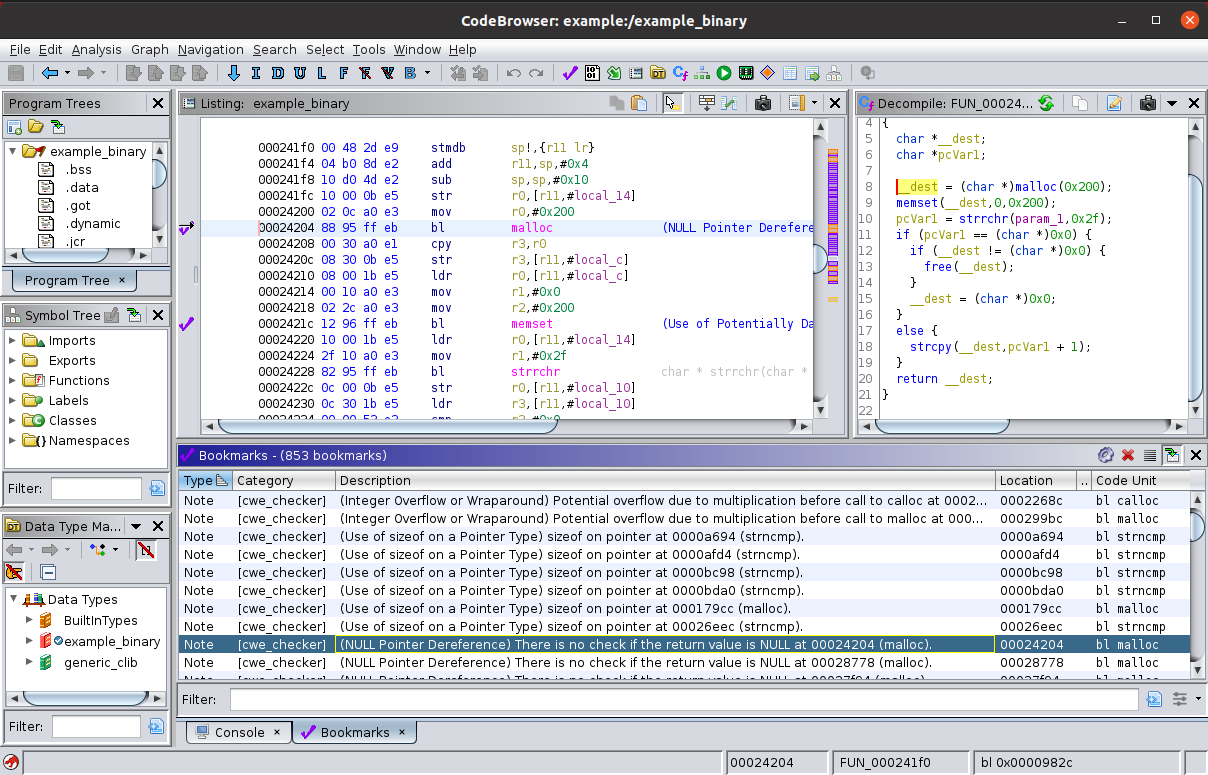
cwe_checker comes with a script for Ghidra,
which parses the output of the cwe_checker and annotates the found CWEs in the disassembler for easier manual analysis.
The script is located at ghidra_plugin/cwe_checker_ghidra_plugin.py, usage instructions are contained in the file.
The cwe_checker is also integrated as a plugin in FACT.
If you want to integrate the cwe_checker into your own analysis toolchain, you can use the --json command line flag (in combination with either the --quiet or the --out=... command line options) to generate the CWE warnings in an easily parseable JSON output format.
How does cwe_checker work internally?
Building the documentation using cargo doc --open --document-private-items --no-deps will give you more information about the internal structure of the cwe_checker.
However, the best documentation is still the source code itself.
If you have questions, be sure to ask them on our discussions page!
We are constantly striving to improve extensibility and documentation and your questions will help us to achieve that!
To get a quick/initial overview of its internals you can also look at the slides of conference presentations on the cwe_checker in the doc folder. We presented cwe_checker at the following conferences so far:
Contribute
Contributions are always welcome. Just fork it and open a pull request!
Acknowledgements
This project is partly financed by German Federal Office for Information Security (BSI).
A special thanks goes out to the BAP community (especially the official gitter) for answering questions and discussing solutions.
License
    Copyright (C) 2018 - 2024  Fraunhofer FKIE  (firmware-security@fkie.fraunhofer.de)

    This library is free software; you can redistribute it and/or
    modify it under the terms of the GNU Library General Public
    License as published by the Free Software Foundation; either
    version 3 of the License, or (at your option) any later version.

    This library is distributed in the hope that it will be useful,
    but WITHOUT ANY WARRANTY; without even the implied warranty of
    MERCHANTABILITY or FITNESS FOR A PARTICULAR PURPOSE.  See the GNU
    Library General Public License for more details.

    You should have received a copy of the GNU General Public License
    along with this program.  If not, see <http://www.gnu.org/licenses/>.