Crit


Review and comment on plans, code diffs, frontend elements and send feedback directly to your agent.
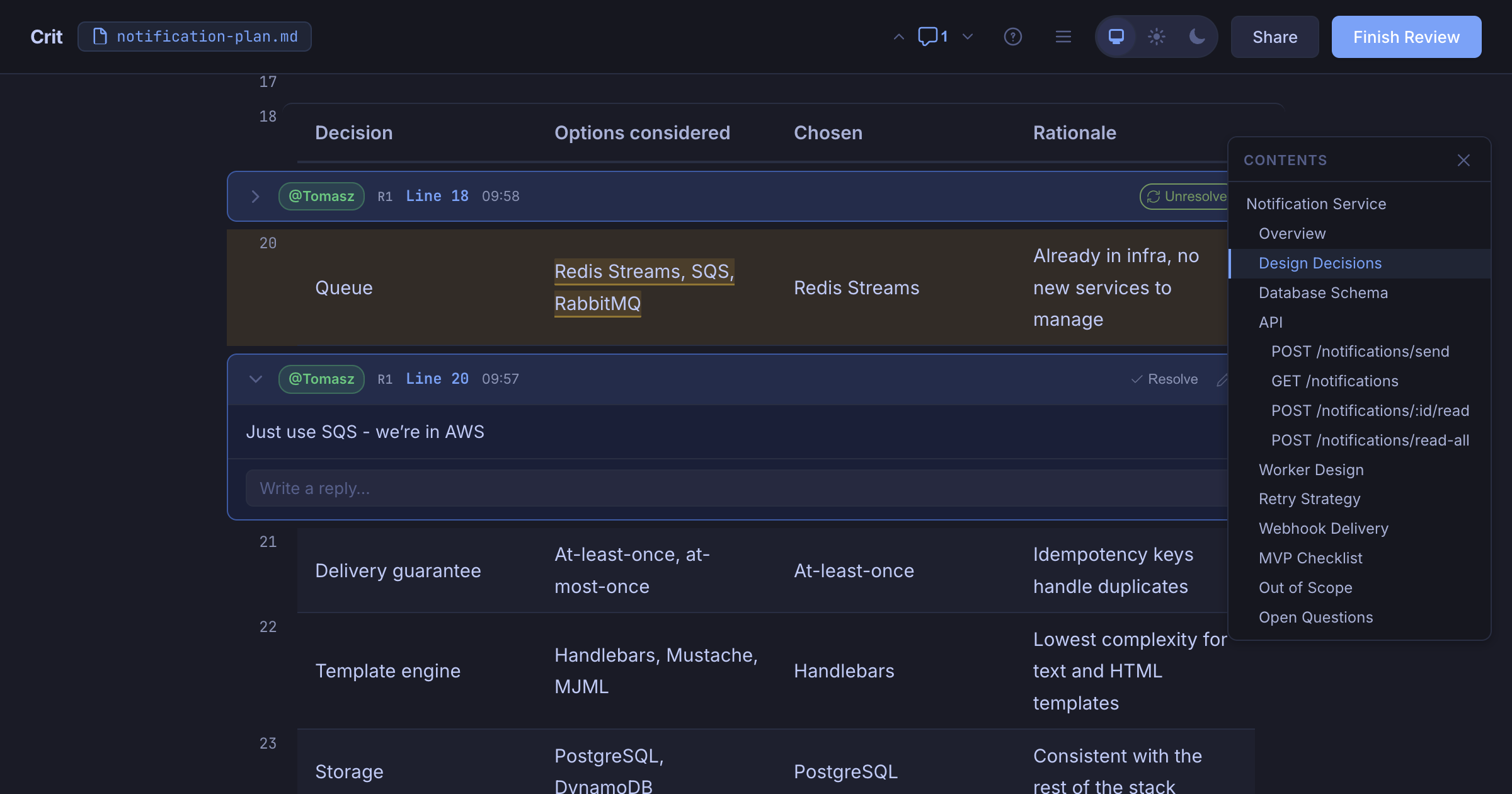
Adaptive UI for each type of output
For agents, plans and code are all the same - it's just text, but for us, humans, reviewing generated plans and reviewing web application are two very different activities.
Crit adds a proper interface for each type of output and lets you point at the exact thing that is wrong and leave a comment for the agent to fix:
crit plan.mdrenders a markdown file with proper formatting and review UIcritauto-detects git changes and shows syntax-highlighted diffs for local review.crit http://localhost:3000proxies your running app and adds a review interface to itcrit landing.htmlrenders a static HTML artifact to review
Everything runs locally via one single binary.
Quickstart
1. Install Crit binary
Brew:
brew install crit
Also available via Go, Nix, Windows
Go:
go install github.com/tomasz-tomczyk/crit/cmd/crit@latest
Nix:
nix profile install github:tomasz-tomczyk/crit
Windows:
iwr https://github.com/tomasz-tomczyk/crit/releases/latest/download/crit-windows-amd64.exe -OutFile crit.exe
Note: Then move crit.exe somewhere on your PATH. ARM64 users: swap amd64 for arm64. WSL users: use the Linux binary instead.
Or download the latest release from GitHub.
2. Integrate with your agent
Claude Code:
claude plugin marketplace add tomasz-tomczyk/crit
claude plugin install crit@crit
Crit also works with Cursor, GitHub Copilot, OpenCode, Codex, Gemini, Qwen, Hermes, Windsurf, Cline, Grok, Aider, and Pi — any agent that can read a file and run a command. See integrations/ for all install methods and details.
3. Tell your agent to use crit
Most integrations include a /crit slash command that automates the full review loop.
Agent launches Crit, waits for your review and acts on the feedback.
Repeat the process until you approve the changes.
Here's a 2-minute demo walkthrough of plan review and branch review:
Usage
The recommended way is to use /crit command with your agent after any piece of work - whether it wrote a plan or made some code changes. You can however, launch it in your terminal by yourself and paste the prompt when you finish to your agent.
crit                              # auto-detect changed files in your repo
crit plan.md                      # review a specific file
crit plan.md api-spec.md          # review multiple files
crit http://localhost:3000        # review a running dev server
crit landing.html                 # review a static HTML file
If talking to an agent, you can invoke the /crit command and optionally provide arguments like the above examples or the agent will try to launch the right thing based on the context of the conversation.
Story mode
For larger branch, PR, MR, or range reviews, story mode adds a chaptered overview of the diff — thematic chapters, a prologue, and a support bucket for noise — so you can understand the shape of the change before line-by-line review. It is an explainer, not a reviewer.
Recommended: invoke /crit-story (or $crit-story, /skill:crit-story,
depending on your agent) after crit install . Your agent authors the
story in-session via crit story --prep / --story-file. Only run it when you
explicitly ask — agents will not infer it from a normal /crit review.
Alternative: crit story from the terminal uses your global agent_cmd
(separate LLM spend). Generation is LLM-driven exploration — cost depends on
change complexity more than raw file/diff size, and does not scale linearly.
In our experience, complex PRs (~20–50 files, ~2k–5k lines) land around
$1–$1.40 with Claude Opus 5. See the story mode guide
for commands, custom prompts, JSON shape, and token-cost notes.
Live mode
crit live (or crit ) proxies a running dev server through Crit's review UI. Crit's iframe loads the app on a different origin/port than your browser tab, so host-scoped session cookies are not shared automatically. If the direct URL works but Crit shows a login page or hydration mismatch, forward the upstream cookies:
# one-off
crit live http://localhost:4000/dashboard --cookie "_crit_key=..."

# repeatable (Netscape jar or raw Cookie header lines)
crit live http://localhost:4000/dashboard --cookie-file .crit/live-cookies.txt

# reuse cookies from a Chrome session with remote debugging enabled
crit live http://localhost:4000/dashboard --cdp-url http://127.0.0.1:9222
Getting cookies: log in to the app in your browser, then copy the session cookie from DevTools (Application → Cookies), export a cookie jar, or start Chrome with --remote-debugging-port=9222 and pass --cdp-url so Crit reads cookies for the target origin automatically.
Config (global or project .crit.config.json; project overrides global):
{
  "live_cookie_file": ".crit/live-cookies.txt",
  "live_cdp_url": "http://127.0.0.1:9222"
}
Relative paths resolve from the repo root. Prefer a gitignored file under .crit/ over committing live_cookie inline. Run crit live --help for all flags.
crit status                       # show review file path and daemon status
crit resume                       # pick a previous review to reopen
crit stats                        # show lifetime review statistics
crit cleanup                      # delete stale review files
crit resume lists every review in ~/.crit/reviews, newest first, with its branch or files, directory, age, and open comment count. Choosing one reconnects to its daemon, or restarts the daemon in the directory the review came from when it has stopped — so you can resume a review from anywhere. Pass --list to print the list instead, or a session ID to skip the picker.
Features
Round-to-round diff
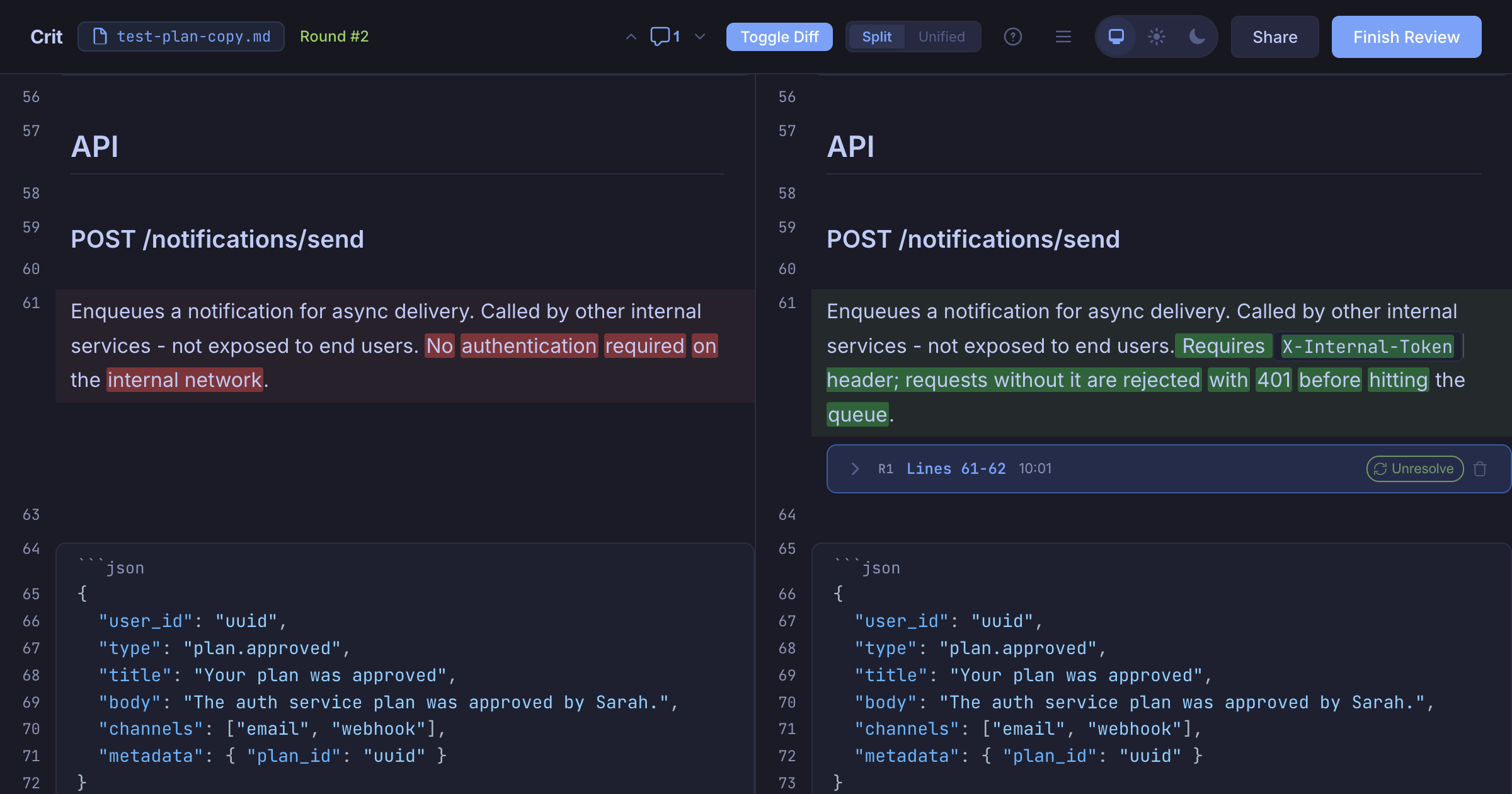
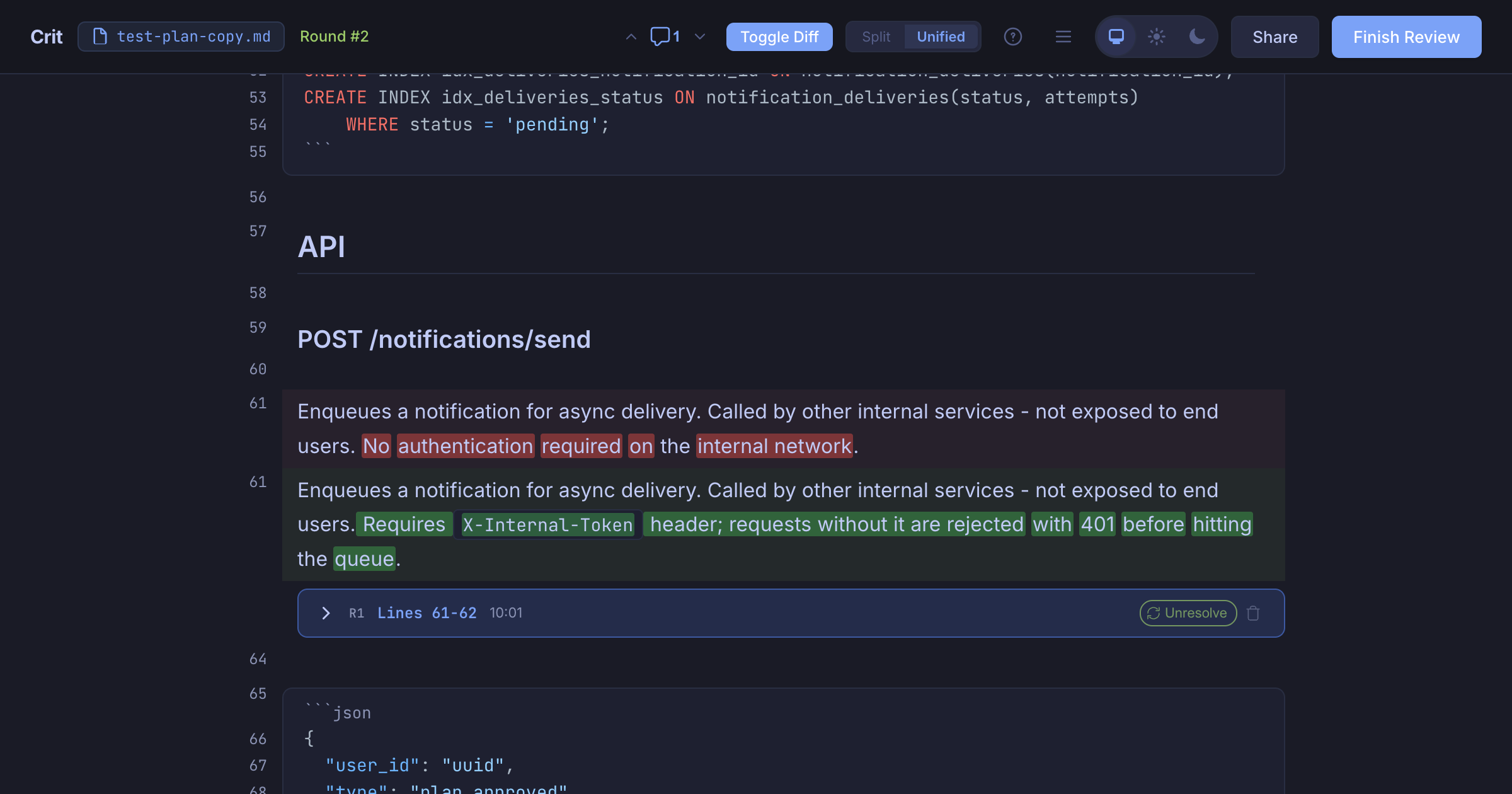
After your agent edits the file, Crit shows a split or unified diff of what changed - toggle it in the header.
Split view
Unified view
Inline comments: single lines and ranges
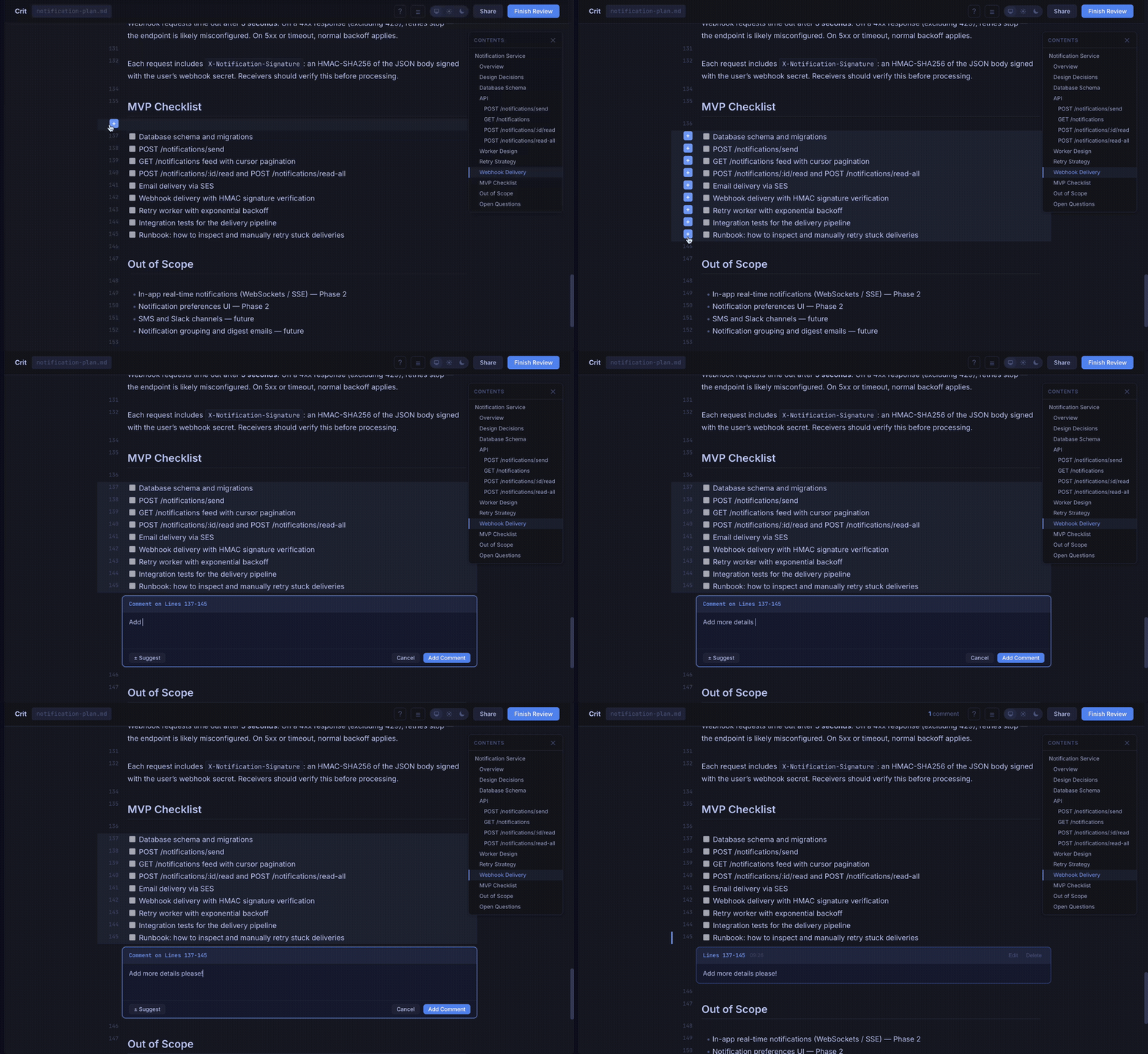
Click a line number to comment. Drag to select a range. Comments are rendered inline after their referenced lines, just like a GitHub PR review.
Programmatic comments
AI agents can use crit comment to add inline review comments without opening the browser UI or constructing JSON manually:
crit comment src/auth.go:42 'Missing null check'
crit comment src/handler.go:15-28 'Error handling issue'
crit comment --session 839f3b4cd5d6 src/auth.go:42 'Target this review'
echo '[{"body":"Overall feedback"}]' | crit comment --session 839f3b4cd5d6 --json
crit comment --output ~/.crit src/auth.go:42 'comment'  # same as default (~/.crit/reviews/<key>/)
crit comment --output .crit src/auth.go:42 'comment'    # in-repo: .crit/reviews/<key>/
crit comment --clear   # remove the review file
Comments are appended to the review file (stored in ~/.crit/reviews/) and created automatically if it doesn't exist. Run crit status to see active review session IDs and paths. If multiple sessions match the same directory and branch, select one with --session on crit comment, crit comments, crit share, crit push, or crit pull; an unqualified command fails instead of guessing.
Share for Async Review
Want a second opinion before handing off to the agent? Click the Share button to upload your review and get a public URL anyone can open in a browser, no install needed. Each reviewer's comments are color-coded by author. Unpublish anytime.
You can also share directly from the CLI without starting the browser UI:
crit share plan.md                    # share files and print the URL
crit share plan.md --qr               # also print a QR code in the terminal
crit share plan.md --org acme         # share under an organization
crit share plan.md --org acme --visibility unlisted  # org share with explicit visibility
crit unpublish                        # remove the shared review
When sharing under an org, visibility defaults to organization (members only). Override with --visibility (organization, unlisted, or public). The browser UI shows an org picker when you're signed in and belong to an organization.
Sharing uses crit.md when no sharing key exists. To use several deployments, configure global share_targets; the browser asks for a destination and each review stays bound to its first destination:
{"share_targets":[
  {"name":"Acme Crit","url":"https://crit.acme.com","default":true,"proxy_auth":true},
  {"name":"crit.md","url":"https://crit.md"}
]}
Run crit auth login --share-url https://crit.acme.com to add or authenticate a target, and add --set-default to make it the CLI default. crit auth status lists every target. An explicit "share_targets": [] disables sharing and never injects crit.md. Legacy share_url remains readable; crit config --migrate converts it atomically. --share-url and CRIT_SHARE_URL are process-only overrides and never persist a new target; an explicitly empty CRIT_SHARE_URL disables sharing for that process.
If a target sits behind an SSO reverse proxy, set proxy_auth: true on that target. Browser-driven Share / Pull / Re-share / Unpublish then use its popup relay; terminal operations remain unavailable for that target.
Authentication
You can share anonymously or you can create a free crit.md account (using GitHub oAuth). To authenticate with crit-web (for sharing and other features that require an account):
crit auth login                    # opens browser to log in
crit auth login --share-url https://crit.acme.com --set-default
crit auth status                   # list targets and identities
crit auth logout --share-url https://crit.md
crit auth login uses the OAuth Device Flow - it opens your browser, you confirm, and the CLI receives a token automatically. The token is stored in your global config (~/.crit.config.json).
GitHub PR and GitLab MR Sync
Crit can review and sync comments bidirectionally with GitHub pull requests and GitLab merge requests. Install and authenticate the CLI for your forge: GitHub CLI (gh auth login) or GitLab CLI (glab auth login). GitLab.com, self-managed GitLab hosts, nested groups, and cross-project merge requests are supported.
Crit auto-detects GitHub or GitLab from the repository remote. Set "forge": "github" or "forge": "gitlab" in config to override ambiguous/self-managed remotes, or pass --forge to crit pull and crit push. GitLab's base URL is configured once with gitlab_url and defaults to https://gitlab.com; set it to your self-managed instance in .crit.config.json. MR URLs remain valid change identifiers, but their host must match the configured gitlab_url.
Open a remote change for review
crit pr 42                                  # GitHub pull request
crit mr 42                                  # GitLab MR in the current project
crit mr https://gitlab.com/group/sub/project/-/merge_requests/42
crit review --mr 42 --remote                # read MR files via GitLab instead of local git
Pull comments
crit pull                                  # auto-detect from current branch and remote
crit pull 42                               # explicit PR number or MR IID
crit pull --forge gitlab 42                # explicit provider
crit pull https://gitlab.com/group/project/-/merge_requests/42
Push comments and review outcomes
crit push                                      # auto-detect PR/MR from current branch
crit push --dry-run                            # preview without posting
crit push --message "Round 2"                  # add a review summary
crit push --event approve 42                   # approve
crit push --event request-changes --forge gitlab 42
GitLab inline comments are published as a single review using Draft Notes. request-changes requires GitLab support for the reviewer_state=requested_changes bulk-publish option; Crit reports an error instead of silently downgrading the outcome. Pulling again imports replies, edits, deletes, and discussion resolution without duplicating local comments.
Send to agent (experimental)
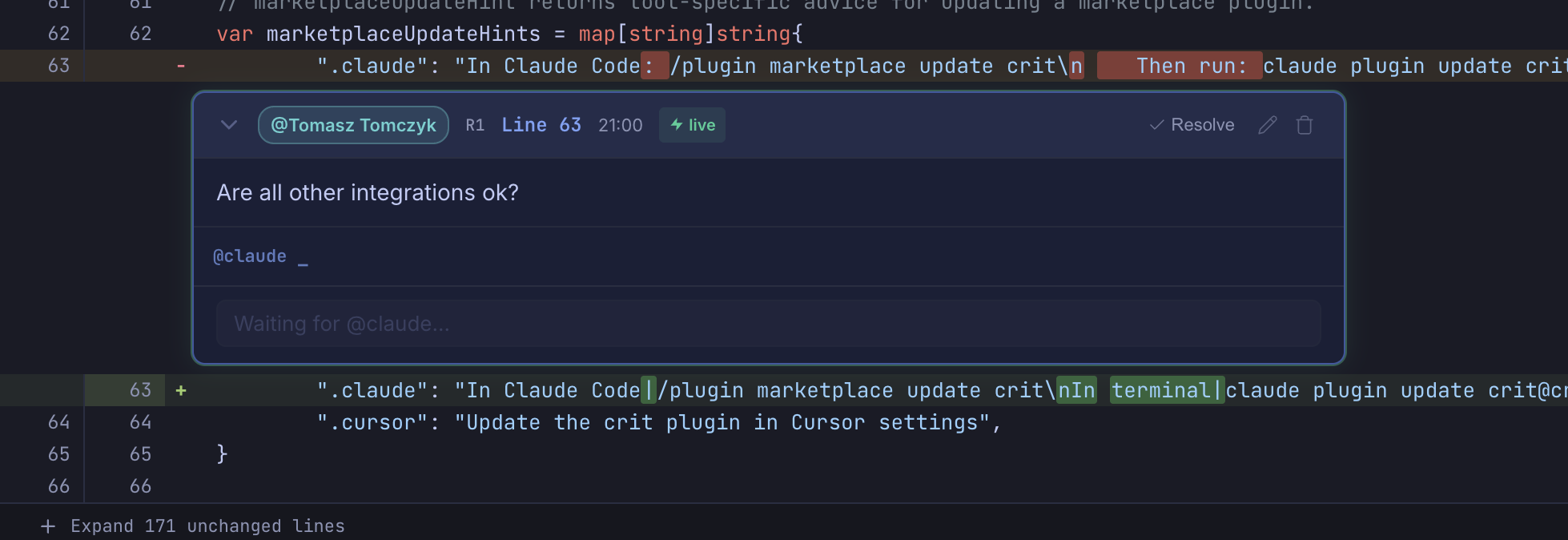
Click "Send now" on any comment during a review to get an AI agent response in real-time. This feature only appears when agent_cmd is configured.
The agent reads the comment context, addresses it (editing code if needed), and replies
inline - all while you continue reviewing.
Configure in ~/.crit.config.json (global config only):
{
  "agent_cmd": "claude --dangerously-skip-permissions -p"
}
Security note:
agent_cmdis read exclusively from your global~/.crit.config.json. Project-level.crit.config.jsonfiles cannot set it. This prevents a malicious repository from executing arbitrary commands when you trigger "Send to agent".
Permission modes
Agents need tool permissions to edit files on your behalf. How you grant them depends on your trust level:
| Mode | Command | What the agent can do |
|---|---|---|
| Full access | claude --dangerously-skip-permissions -p |
Read, write, and run any tool. Simplest option - recommended for trusted repos. |
| Selective access | claude --allowedTools Edit,Read,Bash,Write,Glob,Grep -p |
Only the listed tools are permitted. Good middle ground. |
| No permissions | claude -p |
The agent can respond to comments but cannot edit files. Useful for Q&A-only workflows. |
How it works
- The agent receives the comment text, quoted text (if text was selected), file path, and line range on stdin.
- The agent's stdout is captured and posted as a reply to the comment automatically.
- If the agent edits files, Crit detects the changes via file watching and updates the UI.
Live threads
After the first agent interaction, the comment becomes a live thread:
- Further replies you post in the thread are automatically sent to the agent - no need to click "Send to agent" again.
- The agent sees the full conversation history, so it can build on previous context.
- Live threads show a ⚡ live badge and green glow - the agent will respond immediately to further replies.
Supported agents
| Agent | agent_cmd value |
|---|---|
| Claude Code | claude -p |
| OpenCode | opencode run |
| Cline | cline --pipe |
| Aider | aider --message-file - |
| Cursor (experimental) | cursor --pipe |
Tip: Claude Code still prompts for permission in
-pmode. To let it edit files freely, useclaude --dangerously-skip-permissions -pinstead. The other agents already operate without permission prompts in their pipe/non-interactive modes.You can also specify a model with
--model(e.g.claude --model sonnet -p).
Everything else
- Per-branch review isolation. Each branch gets its own review file — switch branches freely without losing comments. Review data lives in
~/.crit/reviews/, not your repo. - Draft autosave. Close your browser mid-review and pick up exactly where you left off.
- Vim keybindings.
j/kto navigate,cto comment,Shift+Fto finish.?for the full reference. - Concurrent reviews. Each instance runs on its own port - review multiple plans at once.
- Syntax highlighting. Code blocks are highlighted and split per-line, so you can comment on individual lines inside a fence.
- Live file watching. The browser reloads automatically when the source file changes.
- Dark/light/system theme. Three-button pill in the header, persisted to localStorage.
- Configurable code font. Code-review Settings → Display → Code font lists coding/monospace fonts detected by the local Crit daemon, plus Default, System monospace, and a custom
font-familyfallback. Applies to code and diffs, and persists across sessions. - Local by default. Server binds to
127.0.0.1. Your files stay on your machine unless you explicitly share. Non-loopback listen hosts andpublic_urlrequire--allow-unauthenticated-network(orCRIT_ALLOW_UNAUTHENTICATED_NETWORK=1) because Crit has no network authentication — prefer SSH forwarding, Tailscale Serve to loopback, or Docker-p 127.0.0.1:…. - Collapsing generated files. Honors
linguist-generatedin.gitattributes— matching files appear collapsed by default. - No analytics or tracking. Crit collects zero telemetry. No usage stats, no crash reports, no phone-home. If we ever add anonymous usage statistics in the future, they will be explicitly opt-in.
- Update check. On startup, Crit makes one network request to check for a newer version and prints a notice if one is available. Set
CRIT_NO_UPDATE_CHECK=1to disable it.
Configuration
Crit supports persistent configuration via JSON files so you don't have to pass the same flags every time.
| File | Scope | Location |
|---|---|---|
~/.crit.config.json |
Global | Applies to all projects |
.crit.config.json |
Project | Repo root (from git rev-parse --show-toplevel) |
Project config overrides global. CLI flags and env vars override both.
crit config --generate > ~/.crit.config.json   # scaffold a starter config file
crit config                                    # view resolved config (merged global + project)
Config keys
All keys are optional — omit any you don't need.
| Key | Type | Default | Description |
|---|---|---|---|
port |
int | 0 (random) |
Port for the local server. 0 picks a random available port. |
host |
string | "127.0.0.1" |
Listen host (global/CLI/env only). Non-loopback values also require --allow-unauthenticated-network / CRIT_ALLOW_UNAUTHENTICATED_NETWORK=1. Prefer loopback + SSH/Tailscale/Docker host-loopback publish. |
no_open |
bool | false |
Don't auto-open the browser when starting a review. |
quiet |
bool | false |
On success, suppress daemon connect/start lines, integration tips, and the session summary. Errors, approved:, and the finish prompt are unchanged. |
output |
string | ~/.crit |
Crit data root for reviews. Reviews live in /reviews// (same layout as the default). |
author |
string | VCS user name | Author name shown on comments. Falls back to your configured VCS user name. |
forge |
string | "auto" |
Remote review provider: "auto", "github", or "gitlab". Auto-detection uses the repository remote; set this for ambiguous self-managed hosts. |
gitlab_url |
string | "https://gitlab.com" |
GitLab base URL used for every MR operation. Set once for a self-managed instance; MR URL arguments must use the same host. |
base_branch |
string | auto-detected | Base branch to diff against (e.g. "main", "develop"). Overrides auto-detection. |
ignore_patterns |
string[] | [".crit/"] |
File patterns to exclude from git-mode file lists. Global and project patterns are merged. |
auto_viewed_patterns |
string[] | [] |
File patterns auto-marked as viewed (collapsed) once when a review opens — e.g. ["*.lock", "generated/", "PLAN.md"]. Manually un-marking a file keeps it open. Global and project patterns are merged. |
cleanup_on_approve |
bool | true |
Automatically delete the review file when you approve with no unresolved comments. Set to false to preserve review history. |
notify_on_round_ready |
bool | false |
Opt in to a desktop notification when a review round becomes ready for you (after the agent finishes addressing comments). On macOS, install terminal-notifier (brew install terminal-notifier) so clicking the notification opens the review URL — without it, clicking falls back to AppleScript's display notification, which macOS attributes to Script Editor and activates that instead of your browser. |
no_update_check |
bool | false |
Don't check for new versions on startup. |
no_integration_check |
bool | false |
Skip the integration config freshness check on startup. |
vcs |
string | auto-detected | Preferred VCS backend: "git", "sl", or "jj". When set, crit uses this VCS instead of auto-detecting. Falls back to git if the configured VCS isn't available. Can also be set via --vcs CLI flag (flag takes precedence over config). |
live_cookie |
string | "" |
Cookie header value forwarded to the upstream app in live mode (e.g. "_crit_key=..."). Global or project. Prefer live_cookie_file for secrets. |
live_cookie_file |
string | "" |
Path to a file with upstream cookies for live mode (raw header lines or Netscape jar). Global or project; relative paths resolve from repo root. |
live_cdp_url |
string | "" |
Chrome DevTools URL (e.g. http://127.0.0.1:9222) to reuse browser cookies for the live upstream. Global or project. |
prompts |
object | {} |
Custom finish-hook templates (project overrides global per key). See Agent prompts. |
hooks |
object | {} |
Custom finish-hook commands executed at Finish/Approve (project overrides global per key). Deterministic side effects — crit pipes a JSON payload to stdin and sets CRIT_* env vars. See Command hooks. |
Agent prompts
Customize what Crit tells your agent when you Finish Review or Approve. Hooks are templates in global or project config (prompts map) and .crit/prompts/*.md files.
See the agent prompts guide for hook reference, template variables, trust flow, and examples.
Command hooks
Run your own scripts when you Finish Review or Approve — deterministic side effects, no LLM in the loop. Crit pipes a JSON payload to the hook's stdin and sets CRIT_* env vars (review path, session key, mode, unresolved count, files-with-comments, …). Keys and resolution mirror the prompt system (on_finish_unresolved / on_finish_approved, optionally :files / :diff / :live / :preview), and project hooks go through the same trust gate as project prompts.
# ~/.crit.config.json
{
  "hooks": {
    "on_finish_unresolved": "inline:rsync -a \"$CRIT_REVIEW_PATH\" ~/reviews/$CRIT_SESSION_KEY.json",
    "on_finish_approved":   "file:~/.crit/hooks/approved.sh"
  }
}
See the command hooks guide for the full env-var/stdin reference, trust flow, and examples (including the “snapshot commented-on files” recipe). Reference example hook scripts live under docs/example-hooks/ in the repo — they're documentation, not installed by crit install and not tracked among the integrations (hooks are opt-in and not used by default).
Global-only config keys
These keys can only be set in ~/.crit.config.json (global). Project-level .crit.config.json cannot override them — this prevents a malicious repository from hijacking local commands or redirecting share requests.
| Key | Type | Default | Description |
|---|---|---|---|
agent_cmd |
string | "" |
Shell command for "Send to agent" (e.g. "claude -p"). See Send to agent. |
open_cmd |
string | "" |
Custom command to open review URLs — receives the URL as its only argument (must be a single executable, no flags). Use when the browser isn't on the machine running crit, e.g. crit runs on a remote host over SSH and a small wrapper script opens the URL on your local machine. When unset, crit uses the platform default opener. |
share_targets |
array | implicit crit.md when absent | Deployment list with per-target name, url, default, proxy_auth, nested auth, and public share_consented. An explicit empty array disables sharing. |
auth_token |
string | "" |
Legacy singleton token; read only while share_targets is absent. |
share_url |
string | implicit "https://crit.md" |
Legacy singleton URL. An explicitly empty value disables sharing; migrate with crit config --migrate. |
public_url |
string | "" |
Advertised base URL for stderr and browser-open (e.g. https://machine.ts.net via tailscale serve). Listen address unchanged. Requires --allow-unauthenticated-network / CRIT_ALLOW_UNAUTHENTICATED_NETWORK=1. |
share_consented |
bool | false |
Written automatically to true after you confirm the first-time share prompt. Reset to false to see the prompt again. Not used when share_url is a custom (self-hosted) URL. |
proxy_auth |
bool | false |
When true, share / pull / unpublish / re-share use the browser popup relay instead of the local Go server contacting crit-web directly. Use when crit-web is behind an SSO reverse proxy that the terminal cannot authenticate against. No flag or env var — this is a property of the deployment, not a per-invocation choice. |
plan_approve_mode |
string | unset | Claude Code permission mode after Crit approves an ExitPlanMode hook: default, manual, acceptEdits, plan, auto, dontAsk, or bypassPermissions. The update uses destination: "session", so it lasts only for the current Claude Code session. See Claude Code plan approval mode. |
close_on_approve_after_ms |
int | unset (disabled) | Auto-close the review tab this many milliseconds after you Approve with no unresolved comments. Unset means no auto-close (current behavior); negative values are treated as unset. A Cancel button during the countdown skips the close for that approval. |
CLI flags
| Flag | Short | Equivalent config key | Description |
|---|---|---|---|
--port |
-p |
port |
Port to listen on |
--host |
host |
Listen host (default 127.0.0.1) |
|
--public-url |
public_url |
Advertised review URL (listen unchanged) | |
--allow-unauthenticated-network |
— | Required with non-loopback --host or any --public-url |
|
--no-open |
no_open |
Don't auto-open browser | |
--share-url |
share_url |
Share service URL | |
--output |
-o |
output |
Crit data root for reviews (/reviews//). |
--quiet |
-q |
quiet |
On success, suppress connect/start status, tips, and session summary |
--base-branch |
base_branch |
Base branch to diff against | |
--vcs |
vcs |
VCS backend (git, sl, or jj) |
|
--no-ignore |
Temporarily bypass all ignore patterns | ||
--version |
-v |
Print version and exit |
Live mode only (crit live — see crit live --help):
| Flag | Equivalent config key | Description |
|---|---|---|
--cookie |
live_cookie |
Upstream cookie value (repeatable) |
--cookie-file |
live_cookie_file |
File with upstream cookies |
--cdp-url |
live_cdp_url |
Chrome DevTools URL to reuse browser cookies |
Ignore patterns
Patterns from global and project configs are merged. Supported syntax:
| Pattern | Matches |
|---|---|
*.lock |
Files ending in .lock anywhere in tree |
vendor/ |
All files under vendor/ |
package-lock.json |
Exact filename anywhere in tree |
generated/*.pb.go |
Path prefix with glob (filepath.Match syntax) |
Use --no-ignore to temporarily bypass all patterns:
crit --no-ignore
Environment variables
| Variable | Description |
|---|---|
CRIT_PORT |
Default port for the local server |
CRIT_HOST |
Listen host (default 127.0.0.1) |
CRIT_PUBLIC_URL |
Advertised review URL (e.g. tailscale serve) |
CRIT_ALLOW_UNAUTHENTICATED_NETWORK |
Allow non-loopback host / public_url (1/true/yes/on) |
CRIT_SHARE_URL |
Override the share service URL |
CRIT_AUTH_TOKEN |
Override the auth token (skips crit auth login) |
CRIT_NO_UPDATE_CHECK |
Disable the update check on startup |
CRIT_NO_INTEGRATION_CHECK |
Skip integration config freshness checks |
Other Install Methods
Build from Source
Requires Go 1.26+:
git clone https://github.com/tomasz-tomczyk/crit.git
cd crit
go build -o crit ./cmd/crit
mv crit /usr/local/bin/
Go
go install github.com/tomasz-tomczyk/crit/cmd/crit@latest
Nix
nix run github:tomasz-tomczyk/crit -- --help
Or add it to a flake.nix:
inputs.crit.url = "github:tomasz-tomczyk/crit";
Download Binary
Grab the latest binary for your platform from Releases.
Windows
Native Windows: download crit-windows-amd64.exe (or crit-windows-arm64.exe) from Releases, rename to crit.exe, and place it on your PATH.
WSL: install the Linux binary as you would on Linux (go install, nix run, or download crit-linux-amd64 from Releases). Crit detects WSL and opens URLs in your Windows host browser via wslview / powershell.exe / cmd.exe.
Docker (sandboxed agents)
For running crit alongside an AI agent inside a container, with the review UI reachable from your host browser, see integrations/docker/. Includes a working Dockerfile + entrypoint.sh that bridges crit's loopback-bound server via socat. Publish with -p 127.0.0.1:8080:8080 so the host mapping stays on loopback.
Acknowledgements
Crit embeds the following open-source libraries:
- markdown-it: Markdown parser
- highlight.js: Syntax highlighting
- Mermaid: Diagram rendering