
💾🎉 copyparty
turn almost any device into a file server with resumable uploads/downloads using any web browser
- server only needs Python (2 or 3), all dependencies optional
- 🔌 protocols: http(s) // webdav // sftp // ftp(s) // tftp // smb/cifs
- 📱 android app // iPhone shortcuts
👉 Get started! or visit the read-only demo server 👀 running on a nuc in my basement
📷 screenshots: browser // upload // unpost // thumbnails // search // fsearch // zip-DL // md-viewer
🎬 videos: upload // cli-upload // race-the-beam // 👉 feature-showcase (youtube)
built in Norway 🇳🇴 with contributions from not-norway
readme toc
- top
- quickstart - just run copyparty-sfx.py -- that's it! 🎉
- mirrors - other places to download copyparty from
- at home - make it accessible over the internet
- on servers - you may also want these, especially on servers
- features - also see comparison to similar software
- testimonials - small collection of user feedback
- quickstart - just run copyparty-sfx.py -- that's it! 🎉
- motivations - project goals / philosophy
- notes - general notes
- bugs - roughly sorted by chance of encounter
- not my bugs - same order here too
- breaking changes - upgrade notes
- FAQ - "frequently" asked questions
- accounts and volumes - per-folder, per-user permissions
- the browser - accessing a copyparty server using a web-browser
- tabs - the main tabs in the ui
- hotkeys - the browser has the following hotkeys
- navpane - switching between breadcrumbs or navpane
- thumbnails - press
gor田to toggle grid-view instead of the file listing - zip downloads - download folders (or file selections) as
ziportarfiles - uploading - drag files/folders into the web-browser to upload
- file-search - dropping files into the browser also lets you see if they exist on the server
- unpost - undo/delete accidental uploads
- self-destruct - uploads can be given a lifetime
- race the beam - download files while they're still uploading (demo video)
- incoming files - the control-panel shows the ETA for all incoming files
- file manager - cut/paste, rename, and delete files/folders (if you have permission)
- shares - share a file or folder by creating a temporary link
- batch rename - select some files and press
F2to bring up the rename UI - rss feeds - monitor a folder with your RSS reader
- opds feeds - browse and download files from your e-book reader
- recent uploads - list all recent uploads
- media player - plays almost every audio format there is
- playlists - create and play m3u8 playlists
- creating a playlist - with a standalone mediaplayer or copyparty
- audio equalizer - and dynamic range compressor
- fix unreliable playback on android - due to phone / app settings
- textfile viewer - with realtime streaming of logfiles and such (demo)
- markdown viewer - and there are two editors
- markdown vars - dynamic docs with serverside variable expansion
- other tricks
- searching - search by size, date, path/name, mp3-tags, ...
- server config - using arguments or config files, or a mix of both
- version-checker - sleep better at night
- logging - serverlog is sent to stdout by default
- zeroconf - announce enabled services on the LAN (pic)
- qr-code - print a qr-code (screenshot) for quick access
- ftp server - an FTP server can be started using
--ftp 3921 - sftp server - goes roughly 700 MiB/s (slower than webdav and ftp)
- webdav server - with read-write support
- connecting to webdav from windows - using the GUI
- tftp server - a TFTP server (read/write) can be started using
--tftp 3969 - smb server - unsafe, slow, not recommended for wan
- wopi server - edit office documents in the web-ui
- browser ux - tweaking the ui
- opengraph - discord and social-media embeds
- file deduplication - enable symlink-based upload deduplication
- file indexing - enable music search, upload-undo, and better dedup
- exclude-patterns - to save some time
- filesystem guards - avoid traversing into other filesystems
- periodic rescan - filesystem monitoring
- u2sz - configure upload-chunking
- upload rules - set upload rules using volflags
- compress uploads - files can be autocompressed on upload
- chmod and chown - per-volume filesystem-permissions and ownership
- other flags
- descript.ion - add a description to each file in a folder
- dothidden - cosmetically hide specific files in a folder
- thumbnail pregen - if you want to pre-generate everything on startup
- database location - in-volume (
.hist/up2k.db, default) or somewhere else - metadata from audio files - set
-e2tto index tags on upload- metadata from xattrs - unix extended file attributes
- file parser plugins - provide custom parsers to index additional tags
- event hooks - trigger a program on uploads, renames etc (examples)
- zeromq - event-hooks can send zeromq messages
- upload events - the older, more powerful approach (examples)
- handlers - redefine behavior with plugins (examples)
- ip auth - autologin based on IP range (CIDR)
- restrict to ip - limit a user to certain IP ranges (CIDR)
- identity providers - replace copyparty passwords with oauth and such
- generic header auth - other ways to auth by header
- user-changeable passwords - if permitted, users can change their own passwords
- using the cloud as storage - connecting to an aws s3 bucket and similar
- hiding from google - tell search engines you don't wanna be indexed
- themes
- complete examples
- listen on port 80 and 443 - become a real webserver
- reverse-proxy - running copyparty next to other websites
- real-ip - teaching copyparty how to see client IPs
- reverse-proxy performance
- permanent cloudflare tunnel - if you have a domain and want to get your copyparty online real quick
- prometheus - metrics/stats can be enabled
- other extremely specific features - you'll never find a use for these
- custom mimetypes - change the association of a file extension
- GDPR compliance - imagine using copyparty professionally...
- feature chickenbits - buggy feature? rip it out
- feature beefybits - force-enable features with known issues on your OS/env
- packages - the party might be closer than you think
- arch package -
pacman -S copyparty(in arch linux extra) - fedora package - does not exist yet
- gentoo ::guru package -
emerge www-servers/copyparty::guru(in ::guru) - homebrew formulae -
brew install copyparty ffmpeg - nix package -
nix profile install github:9001/copyparty - nixos module
- arch package -
- browser support - TLDR: yes
- server hall of fame - unexpected things that run copyparty
- client examples - interact with copyparty using non-browser clients
- folder sync - sync folders to/from copyparty
- mount as drive - a remote copyparty server as a local filesystem
- android app - upload to copyparty with one tap
- iOS shortcuts - there is no iPhone app, but
- performance - defaults are usually fine - expect
8 GiB/sdownload,1 GiB/supload- client-side - when uploading files
- security - there is a discord server with announcements
- recovering from crashes
- client crashes
- firefox wsod - firefox 87 can crash during uploads
- client crashes
- HTTP API - see devnotes
- dependencies - mandatory deps
- optional dependencies - enable bonus features
- dependency chickenbits - prevent loading an optional dependency
- dependency unvendoring - force use of system modules
- optional gpl stuff
- optional dependencies - enable bonus features
- sfx - the self-contained "binary" (recommended!)
- copyparty.exe - download copyparty.exe (win8+) or copyparty32.exe (win7+)
- zipapp - another emergency alternative, copyparty.pyz
- install on android
- install on iOS
- reporting bugs - ideas for context to include, and where to submit them
- devnotes - for build instructions etc, see ./docs/devnotes.md


quickstart
just run copyparty-sfx.py -- that's it! 🎉
ℹ️ the sfx is a self-extractor which unpacks an embedded
tar.gzinto$TEMP-- if this looks too scary, you can use the zipapp which has slightly worse performance
- or install through pypi:
python3 -m pip install --user -U copyparty - or if you cannot install python, you can use copyparty.exe instead
- or install on arch / homebrew ╱ on NixOS ╱ through nix
- or if you are on android, install copyparty in termux
- or maybe an iPhone or iPad? install in a-Shell on iOS
- or maybe you have a synology nas / dsm
- or if you have uv installed, run
uv tool run copyparty - or if your computer is messed up and nothing else works, try the pyz
- or if your OS is dead, give the bootable flashdrive / cd-rom a spin
- or if you don't trust copyparty yet and want to isolate it a little, then...
- ...maybe prisonparty to create a tiny chroot (very portable),
- ...or bubbleparty to wrap it in bubblewrap (much better)
- or if you prefer to use docker 🐋 you can do that too
- docker has all deps built-in, so skip this step:
enable thumbnails (images/audio/video), media indexing, and audio transcoding by installing some recommended deps:
- Alpine:
apk add py3-pillow ffmpeg - Debian:
apt install --no-install-recommends python3-pil ffmpeg - Fedora: rpmfusion +
dnf install python3-pillow ffmpeg --allowerasing - FreeBSD:
pkg install py311-sqlite3 py311-pillow ffmpeg - MacOS:
port install py-Pillow ffmpeg - MacOS (alternative):
brew install pillow ffmpeg - Windows:
python -m pip install --user -U Pillow - see optional dependencies to enable even more features
running copyparty without arguments (for example doubleclicking it on Windows) will give everyone read/write access to the current folder; you may want accounts and volumes
or see some usage examples for inspiration, or the complete windows example
some recommended options:
-e2dsaenables general file indexing-e2tsenables audio metadata indexing (needs either FFprobe or Mutagen)-v /mnt/music:/music:r:rw,foo -a foo:barshares/mnt/musicas/music,readable by anyone, and read-write for userfoo, passwordbar- replace
:r:rw,foowith:r,footo only make the folder readable byfooand nobody else - see accounts and volumes (or
--help-accounts) for the syntax and other permissions
- replace
mirrors
other places to download copyparty from (non-github links):
- https://copyparty.eu/ (hetzner, finland, official mirror):
- https://copyparty.eu/py = https://copyparty.eu/copyparty-sfx.py = the sfx
- https://copyparty.eu/en = https://copyparty.eu/copyparty-en.py = the english-only sfx
- https://copyparty.eu/pyz = https://copyparty.eu/copyparty.pyz = the zipapp
- https://copyparty.eu/enz = https://copyparty.eu/copyparty-en.pyz = the enterprise pyz
- https://copyparty.eu/cli = online cli helptext
DO NOT download from sourceforge
at home
make it accessible over the internet by starting a cloudflare quicktunnel like so:
first download cloudflared and then start the tunnel with cloudflared tunnel --url http://127.0.0.1:3923
as the tunnel starts, it will show a URL which you can share to let anyone browse your stash or upload files to you
but if you have a domain, then you probably want to skip the random autogenerated URL and instead make a permanent cloudflare tunnel
since people will be connecting through cloudflare, run copyparty with --xff-hdr cf-connecting-ip to detect client IPs correctly
on servers
you may also want these, especially on servers:
- contrib/systemd/copyparty.service to run copyparty as a systemd service (see guide inside)
- contrib/systemd/prisonparty.service to run it in a chroot (for extra security)
- contrib/podman-systemd/ to run copyparty in a Podman container as a systemd service (see guide inside)
- contrib/openrc/copyparty to run copyparty on Alpine / Gentoo
- contrib/rc/copyparty to run copyparty on FreeBSD
- nixos module to run copyparty on NixOS hosts
- contrib/nginx/copyparty.conf to reverse-proxy behind nginx (for better https)
because the following environment variables are commonly used in service-scripts, they are understood by copyparty:
NOTIFY_SOCKETas provided by systemd with service type=notify (see systemd/copyparty.service above)S6_NOTIFY_FDfor dinitready-notification = pipevar:S6_NOTIFY_FDand s6 supervision suite notification support
and remember to open the ports you want; here's a complete example including every feature copyparty has to offer:
firewall-cmd --permanent --add-port={80,443,3921,3922,3923,3945,3990}/tcp  # --zone=libvirt
firewall-cmd --permanent --add-port=12000-12099/tcp  # --zone=libvirt
firewall-cmd --permanent --add-port={69,1900,3969,5353}/udp  # --zone=libvirt
firewall-cmd --reload
(69:tftp, 1900:ssdp, 3921:ftp, 3922:sftp, 3923:http/https, 3945:smb, 3969:tftp, 3990:ftps, 5353:mdns, 12000:passive-ftp)
features
also see comparison to similar software
- backend stuff
- ☑ IPv6 + unix-sockets
- ☑ multiprocessing (actual multithreading)
- ☑ volumes (mountpoints)
- ☑ accounts
- ☑ ftp server
- ☑ tftp server
- ☑ webdav server
- ☑ smb/cifs server
- ☑ qr-code for quick access
- ☑ upnp / zeroconf / mdns / ssdp
- ☑ event hooks / script runner
- ☑ reverse-proxy support
- ☑ cross-platform (Windows, Linux, Macos, Android, iOS, FreeBSD, arm32/arm64, ppc64le, s390x, risc-v/riscv64, SGI IRIX)
- upload
- ☑ basic: plain multipart, ie6 support
- ☑ up2k: js, resumable, multithreaded
- no filesize limit! even on Cloudflare
- ☑ stash: simple PUT filedropper
- ☑ filename randomizer
- ☑ write-only folders
- ☑ unpost: undo/delete accidental uploads
- ☑ self-destruct (specified server-side or client-side)
- ☑ race the beam (almost like peer-to-peer)
- ☑ symlink/discard duplicates (content-matching)
- download
- ☑ single files in browser
- ☑ folders as zip / tar files
- ☑ FUSE client (read-only)
- browser
- ☑ navpane (directory tree sidebar)
- ☑ file manager (cut/paste, delete, batch-rename)
- ☑ audio player (with OS media controls and opus/mp3 transcoding)
- ☑ play video files as audio (converted on server)
- ☑ create and play m3u8 playlists
- ☑ image gallery with webm player
- ☑ and cbz manga/comics reader
- ☑ textfile browser with syntax highlighting
- ☑ realtime streaming of growing files (logfiles and such)
- ☑ thumbnails
- ☑ ...of images using Pillow, pyvips, or FFmpeg
- ☑ ...of RAW images using libraw-dcraw_emu or rawpy
- ☑ ...of videos using FFmpeg
- ☑ ...of audio (spectrograms) using FFmpeg
- ☑ cache eviction (max-age; maybe max-size eventually)
- ☑ multilingual UI (english, norwegian, chinese, add your own))
- ☑ SPA (browse while uploading)
- server indexing
- ☑ locate files by contents
- ☑ search by name/path/date/size
- ☑ search by ID3-tags etc.
- client support
- ☑ folder sync (one-way only; full sync will never be supported)
- ☑ curl-friendly
- ☑ opengraph (discord embeds)
- markdown


PS: something missing? post any crazy ideas you've got as a feature request or discussion 🤙
testimonials
small collection of user feedback
good enough, surprisingly correct, certified good software, just works, why, wow this is better than nextcloud
- UI просто ужасно. Если буду описывать детально не смогу удержаться в рамках приличий
motivations
project goals / philosophy
- inverse unix philosophy -- do all the things, and do an okay job
- quick drop-in service to get a lot of features in a pinch
- some of the alternatives might be a better fit for you
- run anywhere, support everything
- as many web-browsers and python versions as possible
- every browser should at least be able to browse, download, upload files
- be a good emergency solution for transferring stuff between ancient boxes
- minimal dependencies
- but optional dependencies adding bonus-features are ok
- everything being plaintext makes it possible to proofread for malicious code
- no preparations / setup necessary, just run the sfx (which is also plaintext)
- as many web-browsers and python versions as possible
- adaptable, malleable, hackable
- no build steps; modify the js/python without needing node.js or anything like that
becoming rich is specifically not a motivation, but if you wanna donate then see my github profile regarding donations for my FOSS stuff in general (also THANKS!)
notes
general notes:
- paper-printing is affected by dark/light-mode! use lightmode for color, darkmode for grayscale
- because no browsers currently implement the media-query to do this properly orz
browser-specific:
- iPhone/iPad: use Firefox to download files
- Android-Chrome: increase "parallel uploads" for higher speed (android bug)
- Android-Firefox: takes a while to select files (their fix for ☝️)
- Desktop-Firefox:
may use gigabytes of RAM if your files are massiveseems to be OK now - Desktop-Firefox: may stop you from unplugging USB flashdrives until you visit
about:memoryand clickMinimize memory usage
server-os-specific:
- RHEL8 / Rocky8: you can run copyparty using
/usr/libexec/platform-python
server notes:
- pypy is supported but regular cpython is faster if you enable the database
bugs
roughly sorted by chance of encounter
general:
--th-ff-jpgmay fix video thumbnails on some FFmpeg versions (macos, some linux)--th-ff-swrmay fix audio thumbnails on some FFmpeg versions- if the
up2k.db(filesystem index) is on a samba-share or network disk, you'll get unpredictable behavior if the share is disconnected for a bit- use
--histor thehistvolflag (-v [...]:c,hist=/tmp/foo) to place the db and thumbnails on a local disk instead - or, if you only want to move the db (and not the thumbnails), then use
--dbpathor thedbpathvolflag
- use
- all volumes must exist / be available on startup; up2k (mtp especially) gets funky otherwise
- probably more, pls let me know
python 3.4 and older (including 2.7):
- many rare and exciting edge-cases because python didn't handle EINTR yet
- downloads from copyparty may suddenly fail, but uploads should be fine
- many rare and exciting edge-cases because python didn't handle EINTR yet
python 2.7 on Windows:
- cannot index non-ascii filenames with
-e2d - cannot handle filenames with mojibake
- cannot index non-ascii filenames with
if you have a new exciting bug to share, see reporting bugs
not my bugs
same order here too
Chrome issue 1317069 -- if you try to upload a folder which contains symlinks by dragging it into the browser, the symlinked files will not get uploaded
Chrome issue 1352210 -- plaintext http may be faster at filehashing than https (but also extremely CPU-intensive)
Chrome issue 383568268 -- filereaders in webworkers can OOM / crash the browser-tab
- copyparty has a workaround which seems to work well enough
Firefox issue 1790500 -- entire browser can crash after uploading ~4000 small files
Windows: Uploading from a webbrowser may fail with "directory iterator got stuck" due to the max path length; try moving the files somewhere shorter before uploading
Android: music playback randomly stops due to battery usage settings
iPhones: the volume control doesn't work because apple doesn't want it to
AudioContextwill probably never be a viable workaround as apple introduces new issues faster than they fix current ones
iPhones: music volume goes on a rollercoaster during song changes
- nothing I can do about it because
AudioContextis still broken in safari
- nothing I can do about it because
iPhones: the preload feature (in the media-player-options tab) can cause a tiny audio glitch 20sec before the end of each song, but disabling it may cause worse iOS bugs to appear instead
- just a hunch, but disabling preloading may cause playback to stop entirely, or possibly mess with bluetooth speakers
- tried to add a tooltip regarding this but looks like apple broke my tooltips
iPhones: preloaded awo files make safari log MEDIA_ERR_NETWORK errors as playback starts, but the song plays just fine so eh whatever
- awo, opus-weba, is apple's new take on opus support, replacing opus-caf which was technically limited to cbr opus
iPhones: preloading another awo file may cause playback to stop
- can be somewhat mitigated with
mp.au.play()inmp.onpreloadbut that can hit a race condition in safari that starts playing the same audio object twice in parallel...
- can be somewhat mitigated with
Windows: folders cannot be accessed if the name ends with
.- python or windows bug
Windows: msys2-python 3.8.6 occasionally throws
RuntimeError: release unlocked lockwhen leaving a scoped mutex in up2k- this is an msys2 bug, the regular windows edition of python is fine
VirtualBox: sqlite throws
Disk I/O Errorwhen running in a VM and the up2k database is in a vboxsf- use
--histor thehistvolflag (-v [...]:c,hist=/tmp/foo) to place the db and thumbnails inside the vm instead- or, if you only want to move the db (and not the thumbnails), then use
--dbpathor thedbpathvolflag
- or, if you only want to move the db (and not the thumbnails), then use
- also happens on mergerfs, so put the db elsewhere
- use
Ubuntu: dragging files from certain folders into firefox or chrome is impossible
- due to snap security policies -- see
snap connections firefoxfor the allowlist,removable-mediapermits all of/mntand/mediaapparently
- due to snap security policies -- see
breaking changes
upgrade notes
1.9.16(2023-11-04):--stats/prometheus:cpp_bansrenamed tocpp_active_bans, and that +cpp_uptimeare gauges
1.6.0(2023-01-29):- http-api: delete/move is now
POSTinstead ofGET - everything other than
GETandHEADmust pass cors validation
- http-api: delete/move is now
1.5.0(2022-12-03): new chunksize formula for files larger than 128 GiB- users: upgrade to the latest cli uploader if you use that
- devs: update third-party up2k clients (if those even exist)
FAQ
"frequently" asked questions
CopyParty?
- nope! the name is either copyparty (all-lowercase) or Copyparty -- it's one word after all :>
what is a volflag?
- per-volume configuration; many (not all) global-options can be set as volflags, and most (not all) volflags can be set as global-options; complete list of volflags
what is a volume?
- a mapping from a URL (
/music/) to a folder on your server's local filesystem (C:\Users\ed\Music) which can then be accessed through copyparty, depending on the permissions and options you set on it -- see accounts and volumes
- a mapping from a URL (
can I change the 🌲 spinning pine-tree loading animation?
- yeah... :-(
is it possible to block read-access to folders unless you know the exact URL for a particular file inside?
- yes, using the
gpermission, see the examples there - you can also do this with linux filesystem permissions;
chmod 111 musicwill make it possible to access files and folders inside themusicfolder but not list the immediate contents -- also works with other software, not just copyparty
- yes, using the
can I link someone to a password-protected volume/file by including the password in the URL?
- yes, by adding
?pw=hunter2to the end; replace?with&if there are parameters in the URL already, meaning it contains a?near the end- if you have enabled
--usernamesthen do?pw=username:passwordinstead ?pwcan be disabled with--pw-urlp=Abut this breaks support for many clients
- if you have enabled
- yes, by adding
how do I stop
.histfolders from appearing everywhere on my HDD?- by default, a
.histfolder is created inside each volume for the filesystem index, thumbnails, audio transcodes, and markdown document history. Use the--histglobal-option or thehistvolflag to move it somewhere else; see database location
- by default, a
can I make copyparty download a file to my server if I give it a URL?
- yes, using hooks
firefox refuses to connect over https, saying "Secure Connection Failed" or "SEC_ERROR_BAD_SIGNATURE", but the usual button to "Accept the Risk and Continue" is not shown
- firefox has corrupted its certstore; fix this by exiting firefox, then find and delete the file named
cert9.dbsomewhere in your firefox profile folder
- firefox has corrupted its certstore; fix this by exiting firefox, then find and delete the file named
the server keeps saying
thank you for playingwhen I try to access the website- you've gotten banned for malicious traffic! if this happens by mistake, and you're running a reverse-proxy and/or something like cloudflare, see real-ip on how to fix this
copyparty seems to think I am using http, even though the URL is https
- your reverse-proxy is not sending the
X-Forwarded-Proto: httpsheader; this could be because your reverse-proxy itself is confused. Ensure that none of the intermediates (such as cloudflare) are terminating https before the traffic hits your entrypoint
- your reverse-proxy is not sending the
thumbnails are broken (you get a colorful square which says the filetype instead)
- you need to install
FFmpegorPillow; see thumbnails
- you need to install
thumbnails are broken, specifically for photos and videos taken by iphones
- the docker image and bootable flashdrive are not able to read heif/heic images and h265/HEVC video due to legal reasons
thumbnails are broken (some images appear, but other files just get a blank box, and/or the broken-image placeholder)
- probably due to a reverse-proxy messing with the request URLs and stripping the query parameters (
?th=w), so check your URL rewrite rules - could also be due to incorrect caching settings in reverse-proxies and/or CDNs, so make sure that nothing is set to ignore the query string
- could also be due to misbehaving privacy-related browser extensions, so try to disable those
- probably due to a reverse-proxy messing with the request URLs and stripping the query parameters (
i want to learn python and/or programming and am considering looking at the copyparty source code in that occasion
 _|  _      __   _  _|_
(_| (_)     | | (_)  |_
accounts and volumes
per-folder, per-user permissions - if your setup is getting complex, consider making a config file instead of using arguments
- much easier to manage, and you can modify the config at runtime with
systemctl reload copypartyor more conveniently using the[reload cfg]button in the control-panel (if the user hasa/admin in any volume)- changes to the
[global]config section requires a restart to take effect
- changes to the
- when using config-files, ignore all the
-aand-vstuff below, and CTRL-Fconfig file exampleon this page instead
a quick summary can be seen using --help-accounts
configuring accounts/volumes with arguments:
-a usr:pwdadds accountusrwith passwordpwd-v .::radds current-folder.as the webroot,readable by anyone- the syntax is
-v src:dst:perm:perm:...so local-path, url-path, and one or more permissions to set - granting the same permissions to multiple accounts:
-v .::r,usr1,usr2:rw,usr3,usr4= usr1/2 read-only, 3/4 read-write
- the syntax is
permissions:
r(read): browse folder contents, download files, download as zip/tar, see filekeys/dirkeysw(write): upload files, move/copy files into this folderm(move): move files/folders from this folderd(delete): delete files/folders.(dots): user can ask to show dotfiles in directory listingsg(get): only download files, cannot see folder contents or zip/tarG(upget): same asgexcept uploaders get to see their own filekeys (seefkin examples below)h(html): same asgexcept folders return their index.html, and filekeys are not necessary for index.htmla(admin): can see upload time, uploader IPs, config-reloadA("all"): same asrwmda.(read/write/move/delete/admin/dotfiles)
examples:
- add accounts named u1, u2, u3 with passwords p1, p2, p3:
-a u1:p1 -a u2:p2 -a u3:p3 - make folder
/srvthe root of the filesystem, read-only by anyone:-v /srv::r - make folder
/mnt/musicavailable at/music, read-only for u1 and u2, read-write for u3:-v /mnt/music:music:r,u1,u2:rw,u3- unauthorized users accessing the webroot can see that the
musicfolder exists, but cannot open it
- unauthorized users accessing the webroot can see that the
- make folder
/mnt/incomingavailable at/inc, write-only for u1, read-move for u2:-v /mnt/incoming:inc:w,u1:rm,u2- unauthorized users accessing the webroot can see that the
incfolder exists, but cannot open it u1can open theincfolder, but cannot see the contents, only upload new files to itu2can browse it and move files from/incinto any folder whereu2has write-access
- unauthorized users accessing the webroot can see that the
- make folder
/mnt/ssavailable at/i, read-write for u1, get-only for everyone else, and enable filekeys:-v /mnt/ss:i:rw,u1:g:c,fk=4c,fk=4sets thefk(filekey) volflag to 4, meaning each file gets a 4-character accesskeyu1can upload files, browse the folder, and see the generated filekeys- other users cannot browse the folder, but can access the files if they have the full file URL with the filekey
- replacing the
gpermission withwgwould let anonymous users upload files, but not see the required filekey to access it - replacing the
gpermission withwGwould let anonymous users upload files, receiving a working direct link in return
if you want to grant access to all users who are logged in, the group acct will always contain all known users, so for example -v /mnt/music:music:r,@acct
- to do the opposite, granting access to everyone who is NOT logged in.
*,-@acctdoes the trick, for example-v /srv/welcome:welcome:r,*,-@acct - single users can also be subtracted from a group:
@admins,-james
anyone trying to bruteforce a password gets banned according to --ban-pw; default is 24h ban for 9 failed attempts in 1 hour
and if you want to use config files instead of commandline args (good!) then here's the same examples as a configfile; save it as foobar.conf and use it like this: python copyparty-sfx.py -c foobar.conf
- you can also
PRTY_CONFIG=foobar.conf python copyparty-sfx.py(convenient in docker etc)
config file example:
[accounts]
  u1: p1  # create account "u1" with password "p1"
  u2: p2  #  (note that comments must have
  u3: p3  #   two spaces before the # sign)

[groups]
  g1: u1, u2  # create a group

[/]     # this URL will be mapped to...
  /srv  # ...this folder on the server filesystem
  accs:
    r: *  # read-only for everyone, no account necessary

[/music]       # create another volume at this URL,
  /mnt/music   # which is mapped to this folder
  accs:
    r: u1, u2  # only these accounts can read,
    r: @g1     # (exactly the same, just with a group instead)
    r: @acct   # (alternatively, ALL users who are logged in)
    rw: u3     # and only u3 can read-write

[/inc]
  /mnt/incoming
  accs:
    w: u1   # u1 can upload but not see/download any files,
    rm: u2  # u2 can browse + move files out of this volume

[/i]
  /mnt/ss
  accs:
    rw: u1  # u1 can read-write,
    g: *    # everyone can access files if they know the URL
  flags:
    fk: 4   # each file URL will have a 4-character password
shadowing
hiding specific subfolders by mounting another volume on top of them
for example -v /mnt::r -v /var/empty:web/certs: (note: no permissions) mounts the server folder /mnt as the webroot, but another volume is mounted at /web/certs -- so visitors can only see the contents of /mnt and /mnt/web (at URLs / and /web), but not /mnt/web/certs because URL /web/certs is mapped to /var/empty
to fully unmap it from the filesystem, specify //NULL instead of a real path such as /var/empty, so for example -v /mnt::r -v //NULL:web/certs: ensures /web/certs will never be accessible by anyone
the example config file right above this section may explain this better; the first volume / is mapped to /srv which means http://127.0.0.1:3923/music would try to read /srv/music on the server filesystem, but since there's another volume at /music mapped to /mnt/music then it'll go to /mnt/music instead
so, to shadow a file/folder, define a volume but leave out the accs: section
ℹ️ this also works for single files, because files can also be volumes
config file example for unmapping folders by shadowing:
[/drives]
  /mnt   # url "/drives" goes to "/mnt"
  accs:
    r: *  # everyone can read

[/drives/foo/bar]
  //NULL  # blocks access to "/mnt/foo/bar"
dotfiles
unix-style hidden files/folders by starting the name with a dot
anyone can access these if they know the name, but they normally don't appear in directory listings
a client can request to see dotfiles in directory listings if global option -ed is specified, or the volume has volflag dots, or the user has permission .
for shares, the
dotsvolflag is ignored
dotfiles do not appear in search results unless one of the above is true, and the global option / volflag dotsrch is set
even if user has permission to see dotfiles, they are default-hidden unless
--see-dotsis set, and/or user has enabled thedotfilesoption in the settings tab
config file example, where the same permission to see dotfiles is given in two different ways just for reference:
[/foo]
  /srv/foo
  accs:
    r.: ed   # user "ed" has read-access + dot-access in this volume;
             # dotfiles are visible in listings, but not in searches
  flags:
    dotsrch  # dotfiles will now appear in search results too
    dots     # another way to let everyone see dotfiles in this vol
the browser
accessing a copyparty server using a web-browser

tabs
the main tabs in the ui
[🔎]search by size, date, path/name, mp3-tags ...[🧯]unpost: undo/delete accidental uploads[🚀]and[🎈]are the uploaders[📂]mkdir: create directories[📝]new-file: create a new textfile[📟]send-msg: either to server-log or into textfiles if--urlform save[🎺]audio-player config options[⚙️]general client config options
hotkeys
the browser has the following hotkeys (always qwerty)
?show hotkeys helpBtoggle breadcrumbs / navpaneI/Kprev/next folderMparent folder (or unexpand current)Vtoggle folders / textfiles in the navpaneGtoggle list / grid view -- same as田bottom-rightTtoggle thumbnails / iconsESCclose various thingsctrl-Kdelete selected files/foldersctrl-Xcut selected files/foldersctrl-Ccopy selected files/folders to clipboardctrl-Vpaste (move/copy)Ydownload selected filesF2rename selected file/folder- when a file/folder is selected (in not-grid-view):
Up/Downmove cursor- shift+
Up/Downselect and move cursor - ctrl+
Up/Downmove cursor and scroll viewport Spacetoggle file selectionCtrl-Atoggle select all
- when a textfile is open:
I/Kprev/next textfileStoggle selection of open fileMclose textfile
- when playing audio:
J/Lprev/next songU/Oskip 10sec back/forward0..9jump to 0%..90%Pplay/pause (also starts playing the folder)Ydownload file
- when viewing images / playing videos:
J/L, Left/Rightprev/next fileHome/Endfirst/last fileFtoggle fullscreenStoggle selectionRrotate clockwise (shift=ccw)Ydownload fileEscclose viewer- videos:
U/Oskip 10sec back/forward0..9jump to 0%..90%P/K/Spaceplay/pauseMmuteCcontinue playing next videoVloop entire file[loop range (start)]loop range (end)
- when the navpane is open:
A/Dadjust tree width
- in the grid view:
Stoggle multiselect- shift+
A/Dzoom
- in the markdown editor:
^ssave^hheader^kautoformat table^ujump to next unicode character^etoggle editor / preview^up, ^downjump paragraphs
navpane
switching between breadcrumbs or navpane
click the 🌲 or pressing the B hotkey to toggle between breadcrumbs path (default), or a navpane (tree-browser sidebar thing)
[+]and[-](or hotkeysA/D) adjust the size[🎯]jumps to the currently open folder[📃]toggles between showing folders and textfiles[📌]shows the name of all parent folders in a docked panel[a]toggles automatic widening as you go deeper[↵]toggles wordwrap[👀]show full name on hover (if wordwrap is off)
thumbnails
press g or 田 to toggle grid-view instead of the file listing and t toggles icons / thumbnails
- can be made default globally with
--gridor per-volume with volflaggrid - enable by adding
?imgsto a link, or disable with?imgs=0
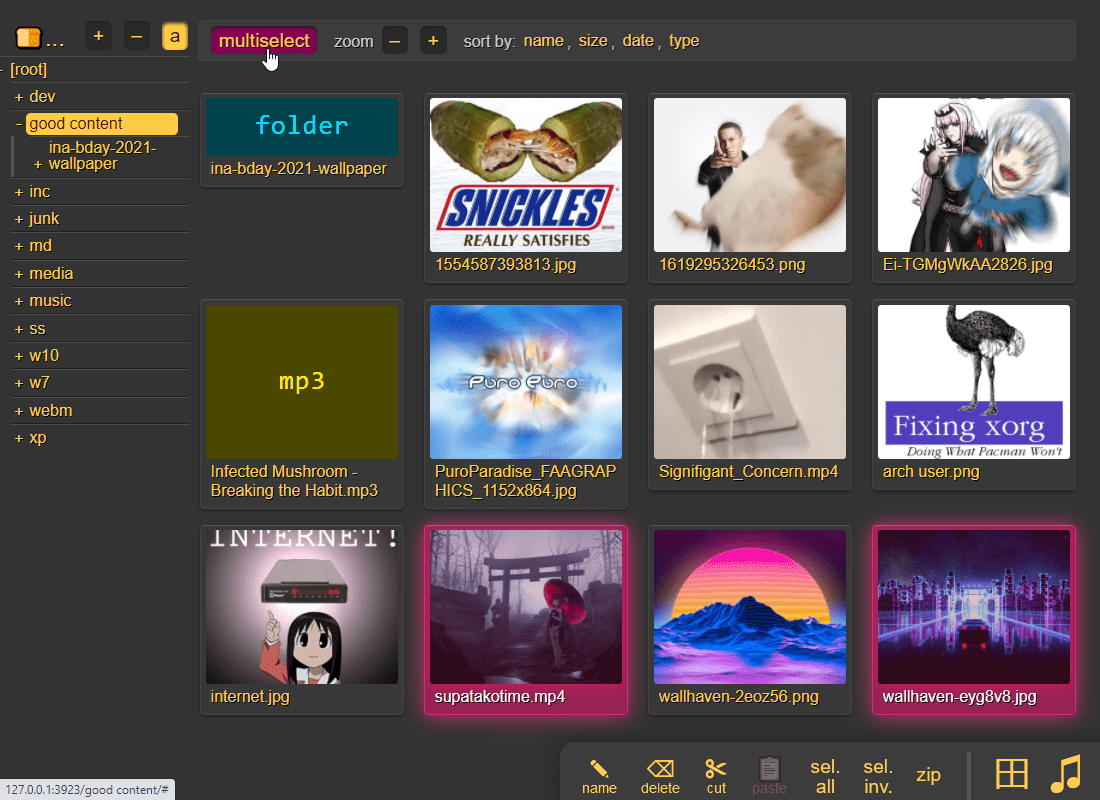
it does static images with Pillow / pyvips / FFmpeg, and uses FFmpeg for video files, so you may want to --no-thumb or maybe just --no-vthumb depending on how dangerous your users are
- Pillow is 3x faster (and safer) than FFmpeg
- disable thumbnails for specific volumes with volflag
dthumbfor all, ordvthumb/dathumb/dithumbfor video/audio/images only - for installing FFmpeg on windows, see optional dependencies
audio files are converted into spectrograms using FFmpeg unless you --no-athumb (and some FFmpeg builds may need --th-ff-swr)
images with the following names (see --th-covers) become the thumbnail of the folder they're in: folder.png, folder.jpg, cover.png, cover.jpg
- the order is significant, so if both
cover.pngandfolder.jpgexist in a folder, it will pick the first matching--th-coversentry (folder.jpg) - and, if you enable file indexing, it will also try those names as dotfiles (
.folder.jpgand so), and then fallback on the first picture in the folder (if it has any pictures at all) - disable folderthumbs with
--th-covers no
enabling multiselect lets you click files to select them, and then shift-click another file for range-select
multiselectis mostly intended for phones/tablets, but theseloption in the[⚙️] settingstab is better suited for desktop use, allowing selection by CTRL-clicking and range-selection with SHIFT-click, all without affecting regular clicking- the
seloption can be made default globally with--gselor per-volume with volflaggsel
- the
to show /icons/exe.png and /icons/elf.gif as the thumbnail for all .exe and .elf files respectively, do this: --ext-th=exe=/icons/exe.png --ext-th=elf=/icons/elf.gif
- optionally as separate volflags for each mapping; see config file example below
- the supported image formats are jpg, png, gif, webp, ico
- be careful with svg; chrome will crash if you have too many unique svg files showing on the same page (the limit is 250 or so) -- showing the same handful of svg files thousands of times is ok however
note:
- heif/heifs/heic/heics images usually require the
libvipsoptional dependency but this is not possible with the docker-images due to legal reasons - if you do not want thumbnails to be generated on-the-fly, and instead wish to generate all of them on server startup, then see thumbnail pregen
config file example:
[global]
  no-thumb   # disable ALL thumbnails and audio transcoding
  no-vthumb  # only disable video thumbnails

[/music]
  /mnt/nas/music
  accs:
    r: *     # everyone can read
  flags:
    dthumb   # disable ALL thumbnails and audio transcoding
    dvthumb  # only disable video thumbnails
    ext-th:  exe=/ico/exe.png  # /ico/exe.png is the thumbnail of *.exe
    ext-th:  elf=/ico/elf.gif  # ...and /ico/elf.gif is used for *.elf
    th-covers:  folder.png,folder.jpg,cover.png,cover.jpg  # the default
zip downloads
download folders (or file selections) as zip or tar files
select which type of archive you want in the [⚙️] config tab:
| name | url-suffix | description |
|---|---|---|
tar |
?tar |
plain gnutar, works great with curl | tar -xv |
pax |
?tar=pax |
pax-format tar, futureproof, not as fast |
tgz |
?tar=gz |
gzip compressed gnu-tar (slow), for curl | tar -xvz |
txz |
?tar=xz |
gnu-tar with xz / lzma compression (v.slow) |
zip |
?zip |
works everywhere, glitchy filenames on win7 and older |
zip_dos |
?zip=dos |
traditional cp437 (no unicode) to fix glitchy filenames |
zip_crc |
?zip=crc |
cp437 with crc32 computed early for truly ancient software |
- gzip default level is
3(0=fast, 9=best), change with?tar=gz:9 - xz default level is
1(0=fast, 9=best), change with?tar=xz:9 - bz2 default level is
2(1=fast, 9=best), change with?tar=bz2:9 - hidden files (dotfiles) are excluded unless account is allowed to list them
up2k.dbanddir.txtis always excluded
- bsdtar supports streaming unzipping:
curl foo?zip | bsdtar -xv- good, because copyparty's zip is faster than tar on small files
- but
?taris better for large files, especially if the total exceeds 4 GiB
- but
- good, because copyparty's zip is faster than tar on small files
zip_crcwill take longer to download since the server has to read each file twice- this is only to support MS-DOS PKZIP v2.04g (october 1993) and older
- how are you accessing copyparty actually
- this is only to support MS-DOS PKZIP v2.04g (october 1993) and older
you can also zip a selection of files or folders by clicking them in the browser, that brings up a selection editor and zip button in the bottom right
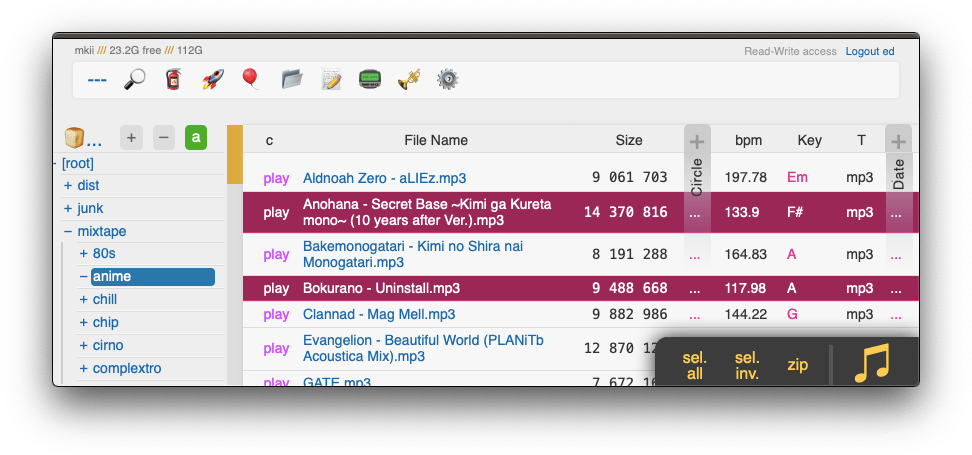
cool trick: download a folder by appending url-params ?tar&opus or ?tar&mp3 to transcode all audio files (except aac|m4a|mp3|ogg|opus|wma) to opus/mp3 before they're added to the archive
- super useful if you're 5 minutes away from takeoff and realize you don't have any music on your phone but your server only has flac files and downloading those will burn through all your data + there wouldn't be enough time anyways
- and url-param
&name=foochanges the name of the toplevel folder in the archive tofoo, and just&nameremoves the folder entirely - and url-param
&nodotskips dotfiles/dotfolders; they are included by default if your account has permission to see them - and url-params
&j/&wproduce jpeg/webm thumbnails/spectrograms instead of the original audio/video/images (&pfor audio waveforms)- can also be used to pregenerate thumbnails; combine with
--th-maxage=9999999or--th-clean=0- but now there is also a real thumbnail pregen so just use that
- can also be used to pregenerate thumbnails; combine with
uploading
drag files/folders into the web-browser to upload
dragdrop is the recommended way, but you may also:
- select some files (not folders) in your file explorer and press CTRL-V inside the browser window
- use the command-line uploader
- upload using curl, sharex, ishare, ...
when uploading files through dragdrop or CTRL-V, this initiates an upload using up2k; there are two browser-based uploaders available:
[🎈] bup, the basic uploader, supports almost every browser since netscape 4.0[🚀] up2k, the good / fancy one
NB: you can undo/delete your own uploads with [🧯] unpost (and this is also where you abort unfinished uploads, but you have to refresh the page first)
up2k has several advantages:
- you can drop folders into the browser (files are added recursively)
- files are processed in chunks, and each chunk is checksummed
- uploads autoresume if they are interrupted by network issues
- uploads resume if you reboot your browser or pc, just upload the same files again
- server detects any corruption; the client reuploads affected chunks
- the client doesn't upload anything that already exists on the server
- no filesize limit, even when a proxy limits the request size (for example Cloudflare)
- much higher speeds than ftp/scp/tarpipe on some internet connections (mainly american ones) thanks to parallel connections
- the last-modified timestamp of the file is preserved
it is perfectly safe to restart / upgrade copyparty while someone is uploading to it!
all known up2k clients will resume just fine 💪
see up2k for details on how it works, or watch a demo video

protip: you can avoid scaring away users with contrib/plugins/minimal-up2k.js which makes it look much simpler

protip: if you enable favicon in the [⚙️] settings tab (by typing something into the textbox), the icon in the browser tab will indicate upload progress -- also, the [🔔] and/or [🔊] switches enable visible and/or audible notifications on upload completion
the up2k UI is the epitome of polished intuitive experiences:
- "parallel uploads" specifies how many chunks to upload at the same time
[🏃]analysis of other files should continue while one is uploading[🥔]shows a simpler UI for faster uploads from slow devices[🛡️]decides when to overwrite existing files on the server🛡️= never (generate a new filename instead)🕒= overwrite if the server-file is older♻️= always overwrite if the files are different
[🎲]generate random filenames during upload[🔎]switch between upload and file-search mode- ignore
[🔎]if you add files by dragging them into the browser
- ignore
and then there's the tabs below it,
[ok]is the files which completed successfully[ng]is the ones that failed / got rejected (already exists, ...)[done]shows a combined list of[ok]and[ng], chronological order[busy]files which are currently hashing, pending-upload, or uploading- plus up to 3 entries each from
[done]and[que]for context
- plus up to 3 entries each from
[que]is all the files that are still queued
note that since up2k has to read each file twice, [🎈] bup can theoretically be up to 2x faster in some extreme cases (files bigger than your ram, combined with an internet connection faster than the read-speed of your HDD, or if you're uploading from a cuo2duo)
if you are resuming a massive upload and want to skip hashing the files which already finished, you can enable turbo in the [⚙️] config tab, but please read the tooltip on that button
if the server is behind a proxy which imposes a request-size limit, you can configure up2k to sneak below the limit with server-option --u2sz
if you want to replace existing files on the server with new uploads by default, run with --u2ow 2 (only works if users have the delete-permission, and can still be disabled with 🛡️ in the UI)
file-search
dropping files into the browser also lets you see if they exist on the server

when you drag/drop files into the browser, you will see two dropzones: Upload and Search
on a phone? toggle the
[🔎]switch green before tapping the big yellow Search button to select your files
the files will be hashed on the client-side, and each hash is sent to the server, which checks if that file exists somewhere
files go into [ok] if they exist (and you get a link to where it is), otherwise they land in [ng]
- the main reason filesearch is combined with the uploader is cause the code was too spaghetti to separate it out somewhere else, this is no longer the case but now i've warmed up to the idea too much
if you have a "wark" (file-identifier/checksum) then you can also search for that in the [🔎] tab by putting w = kFpDiztbZc8Z1Lzi in the raw field
unpost
undo/delete accidental uploads using the [🧯] tab in the UI

you can unpost even if you don't have regular move/delete access, however only for files uploaded within the past --unpost seconds (default 12 hours) and the server must be running with -e2d
config file example:
[global]
  e2d            # enable up2k database (remember uploads)
  unpost: 43200  # 12 hours (default)
self-destruct
uploads can be given a lifetime, after which they expire / self-destruct
the feature must be enabled per-volume with the lifetime upload rule which sets the upper limit for how long a file gets to stay on the server
clients can specify a shorter expiration time using the up2k ui -- the relevant options become visible upon navigating into a folder with lifetimes enabled -- or by using the life upload modifier
specifying a custom expiration time client-side will affect the timespan in which unposts are permitted, so keep an eye on the estimates in the up2k ui
race the beam
download files while they're still uploading (demo video) -- it's almost like peer-to-peer
requires the file to be uploaded using up2k (which is the default drag-and-drop uploader), alternatively the command-line program
incoming files
the control-panel shows the ETA for all incoming files , but only for files being uploaded into volumes where you have read-access
file manager
cut/paste, rename, and delete files/folders (if you have permission)
file selection: click somewhere on the line (not the link itself), then:
spaceto toggleup/downto moveshift-up/downto move-and-selectctrl-shift-up/downto also scrollshift-click another line for range-select
cut: select some files and
ctrl-xcopy: select some files and
ctrl-cpaste:
ctrl-vin another folderrename:
F2
you can copy/move files across browser tabs (cut/copy in one tab, paste in another)
shares
share a file or folder by creating a temporary link
when enabled in the server settings (--shr), click the bottom-right share button to share the folder you're currently in, or alternatively:
- select a folder first to share that folder