Project Copacetic: Directly patch container image vulnerabilities


copa is a CLI tool written in Go and based on buildkit that can be used to directly patch container images without full rebuilds. copa can also patch container images using the vulnerability scanning results from popular tools like Trivy.
For more details and how to get started, please refer to full documentation.
Ubuntu Chiseled images
Copa supports both apt-less Ubuntu images that retain a full
/var/lib/dpkg/status file and native Chisel images that contain
/var/lib/chisel/manifest.wall. Full-status images support report-driven and
comprehensive updates. Native-manifest images support comprehensive updates
only; omit --report so Copa can re-cut every installed slice.
For native manifest.wall images, use --chisel-release to select a named
release such as ubuntu-24.04, a local release directory, or a public HTTPS Git
URL with a mandatory pinned commit or tag fragment. Without an override, Copa
infers
ubuntu- from the target's /etc/os-release. Initial support uses
public archives only. As verified on July 31, 2026 with Copa's pinned Trivy
version (v0.69.3), Trivy does not extract OS package inventory from native
manifest.wall files.
See Ubuntu Chiseled image
patching for behavior and limitations.
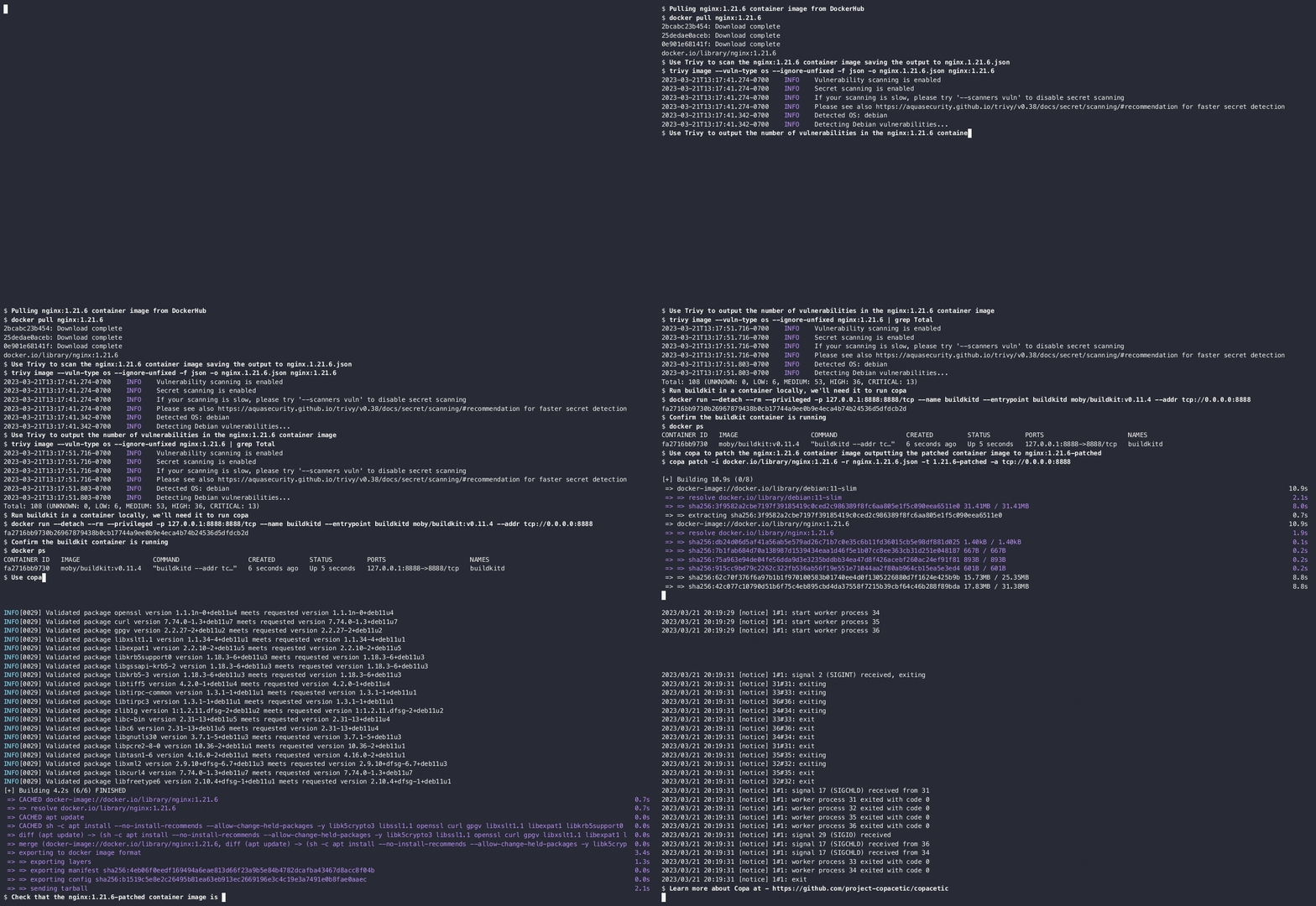
Demo
Why?
We needed the ability to patch containers quickly without going upstream for a full rebuild. As the window between vulnerability disclosure and active exploitation continues to narrow, there is a growing operational need to patch critical security vulnerabilities in container images so they can be quickly redeployed into production. The need is especially acute when those vulnerabilities are:
- inherited from base images several levels deep and waiting on updated releases to percolate through the supply chain is not an option
- found in 3rd party app images you don't maintain with update cadences that don't meet your security SLAs.
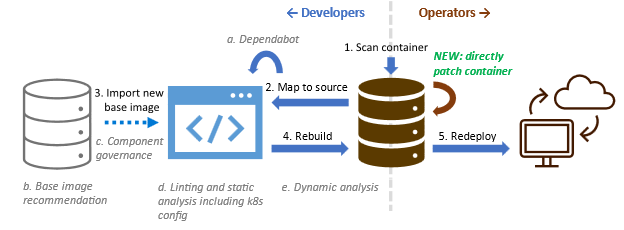
In addition to filling the operational gap not met by left-shift security practices and tools, the ability of copa to patch a container without requiring a rebuild of the container image provides other benefits:
- Allows users other than the image publishers to also patch container images, such as DevSecOps engineers.
- Reduces the storage and transmission costs of redistributing patched images by only creating an additional patch layer, instead of rebuilding the entire image which usually results in different layer hashes that break layer caching.
- Reduces the turnaround time for patching a container image by not having to wait for base image updates and being a faster operation than a full image rebuild.
- Reduces the complexity of patching the image from running a rebuild pipeline to running a single tool on the image.
How?
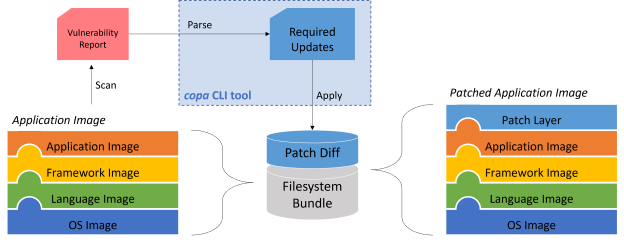
The copa tool is an extensible engine that:
- Determines the update scope from a supported vulnerability report or, for a comprehensive update, from package metadata in the target image.
- Obtains and processes the updates using the appropriate package-manager tooling or Chisel release definitions. New adapters can be written to support more package managers and report formats.
- Applies the resulting update binaries to the container image using buildkit.
This approach is motivated by the core principles of making direct container patching broadly applicable and accessible:
- Copa supports patching existing container images.
- Devs don't need to build their images using specific tools or modify them in some way just to support container patching.
- Copa works with the existing vulnerability scanning and mitigation ecosystems.
- Image publishers don't need to create new workflows for container patching since Copa supports patching container images using the security update packages already being published today.
- Consumers do not need to migrate to a new and potentially more limited support ecosystem for custom distros or change their container vulnerability scanning pipelines to include remediation, since Copa can be integrated seamlessly as an extra step to patch containers based on those scanning reports.
- Copa reduces the technical expertise needed and waiting on dependencies needed to patch an image.
- For OS package vulnerabilities, no specialized knowledge about a specific image is needed to be patch it as Copa relies on the vulnerability remediation knowledge already embedded in the reports produced by popular container scanning tools today.
Contributing
There are several ways to get involved:
- Join the mailing list to get notifications for releases, security announcements, etc.
- Join the biweekly community meetings to discuss development, issues, use cases, etc.
- Join the
#copaceticchannel on the CNCF Slack.
The project welcomes contributions and suggestions that abide by the CNCF Code of Conduct.