comfortable-mexican-sofa is a free, open source content management systems (cms) project written in Ruby and released under MIT. It has 2,706 GitHub stars, 616 forks and 47 open issues, and was last pushed 3 days ago. On this registry it ranks #30 of 70 tracked projects in Content Management Systems (CMS), with 5 head-to-head comparisons available.

What is comfortable-mexican-sofa?

ComfortableMexicanSofa is an MIT-licensed content management engine, distributed as a Ruby gem, that drops into an existing Ruby on Rails 5.2+ application to provide a self-contained admin area, page templating and multi-site content management without the CMS intruding on the rest of the codebase.

What it is

ComfortableMexicanSofa is a Rails Engine — a packaged slice of an application that mounts into a host Rails app — published as the comfortable_mexican_sofa gem and tagged in this registry under cms, rails, rails-engine and ruby. Rather than running as a separate application alongside your code, it installs into the Rails project itself, adds its own database migrations, and attaches two route sets: one for the admin area and one for serving content. The README describes the integration as a "simple drop-in" requiring minimal configuration, and states explicitly that the CMS stays away from the rest of your application.

The concrete problem it solves is the gap between a Rails application and editable web content. Instead of hand-building an administrative interface for pages, layouts and uploaded files, or standing up a separate CMS product and then reconciling two codebases, a team adds the gem and gets a Bootstrap 4 admin area, a page model built from Layouts and Pages, and a templating layer that renders stored content into the host application's routes. Content authors work in a browser at /admin while developers keep working in the Rails codebase they already maintain.

Key capabilities

  • Drop-in Rails Engine integration mounted through comfy_route :cms_admin, path: "/admin" and comfy_route :cms, path: "/", with the content-serving route required to sit last in config/routes.rb.
  • Page templating through Content Tags, so a Layout can mix reusable markup with editable regions such as {{ cms:text title }} and {{ cms:wysiwyg content }}.
  • Multiple Sites from a single installation, where each Site defines a hostname, a content path and a language.
  • Multi-language support (i18n) across locales including ca, cs, da, de, en, es, fi, fr, gr, hr, it, ja, nb, nl, pl, pt-BR, ru, sv, tr, uk, zh-CN and zh-TW, plus per-page localization.
  • CMS Seeds for populating initial content, and Revision History for reverting changes to content over time.
  • An extendable admin area built on Bootstrap 4, using CodeMirror for HTML and Markdown highlighting and Redactor as the WYSIWYG editor.
  • File attachments handled by ActiveStorage, image resizing via ImageMagick, and pagination through either kaminari or will_paginate.

Who uses it and how

  • Rails teams that want editorial control over marketing or documentation pages without introducing a second application, a second deployment or a second user database.
  • Operators running several hostnames from one Rails deployment, using the Multiple Sites feature to give each site its own content path and language.
  • Multilingual publishers who need localized pages across the twenty-plus locales the engine ships translations for.
  • Agencies and teams that provision a fresh environment repeatedly, using CMS Seeds to populate baseline content rather than recreating pages by hand.
  • Developers who need to extend the admin area itself, which the README documents as reusable through its "Reusing Admin Area" guide.

Getting started

Add gem "comfortable_mexican_sofa", "~> 2.0.0" to the Gemfile, run bundle install, then rails generate comfy:cms and rake db:migrate from the Rails project root, followed by rails active_storage:install so attachment migrations are available.

How it compares

No list of paid or proprietary products that this project replaces is provided in the facts, and no comparable tools are named, so it stands alone in this registry. The relevant contrast is structural rather than competitive: it is an MIT-licensed engine that lives inside a Rails application, not a standalone CMS product with its own hosting stack.

When to use it — and when not

Choose it when the host application is already Rails 5.2 or newer and the team is comfortable owning the operational surface it pulls in: ActiveStorage configuration and migrations, an ImageMagick installation, a pagination gem added to the Gemfile, and a database that supports the engine's migrations. It is a poor fit for non-Ruby stacks, for applications pinned below Rails 5.2, or for teams wanting a CMS they can run without a developer in the loop — the README is a short quick-start that defers most detail to the project wiki, and the default admin credentials of username and password must be changed in the initializer immediately after installation.

project readme (upstream, from github) — read inline

ComfortableMexicanSofa

ComfortableMexicanSofa is a powerful Ruby on Rails 5.2+ CMS (Content Management System) Engine

Gem Version Gem Downloads Build Status Coverage Status Gitter

Features

  • Simple drop-in integration with Rails 5.2+ apps with minimal configuration
  • CMS stays away from the rest of your application
  • Powerful page templating capability using Content Tags
  • Multiple Sites from a single installation
  • Multi-Language Support (i18n) (ca, cs, da, de, en, es, fi, fr, gr, hr, it, ja, nb, nl, pl, pt-BR, ru, sv, tr, uk, zh-CN, zh-TW) and page localization.
  • CMS Seeds for initial content population
  • Revision History to revert changes
  • Extendable Admin Area built with Bootstrap 4 (responsive design). Using CodeMirror for HTML and Markdown highlighing and Redactor as the WYSIWYG editor.

Dependencies

  • File attachments are handled by ActiveStorage. Make sure that you can run appropriate migrations by running: rails active_storage:install
  • Image resizing is done with with ImageMagick, so make sure it's installed.
  • Pagination is handled by kaminari or will_paginate. Please add one of those to your Gemfile.

Installation

Add gem definition to your Gemfile:

gem "comfortable_mexican_sofa", "~> 2.0.0"

Then from the Rails project's root run:

bundle install
rails generate comfy:cms
rake db:migrate

Now take a look inside your config/routes.rb file. You'll see where routes attach for the admin area and content serving. Make sure that content serving route appears as a very last item or it will make all other routes to be inaccessible.

comfy_route :cms_admin, path: "/admin"
comfy_route :cms, path: "/"

Quick Start Guide

After finishing installation you should be able to navigate to http://localhost:3000/admin

Default username and password is 'username' and 'password'. You probably want to change it right away. Admin credentials (among other things) can be found and changed in the cms initializer: /config/initializers/comfortable_mexican_sofa.rb

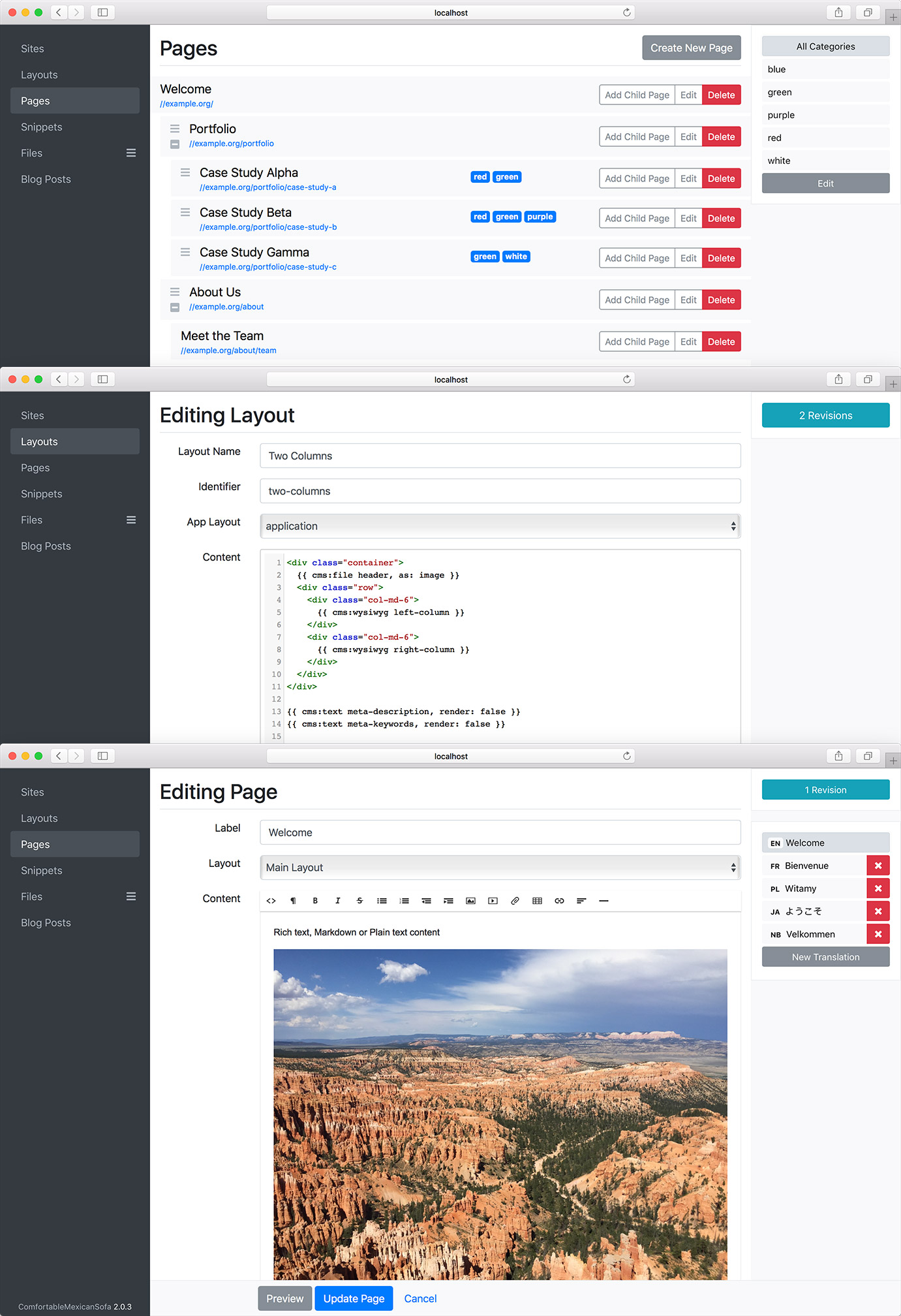
Before creating pages and populating them with content we need to create a Site. Site defines a hostname, content path and its language.

After creating a Site, you need to make a Layout. Layout is the template of your pages; it defines some reusable content (like header and footer, for example) and places where the content goes. A very simple layout can look like this:

<html>
  <body>
    <h1>{{ cms:text title }}</h1>
    {{ cms:wysiwyg content }}
  </body>
</html>

Once you have a layout, you may start creating pages and populating content. It's that easy.

Documentation

For more information on how to use this CMS please refer to the Wiki. Section that might be of interest is the entry on Content Tags.

Comfy Demo App also can be used as an example of a default Rails app with CMS installed.

Add-ons

If you want to add a Blog functionality to your app take a look at ComfyBlog.

Admin Area Preview

Old Versions

CMS for Rails 5.1 doesn't have published gem, but you may use rails 5.1 branch directly.

If you want to use CMS version 1.12 on Rails 5.2 use 1.13 branch directly.

With Rails 4.2 and 5.0 use gem version 1.12.10

With Rails 3.0 use gem version 1.8.5

CHANGELOG is documented in Github releases.

Contributing

ComfortableMexicanSofa repository can be ran like a regular Rails application in development environment. It's as easy to work on as any other Rails app out there. For more detail take a look at CONTRIBUTING

Help and Contact

Gitter: https://gitter.im/comfy/comfortable-mexican-sofa

Twitter: @GroceryBagHead

Acknowledgements

Thanks to Roman Almeida for contributing OEM License for Redactor Text Editor


Copyright 2010-2019 Oleg Khabarov. Released under the MIT license

Frequently asked questions

Is comfortable-mexican-sofa free to use?

comfortable-mexican-sofa is open source under the MIT licence. There is no licence fee and no seat count — you can self-host it or, where the project offers one, pay a vendor for a managed version instead.

What does comfortable-mexican-sofa do?

ComfortableMexicanSofa is a powerful Ruby on Rails 5.2+ CMS (Content Management System) Engine

What is comfortable-mexican-sofa written in?

comfortable-mexican-sofa is primarily written in Ruby. Its source is publicly available at https://github.com/comfy/comfortable-mexican-sofa, and it has 2,706 GitHub stars.