code-inspector is a free, open source frameworks & platforms project written in TypeScript and released under MIT. It has 3,038 GitHub stars, 241 forks and 4 open issues, and was last pushed 16 days ago. On this registry it ranks #57 of 78 tracked projects in Frameworks & Platforms, with 5 head-to-head comparisons available.

What is code-inspector?

code-inspector is a TypeScript, MIT-licensed developer tool that lets a developer click any element on a running web page and have their code editor open automatically with the cursor placed at that element's source code, and it is built for front-end engineers working in bundler-driven Vue, React, Svelte, Astro, and comparable component frameworks.

What it is

code-inspector is a build-tool plugin published on npm as code-inspector-plugin and developed in TypeScript. It hooks into the JavaScript front-end build ecosystem, where it is registered inside a bundler's configuration file and paired with the framework that bundler is compiling. The supported bundlers are webpack, vite, rspack and rsbuild, farm, esbuild, turbopack, and mako, and the supported frameworks are vue2, vue3 and nuxt; react, nextjs and umijs; preact; solid; qwik; svelte; and astro. Editor launching is handled through a companion project named launch-ide, which maintains the supported editor list, with additional editor options documented on the project's site at inspector.fe-dev.cn.

The concrete problem it solves is the manual round trip between a rendered page and the file that produced it. During development, locating the source of a visible element normally means inspecting the node in the browser's developer tools, inferring which component rendered it, and then searching the project for that component by hand. code-inspector replaces that hunt with a click: the running page becomes the entry point into the codebase, and the bundler's own knowledge of where components came from is what drives the jump. It is a development-time integration, added to a bundler config, rather than a runtime library or a hosted service.

Key capabilities

  • Clicking a DOM element on the page automatically opens the code editor and positions the cursor at that element's source location.
  • Distributed as the code-inspector-plugin package and installed as a development dependency with npm i code-inspector-plugin -D, yarn add code-inspector-plugin -D, or pnpm add code-inspector-plugin -D.
  • Configured per bundler through a single call, codeInspectorPlugin({ bundler: 'webpack' }), with bundler values including webpack, vite, rspack, and esbuild.
  • Integrates with webpack, vite, rspack and rsbuild, farm, esbuild, turbopack, and mako build setups.
  • Covers vue2, vue3, nuxt, react, nextjs, umijs, preact, solid, qwik, svelte, and astro application frameworks.
  • Opens the developer's IDE through the companion launch-ide project, which documents the supported editor list.
  • Ships runnable StackBlitz demos for vue, react, preact, solid, qwik, svelte, and astro, each configured through a bundler config file such as vite.config.ts or astro.config.mjs.

Who uses it and how

  • Teams building Vue 2, Vue 3, or Nuxt applications who add the plugin to vite.config.js or webpack.config.js so any rendered component can be traced to its file during development.
  • React, Next.js, and UmiJS developers who want the same click-to-source path in their own bundler configuration.
  • Projects that have moved to rspack, rsbuild, farm, or mako and still want editor jumping, since those bundlers are supported alongside the more established ones.
  • Individual developers evaluating the tool before installing it, using the hosted StackBlitz demos for vue, react, preact, solid, qwik, svelte, and astro.

Getting started

Install the plugin as a development dependency with npm i code-inspector-plugin -D (or the yarn and pnpm equivalents), then register codeInspectorPlugin({ bundler: 'vite' }) — or your bundler's value — in the bundler configuration file. Full configuration details are linked from the README to the project documentation at inspector.fe-dev.cn.

How it compares

The facts provided name no paid products that this project replaces, and no directly comparable alternative tools, so code-inspector stands alone in this registry. It occupies the gap between the browser's developer tools and the code editor, using the bundler as the bridge between the two.

When to use it — and when not to

Adopting code-inspector means editing a bundler configuration and running it in development, so it suits projects whose build setup the team can modify; teams that cannot touch their bundler config, or that work outside these JavaScript bundlers and frameworks, will not get value from it. The plugin is aimed at development workflows rather than production builds. One honest caveat in the supplied material: the README excerpt here ends partway through the vue-cli configuration block, so the full set of setup snippets must be read on the linked documentation site rather than from the repository front page. The licence is MIT and the project is actively pushed, with a small open-issue count of four.

project readme (upstream, from github) — read inline

code-inspector

中文文档 | Documentation

NPM version GITHUB star NPM Downloads MIT-license GITHUB-language


📖 Introduction

Click the element on the page, it can automatically open the code editor and position the cursor to the source code of the element.
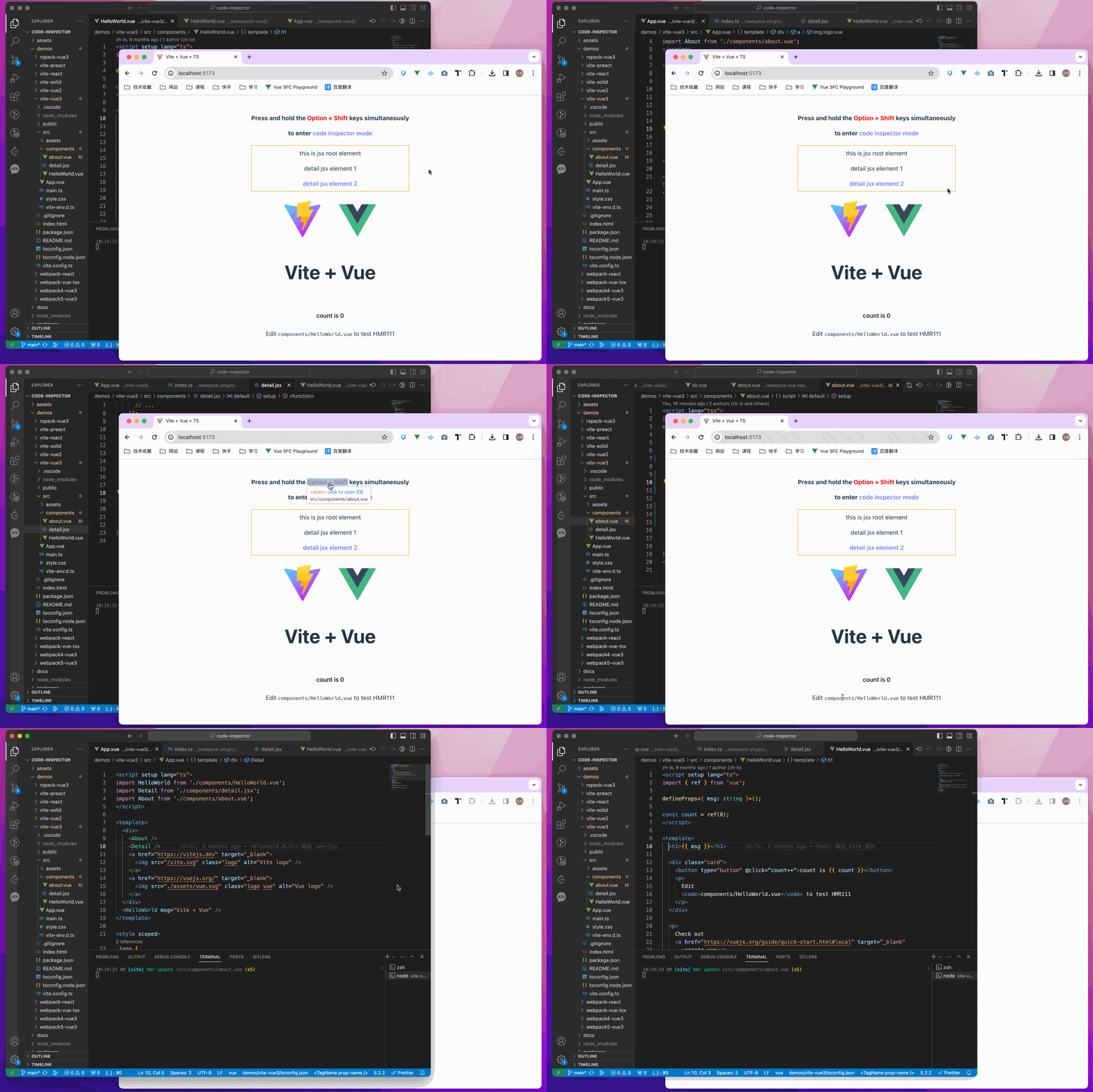
code-inspector

💻 Try it out online

🎨 Support

The following are which compilers, web frameworks and editors we supported now:

  • The following bundlers are currently supported:
    ✅ webpack
    ✅ vite
    ✅ rspack / rsbuild
    ✅ farm
    ✅ esbuild
    ✅ turbopack
    ✅ mako
  • The following Web frameworks are currently supported:
    ✅ vue2 / vue3 / nuxt
    ✅ react / nextjs / umijs
    ✅ preact
    ✅ solid
    ✅ qwik
    ✅ svelte
    ✅ astro
  • Supported editor list | and Others

🚀 Install

npm i code-inspector-plugin -D
# or
yarn add code-inspector-plugin -D
# or
pnpm add code-inspector-plugin -D

🌈 Usage

Please check here for more usage information: code-inspector-plugin configuration

  • 1.Configuring Build Tools
Click to expand configuration about: webpack
// webpack.config.js
const { codeInspectorPlugin } = require('code-inspector-plugin');

module.exports = () => ({
  plugins: [
    codeInspectorPlugin({
      bundler: 'webpack',
    }),
  ],
});
Click to expand configuration about: vite
// vite.config.js
import { defineConfig } from 'vite';
import { codeInspectorPlugin } from 'code-inspector-plugin';

export default defineConfig({
  plugins: [
    codeInspectorPlugin({
      bundler: 'vite',
    }),
  ],
});
Click to expand configuration about: rspack
// rspack.config.js
const { codeInspectorPlugin } = require('code-inspector-plugin');

module.exports = {
  // other config...
  plugins: [
    codeInspectorPlugin({
      bundler: 'rspack',
    }),
    // other plugins...
  ],
};
Click to expand configuration about: rsbuild
// rsbuild.config.js
const { codeInspectorPlugin } = require('code-inspector-plugin');

module.exports = {
  // other config...
  tools: {
    rspack: {
      plugins: [
        codeInspectorPlugin({
          bundler: 'rspack',
        }),
      ],
    },
  },
};
Click to expand configuration about: esbuild
// esbuild.config.js
const esbuild = require('esbuild');
const { codeInspectorPlugin } = require('code-inspector-plugin');

esbuild.build({
  // other configs...
  // [注意] esbuild 中使用时,dev 函数的返回值需自己根据环境判断,本地开发的环境返回 true,线上打包返回 false
  plugins: [codeInspectorPlugin({ bundler: 'esbuild', dev: () => true })],
});
Click to expand configuration about: farm
// farm.config.js
import { defineConfig } from '@farmfe/core';
import { codeInspectorPlugin } from 'code-inspector-plugin';

export default defineConfig({
  vitePlugins: [
    codeInspectorPlugin({
      bundler: 'vite',
    }),
    // ...other code
  ],
});
Click to expand configuration about: vue-cli
// vue.config.js
const { codeInspectorPlugin } = require('code-inspector-plugin');

module.exports = {
  // ...other code
  chainWebpack: (config) => {
    config.plugin('code-inspector-plugin').use(
      codeInspectorPlugin({
        bundler: 'webpack',
      })
    );
  },
};
Click to expand configuration about: nuxt
  • For nuxt3.x :

    // nuxt.config.js
    import { codeInspectorPlugin } from 'code-inspector-plugin';
    
    // https://nuxt.com/docs/api/configuration/nuxt-config
    export default defineNuxtConfig({
      vite: {
        plugins: [codeInspectorPlugin({ bundler: 'vite' })],
      },
    });
    
  • For nuxt2.x :

    // nuxt.config.js
    import { codeInspectorPlugin } from 'code-inspector-plugin';
    
    export default {
      build: {
        extend(config) {
          config.plugins.push(codeInspectorPlugin({ bundler: 'webpack' }));
          return config;
        },
      },
    };
    
Click to expand configuration about: next.js
  • For next.js( { config.plugins.push(codeInspectorPlugin({ bundler: 'webpack' })); return config; }, };

    module.exports = nextConfig;

  • For next.js(15.0.x ~ 15.2.x):

    import type { NextConfig } from 'next';
    import { codeInspectorPlugin } from 'code-inspector-plugin';
    
    const nextConfig: NextConfig = {
      experimental: {
        turbo: {
          rules: codeInspectorPlugin({
            bundler: 'turbopack',
          }),
        },
      },
    };
    
    export default nextConfig;
    
  • For next.js(>= 15.3.x):

    // next.config.js
    import type { NextConfig } from 'next';
    import { codeInspectorPlugin } from 'code-inspector-plugin';
    
    const nextConfig: NextConfig = {
      turbopack: {
        rules: codeInspectorPlugin({
          bundler: 'turbopack',
        }),
      },
    };
    
    export default nextConfig;
    
Click to expand configuration about: umi.js
  • With webpack:

    // umi.config.js or umirc.js
    import { defineConfig } from '@umijs/max';
    import { codeInspectorPlugin } from 'code-inspector-plugin';
    
    export default defineConfig({
      chainWebpack(memo) {
        memo.plugin('code-inspector-plugin').use(
          codeInspectorPlugin({
            bundler: 'webpack',
          })
        );
      },
      // other config
    });
    
  • With mako:

    // .umirc.ts
    import { defineConfig } from 'umi';
    import { codeInspectorPlugin } from 'code-inspector-plugin';
    
    export default defineConfig({
      // other config...
      mako: {
        plugins: [
          codeInspectorPlugin({
            bundler: 'mako',
          }),
        ],
      },
    });
    
Click to expand configuration about: astro
// astro.config.mjs
import { defineConfig } from 'astro/config';
import { codeInspectorPlugin } from 'code-inspector-plugin';

export default defineConfig({
  vite: {
    plugins: [codeInspectorPlugin({ bundler: 'vite' })],
  },
});
  • 2.Using the function

    Now you can enjoy using it!~

    When pressing the combination keys on the page, moving the mouse over the page will display a mask layer on the DOM with relevant information. Clicking will automatically open the IDE and position the cursor to the corresponding code location. (The default combination keys for Mac are Option + Shift; for Windows, it's Alt + Shift, and the browser console will output related combination key prompts)

👨‍💻 Contributors

Special thanks to the contributors of this project:

📧 Communication and Feedback

For any usage issues, please leave a message below my Twitter post or submit an issue on Github.

For Chinese users, you can join the QQ group 769748484 or add the author's WeiXin account zhoulx1688888 for consultation and feedback:


💖 Sponsor

Sponsoring this project can help the author create better. If you are willing, you can sponsor me through Alipay or WeChatPay:


Star History

Star History Chart

Frequently asked questions

Is code-inspector free to use?

code-inspector is open source under the MIT licence. There is no licence fee and no seat count — you can self-host it or, where the project offers one, pay a vendor for a managed version instead.

What does code-inspector do?

🚀 Click the dom to open your IDE and position the cursor at dom's source code location! 点击页面 dom 来打开 IDE 并将光标自动定位到源代码位置!

What is code-inspector written in?

code-inspector is primarily written in TypeScript. Its source is publicly available at https://github.com/zh-lx/code-inspector, and it has 3,038 GitHub stars.