




Open-source Feedback Management Tool.
Alternative to Canny and UserVoice.


Contents
Managed Hosting
Support our open-source development by choosing cloud hosting with scalable pricing, check us out on our website.
Self Hosting
One-click deploy
Deploy a self-contained instance (API server, SSR frontend, MariaDB) in a few clicks — no custom domain required, it works entirely on your generated domain:

Quick start
For a quick start using Docker, download
the Docker Compose service file
as docker-compose.yml, and run the following:
docker-compose --profile with-deps up
Point your browser at http://localhost and create an account using email admin@localhost.
You also want to setup outgoing mail, read the Email section.
If you wish to host it on your domain other than localhost, read the DNS section and then
setup SSL/TLS certificates.
Kubernetes deployment
For self-hosting, we provide Kubernetes Helm charts.
Installation
- Add the Helm repository:
helm repo add clearflask https://clearflask.github.io/clearflask
helm repo update
- Install dependencies (MySQL + LocalStack):
helm install clearflask-deps clearflask/clearflask-dependencies \
  --set mysql.enabled=true \
  --set localstack.enabled=true
- Generate secrets and install ClearFlask:
TOKEN_SIGNER=$(openssl rand -base64 172 | tr -d '\n')
CURSOR_KEY=$(openssl rand -base64 16)
SSO_SECRET=$(uuidgen)
CONNECT_TOKEN=$(uuidgen)

helm install clearflask clearflask/clearflask \
  --set global.domain=yourdomain.com \
  --set server.config.searchEngine=READWRITE_MYSQL \
  --set server.secrets.tokenSignerPrivKey="$TOKEN_SIGNER" \
  --set server.secrets.cursorSharedKey="$CURSOR_KEY" \
  --set server.secrets.ssoSecretKey="$SSO_SECRET" \
  --set server.secrets.connectToken="$CONNECT_TOKEN"
- Access your instance:
kubectl port-forward svc/clearflask-connect 3000:80
# Visit http://localhost:3000
See the Helm Chart documentation for more information.
Replace dependencies
There are several dependencies that you can swap out for ClearFlask:
- AWS DynamoDB or Localstack or API-compatible alternative (ScyllaDB is not fully compatible)
- MinIO or AWS S3 or API-compatible alternative
- One of:
- MySQL or Aurora
- ElasticSearch or OpenSearch
- Email service via SMTP or AWS SES
And a few optional:
- Google ReCaptcha
- Let's Encrypt automagic certificate management
- CloudFront as a CDN (Use in front of
clearflask-connect)
Via Docker
You can spin up all dependencies via Docker.
Simply add the --profile with-deps to your docker-compose command when starting ClearFlask.
All database content will be persisted to local filesystem under data folder.
Via Kubernetes
Production-ready Helm charts are available:
helm repo add clearflask https://clearflask.github.io/clearflask
helm repo update

helm install clearflask-deps clearflask/clearflask-dependencies \
  --set mysql.enabled=true \
  --set localstack.enabled=true
This deploys:
- MySQL/MariaDB for search and filtering with persistent storage (20Gi default)
- LocalStack for DynamoDB, S3, and SES emulation with persistent storage (10Gi default)
- ElasticSearch (optional) for advanced search with persistent storage (50Gi default)
All databases are persistent by default using PersistentVolumeClaims. See the Helm Chart documentation for configuration options.
Via AWS
For production workload, you will want to spin up these dependencies yourself and point ClearFlask to their endpoints.
IAM access
For AWS services, clearflask-server auto-detects Access Keys using either a configuration property or the default
locations. If you are running in EC2 or ECS, keys detection is automated, you just need to create the appropriate IAM
role.
AWS DynamoDB
Provide IAM access including create table permission as table is created automatically by ClearFlask on startup.
IAM actions:
- CreateTable
- BatchGetItem
- GetItem
- Query
- BatchWriteItem
- DeleteItem
- PutItem
- UpdateItem
AWS S3
Create a private bucket with IAM access to ClearFlask.
IAM actions:
- ListBucket
- GetObject
- DeleteObject
- PutObject
You can also use an API-compatible alternative service such as Wasabi, MinIO...
ElasticSearch or MySQL
Recommended is AWS ES, give the proper IAM access
IAM actions, all in these categories:
- List
- Read
- Write
- Tagging
Alternatively you can deploy it yourself (cheaper) or host it on Elastic. Or you can choose to use MySQL/Aurora as a cheaper alternative.
AWS SES
In order to setup SES, you need to seek limit increase via AWS support.
Change the config property ...EmailServiceImpl$Config.useService to ses and give the proper IAM access.
IAM actions:
- SendEmail
- SendRawEmail
Alternatively use any other email provider and fill out the SMTP settings
Deploy ClearFlask
ClearFlask consists of two components:
- clearflask-server: Tomcat application for serving API requests
- clearflask-connect: NodeJS for SSR, dynamic cert management and serving static files
Via Kubernetes (Recommended for Production)
No build required - uses pre-built Docker images.
# Add Helm repository
helm repo add clearflask https://clearflask.github.io/clearflask
helm repo update

# Generate required secrets
TOKEN_SIGNER=$(openssl rand -base64 172 | tr -d '\n')
CURSOR_KEY=$(openssl rand -base64 16)
SSO_SECRET=$(uuidgen)
CONNECT_TOKEN=$(uuidgen)

# Install ClearFlask
helm install clearflask clearflask/clearflask \
  --set global.domain=yourdomain.com \
  --set server.config.searchEngine=READWRITE_MYSQL \
  --set server.secrets.tokenSignerPrivKey="$TOKEN_SIGNER" \
  --set server.secrets.cursorSharedKey="$CURSOR_KEY" \
  --set server.secrets.ssoSecretKey="$SSO_SECRET" \
  --set server.secrets.connectToken="$CONNECT_TOKEN"
Features:
- Horizontal Pod Autoscaling
- Zero-downtime rolling updates
- Built-in health checks
- TLS certificate management
For detailed configuration options, deployment scenarios (AWS EKS, GKE, AKS), and troubleshooting, see the Helm Chart documentation.
Via Docker (Quick Start)
Setup
- Download the Docker Compose service file
- Run it with
docker-compose --profile with-deps upwhich creates few configuration files in your local directory - Carefully read and modify
server/config-selfhost.cfg. - Carefully read and modify
connect/connect.config.json. - Adjust the Docker Compose service file to add/remove dependencies if you are hosting them outside of Docker
On the first run, install-specific secrets (VAPID keypair, cursor encryption key, token signing key, SSO key)
are generated automatically into server/config-selfhost.cfg. Installs created before this behavior existed
share publicly-known default secrets: check your server logs for a SECURITY: warning and regenerate any
flagged values using the commands in the config file comments.
Configuration via environment variables
Instead of editing the configuration files, common settings can be set with environment variables on the
clearflask-server container. They are applied into config-selfhost.cfg on startup and always take
precedence over values in the file. This is useful on platforms without persistent-file editing
(Railway, PikaPods, Elestio, ...).
| Environment variable | Purpose |
|---|---|
CLEARFLASK_DOMAIN |
Your domain, e.g. feedback.example.com |
CLEARFLASK_SUPER_ADMIN_EMAIL |
Email address allowed to sign up as super-admin |
CLEARFLASK_SIGNUP_ENABLED |
true/false: allow further signups |
CLEARFLASK_AUTH_COOKIE_SECURE |
true when serving over HTTPS |
CLEARFLASK_CONNECT_TOKEN |
Shared secret between Connect and Server; set the same value on both containers |
CLEARFLASK_TELEMETRY_ENABLED |
false to disable telemetry |
CLEARFLASK_SMTP_HOST / CLEARFLASK_SMTP_PORT / CLEARFLASK_SMTP_USER / CLEARFLASK_SMTP_PASSWORD / CLEARFLASK_SMTP_STRATEGY |
Outgoing email via SMTP; setting the host also switches email service to SMTP |
CLEARFLASK_EMAIL_DISPLAY_NAME / CLEARFLASK_EMAIL_FROM_LOCAL_PART / CLEARFLASK_EMAIL_FROM_DOMAIN |
Outgoing email sender identity |
CLEARFLASK_MYSQL_HOST / CLEARFLASK_MYSQL_USER / CLEARFLASK_MYSQL_PASSWORD |
MySQL/MariaDB connection |
CLEARFLASK_DYNAMO_ENDPOINT / CLEARFLASK_ES_ENDPOINT / CLEARFLASK_S3_ENDPOINT |
Dependency service endpoints |
CLEARFLASK_EXTRA_PROPS |
Newline-separated full.property.key=value lines for any other setting |
The clearflask-connect container supports: CLEARFLASK_CONNECT_TOKEN, CLEARFLASK_DOMAIN,
CLEARFLASK_API_BASE_PATH, CLEARFLASK_LISTEN_PORT, CLEARFLASK_DISABLE_AUTO_FETCH_CERTIFICATE
and CLEARFLASK_FORCE_REDIRECT_HTTPS, overriding connect.config.json.
By default, email is configured for AWS SES pointing to your Localstack (which doesn't do anything).
You can choose to setup your own SMTP server or use AWS SES.
Email using SMTP
Change the configuration to SMTP:
com.smotana.clearflask.core.push.provider.EmailServiceImpl$Config.useService:smtp
Then you need to gather your SMTP settings and fill out the following:
com.smotana.clearflask.core.push.provider.EmailServiceImpl$Config.smtpStrategy:SMTP_TLS(SMTP_TLS, SMTPS, SMTP)com.smotana.clearflask.core.push.provider.EmailServiceImpl$Config.smtpHost:smtp.gmail.com(e.g. smtp.gmail.com)com.smotana.clearflask.core.push.provider.EmailServiceImpl$Config.smtpPort:587(587 for SMTP_TLS, 465 for SMTPS, 25 for SMTP)com.smotana.clearflask.core.push.provider.EmailServiceImpl$Config.smtpUser:my.name@gmail.com(e.g. my.name@gmail.com)com.smotana.clearflask.core.push.provider.EmailServiceImpl$Config.smtpPassword:asdfqwerzxcvasdf(To get this working, you need to enable IMAP if not enabled. If you use 2FA, you need to generate an app password and use it here)com.smotana.clearflask.core.push.provider.EmailServiceImpl$Config.emailDisplayName:ClearFlask(e.g. 'ClearFlask for MyCompany')com.smotana.clearflask.core.push.provider.EmailServiceImpl$Config.fromEmailLocalPart:my.name(first part of your email, for my.name@gmail.com, it would be 'my.name')com.smotana.clearflask.core.push.provider.EmailServiceImpl$Config.fromEmailDomainOverride:gmail.com(domain part of your email, for my.name@gmail.com, it would be 'gmail.com')
Email using AWS SES
Change the configuration to SMTP:
com.smotana.clearflask.core.push.provider.EmailServiceImpl$Config.useService:ses
Then fill out the SES settings:
com.smotana.clearflask.core.email.AmazonSimpleEmailServiceProvider$Config.region:us-east-1com.smotana.clearflask.core.email.AmazonSimpleEmailServiceProvider$Config.serviceEndpoint: (Leave blank, unless you need to override)
DNS
By default, everything is assumed to be on localhost. If you wish to host your portal on yoursite.com
or 192.168.1.123, set the following properties:
connect.config.json:parentDomain:yoursite.comconfig-selfhost.cfg:com.smotana.clearflask.web.Application$Config.domain:yoursite.com
Certificate management
Automagic using Let's Encrypt
If you wish to have certificates fetched and renewed for you automagically using Let's Encrypt, ensure your DNS is correctly pointing to your server, it is publicly accessible, and set the following config parameters:
connect.config.json:disableAutoFetchCertificate:falseconnect.config.json:forceRedirectHttpToHttps:trueconfig-selfhost.cfg:com.smotana.clearflask.web.security.AuthCookieImpl$Config.authCookieSecure:true
Once you load your site for the first time, a Certificate is auto-magically fetched for you.
Static certificate
If you wish to use your own certificate, set the following properties:
connect.config.json:disableAutoFetchCertificate:falseconnect.config.json:forceRedirectHttpToHttps:trueconfig-selfhost.cfg:com.smotana.clearflask.web.security.AuthCookieImpl$Config.authCookieSecure:trueconfig-selfhost.cfg:com.smotana.clearflask.security.CertFetcherImpl$Config.staticCert: ``
For the staticCert property value, this has to be a JSON object with the following structure, but you need to put it
in a single line:
{
    "cert": {
        "cert": "-----BEGIN CERTIFICATE-----\nMIIFFjCC...",
        "chain": "-----BEGIN CERTIFICATE-----\nMIIE/jCC",
        "subject": "feedback.example.com",
        "altnames": [
            "feedback.example.com"
        ],
        "issuedAt": 1709572939000,
        "expiresAt": 1741108939000
    },
    "keypair": {
        "privateKeyPem": "-----BEGIN PRIVATE KEY-----\nMIIEvwIB..."
    }
}
Note that you have to put this into a single line. The cert, chain and keypair will replace any literal \n into a
newline.
This approach is not recommended as you will have to update this certificate manually.
Self-managed behind reverse proxy
ClearFlask wasn't designed to be deployed on a subpath (e.g. example.com/clearflask/), rather it is
intended to be deployed either directly on a domain or a subdomain. (e.g. examplefeedback.com or
feedback.example.com)
If you are managing TLS certificates behind a reverse proxy, redirect all http requests to https, set the following
config:
connect.config.json:disableAutoFetchCertificate:trueconnect.config.json:forceRedirectHttpToHttps:trueconfig-selfhost.cfg:com.smotana.clearflask.web.security.AuthCookieImpl$Config.authCookieSecure:true
No certificates
Although discouraged, you can run ClearFlask over HTTP only. Ensure these settings are set:
connect.config.json:disableAutoFetchCertificate:trueconnect.config.json:forceRedirectHttpToHttps:falseconfig-selfhost.cfg:com.smotana.clearflask.web.security.AuthCookieImpl$Config.authCookieSecure:false
Dashboard account
For you to manage the dashboard, you need to whitelist an email to be able to create a super-admin account:
config-selfhost.cfg:com.smotana.clearflask.web.security.SuperAdminPredicate$Config.superAdminEmailRegex:
^admin@yoursite.com$
After you sign-up, disable further signups using:
config-selfhost.cfg:com.smotana.clearflask.web.resource.AccountResource$Config.signupEnabled: false
Run
- Run
docker-compose upordocker-compose --profile with-deps upto also start dependencies. - Point your browser at
http://localhostor if you configured your DNShttps://yoursite.com. - Create an account using
admin@localhostemail or based on your configuration ofsuperAdminEmailRegex.
Maintenance
Migration between ElasticSearch/MySQL
Source of truth data is stored in a NoSQL DynamoDB compatible database. For searching/filtering, you have a choice of using a separate database:
ElasticSearch:
- Intended for large projects
- Searching is great (example: searching for 'Johnny' will find 'Jonathan')
MySQL:
- Intended for small projects
- Lightweight
- Cheap to host
- Searching is idential match only (example: searching for 'Jon' will find 'Jonathan')
Migration prerequisites
To check what you are using now, open your configuration file config-selfhost.cfg for the
property com.smotana.clearflask.web.Application$Config.defaultSearchEngine. If you can't find it, the default value
uses ElasticSearch.
You will need a JMX client such
as jconsole probably already bundled
with your JRE/JDK on your system or VisualVM. To connect to your running instance, you
need to enable port forwarding in your docker-compose.yml file by uncommenting the JMX ports and restarting. Then
you can connect to service:jmx:rmi:///jndi/rmi://localhost:9950/jmxrmi without credentials and without SSL.
During the migration, you should be checking the logs for any warnings or errors. Especially when starting up or invoking a JMX method. If you run in to issues, document it, open an issue on GitHub and optionally rolback by undoing all the steps in reverse order.
Migrate from Mysql to ElasticSearch
- Double check you are using MySQL, you should have this property
set:
config-selfhost.cfg:com.smotana.clearflask.web.Application$Config.defaultSearchEngine:READWRITE_MYSQL - Edit
docker-compose.yml:- Uncomment
clearflask-servercontainer's JMX ports9950:9950and9951:9951 - Uncomment
elasticsearchcontainer - Restart the server
- Uncomment
- Using JMX, invoke
com.smotana.clearflask.web.resource.ProjectResource.createIndexes(true,false); On failure, check the logs - Edit
docker-compose.yml- Change
com.smotana.clearflask.web.Application$Config.defaultSearchEnginetoREAD_MYSQL_WRITE_BOTH - Restart the server
- Change
- Using JMX, invoke
com.smotana.clearflask.web.resource.ProjectResource.reindexProjects(true,true,false) - At this point you are using both ElasticSearch and MySQL but reading only from MySQL. To test a single project with
ElasticSearch, as super admin open
https:///dashboard/settings/project/advancedand at the bottom of the page force override the search engine to ElasticSearch. Remember to unset this property before continuing. - Edit
docker-compose.yml- Change
com.smotana.clearflask.web.Application$Config.defaultSearchEnginetoREAD_ELASTICSEARCH_WRITE_BOTH - Restart the server and ensure every project is working well.
- Change
- Edit
docker-compose.ymland changecom.smotana.clearflask.web.Application$Config.defaultSearchEnginetoREADWRITE_ELASTICSEARCH - Edit
docker-compose.yml:- Comment out
mysql-dbcontainer to prevent it from starting up. - Comment out
clearflask-servercontainer's JMX ports9950:9950and9951:9951 - Restart the server
- Comment out
- Remove the leftover data stored by the now non-functional MySQL container.
Migrate from ElasticSearch to Mysql
- Double check you are using ElasticSearch, you may have this property
set:
config-selfhost.cfg:com.smotana.clearflask.web.Application$Config.defaultSearchEngine:READWRITE_ELASTICSEARCH. If it is missing, the default is ElasticSearch - Edit
docker-compose.yml:- Uncomment
clearflask-servercontainer's JMX ports9950:9950and9951:9951 - Uncomment
mysql-dbcontainer - Restart the server
- Uncomment
- Using JMX, invoke
com.smotana.clearflask.web.resource.ProjectResource.createIndexes(false,true); On failure, check the logs - Edit
docker-compose.yml- Change
com.smotana.clearflask.web.Application$Config.defaultSearchEnginetoREAD_ELASTICSEARCH_WRITE_BOTH - Restart the server
- Change
- Using JMX, invoke
com.smotana.clearflask.web.resource.ProjectResource.reindexProjects(true,false,true) - At this point you are using both ElasticSearch and MySQL but reading only from ElasticSearch. To test a single
project with MySQL, as super admin open
https:///dashboard/settings/project/advancedand at the bottom of the page force override the search engine to MySQL. Remember to unset this property before continuing. - Edit
docker-compose.yml- Change
com.smotana.clearflask.web.Application$Config.defaultSearchEnginetoREAD_MYSQL_WRITE_BOTH - Restart the server and ensure every project is working well.
- Change
- Edit
docker-compose.ymland changecom.smotana.clearflask.web.Application$Config.defaultSearchEnginetoREADWRITE_MYSQL - Edit
docker-compose.yml:- Comment out
elasticsearchcontainer to prevent it from starting up. - Comment out
clearflask-servercontainer's JMX ports9950:9950and9951:9951 - Restart the server
- Comment out
- Remove the leftover data stored by the now non-functional ElasticSearch container.
Telemetry
To disable any telemetry, set the following configuration property:
config-selfhost.cfg:com.smotana.clearflask.web.Application$Config.enableTelemetry: false
Contributing
Your contributions are very much appreciated. Please see here on how to contribute to our codebase.
Code quality
Java
- Generally following the Google Java Style Guide
- IntelliJ Recommended: Code style formatting is in
.ideafolder - It is expected to write a test for each functionality.
JS/TS
- VisualCode recommended: code formatting and properties are defined in
.vscodefolder - We are yet to establish a proper test framework. A proposal would be welcome.
Building
Environment setup
Development has been done under Mac, Linux, and Windows (with WSL)
The following requirements are a minimum:
- Java 11
- Maven
- Makefile (for local and production deployment)
- Docker
- FFmpeg and ffprobe (For
babel-plugin-transform-media-imports) - OpenSSL (For local deployment's self-signed certs)
brew install maven ffmpeg make openssl
Please let us know if we missed anything.
Compile and build
Building is straightforward and can be done by running:
mvn clean install
Add -DskipTests or -DskipITs to skip all tests or just Integration tests respectively.
For developing integration tests, you may want to start a local instance of ClearFlask and run integrations directly from your IDE. Otherwise you will have to alwasy spin up all dependencies.
Run locally
There are several ways to run locally depending on what you want to test.
Kubernetes (Full Production Stack)
Intended for testing production deployment locally. No build required - uses pre-built Docker images.
git clone https://github.com/clearflask/clearflask.git
cd clearflask/clearflask-helm
./local-start.sh
Access via port-forward at http://localhost:3000.
Cleanup:
./local-stop.sh
Note: For testing code changes, you would need to build and push new Docker images first.
Frontend + Mock backend
Ideal for fast-iteration on frontend changes. Changes to code take effect immediately.
make frontend-start
Open browser at http://localhost:3000.
Connect + Frontend + Mock backend
Intended for testing Connect and SSR. For code changes to take effect, you must rebuild clearflask-frontend.
make connect-start
Open browser at http://localhost:9080.
HTTPS + Connect + Frontend + Backend
Intended for testing the whole deal before deployment. For code changes to take effect, you must completely rebuild clearflask.
make local-up
make local-down
Open browser at https://localhost.
Connect + Frontend + Backend (Self-host)
Intended for testing self-host deployment, uses locally built Docker images rather than officially released images. For code changes to take effect, you must completely rebuild clearflask.
make selfhost-up
make selfhost-down
Open browser at https://localhost.
Debugging
When running a local deploy, you can debug various components:
Attach debugger
For debugging clearflask-server running on Tomcat, point IntelliJ IDEA or your favourite IDE to remote JVM debug
on localhost:9999.
JMX
For changing configuration parameters or running exposed operations, connect via JMX using your favourite tool (
JVisualVM, JConsole, ...) on localhost:9950 without credentials and without SSL.
ElasticSearch Kibana
To look at the ES cluster and run commands, point your browser at http://localhost:5601.
KillBill Kaui
To look at the billing sysstem, point your browser at http://localhost:8081.
Credentials are admin/password and API key and secret is bob/lazar.
If you are debugging an Integration Test, a log line will reveal the API key and
secret: KillBill test randomized apiKey {} secretKey {}.
AWS services (DynamoDB, Route53, SES, S3)
You can use regular AWS command line tool and point it to our mocked up LocalStack services:
aws --endpoint-url=http://localhost:4566 ...
Architecture
Overall view
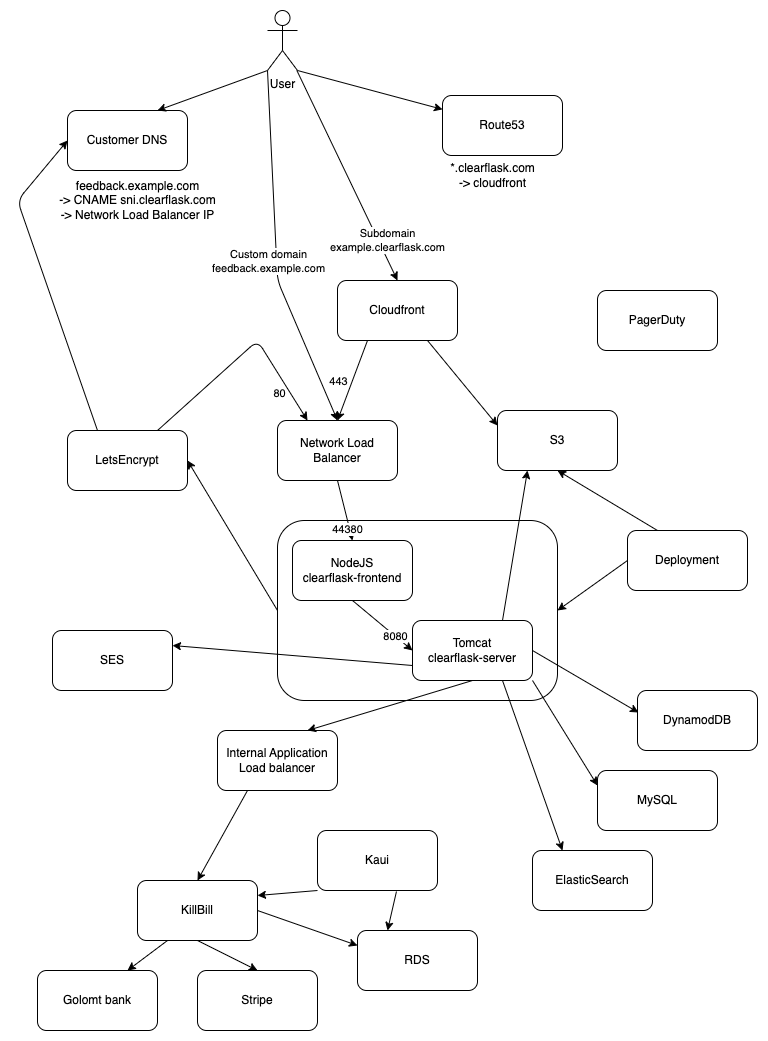
The following is a production deployment of ClearFlask. It was once scribbled down during a conversation and now it's an official architecture diagram until we have a better replacement.
Project Structure
clearflask-api
Contains OpenAPI definition for communication between frontend and backend. Also includes definition of project settings.
clearflask-frontend
Client side React application containing the Landing page, customer dashboard and portal. Entry point is index.ts.
Also contains a NodeJS server nicknamed Connect that serves static files, Server-Side Rendered page as well as
handling dynamic TLS certificate issuing for customers. Entry point is connect.ts.
clearflask-legal
Resource module containing Privacy Policy and Terms of Service documents.
clearflask-logging
Server logging module used for formattinbg logs as well as sending criticial emails to SRE of any warnings or errors. It
is a separate package since it's used by both clearflask-server as well as KillBill servers.
clearflask-resources
ClearFlask official vector logo and resources.
clearflask-server
Server implementation of the OpenAPI definition to serve requests from clients. Uses several dependencies:
- DynamoDB: Most data is stored in this NoSQL database for fast access and scalability
- ElasticSearch: For relevant results and searching, data is replicated to ES for fast searching.
- S3: User uploaded images are served directly from S3.
- KillBill: For payment processing and billing management, KillBill is used.
Release
Intended for ClearFlask developers, this guide is for making a release of ClearFlask to create Docker images and Maven artifacts.
Prerequisites
You need credentials for uploading to GitHub Packages repository for both Docker and Maven.
In GitHub personal settings create a PAT with read:packages, write:packages, and delete:packages scopes.
For Docker registry, run this command and input your PAT as password:
docker login ghcr.io -u USERNAME
Then fill out the following with your PAT and put it under ~/.m2/settings.xml:
<settings xmlns="http://maven.apache.org/SETTINGS/1.0.0"
          xmlns:xsi="http://www.w3.org/2001/XMLSchema-instance"
          xsi:schemaLocation="http://maven.apache.org/SETTINGS/1.0.0
                          https://maven.apache.org/xsd/settings-1.0.0.xsd">

    <servers>
        <server>
            <id>github</id>
            <username>matusfaro</username>
            <password>~~INSERT PAT TOKEN~~</password>
        </server>
    </servers>

    <profiles>
        <profile>
            <id>github</id>
            <repositories>
                <repository>
                    <id>central</id>
                    <url>https://repo1.maven.org/maven2</url>
                </repository>
                <repository>
                    <id>github</id>
                    <url>https://maven.pkg.github.com/OWNER/*</url>
                    <snapshots>
                        <enabled>true</enabled>
                    </snapshots>
                </repository>
            </repositories>
        </profile>
    </profiles>

    <activeProfiles>
        <activeProfile>github</activeProfile>
    </activeProfiles>

</settings>
Perform release
To perform a release, decide which version to increment and run the following Makefile target:
make release-<patch|minor|major>
Continuing a failed release
If the perform:prepare Maven target failed, you can re-run the whole release again from beginning.
If the perform:release Maven target failed, you can resume it by:
cd target/checkout
mvn deploy -P docker-images-push -rf clearflask-<module-to-resume>
Security Policy
Reporting a Vulnerability
Please report to security@clearflask.com for all vulnerabilities or questions regarding security. We will issue a bounty for useful vulnerabilities to pay for your contribution, however we do not have a set standard on the amount and type of vulnerabilities at this time.