


What is Cerbos?
Cerbos is an authorization layer that evolves with your product. It enables you to define powerful, context-aware access control rules for your application resources in simple, intuitive YAML policies; managed and deployed via your Git-ops infrastructure. It provides highly available APIs to make simple requests to evaluate policies and make dynamic access decisions for your application.
This repo has everything you need to set up a self-hosted Cerbos Policy Decision Point (PDP). Sign up for a free Cerbos Hub account to streamline your policy authoring and distribution workflow to self-hosted PDPs.
With Cerbos Hub you can:
- Collaborate with colleagues to author and share policies in fully-interactive private playgrounds
- Quickly and efficiently distribute policy updates to your whole PDP fleet
- Build special policy bundles for client-side or in-browser authorization
- Easily integrate with Cerbos in serverless and edge deployments
Key concepts, at a glance 👀
PRINCIPAL: oftentimes just the "user", but can also represent: other applications, services, bots or anything you can think of. The "thing" that's trying to carry out an... ↙️
ACTION: a specific task. Whether to create, view, update, delete, acknowledge, approve... anything. The principal might have permission to do all actions or maybe just one or two. The actions are carried out on a... ↙️
RESOURCE: the thing you're controlling access to. It could be anything, e.g., in an expense management system; reports, receipts, card details, payment records, etc. You define resources in Cerbos by writing... ↙️
POLICIES: YAML files where you define the access rules for each resource, following a simple, structured format. Stored either: on disk, in cloud object stores, git repos, or dynamically in supported databases. These are continually monitored by the... ↙️
CERBOS PDP: the Policy Decision Point: the stateless service where policies are executed and decisions are made. This runs as a separate process in kube (as a service or a sidecar), directly as a systemd service or as an AWS Lambda function. Once deployed, the PDP provides two primary APIs...
- CheckResources: "Can this principal access this resource?"
- PlanResources: "Which of resource kind=X can this principal access?"
These APIs can be called via cURL, or in production via one of our many... ↙️
SDKs: you can see the list here. There are also a growing number of query plan adapters to convert the SDK PlanResources responses to a convenient query instance.
RBAC -> ABAC: If simple RBAC doesn't cut it, you can extend the decision-making by implementing attribute based rules. Implement conditions in your resource policies which are evaluated dynamically at runtime using contextual data, for much more granular control. Add conditions in derived roles to extend the RBAC roles dynamically. Or use principal policies for more particular overrides for a specific user.
CERBOS HUB: A cloud-hosted control plane to streamline your Cerbos PDP deployment. Includes a comprehensive CI/CD solution for testing and distributing policy updates securely and efficiently, collaborative private playgrounds for quick prototyping and experimentation, and an exclusive Embedded PDP solution for deploying your policies to browsers and serverless/edge applications.
How Cerbos PDP works with your application:
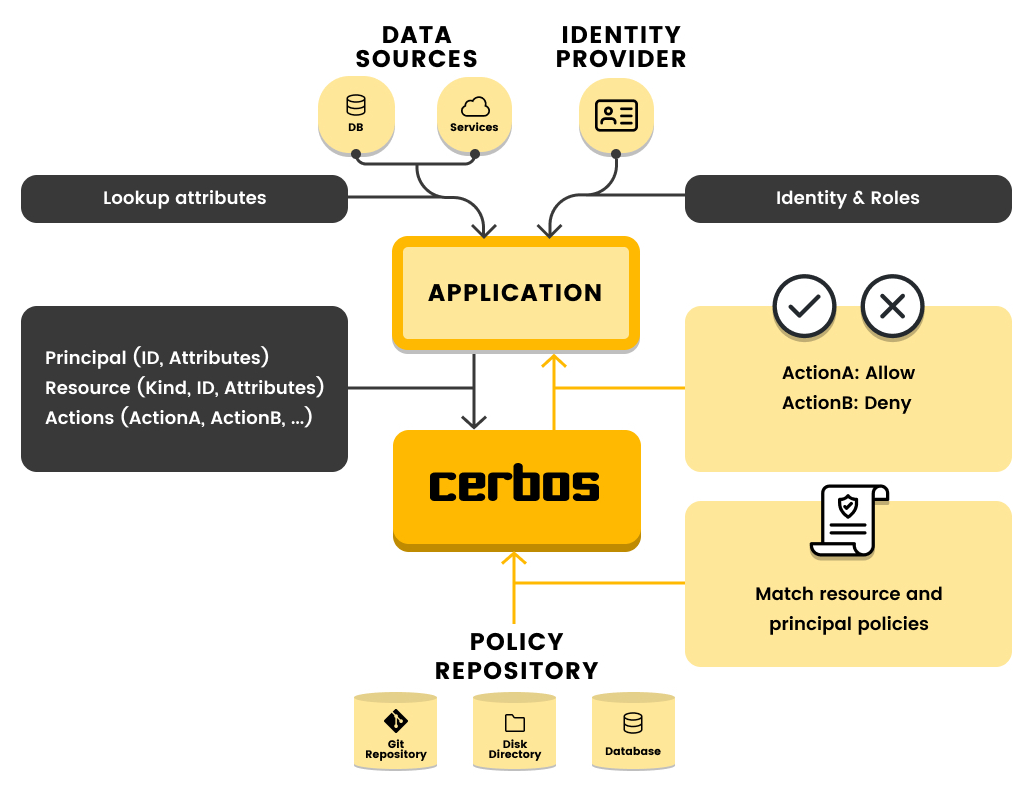
Learn more about how Cerbos PDP and Cerobs Hub work together to solve your authorization headaches here.
Learn more
- Get up and running quickly with our quickstart, or build an example implementation in our tutorial
- See example policies and requests
- Read the full documentation
- Explore some of our demo repositories
- Try online with the Cerbos playground
- Learn more about Cerbos Hub and make an account
Used by
Cerbos is popular among large and small organizations:
Using Cerbos? Let us know by emailing devrel@cerbos.dev.
Installation
Examples
Resource policy
Write access rules for a resource.
---
apiVersion: api.cerbos.dev/v1
resourcePolicy:
  importDerivedRoles:
    - common_roles
  resource: "album:object"
  version: "default"
  rules:
    - actions: ['*']
      effect: EFFECT_ALLOW
      derivedRoles:
        - owner

    - actions: ['view', 'flag']
      effect: EFFECT_ALLOW
      roles:
        - user
      condition:
        match:
          expr: request.resource.attr.public == true

    - actions: ['view', 'delete']
      effect: EFFECT_ALLOW
      derivedRoles:
        - abuse_moderator
Derived roles
Dynamically assign new roles to users based on contextual data.
---
apiVersion: "api.cerbos.dev/v1"
derivedRoles:
  name: common_roles
  definitions:
    - name: owner
      parentRoles: ["user"]
      condition:
        match:
          expr: request.resource.attr.owner == request.principal.id

    - name: abuse_moderator
      parentRoles: ["moderator"]
      condition:
        match:
          expr: request.resource.attr.flagged == true
API request
cat <<EOF | curl --silent "http://localhost:3592/api/check/resources?pretty" -d @-
{
  "requestId": "test01",
  "includeMeta": true,
  "principal": {
    "id": "alicia",
    "roles": [
      "user"
    ]
  },
  "resources": [
    {
      "actions": [
        "view"
      ],
      "resource": {
        "id": "XX125",
        "kind": "album:object",
        "attr": {
          "owner": "alicia",
          "public": false,
          "flagged": false
        }
      }
    }
  ]
}
EOF
API response
{
  "requestId": "test01",
  "results": [
    {
      "resource": {
        "id": "XX125",
        "kind": "album:object",
        "policyVersion": "default"
      },
      "actions": {
        "view": "EFFECT_ALLOW"
      },
      "meta": {
        "actions": {
          "view": {
            "matchedPolicy": "resource.album_object.vdefault"
          }
        },
        "effectiveDerivedRoles": [
          "owner"
        ]
      }
    }
  ]
}
Client SDKs
Query plan adapters
Telemetry
We collect anonymous usage data to help us improve the product. You can opt out by setting the CERBOS_NO_TELEMETRY=1 environment variable. For more information about what data we collect and other ways to opt out, see the telemetry documentation.
Join the community on Slack 💬

🔗 Links
🛡️ License
Cerbos is licensed under the Apache License 2.0 - see the LICENSE file for details.
💪 Thanks To All Contributors
Thanks a lot for spending your time helping Cerbos grow. Keep rocking 🥂