
catai is a free, open source ai interaction & interfaces project written in TypeScript and released under MIT. It has 498 GitHub stars, 39 forks and 2 open issues, and was last pushed 12 months ago. On this registry it ranks #153 of 156 tracked projects in AI Interaction & Interfaces, with 5 head-to-head comparisons available.

What is catai?

catai is an MIT-licensed TypeScript command-line tool that runs GGUF language models on your own computer and serves them through a chat interface and a small Node.js API, built for developers who want a private AI assistant without a hosted service.

What it is

catai is an npm package and CLI that manages local large language models for you. It lives in the Node.js ecosystem and is inspired by Node-Llama-Cpp and Llama.cpp. The tool downloads GGUF model files, keeps them in a local directory, and starts a chat website backed by those models, so the assistant runs on the machine rather than on someone else's servers. It ships as a global npm binary and supports Windows, Linux and Mac.

The concrete problem it solves is model plumbing. Running llama.cpp directly means building or fetching the right binaries, choosing and fetching GGUF weights, wiring the bindings, and then writing your own chat front end and HTTP layer. catai replaces that manual assembly with a single command set: it installs models, tracks which one is active, and exposes both a browser chat UI and an API. Under the hood it uses node-llama-cpp, which supplies prebuilt binaries for darwin-x64, darwin-arm64, linux-x64, linux-arm64, linux-armv7l, linux-ppc64le and win32-x64-msvc.

Key capabilities

  • Full CLI surface: install|i, models|ls, use, serve|up, update, active, remove|rm, uninstall, and node-llama-cpp|cpp for recompiling node-llama-cpp binaries.
  • Model installation for any GGUF model via catai install qwen3-4b-q4_k_m, with flags -t --tag, -l --latest, -b --bind and -bk --bind-key.
  • An HTTP endpoint at http://127.0.0.1:3000/api/chat/prompt that accepts a JSON body and returns the model response as text.
  • A development API exported from the catai package: createChat, downloadModel, initCatAILlama, LlamaJsonSchemaGrammar, LlamaChatSession and getModelPath.
  • Structured output through LlamaJsonSchemaGrammar, which constrains generation to a JSON schema, alongside sampling controls such as topP and temperature.
  • Chat UI behaviour including real time text streaming, automatic programming-language detection, and clicking a user icon to reveal the original message.
  • Multi-threaded model downloads, stored by default under the ~/catai folder, plus a dedicated low-level integration path for node-llama-cpp@beta.

Who uses it and how

  • Node.js developers who want a working local assistant after three commands: npm install -g catai, catai install qwen3-4b-q4_k_m, catai up.
  • Applications that need deterministic machine-readable answers, using LlamaJsonSchemaGrammar to force output into a typed array or object instead of free text.
  • Individual users on a single workstation or laptop running Windows, Linux or Mac, with all weights kept locally in ~/catai.
  • Teams building chat front ends against the local /api/chat/prompt endpoint rather than a cloud provider's SDK.
  • Advanced users who pair catai's model management with node-llama-cpp@beta for lower-level control.

Getting started

Install Node.js (current release), then run npm install -g catai, followed by catai install qwen3-4b-q4_k_m and catai up. The last command opens the chat website; an API guide is linked from the repository.

How it compares

The README names Node-Llama-Cpp and Llama.cpp as its inspirations, and the topic list also references dalai, ggmlv3 and llama-cpp. Against those, catai sits one level higher: it adds model installation, activation and a chat UI on top of node-llama-cpp rather than exposing raw inference primitives. It is therefore closest to a convenience wrapper and chat front end for the same local-inference stack, not a replacement for the underlying runtime.

When to use it โ€” and when not to

A self-hoster must supply Node.js and disk space for multi-gigabyte GGUF weights in ~/catai, and should expect heavy bandwidth use during downloads, since transfers are multi-threaded by design. The README announces a new UI and function calling as features coming soon, so anyone who needs function calling today should not pick it yet, and the repository does not document authentication or multi-user hosting for the local web server. The licence is clear (MIT), but newer readers should treat the chat UI as the documented scope and verify the API guide before depending on specific behaviour.

project readme (upstream, from github) โ€” read inline

Catai

Build License License Version


๐Ÿš€ Exciting Updates Coming Soon!

New UI, Function Calling, and more amazing features are on the way! Stay tuned for updates.

Run GGUF models on your computer with a chat ui.

Your own AI assistant runs locally on your computer.

Inspired by Node-Llama-Cpp, Llama.cpp

Installation & Use

Make sure you have Node.js (download current) installed.

npm install -g catai

catai install qwen3-4b-q4_k_m
catai up
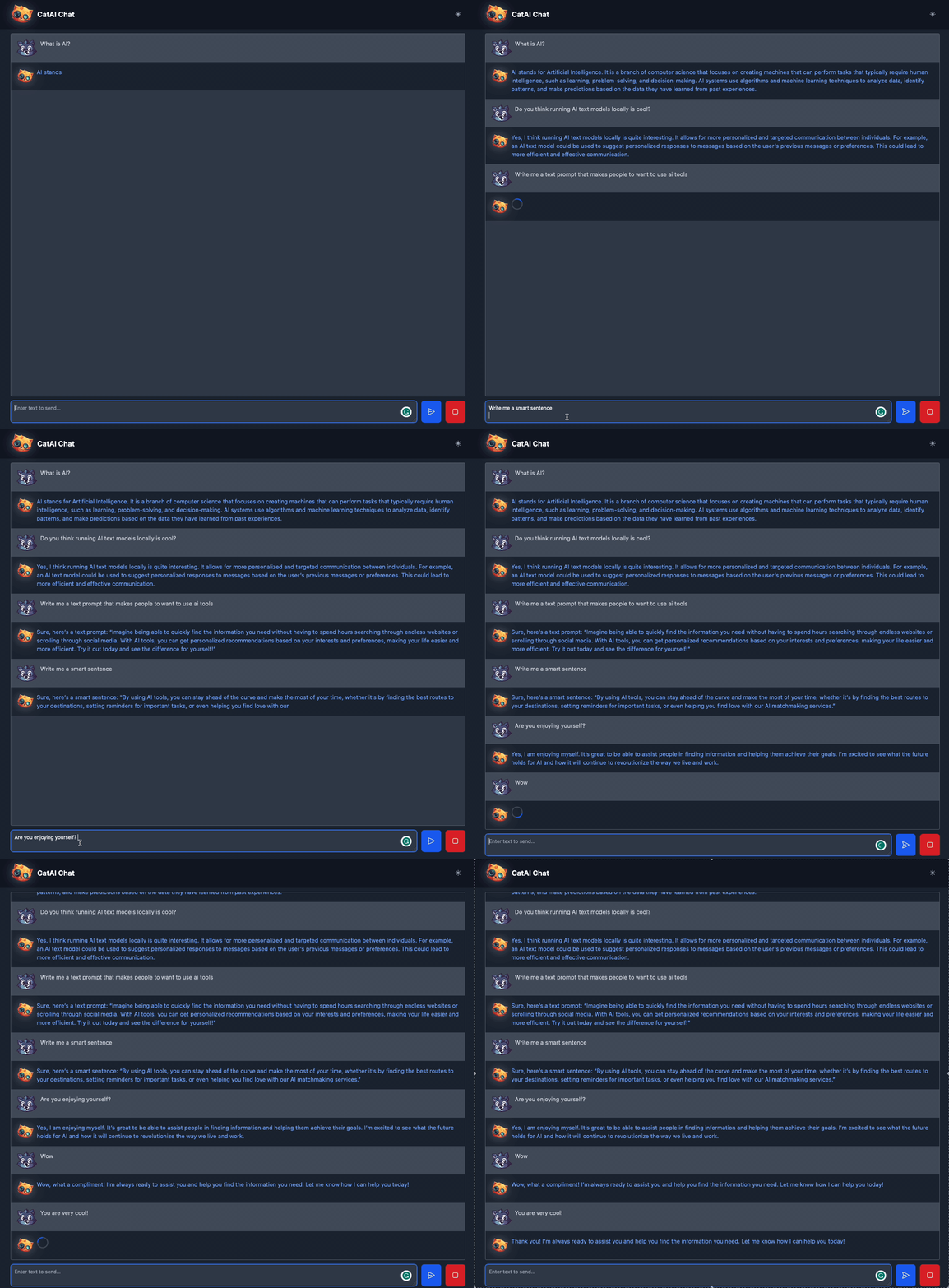
catai

Features

  • Auto detect programming language ๐Ÿง‘โ€๐Ÿ’ป
  • Click on user icon to show original message ๐Ÿ’ฌ
  • Real time text streaming โฑ๏ธ
  • Fast model downloads ๐Ÿš€

CLI

Usage: catai [options] [command]

Options:
  -V, --version                    output the version number
  -h, --help                       display help for command

Commands:
  install|i [options] [models...]  Install any GGUF model
  models|ls [options]              List all available models
  use [model]                      Set model to use
  serve|up [options]               Open the chat website
  update                           Update server to the latest version
  active                           Show active model
  remove|rm [options] [models...]  Remove a model
  uninstall                        Uninstall server and delete all models
  node-llama-cpp|cpp [options]     Node llama.cpp CLI - recompile node-llama-cpp binaries
  help [command]                   display help for command

Install command

Usage: cli install|i [options] [models...]

Install any GGUF model

Arguments:
  models                Model name/url/path

Options:
  -t --tag [tag]        The name of the model in local directory
  -l --latest           Install the latest version of a model (may be unstable)
  -b --bind [bind]      The model binding method
  -bk --bind-key [key]  key/cookie that the binding requires
  -h, --help            display help for command

Cross-platform

You can use it on Windows, Linux and Mac.

This package uses node-llama-cpp which supports the following platforms:

  • darwin-x64
  • darwin-arm64
  • linux-x64
  • linux-arm64
  • linux-armv7l
  • linux-ppc64le
  • win32-x64-msvc

Good to know

  • All download data will be downloaded at ~/catai folder by default.
  • The download is multi-threaded, so it may use a lot of bandwidth, but it will download faster!

Web API

There is also a simple API that you can use to ask the model questions.

const response = await fetch('http://127.0.0.1:3000/api/chat/prompt', {
    method: 'POST',
    body: JSON.stringify({
        prompt: 'Write me 100 words story'
    }),
    headers: {
        'Content-Type': 'application/json'
    }
});

const data = await response.text();

For more information, please read the API guide

Development API

You can also use the development API to interact with the model.

import {createChat, downloadModel, initCatAILlama, LlamaJsonSchemaGrammar} from "catai";

// skip downloading the model if you already have it
await downloadModel("qwen3-4b-q4_k_m");

const llama = await initCatAILlama();
const chat = await createChat({
    model: "qwen3-4b-q4_k_m"
});

const fullResponse = await chat.prompt("Give me array of random numbers (10 numbers)", {
    grammar: new LlamaJsonSchemaGrammar(llama, {
        type: "array",
        items: {
            type: "number",
            minimum: 0,
            maximum: 100
        },
    }),
    topP: 0.8,
    temperature: 0.8,
});

console.log(fullResponse); // [10, 2, 3, 4, 6, 9, 8, 1, 7, 5]

(For the full list of model, run catai models)

Node-llama-cpp@beta low level integration

You can use the model with node-llama-cpp@beta

Catai enables you to easily manage the models and chat with them.

import {downloadModel, getModelPath, initCatAILlama, LlamaChatSession} from 'catai';

// download the model, skip if you already have the model
await downloadModel(
    "https://huggingface.co/giladgd/Qwen3-Reranker-4B-GGUF/resolve/main/Qwen3-Reranker-4B.Q3_K_M.gguf?download=true",
    "qwen3-reranker-4b"
);

// get the model path with catai
const modelPath = getModelPath("qwen3-reranker-4b");

const llama = await initCatAILlama();
const model = await llama.loadModel({
    modelPath
});

const context = await model.createContext();
const session = new LlamaChatSession({
    contextSequence: context.getSequence()
});

const a1 = await session.prompt("Hi there, how are you?");
console.log("AI: " + a1);

Configuration

You can edit the configuration via the web ui.

More information here

Contributing

Contributions are welcome!

Please read our contributing guide to get started.

License

This project uses Llama.cpp to run models on your computer. So any license applied to Llama.cpp is also applied to this project.



If you like this repo, star it โœจ                                                    

Frequently asked questions

Is catai free to use?

catai is open source under the MIT licence. There is no licence fee and no seat count โ€” you can self-host it or, where the project offers one, pay a vendor for a managed version instead.

What does catai do?

Run AI โœจ assistant locally! with simple API for Node.js ๐Ÿš€

What is catai written in?

catai is primarily written in TypeScript. Its source is publicly available at https://github.com/withcatai/catai, and it has 498 GitHub stars.