BrowserKitten is a free, open source data extraction & web scraping project written in JavaScript and released under MIT. It has 2,381 GitHub stars, 10 forks and 2 open issues, and was last pushed 32 hours ago. On this registry it ranks #75 of 151 tracked projects in Data Extraction & Web Scraping, with 5 head-to-head comparisons available.

What is BrowserKitten?

BrowserKitten is an MIT-licensed Chrome Manifest V3 extension that puts an agent in the browser side panel, for people who want to read, act on and produce files from the signed-in pages they already use, driven by models they configure themselves.

What it is

BrowserKitten is a JavaScript Chrome extension built on Manifest V3, with the agent living in the side panel rather than in a separate application window. It works with the browser session the user is already signed in to and keeps conversations, workspace files and follow-up tasks on that computer, while model and other provider requests go to the services the user configures. The current source version is 1.2.0, and its topics include ai-agent, browser-agent, byok, local-first and manifest-v3; it sits in the Data & Analytics / Data Extraction & Web Scraping category.

The concrete problem is the gap between an authenticated page and the tool meant to work on it. Agents driving a fresh browser profile cannot reach content behind a login, so the usual fallback is to copy text out by hand or to maintain separate automation software. BrowserKitten reads the pages the user is signed in to, selects relevant content and collects findings in place, and it does so under a bring-your-own-key arrangement: the unpacked build accepts the user's own keys without a Browser Kitten subscription, and account-hosted services are optional and depend on a separate backend.

Key capabilities

  • Reads and researches signed-in pages, selecting relevant content and collecting findings.
  • Delegates clicks, form entry and navigation to a separately configured execution model, System1.
  • Creates deliverables such as documents, HTML pages, data and files in a session workspace.
  • Runs local follow-ups from a collapsible task drawer above the input, where the user states the goal, permitted actions, reporting conditions and stop conditions, and the agent arranges or removes wakeups within that goal.
  • Configures Inference (base URL, API key, tool-capable model ID) and System1 (an OpenAI-compatible /chat/completions endpoint) separately, though both may use one provider.
  • Adds optional Image, Transcription and Search services when a task needs them.
  • Installs with no build step: the folder containing manifest.json is the load root for Load unpacked, and Node.js, Python and npm are not required.

Who uses it and how

  • Researchers and analysts working behind a login, who summarise the current page and save its key findings as a document without leaving the browser.
  • Users delegating page interaction to an execution model kept distinct from the planning model used for analysis and tool calls.
  • Teams with own-key or data-ownership requirements: conversations, workspace files and follow-up tasks stay on the machine, and requests reach only the providers they configure.
  • People watching a page over time, who set a follow-up goal and receive reports on actions, changes or requests for help, while quiet scheduled tasks stay silent when nothing meaningful changes.

Getting started

Download the current source ZIP from the main branch, extract it, open chrome://extensions with Developer mode enabled, and use Load unpacked to select BrowserKitten-main, the folder that directly contains manifest.json. Pin the extension, open the side panel and configure providers in Settings; a small first task such as summarising the current page and saving its key findings as a document is a reasonable check.

How it compares

No comparable tool is named in the facts for this registry entry, so BrowserKitten stands alone here. Its position is set by MIT-licensed source, an unpacked install with no build step, bring-your-own-key access to OpenAI-compatible endpoints, and conversations, workspace files and follow-up tasks held on the local computer.

When to use it — and when not to

Choose it if you want an agent inside the browser profile you are already signed in to, you accept configuring and paying for Inference and System1 separately, and you can leave Chrome running and the computer awake so minute-scale follow-up checks fire. Do not choose it if you need cloud execution, native OS or terminal control, immediate webpage-event subscriptions, or automatic grouping of every agent-controlled tab, all of which the README lists as current limits. Expect to validate behaviour yourself: forks are few against the star count, and the README points users to main rather than to tagged releases.

project readme (upstream, from github) — read inline

Browser Kitten

An agent for the browser you already use.
Read signed-in pages, take action, create files, and follow up locally.

Runtime regression and package integrity CI Desktop Chrome 135 or newer MIT License Contributions welcome

English · 简体中文

Quick start · Configuration · Documentation · Current limits · Contribute · Issues


Browser Kitten is an MIT-licensed Chrome MV3 extension with an agent in the side panel. It works with your existing browser session and keeps conversations, workspace files, and follow-up tasks on this computer. Model and other provider requests use the services you configure.

Current source version: 1.2.0 · Load unpacked · No build step for installation.

What you can do

Capability In practice
Read & research Understand pages you are signed in to, select relevant content, and collect findings.
Act on pages Delegate clicks, form entry, and navigation to a separately configured execution model.
Create deliverables Save documents, HTML pages, data, and files in a session workspace.
Follow up Arrange local checks, preserve progress, and manage ongoing tasks from a collapsible drawer.
See the actual side panel — light & dark
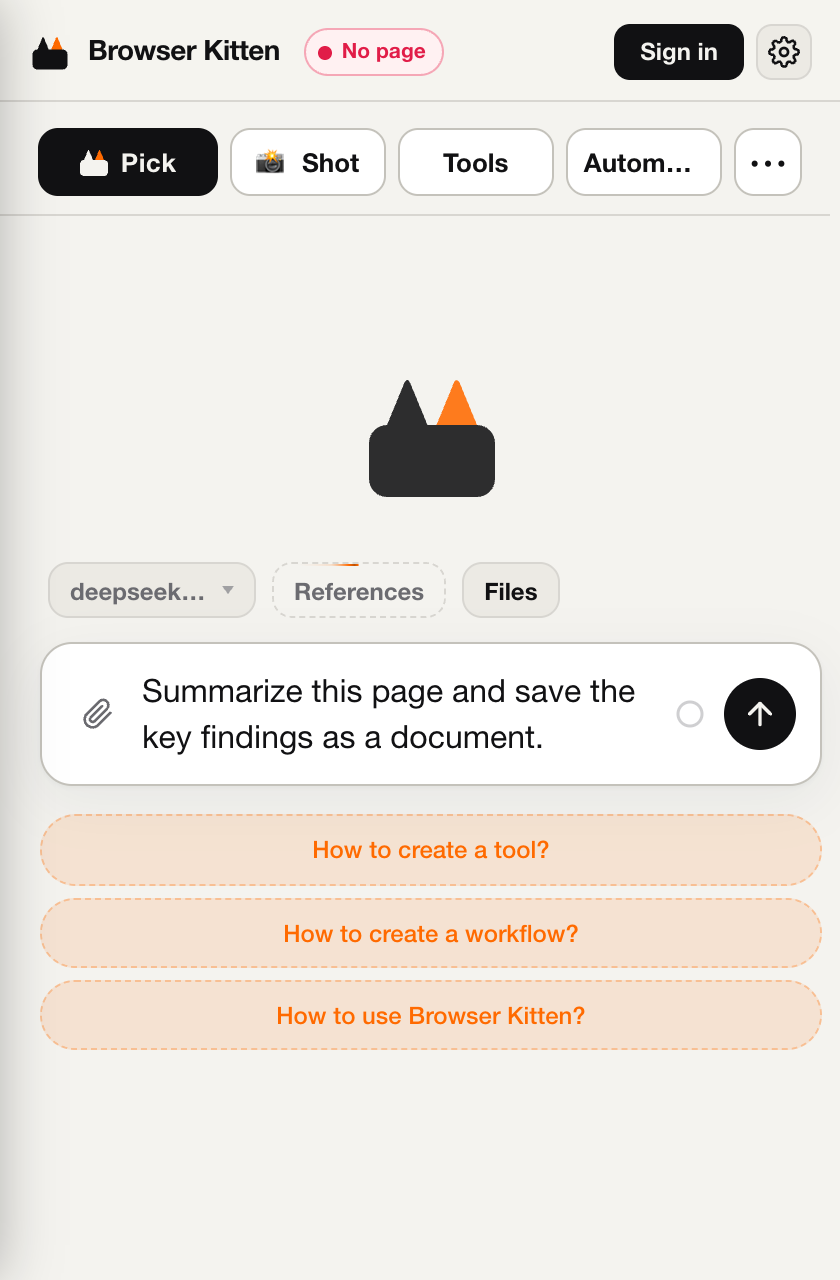
Captured from the extension in a fresh browser profile. The example is an unsent draft, not a completed run.

Quick start

  1. Download the current source ZIP and extract it into a folder you will keep.
  2. Open chrome://extensions in desktop Chrome, enable Developer mode, then choose Load unpacked. Select BrowserKitten-main, the folder that directly contains manifest.json.
  3. Pin Browser Kitten, refresh an ordinary website tab, open the side panel, and configure your providers below.

You do not need Node.js, Python, npm, or a build command to install it. The source folder itself is the extension load root.

Trying the latest work? The download above follows main. The separate GitHub Releases page may contain older tagged versions.

For the full walkthrough, permissions, update instructions, and troubleshooting, see Getting started · 中文安装指南.

Configuration

Open Settings from the side-panel menu. For a bring-your-own-key setup:

Setting Needed for Enter
Inference Planning, analysis, and tool calls Base URL, API key, and a tool-capable model ID
System1 Page clicks and form interactions A separate execution-model configuration using an OpenAI-compatible /chat/completions endpoint
Image / Transcription / Search Additional media and web capabilities Configure only the services you need

Inference and System1 can use the same provider, but must be configured separately. The unpacked build accepts your own keys without a Browser Kitten subscription; the external providers still charge for usage. Account-hosted services are optional and depend on the separate backend.

Try a small first task:

Summarize the current page and save its key findings as a document.

Enter inserts a newline. Ctrl+Enter / Cmd+Enter sends. Enable page scripts and capture permissions only when the task needs them; see the permission guide.

Local follow-ups

Describe the goal, permitted actions, reporting conditions, and when to stop. The agent can arrange or remove wakeups within that goal. Manage them in the collapsible task drawer above the input.

  • Chrome must remain running and the computer awake. Closing the side panel is fine.
  • Checks run on a minute-scale schedule; immediate webpage-event subscriptions are not implemented.
  • New scheduled tasks can stay quiet when nothing meaningful changes, and report actions, changes, or requests for help.

See follow-up behavior and controls.

Current limits

  • This is a local browser extension; there is no cloud execution environment or native OS / terminal control.
  • The host currently enforces per-tab leases and per-session execution slots, rather than a global browser lock. Automatic grouping of all agent-controlled website tabs is not implemented. Run one browser-operating task at a time.
  • Restricted Chrome pages and the Web Store are not ordinary automation targets. Browser smoke tests do not establish success on every website or with every model.
  • Settings and workspaces are local to this Chrome profile. They do not automatically move to another computer. Relevant task content may be sent to your configured providers.

Read updates and data before replacing an installation.

Documentation

Contributing

Bug reports, documentation fixes, and focused pull requests are welcome. Start with CONTRIBUTING.md for setup and checks. Use a bug report or feature request to give maintainers useful context.

Please follow the Code of Conduct. Report vulnerabilities through private security reporting, rather than a public issue. No response-time commitment is implied.

License & acknowledgments

MIT © 2026 Yiteng (Player-YN). Built with open-source projects including Vercel AI SDK, QuickJS, esbuild, Zod, Lucide, and fflate. See third-party notices for their respective licenses.

Back to top ↑

Frequently asked questions

Is BrowserKitten free to use?

BrowserKitten is open source under the MIT licence. There is no licence fee and no seat count — you can self-host it or, where the project offers one, pay a vendor for a managed version instead.

What does BrowserKitten do?

A Chrome side-panel agent for your signed-in browser. Read pages, take action, create files, and run local follow-ups. Bring your own models.

What is BrowserKitten written in?

BrowserKitten is primarily written in JavaScript. Its source is publicly available at https://github.com/Player-YN/BrowserKitten, and it has 2,381 GitHub stars.