
browser-agent is a free, open source browsers & extensions project written in TypeScript and released under Apache-2.0. It has 4,128 GitHub stars, 238 forks and 34 open issues, and was last pushed 7 months ago. On this registry it ranks #67 of 133 tracked projects in Browsers & Extensions, with 5 head-to-head comparisons available.

What is browser-agent?

Magnitude is an open-source, vision-first browser agent written in TypeScript that lets developers control a real browser with natural language, and it is aimed at engineers who need to automate repetitive web work, move data between applications that lack APIs, or test web interfaces rather than click through them by hand.

What it is

Magnitude is an Apache-2.0 licensed browser agent that uses a visually grounded language model to see and understand any interface, plan actions, and then execute them with precise mouse and keyboard input. It is published in the Node and TypeScript ecosystem through npm, with a scaffolding package for new projects and a separate test-runner package for existing web applications. Its topic list places it in the browser automation space alongside Playwright and Selenium, and the README presents vision as the architectural difference from both.

The concrete problem it replaces is element-addressing by DOM inspection. Most browser agents wrap numbered boxes around page elements, which the README argues generalises poorly on complex modern sites, because the agent's behaviour is tied to the page's structure. Magnitude instead asks the model to specify pixel coordinates, which keeps the agent independent of DOM shape and, per the README, positions it for future use against desktop apps and VMs. It also targets a second failure mode: the "high-level prompt plus tools, work until done" pattern that demos well but does not hold up in production.

Key capabilities

  • Navigate, Interact, Extract, and Verify are the four stated capabilities: seeing and understanding an interface, executing mouse and keyboard actions, pulling structured data out, and asserting on results.
  • agent.act() accepts high-level tasks, such as 'Create a task', with an optional data payload the agent uses where appropriate.
  • The same API handles low-level instructions, for example dragging an item to the top of a specific column.
  • agent.extract() returns data matched against a supplied zod schema, and can derive new insights such as a rated difficulty field, not only copy existing text.
  • A built-in test runner installs as magnitude-test and generates tests/magnitude, containing magnitude.config.ts and an example test file named example.mag.ts.
  • Custom actions and prompts are configurable at both agent and action level, giving a choice between granular actions and larger flows.
  • A native caching system is intended to make runs deterministic, and is documented as in progress.

Who uses it and how

  • Teams automating routine web tasks that have no API surface, using agent.act() as the substitute for manual clicking.
  • Data engineers extracting structured records by describing the target list in natural language and a zod schema.
  • Web application teams running visual assertions in a test suite, from the terminal on a developer machine and, per the linked documentation, inside CI/CD pipelines.
  • Developers building their own browser agents who want Magnitude as a lower-level building block rather than an end-user tool.
  • Enterprises that need additional features or support contact the maintainers directly via [email protected] or a scheduled call.

Getting started

For a new project, run npx create-magnitude-app, which scaffolds a project and an example script. To add the test runner to an existing app, run npm i --save-dev magnitude-test && npx magnitude init. Both paths require a large visually grounded model: Claude Sonnet 4 is recommended, and Qwen-2.5VL 72B is also compatible.

How it compares

The project's topic list places it next to Playwright and Selenium, but Magnitude's stated distinction is that it does not depend on DOM structure, addressing elements by pixel coordinate instead, which is also the basis for its desktop and VM ambitions. Against the general class of demo-oriented prompt-and-tools agents, the README draws the line at controllable and repeatable automation through configurable abstraction levels and caching.

When to use it — and when not to

Adopting Magnitude means taking on a dependency on a large visually grounded model, so planning should include the cost, latency, and configuration of that model, along with the npm packages and the generated tests/magnitude directory. Teams that need guaranteed deterministic replay today should be cautious, because the caching system that provides it is still marked in progress. The README is short and defers most operational detail to docs.magnitude.run, so anyone unwilling to read the external documentation, or unable to call a strong vision model, is a poor fit.

project readme (upstream, from github) — read inline

Documentation License Discord Follow Tom Follow Anders


🚀 New: Magnitude is state-of-the-art, scoring 94% on WebVoyager!

Magnitude uses vision AI to enable you to control your browser with natural language.

  • 🧭 Navigate - Sees and understands any interface to plan out actions
  • 🖱️ Interact - Executes precise actions using mouse and keyboard
  • 🔍 Extract - Intelligently extracts useful structured data
  • Verify - Built-in test runner with powerful visual assertions

You can use it to automate tasks on the web, integrate between apps without APIs, extract data, test your web apps, or as a building block for your own browser agents.
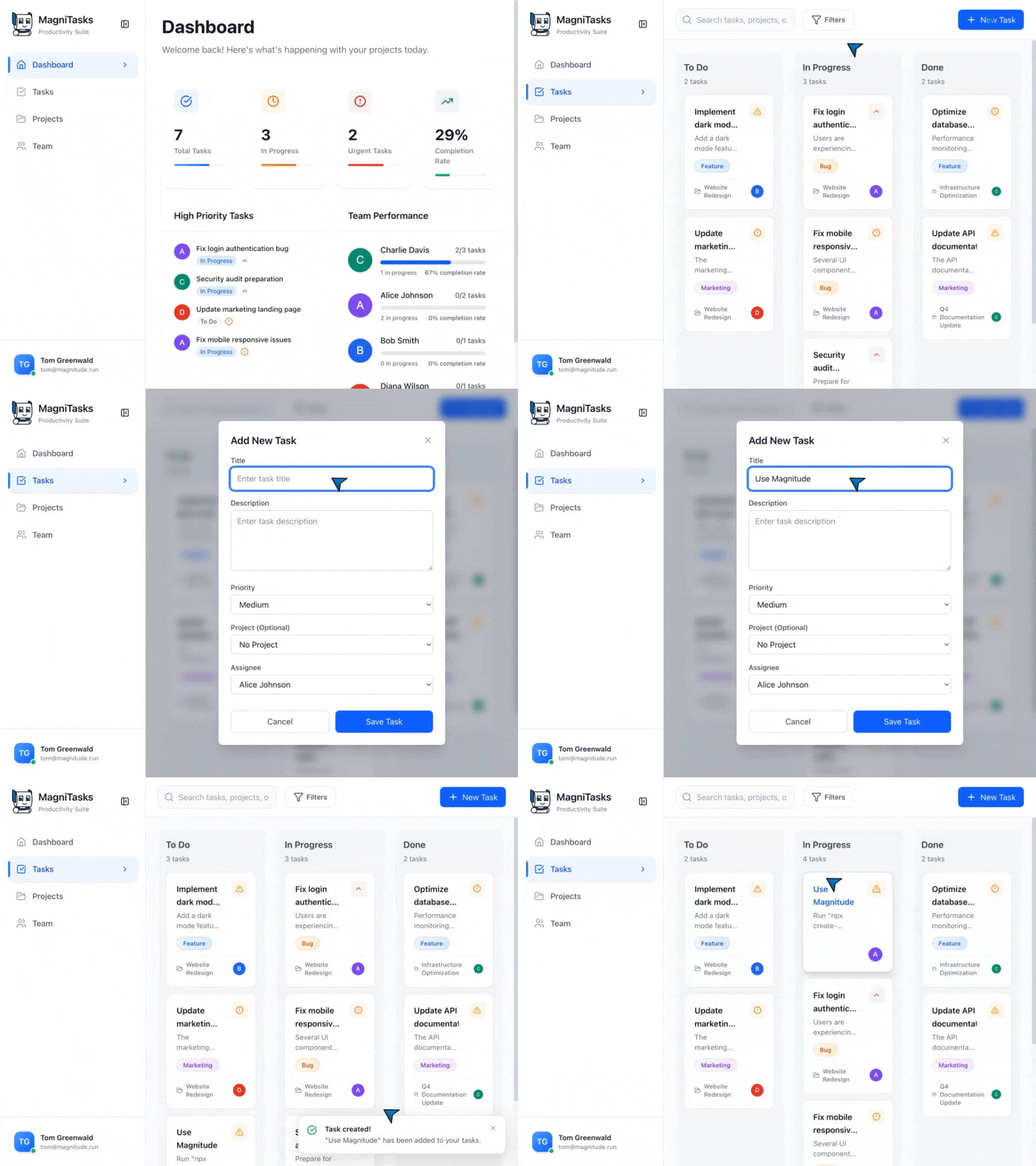
Video showing Magnitude tests running in a terminal and agent taking actions in the browser

↕️ Magnitude in action! ↕️

// Magnitude can handle high-level tasks
await agent.act('Create a task', {
    // Optionally pass data that the agent will use where appropriate
    data: {
        title: 'Use Magnitude',
        description: 'Run "npx create-magnitude-app" and follow the instructions',
    },
});

// It can also handle low-level actions
await agent.act('Drag "Use Magnitude" to the top of the in progress column');

// Intelligently extract data based on the DOM content matching a provided zod schema
const tasks = await agent.extract(
    'List in progress tasks',
    z.array(z.object({
        title: z.string(),
        description: z.string(),
        // Agent can extract existing data or new insights
        difficulty: z.number().describe('Rate the difficulty between 1-5')
    })),
);

Get started

Running your first browser automation

npx create-magnitude-app

This will create a new project and walk you through the steps for setting up Magnitude. It will also create an example script that you can run right away!

Using the test runner

To install the test runner for use in an existing web app, please run:

npm i --save-dev magnitude-test && npx magnitude init

This will create a basic tests directory tests/magnitude with:

  • magnitude.config.ts: Magnitude test configuration file
  • example.mag.ts: An example test file

For information on how to run tests and integrate into CI/CD see here.

[!NOTE] Magnitude requires a large visually grounded model. We recommend Claude Sonnet 4 for the best performance, but are also compatible with Qwen-2.5VL 72B. See docs for more information.

Why Magnitude?

Problem #1: Most browser agents draw numbered boxes around page elements - doesn't generalize well due to complex modern sites

Solution: Vision-first architecture

  • Visually grounded LLM specifies pixel coordinates
  • True generalization independent of DOM structure
  • Future-proof architecture for desktop apps, VMs, etc.

Problem #2: Most browser agents follow "high-level prompt + tools = work until done" - works for demos, not production

Solution: Controllable & repeatable automation

  • Flexible abstraction levels (granular actions vs. flows)
  • Custom actions + prompts at agent and action level
  • Deterministic runs via native caching system (in progress)

Additional info

Please see our docs for more information on how to best build Magnitude automations and test cases.

Contact

If you are an enterprise and want more features or support, feel free to reach out to us at [email protected] or schedule a call here to discuss your needs.

You can also join our Discord community for help or any suggestions!

Frequently asked questions

Is browser-agent free to use?

browser-agent is open source under the Apache-2.0 licence. There is no licence fee and no seat count — you can self-host it or, where the project offers one, pay a vendor for a managed version instead.

What does browser-agent do?

Open-source, vision-first browser agent

What is browser-agent written in?

browser-agent is primarily written in TypeScript. Its source is publicly available at https://github.com/magnitudedev/browser-agent, and it has 4,128 GitHub stars.