beutl is a free, open source photo & video editors project written in C# and released under MIT. It has 1,232 GitHub stars, 60 forks and 61 open issues, and was last pushed 2 hours ago. On this registry it ranks #32 of 35 tracked projects in Photo & Video Editors, with 5 head-to-head comparisons available.

What is beutl?

Beutl (pronounced /bjútəl/) is a free, MIT-licensed, cross-platform video editing and compositing application written in C# on the latest .NET, built for editors, compositors, and C# developers who need an extensible editor that runs on Windows, Linux, and macOS.

What it is

Beutl is a cross-platform video editing and compositing tool written in C# and distributed through the b-editor organisation on GitHub. It targets modern .NET, and its development scripts select net10.0-windows on Windows and net10.0 on macOS and Linux, which is what allows a single codebase to cover all three desktop operating systems. The project is licensed under the MIT License, with a separately distributed Beutl.FFmpegWorker executable under GPLv3, and it presents itself as the continuation of the older BEditor application, whose source code still lives in the old/develop branch of the same repository.

The concrete problem it solves is the displacement of that earlier BEditor generation. Beutl consolidates editing and compositing into one .NET-based application, adds an extension system for effects, objects, codecs, and UI, and folds version control directly into the editing workflow so that a project's history can be tracked with Git rather than managed with external tooling. It also reaches outside the Windows-only habit of many desktop editors by shipping macOS and Linux builds from the same source tree.

Key capabilities

  • Cross-platform execution on Windows, Linux, and macOS, built on the latest .NET.
  • Keyframe animation for basic motion such as fade-ins and slide-ins, and for animating arbitrary objects.
  • A broad built-in effect library covering color filters, blurs, shadows, and LUTs, plus outline, inner shadow, and long shadow effects.
  • An extension system acquired or published through a Beutl account, capable of adding effects, objects, codecs, and UI.
  • Git-backed version control inside the application: tracking editing history, restoring earlier versions, creating experimental branches, and backing up to a remote repository.
  • FFmpeg integration through Beutl.FFmpegWorker, a separate GPLv3 executable linked against GPL-licensed FFmpeg that communicates with the main application over IPC.
  • Repository build tooling that needs no globally installed Nuke: ./build.sh dev on macOS and Linux, .\build.ps1 dev on Windows, or nuke dev if the global tool is present, after git submodule update --init --recursive.

Who uses it and how

  • Editors working across mixed operating system fleets who need the same compositing tool on Windows, Linux, and macOS.
  • Small teams and solo creators who treat edits as versioned work, branching an experimental cut and pushing backups to a remote from inside Beutl.
  • .NET and C# developers who want to publish extensions that introduce new effects, objects, codecs, or UI rather than writing a separate plugin host.
  • Compositors who rely on LUTs, blurs, shadows, and the more specialised outline, inner shadow, and long shadow effects for finishing work.
  • Japanese- and English-speaking users, served by parallel README.md and README.ja.md documentation, a Discord community, and the project homepage and documentation site.

Getting started

Installation instructions are published externally at the project documentation, https://docs.beutl.beditor.net/get-started/install. To run from source, initialise submodules with git submodule update --init --recursive and then execute ./build.sh dev on macOS or Linux, .\build.ps1 dev on Windows, or nuke dev if the global Nuke tool is installed.

How it compares

The facts provided name no comparable editing products, so Beutl stands alone in this registry among video editors and compositors. The only related project named anywhere in the material is its own predecessor, BEditor, whose source remains available in the old/develop branch rather than being maintained as a parallel product.

When to use it — and when not to

A self-hoster or contributor must operate a full .NET development environment, initialise Git submodules, and accept that the FFmpeg worker is a separate GPLv3 process rather than part of the MIT-licensed codebase. Anyone who wants a one-click installer, a hosted service, or extensions without creating a Beutl account should look elsewhere, and non-developers will find the README thin on deployment detail since it defers installation entirely to an external site. The community is also modest in size, at roughly 1,232 stars, 60 forks, and 61 open issues, which is worth weighing before adopting it for production work.

project readme (upstream, from github) — read inline

🎬 Beutl

English / Japanese

Daily build Discord

Beutl (pronounced /bjútəl/) is a cross-platform video editing (compositing) software.

Source code of the old version (BEditor)
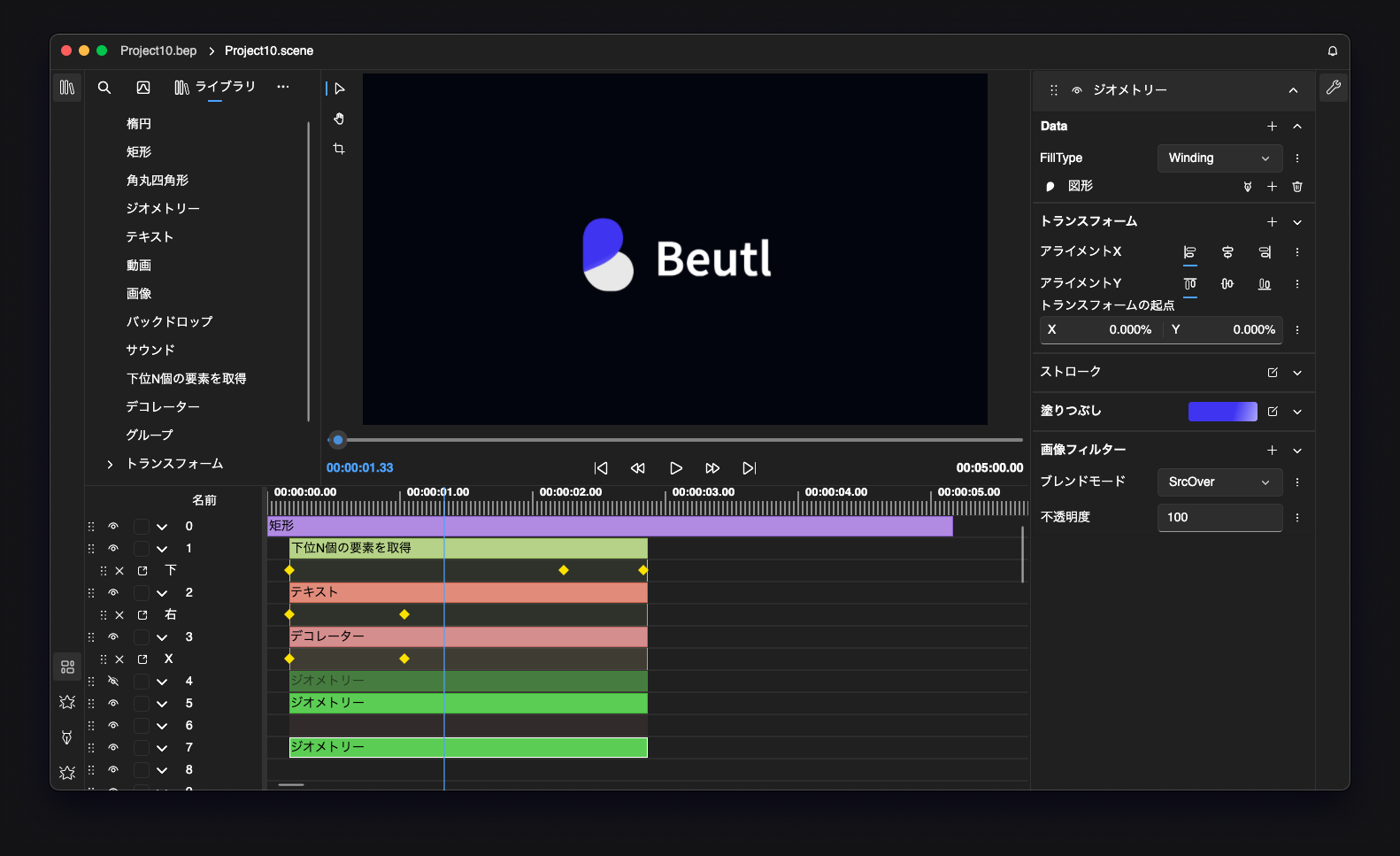
The image is from a development version.

📖 Features

💻 Cross-Platform

Beutl uses the latest .NET, enabling it to run on various operating systems. It supports Windows, Linux, and macOS.

⏳ Keyframes

Using keyframes, you can create basic animations such as fade-ins and slide-ins, as well as animate various objects.

🔌 Extensions

Create a Beutl account to acquire extensions or publish your own developed extensions. Extensions can add effects, objects, codecs, UI, and more.

🧰 Rich Effects

From basic effects like color filters, blurs, shadows, and LUTs, to minor effects like outlines, inner shadows, and long shadows, Beutl offers a wide range of effects. These can be further expanded through extensions.

🕘 Version Control

Track a project's editing history with Git, restore earlier versions, create experimental branches, and back up work to a remote repository from within Beutl.

📥 Installation

Refer to the documentation here.

Development

On a fresh checkout, initialize the Git submodules first with git submodule update --init --recursive.

Run the application from the repository root using the included scripts, which do not require the global Nuke tool.

macOS/Linux:

./build.sh dev

Windows (PowerShell):

.\build.ps1 dev

This runs src/Beutl in Debug configuration, automatically selecting net10.0-windows on Windows and net10.0 on macOS/Linux. If the global Nuke tool is already installed, you can also use nuke dev.

License

This project is licensed under the MIT License (LICENSE).

Beutl.FFmpegWorker is a separate executable that links with GPL-licensed FFmpeg and is distributed under the GNU General Public License v3 (LICENSE.GPL). It runs as an independent process and communicates with the main application via IPC, so the GPL does not apply to the rest of the codebase.

Patrons

Frequently asked questions

Is beutl free to use?

beutl is open source under the MIT licence. There is no licence fee and no seat count — you can self-host it or, where the project offers one, pay a vendor for a managed version instead.

What does beutl do?

Cross-platform video editing (compositing) software.

What is beutl written in?

beutl is primarily written in C#. Its source is publicly available at https://github.com/b-editor/beutl, and it has 1,232 GitHub stars.



