ArrowDL is a free, open source data extraction & web scraping project written in C++ and released under LGPL-3.0. It has 853 GitHub stars, 42 forks and 7 open issues, and was last pushed 6 months ago. On this registry it ranks #126 of 149 tracked projects in Data Extraction & Web Scraping, with 5 head-to-head comparisons available. It gained 2 stars over the last 30 tracked days.

What is ArrowDL?

ArrowDL (Arrow Downloader) is a free, open-source, standalone download manager for Windows, macOS and Linux, built in C++ with the Qt framework and aimed at anyone who needs to capture, queue and batch-download files, media streams and torrents without depending on a browser's built-in downloader.

What it is

ArrowDL is a native desktop application that embeds its own web engine rather than borrowing a browser's. It is written in C++ and based on the Qt framework, distributed under the LGPL-3.0 licence, and builds are produced through GitHub Actions from the master and develop branches. The internal web engine differs by toolchain: the MinGW and GNU builds use Google Gumbo Parser, a small pure-C HTML5 parser that does not parse JavaScript, while the MSVC build uses Chromium, which parses both HTML and JavaScript. The project states that it is designed to add new parsers or additional existing parsers as web technology evolves.

The concrete problem it solves is link discovery and bulk retrieval. Given a URL, ArrowDL downloads the page, parses the HTML and collects the links it finds, so that a user does not have to click through a gallery, a forum thread or a video page item by item. It also covers the gap left by a browser's own download manager, which handles a single file at a time and offers little control over queues, torrents or streamed media. ArrowDL lives in the desktop download-manager ecosystem, alongside tools such as NativeClient, which the README names as an alternative to ArrowDL.

Key capabilities

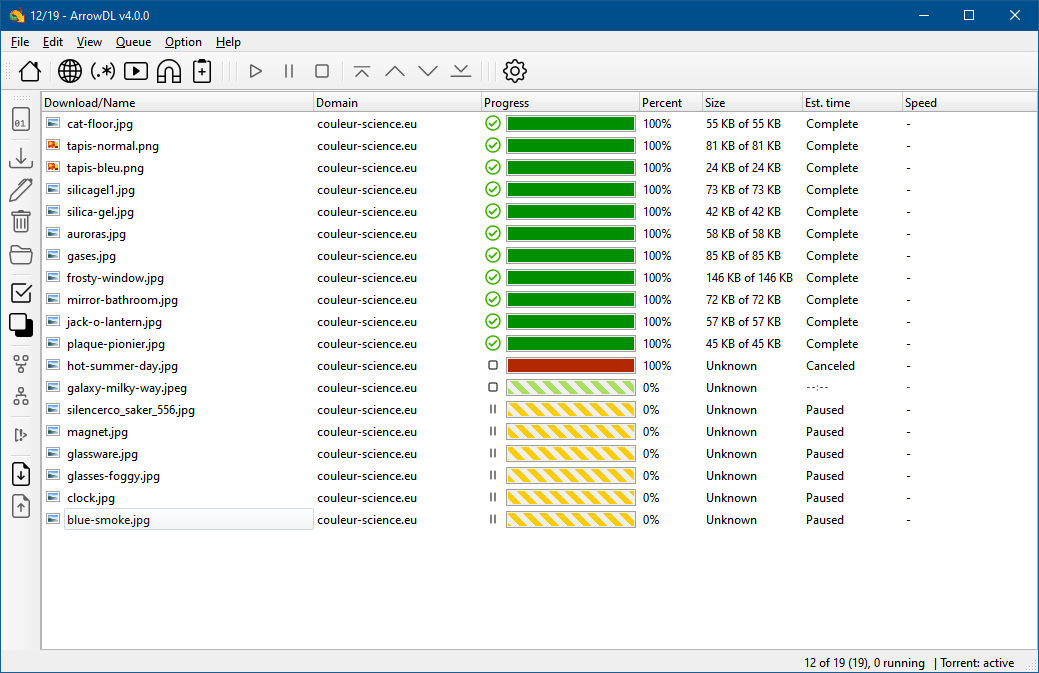
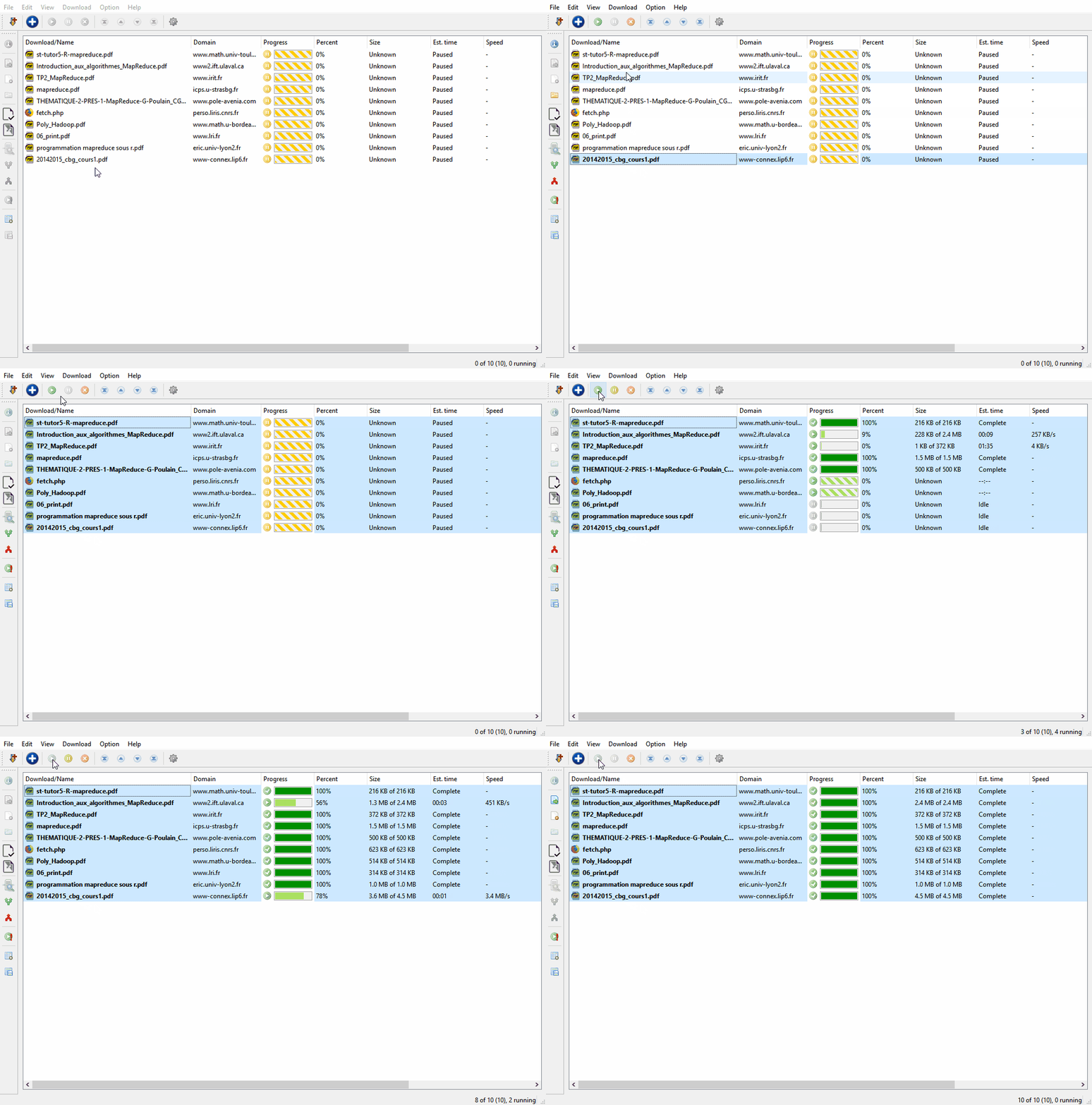
  • Batch downloading of many files at once, including the "Batch of Files" workflow shown in the project screenshots.
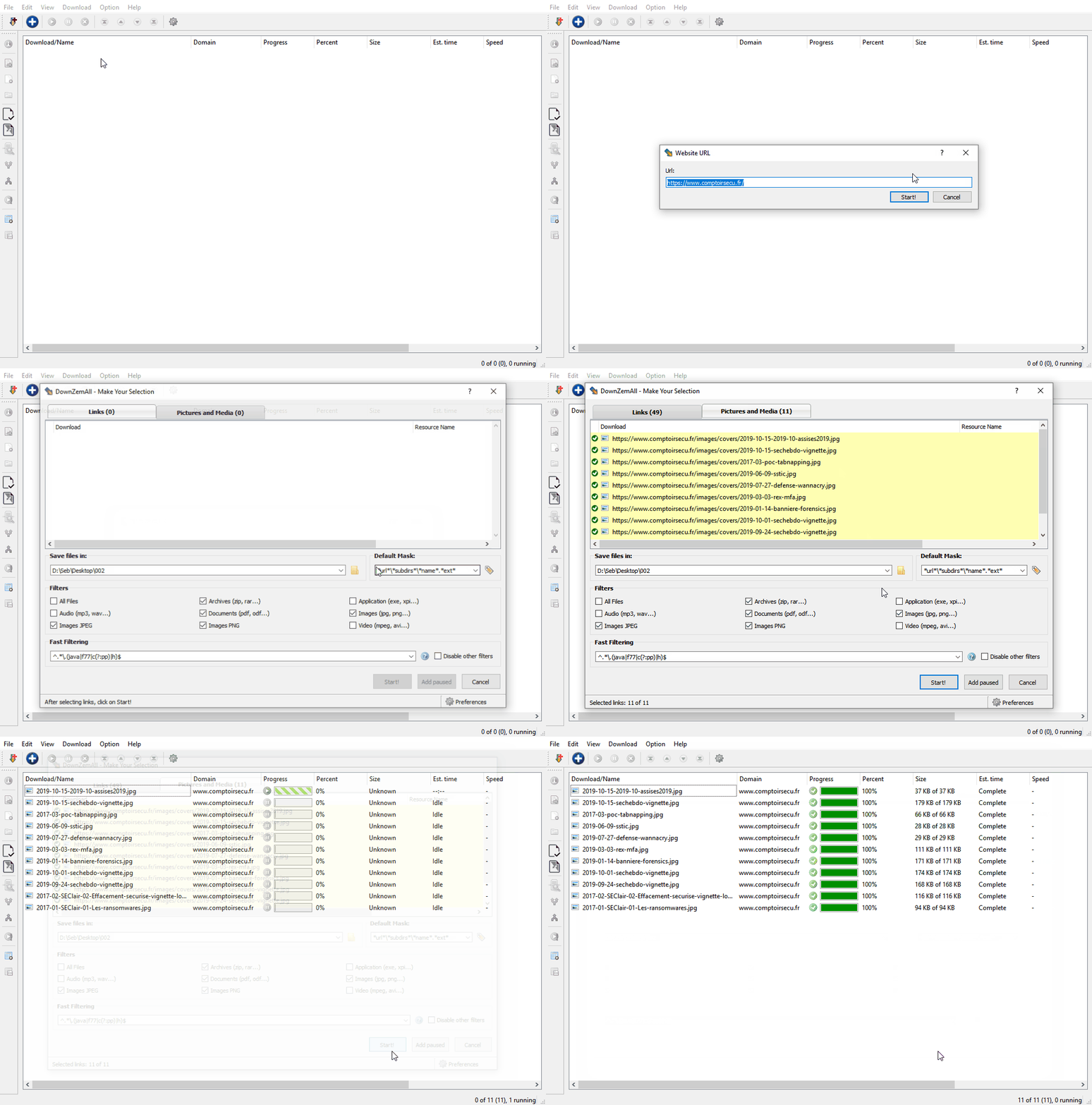
  • Built-in crawler: given an address, it downloads the page, parses the HTML and collects the links.
  • Embedded web engine that is toolchain-dependent — Google Gumbo Parser for the MinGW and GNU builds, Chromium for the MSVC build.
  • Torrent support through libtorrent, with magnet-link handling, listed among the project topics alongside torrent-client and torrent-downloader.
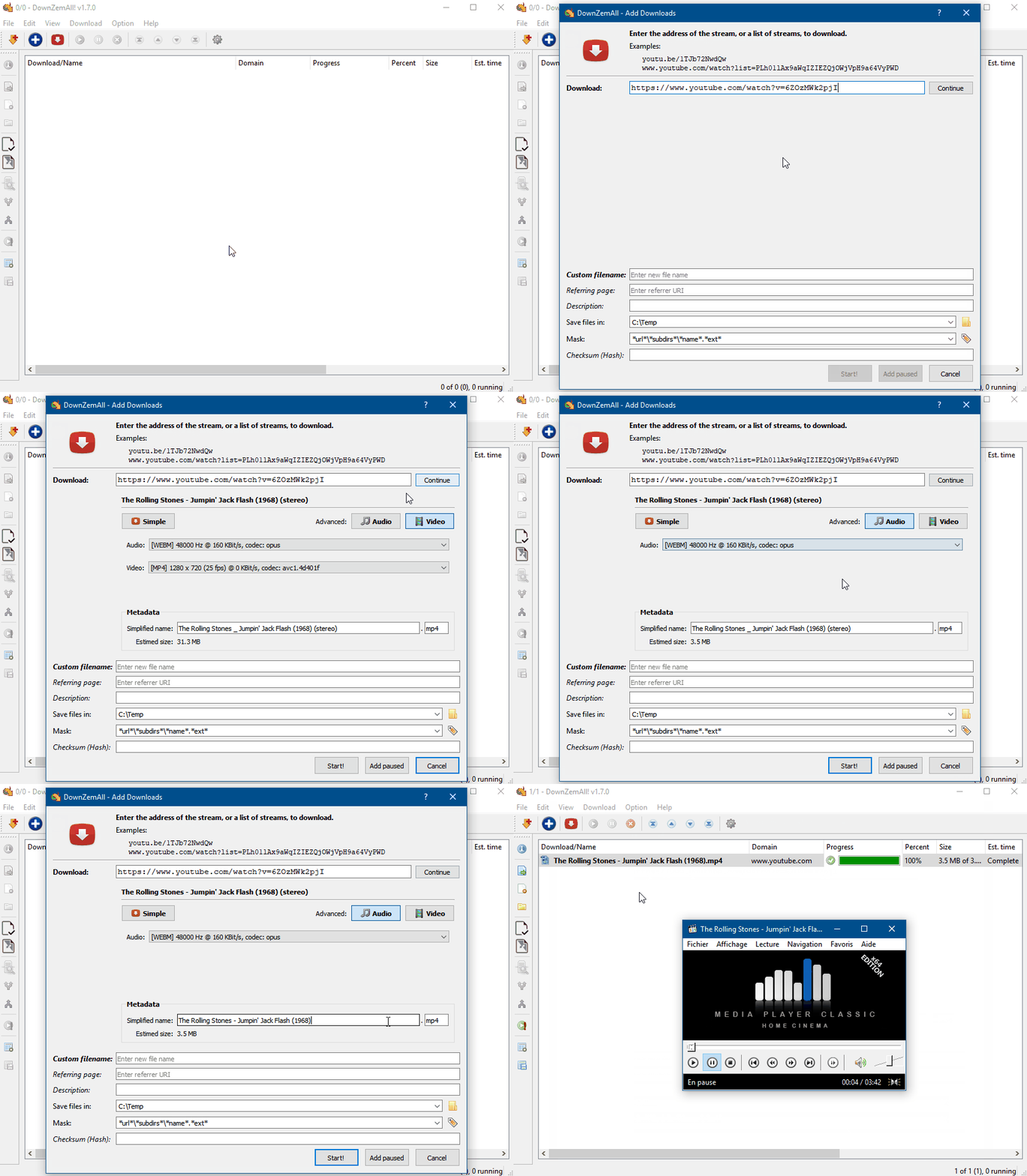
  • Video and stream downloading, with youtube-dl and stream-downloader among the project topics and a dedicated "Video Streams" screenshot.
  • Browser integration through WebExtensions, targeting recent Mozilla Firefox versions and other browsers including Chrome, Edge and Safari; the README carries badges for a Chrome Web Store extension and a Mozilla Add-on, plus a native-client messaging component.
  • Packaging and updates through Chocolatey on Windows, via the arrowdl package.

Who uses it and how

  • Desktop users on Windows, macOS or Linux who need a standalone download queue rather than a browser sidebar, and who want the same tool across all three platforms.
  • Firefox, Chrome, Edge or Safari users who pair the browser extension with the standalone application, using WebExtensions and native-client messaging to hand links off to the desktop app.
  • People archiving media pages, who use the video-stream workflow to pull videos and streams that an ordinary browser download would not capture.
  • Torrent users, who add magnet links and let the libtorrent-based engine handle the transfer inside the same application.
  • Windows administrators and power users, who install and keep the application updated through the Chocolatey arrowdl package instead of manual downloads.

Getting started

Install the application for the target operating system from the Download page at arrow-dl.com, or on Windows run choco install arrowdl. A Tutorial page covers usage, and the repository documents building from ./CMakeLists.txt in QtCreator with a Qt 6.3.1 MinGW 64-bit kit.

How it compares

No set of paid products is listed as being replaced, so positioning is best read against the tools the facts name. NativeClient is presented in the README as an alternative to ArrowDL, and both occupy the same niche of a desktop client that collects links for a browser. The distinction from command-line tools such as youtube-dl, which appears in the topic list, is that ArrowDL wraps retrieval in a Qt GUI with its own embedded web engine and a torrent client attached, rather than exposing a single-purpose command.

When to use it — and when not to

Pick ArrowDL when the goal is bulk retrieval, link crawling, torrents and streamed media inside one cross-platform desktop application, and when the LGPL-3.0 licence is acceptable. It is not a server-side or self-hosted scraping service, so there is no database, object storage or SMTP relay to operate — the cost of adoption is installing a native application and, on Windows only, optionally the Chocolatey package. The honest caveats are that the README is high-level and defers usage detail to an external tutorial, and that the Gumbo-based MinGW and GNU builds cannot parse JavaScript, so link collection on script-driven pages is weaker there than in the Chromium-based MSVC build.

project readme (upstream, from github) — read inline

ArrowDL

ArrowDL (Arrow Downloader)

Release version License GitHub All Releases

Chrome Web Store Users Mozilla Add-on Chocolatey

X (formerly Twitter) Follow

Overview

ArrowDL is a standalone download manager for Windows, MacOS and Linux.

It aims to work with latest versions of Mozilla Firefox (powered by WebExtensions), and other web browsers (Chrome, Edge, Safari...).

Development

ArrowDL is written in C++ and based on the Qt framework.

master develop
Built with GitHub Actions Built with GitHub Actions

Screenshots

Overview

ArrowDL

Video Streams

Video Download

Webpage Content

WebPage

Batch of Files

Batch

More screenshots on the Gallery page.

Installation

Go to Download page to install the application for your operating system.

Rem: Native-Client is an alternative to ArrowDL. Click here for more information.

On Windows, you can also use the Chocolatey package to handle the installation/updates:

choco install arrowdl

Usage

Go to Tutorial page.

Under the hood

ArrowDL is a standalone application, embedding its own web engine. That is, it aims to be free and independent, and not rely on any third-party Web Browser technology.

The internal web engine is currently:

  • Google Gumbo Parser, for the MinGW and GNU versions.

    Gumbo is a small pure-C HTML5 parser (but doesn't parse Javascript)

  • Chromium, for the MSVC version.

    Chromium is a powerful web engine (parses HTML+Javascript)

When we give an URL address to ArrowDL, ArrowDL downloads the page, parses the HTML page and collects the links.

Due to rapid evolution of web technology, ArrowDL is designed to implement new parsers or add existing ones if required.

Code of Conduct

Click here for Code of Conduct.

Translations

Click here for translator guide.

Build with QtCreator on Windows

Assuming that the configured Kit in QtCreator is the auto-detected Desktop Qt 6.3.1 MinGW 64-bit (by default). (see Tools > Options > Kits)

Assuming that libtorrent is already compiled.

  1. File > Open File or Project.... Select ./CMakeLists.txt

  2. Go to page Debug. Click Configure

  3. Go to page Projects. Select Build > Parameters
    Set the values:

    • Boost_ROOT: "path/to/Boost"
    • LibtorrentRasterbar_ROOT: "path/to/libtorrent"

    Eventually, if OpenSSL path is not recognized, set explicitly:

    • OpenSSL_ROOT_DIR: "(path/to/Qt6)/Tools/OpenSSL/Win_x64"

    Moreover,

    • CMAKE_INSTALL_PREFIX: Chose another install path.
  4. Click Run CMake.

  5. Go to page Editor. Build. Run.

  6. To install: go to page Projects. Select Build > Parameters. In Step Build, check install amongst the targets, thus CMake will build and install.

Other builds

Click here for build instructions and tips.

License and Disclaimer

The code is released under the GNU Lesser General Public License (LGPL).

Use it at your own risk. None of the authors, contributors, or anyone else connected with this ArrowDL software and the ArrowDL add-ons, in any way whatsoever, can be responsible for your use of the application.

Please be aware that this site contains copyrighted material the use of which has not always been specifically authorized by the copyright owner.

Frequently asked questions

Is ArrowDL free to use?

ArrowDL is open source under the LGPL-3.0 licence. There is no licence fee and no seat count — you can self-host it or, where the project offers one, pay a vendor for a managed version instead.

What does ArrowDL do?

ArrowDL (Arrow Downloader) is a download manager for Windows, MacOS and Linux

What is ArrowDL written in?

ArrowDL is primarily written in C++. Its source is publicly available at https://github.com/setvisible/ArrowDL, and it has 853 GitHub stars.