
apollo-client-devtools is a free, open source frameworks & platforms project written in TypeScript and released under MIT. It has 1,528 GitHub stars, 173 forks and 53 open issues, and was last pushed yesterday. On this registry it ranks #94 of 113 tracked projects in Frameworks & Platforms, with 5 head-to-head comparisons available.

What is apollo-client-devtools?

Apollo Client Devtools is a free, MIT-licensed browser extension for Chrome and Firefox that gives developers an "Apollo" tab in their browser inspector for debugging GraphQL applications built with Apollo Client.

What it is

The Apollo Client Browser Devtools is a TypeScript browser extension published to the Chrome Web Store and Firefox Browser Add-ons that surfaces an "Apollo" tab alongside standard inspector tabs such as "Elements" and "Console". It lives in the GraphQL and Apollo Client ecosystem, and it integrates directly with a running Apollo Client instance in the page rather than requiring any separate configuration of your app's network interface.

The concrete problem it solves is the opacity of client-side GraphQL state in the browser: without it, developers cannot easily see which queries are active, what variables they were fired with, what results are sitting in the cache, or why a mutation behaved unexpectedly. The extension replaces that blind debugging — inspecting network traffic by hand and logging cache contents to the console — with purpose-built inspectors for watched queries, mutations, and cache contents, plus a built-in query explorer.

Key capabilities

  • Explorer: a built-in version of the Apollo Studio Explorer that issues queries against your GraphQL server through your application's network interface, with no configuration required.
  • Watched query inspector: view active queries, their variables, and cached results, and re-run individual queries directly from the devtools.
  • Mutation inspector: view fired mutations along with their variables and re-run individual mutations.
  • Cache inspector: visualize the Apollo Client cache and search it by field names and/or values.
  • Enable the tab in production by passing connectToDevTools: true to the ApolloClient constructor, or by manually attaching the instance to window.__APOLLO_CLIENT__.
  • Explicitly disable the connection by passing connectToDevTools: false to the constructor.
  • Installable as a local build for development, with a documented Developing section in the repository.

Who uses it and how

  • Frontend developers running an Apollo Client application in dev mode, where the "Apollo" tab appears automatically because window.__APOLLO_CLIENT__ is attached unless process.env.NODE_ENV === 'production'.
  • Teams that need to debug GraphQL behaviour in a production build by passing connectToDevTools: true or attaching the client instance to window.__APOLLO_CLIENT__ manually.
  • Developers working on the current minor release of Apollo Client, which receives active support, or on older 3.x releases, which the project makes a best effort to support.
  • Opera users, who install the extension from the Chrome Web Store through the Download Chrome Extension addon.
  • Contributors running the extension locally from source instead of installing it from a store.

Getting started

Install the extension from the Chrome Web Store using the jdkknkkbebbapilgoeccciglkfbmbnfm listing, or from Firefox Browser Add-ons as apollo-developer-tools; alternatively, build and load a local version by following the repository's Developing section.

How it compares

Among the tools named in these facts, the extension pairs specifically with the Apollo Studio Explorer, which it embeds in a reduced form that talks directly to your app's own network interface rather than to a separately configured endpoint. It is distributed under the MIT licence with 1,528 stars, and it sits in the browser inspector next to the built-in "Elements" and "Console" tabs rather than replacing them.

When to use it — and when not

You should not pick it if your application uses Apollo Client 2.x, since the project explicitly offers no support for that version, and teams on older releases are advised to upgrade to the latest version first. Be aware that support is strongest on the current minor release of Apollo Client, with only best-effort support for older 3.x versions, and that production use requires deliberate opt-in through connectToDevTools: true or a manual window.__APOLLO_CLIENT__ attachment. The repository currently lists 53 open issues, so gaps in coverage may take time to resolve.

project readme (upstream, from github) — read inline

Apollo Client Devtools


Chrome Web Store Addons.mozilla.org Build Status

This repository contains the Apollo Client Browser Devtools extension for Chrome & Firefox.

☑️ Apollo Client User Survey
What do you like best about Apollo Client? What needs to be improved? Please tell us by taking a one-minute survey. Your responses will help us understand Apollo Client usage and allow us to serve you better.

Installation

Chrome Web Store

Chrome users can install the extension by visiting the Chrome Web Store.

Opera users can install the extension from Chrome Web Store using the Download Chrome Extension addon for Opera.

Firefox

Firefox users can install the addon via Firefox Browser Add-ons.

Install local version

If you want to install a local version of the extension instead, skip ahead to the Developing section.

Features

The Apollo Client Browser Devtools appear as an "Apollo" tab in your web browser inspector, alongside other tabs like "Elements" and "Console". The devtools currently have four main features:

  • Explorer: A built-in version of the Apollo Studio Explorer that allows you to make queries against your GraphQL server using your app's network interface directly (no configuration necessary).
  • Watched query inspector: View active queries, variables, cached results, and re-run individual queries.
  • Mutation inspector: View fired mutations, variables, and re-run individual mutations.
  • Cache inspector: Visualize the Apollo Client cache and search through it by field names and/or values.
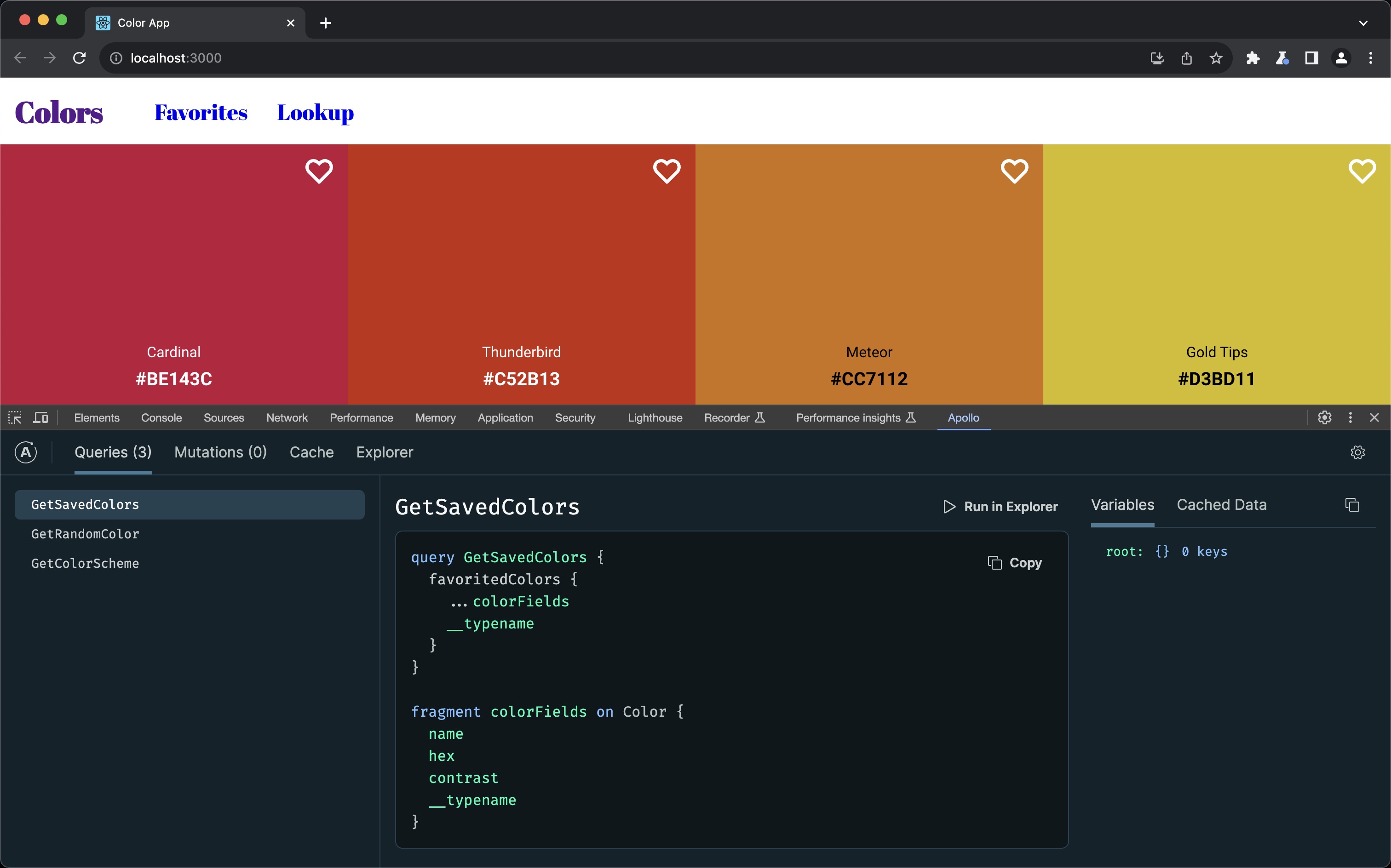
Apollo Client Browser Devtools

Apollo Client version support

if you are using an older version of Apollo Client and have issues with our Client Browser Devtools we recommend you upgrade to the latest version of Apollo Client.

  • We provide active support for the current minor release of Apollo Client for use with our Client Browser DevTools.
  • We do our best to support older 3.x versions of Apollo Client for use with our Client Browser DevTools.
  • We do not offer support of 2.x versions of Apollo Client for use with our Client Browser DevTools.

Configuration

While your application is in dev mode, the devtools will appear as an "Apollo" tab in your web browser inspector. To enable the devtools for your application in production, pass connectToDevTools: true to the ApolloClient constructor in your application. Pass connectToDevTools: false if want to manually disable this functionality.

The "Apollo" tab will appear in your web browser inspector if a global window.__APOLLO_CLIENT__ object exists in your application. Apollo Client adds this hook to the window automatically unless process.env.NODE_ENV === 'production'. If you would like to use the devtools in production, manually attach your Apollo Client instance to window.__APOLLO_CLIENT__ or pass connectToDevTools: true to the constructor.

If you are seeing the "Apollo" tab but are still having issues, skip ahead to the Debugging section.

Developing

Build the extension

Before building the extension you should install dependencies:

# Install dependencies
> npm install

# (Optional) build the extension for local use
> npm run build -- --env TARGET=chrome
# or
> npm run build -- --env TARGET=firefox

# Or generate zipped distributables (already includes the above build step)
> npm run dist:chrome
# or
> npm run dist:firefox

Running the sample application

Read more.

Development with web-ext & WebExtWebpackPlugin

Read more.

Tests

We use Jest and React Testing Library to write and run our tests.

To run tests for both src and development, run the following command:

npm run test

You can also run with --watch to watch and re-run tests automatically:

npm run test:watch

Folder structure

Read more.

Debugging

Read more.

Testing locally

Read more.

Code of Conduct

This project is governed by the Apollo Code of Conduct.

Who is Apollo?

Apollo builds open-source software and a graph platform to unify GraphQL across your apps and services. We help you ship faster with:

  • Apollo Studio – A free, end-to-end platform for managing your GraphQL lifecycle. Track your GraphQL schemas in a hosted registry to create a source of truth for everything in your graph. Studio provides an IDE (Apollo Explorer) so you can explore data, collaborate on queries, observe usage, and safely make schema changes.
  • Apollo Federation – The industry-standard open architecture for building a distributed graph. Use Apollo’s gateway to compose a unified graph from multiple subgraphs, determine a query plan, and route requests across your services.
  • Apollo Client – The most popular GraphQL client for the web. Apollo also builds and maintains Apollo iOS and Apollo Kotlin.
  • Apollo Server – A production-ready JavaScript GraphQL server that connects to any microservice, API, or database. Compatible with all popular JavaScript frameworks and deployable in serverless environments.

Learn how to build with Apollo

Check out the Odyssey learning platform, the perfect place to start your GraphQL journey with videos and interactive code challenges. Join the Apollo Community to interact with and get technical help from the GraphQL community.

Maintainers

Name Username
Jeff Auriemma @bignimbus
Jerel Miller @jerelmiller
Lenz Weber-Tronic @phryneas

Frequently asked questions

Is apollo-client-devtools free to use?

apollo-client-devtools is open source under the MIT licence. There is no licence fee and no seat count — you can self-host it or, where the project offers one, pay a vendor for a managed version instead.

What does apollo-client-devtools do?

Apollo Client browser developer tools.

What is apollo-client-devtools written in?

apollo-client-devtools is primarily written in TypeScript. Its source is publicly available at https://github.com/apollographql/apollo-client-devtools, and it has 1,528 GitHub stars.