Apinto is an open-source, cloud-native API gateway written in Go and released under the Apache-2.0 licence, built for teams that need to manage API services and raise their stability and security.
What it is
Apinto is a gateway developed in Go with a modular architecture, described by its maintainers as high-performance, extensible and easy to maintain. It sits at the entry point of business traffic, where it handles dynamic routing, load balancing, service discovery, circuit breaking, identity authentication, monitoring and alerting. It is not tied to any cloud platform, and the project ships a separate management console, Apinto Dashboard, maintained in its own repository at eolinker/apinto-dashboard. The registry entry lists it under Developer Tools / API Development & Testing, with topics covering api-gateway, microservice, grpc, dubbo2, goku and loadbalancer.
The concrete problem it addresses is configuration sprawl across clusters. When business configuration has to be maintained as separate sets for each cluster, operations cost rises and the chance of configuration mistakes rises with it. Apinto's cluster management lets a team configure business once and publish it to the relevant clusters, so gateway nodes can be freely added or removed without rewriting the configuration per cluster. A second problem is service governance: rather than pushing rate limiting, circuit breaking, caching and canary releases into individual services, Apinto applies those rules at the gateway by filtering traffic on combinations of application, API, upstream, request method, IP, request path and custom application labels.
Key capabilities
- Dynamic routing matches services on
location, query, header, host and method parameters.
- Service discovery integrates with Eureka, Nacos and Consul.
- Protocol support covers HTTP/HTTPS, Webservice, Restful, gRPC, Dubbo2 and SOAP.
- User authentication supports anonymous access plus Basic, Apikey, JWT and AK/SK schemes.
- Traffic policy features include blacklists and whitelists by application and IP, request count and payload size limits, circuit breaking, canary releases by percentage or advanced rules, response caching and traffic mirroring.
- Request transformation covers parameter mapping, extra backend parameters, and rewriting of
scheme, uri and host along with adding or deleting forwarded headers.
- Request logs can be sent to receivers such as file,
nsq and kafka, and the CLI installs and downloads plugins and starts or stops the gateway.
- API documentation can be synchronised through OpenAPI using Swagger 3.0
json or yaml files.
Who uses it and how
- Operations teams running several gateway clusters, who configure a business once and publish it to the appropriate clusters instead of duplicating configuration sets.
- Platform teams that need application-level lifecycle management, where the application is treated as the initiator of business communication and is authenticated and governed across the whole call chain.
- Teams exposing gRPC or Dubbo2 backends behind a single HTTP/HTTPS entry point, with health checks on load-balanced nodes and SSL certificate management for multiple certificates.
- Teams needing canary releases and traffic mirroring without changing application code, filtering live requests by application, API, upstream, method, IP or path.
- Enterprise users who intend to build custom enterprise plugins, since the project supports user-defined enterprise plugins and independent deployment.
Getting started
The README documents direct deployment, compiling from source, and Docker deployment through the published image eolinker/apinto-gateway on Docker Hub. A release archive such as apinto_v0.12.1_linux_amd64.tar.gz can be downloaded and extracted, and a hosted console is available at demo-dashboard.apinto.com with trial accounts apinto-1 through apinto-3.
How it compares
This registry entry provides no list of paid products that Apinto replaces, and the README names no directly comparable gateway projects, so the page cannot draw a contrast with named commercial alternatives. The only tools the facts place alongside it are integration targets rather than competitors: Eureka, Nacos and Consul for service discovery. On the evidence available, it stands alone in this registry.
When to use it — and when not to
A self-hoster must operate one or more gateway nodes and, if request logs are centralised, the receiving infrastructure behind the file, nsq or kafka outputs. Kubernetes deployment is listed as planned rather than supported, and the enterprise plugin module is described as forthcoming, so teams needing either today should wait or expect to build it themselves. The README excerpt is cut off mid-command during the startup instructions, and the enterprise plugin list — user role permissions, monitoring, API documentation, security testing, national cryptography and more — is a roadmap rather than shipped functionality.
project readme (upstream, from github) — read inline

Apinto






Apinto是一款高性能、可扩展、易维护的云原生API网关。
Apinto网关基于GO语言模块化开发,5分钟极速部署,配置简单、易于维护,支持集群与动态扩容,并且提供几十款网关插件和实用的企业级插件,让用户开箱即用。
Demo
体验地址:demo-dashboard.apinto.com
提供了三个试用账号,避免被使用者挤下来
账号:apinto-1
密码:12345678
账号:apinto-2
密码:12345678
账号:apinto-3
密码:12345678
快速入门:https://help.apinto.com/docs/dashboard-v2/quick/quick_start.html
Apinto Dashboard github地址: https://github.com/eolinker/apinto-dashboard
Apinto功能架构图:

Apinto亮点特性
Apinto API 网关以出色的用户体验和适用于各种企业级业务场景的控制台为特色。控制台具有四大亮点功能:集群管理、应用管理、精细服务治理和企业插件,能够满足企业对 API 网关更高级场景化需求的要求。
集群管理
Apinto 提供集群管理功能,可以一次性配置业务并将其发布到相应的集群。这解决了多集群维护多套业务配置的问题,显著提高了运维效率,并降低了繁杂配置时的事故率。
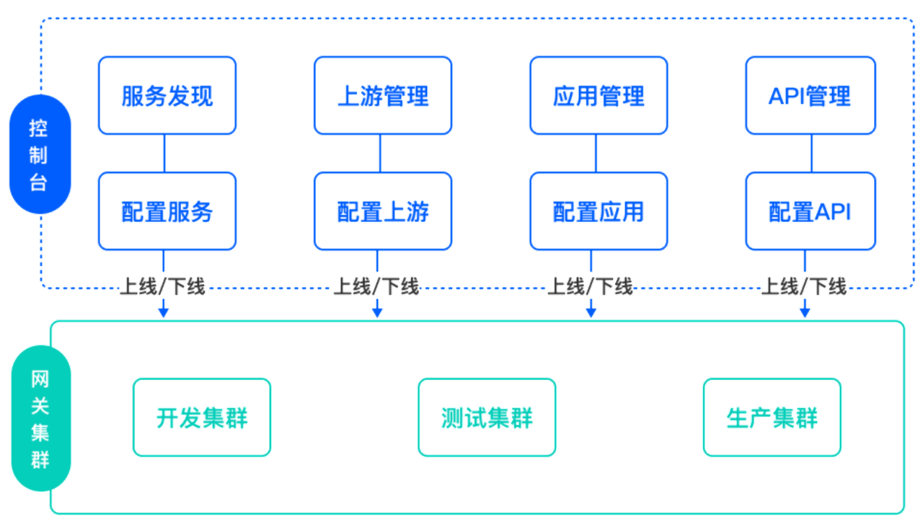
应用管理
Apinto 网关推出应用管理概念,统一管理应用及其生命周期。作为业务通讯的发起者,应用贯穿整个调用链。Apinto 网关对应用请求的流量进行鉴权认证和服务治理,并对请求的流量进行监控告警,统计应用调用情况。
精细化服务治理
Apinto提出精细化流量管理方案,即所有调用方的请求流量都经过网关,通过对应用、API、上游服务、请求方式、IP、请求路径、应用自定义标签等组合条件筛选请求流量,执行限量、访问、熔断、灰度、缓存等策略规则,帮助企业快速、灵活地制定策略,以满足不同业务场景的需求,并全方位治理好服务。

企业插件
Apinto网关即将推出企业插件模块,并且陆续提供业务型企业插件如:用户角色权限、监控告警、日志、API文档、开放平台、安全防护、数据分析、调用链、mock、在线调测、安全测试、国密、多协议等。支持用户自定义企业插件,支持独立部署。
Apinto功能
Apinto网关可以作为业务流量的入口,可以对业务流量进行处理,如动态路由、负载均衡、服务发现、熔断降级、身份认证、监控与告警等。
Apinto网关不受云平台限制,也能在Kubernetes运行。
产品特性
迭代计划
 如果您是个人开发者,可基于API网关相关的业务场景开发有价值的网关插件或企业级插件,并且愿意分享给Apinto,您将会成为Apinto的杰出贡献者或得到一定的收益。
如果您是企业,可基于Apinto网关开发企业级插件,成为Apinto的合作伙伴。
Star历史

基准测试

部署
启动
1.下载安装包并解压(此处以v0.12.1版本的安装包示例)
wget https://github.com/eolinker/apinto/releases/download/v0.12.1/apinto_v0.12.1_linux_amd64.tar.gz && tar -zxvf apinto_v0.12.1_linux_amd64.tar.gz && cd apinto
Apinto支持在arm64、amd64架构上运行。
请根据需要下载对应架构及系统的安装包,安装包下载请点击跳转
- 安装网关:
./install.sh install
执行该步骤将会生成配置文件/etc/apinto/apinto.yml和/etc/apinto/config.yml,可根据需要修改。
3.启动网关:
apinto start
Bug 和需求反馈
如果想要反馈 Bug、提供产品意见,可以创建一个 Github issue 联系我们,十分感谢!
如果你希望和 Apinto 团队近距离交流,讨论产品使用技巧以及了解更多产品最新进展,欢迎加入以下渠道。