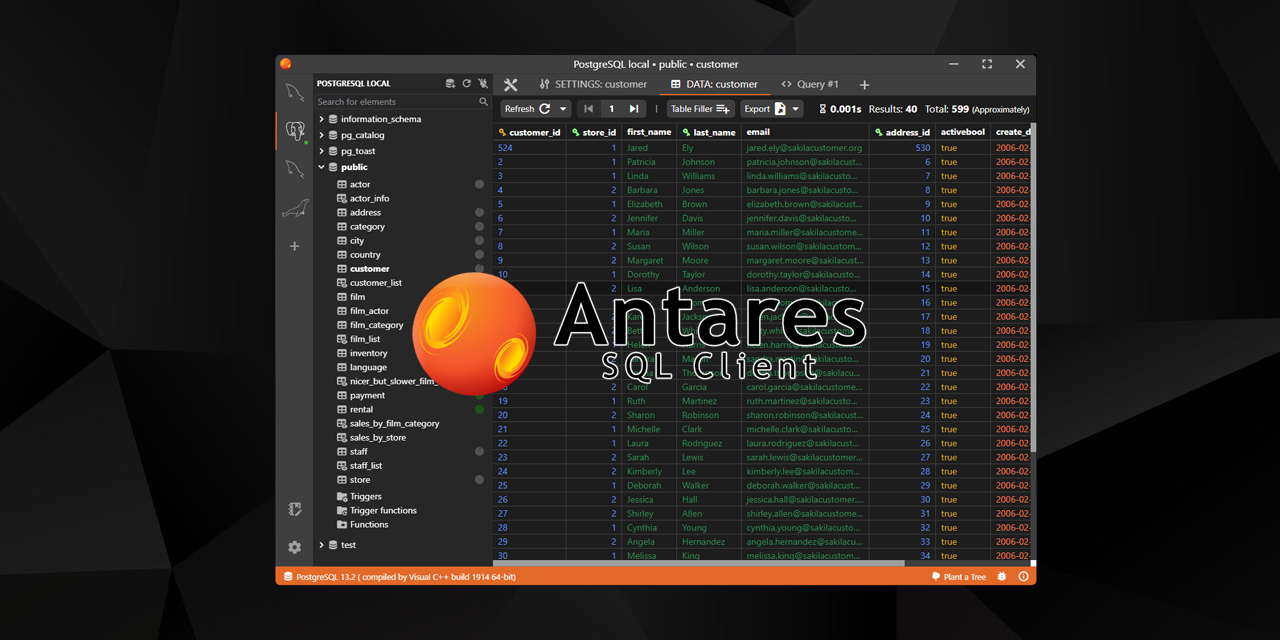




antares is a free, open source databases project written in Vue and released under MIT. It has 2,650 GitHub stars, 168 forks and 150 open issues, and was last pushed 11 months ago. On this registry it ranks #67 of 81 tracked projects in Databases, with 5 head-to-head comparisons available.

What is antares?

What it is

Antares SQL Client is a desktop application for working with relational databases. It is built with Electron.js and Vue.js in the JavaScript ecosystem, and it places the user interface at the center of the experience. The project targets developers needing a cross-platform tool for everyday database work, including ARM systems.

The concrete problem it solves is the need for a free, open-source SQL client that can connect to several common database engines without paid licenses or premium features. Currently, it supports MySQL/MariaDB, PostgreSQL, SQLite, and Firebird SQL. It remains in development, but already includes tools to manage connections, tables, queries, and objects in one workspace.

Key capabilities

  • Multiple database connections can be open at once, allowing work across separate servers or files.
  • Tables, indexes, foreign keys, views, triggers, stored routines, functions, and schedulers can be created, edited, and deleted.
  • The tab system keeps query tabs, notes, and saved queries open together.
  • Query suggestions and autocomplete help write SQL, while query history lets users search through the last 1,000 queries.
  • A fake table data filler can generate test data, and import and export functions handle database dumps.
  • SSH tunnels, manual commits, customizable shortcuts, and themes improve daily use.

Who uses it and how

  • Developers use it as a desktop tool for connecting to MySQL/MariaDB, PostgreSQL, SQLite, or Firebird SQL databases during application work.
  • It can be used for routine database management, including adding or editing tables, indexes, foreign keys, views, triggers, and stored routines.
  • Users can keep several connections open, write queries in tabs, save queries or notes, and review recent query history.
  • The fake data filler and dump import and export features support testing and migration or backup workflows.
  • SSH tunnel support allows access to remote database servers when direct network access is not available.

Getting started

Download the latest release from the project releases page. On Linux, users can run an .AppImage, install from FlatHub, Snap Store, AUR, or the project PPA repository; on Windows, users can install from Microsoft Store or download an unsigned .exe; on macOS, users can run a .dmg distribution.

When to use it — and when not to

Use Antares when a free, open-source desktop client is enough for supported database work and when users prefer a simple interface over a large feature set. Do not use it if the environment requires a database engine outside the supported list, or if a fully signed installer is required on Windows. The project is still in development, so some capabilities may arrive only in future updates, and users may need extra installation steps because the project lacks paid certificates.

project readme (upstream, from github) — read inline

Antares SQL Client

GitHub package.json version GitHub Test e2e Mastodon Follow Plant a Tree

Antares is an SQL client based on Electron.js and Vue.js that aims to become a useful tool, especially for developers.
Our target is to support as many databases as possible, and all major operating systems, including the ARM versions.

At the moment this application is in development state, many features will come in future updates, and supports only MySQL/MariaDB, PostgreSQL, SQLite and Firebird SQL.
However, there are all the features necessary to have a pleasant database management experience, so give it a chance and send us your feedback, we would really appreciate it.
We are actively working on it, hoping to provide new cool features, improvements and fixes as soon as possible.

🔗 If you are curious to try Antares you can download and install the latest release.
👁 To stay tuned for new releases follow Antares SQL on Mastodon.
🌟 Don't forget to leave a star if you appreciate this project.

🗳️ Polls:

Current key features

  • Multiple database connections at same time.
  • Database management (add/edit/delete).
  • Full tables management, including indexes and foreign keys.
  • Views, triggers, stored routines, functions and schedulers management (add/edit/delete).
  • A modern and friendly tab system; keep open every kind of tab you need in your workspace.
  • Fake table data filler to generate tons of data for test purpose.
  • Query suggestions and auto complete.
  • Query history: search through the last 1000 queries.
  • Save queries, notes or todo.
  • SSH tunnel support.
  • Manual commit mode.
  • Import and export database dumps.
  • Customizable keyboard shortcuts.
  • Dark and light theme.
  • Editor themes.

Philosophy

Why are we developing an SQL client when there are a lot of them on the market?
The main goal is to develop a forever 100% free (without paid premium feature), full featured, as possible community driven, cross platform and open source alternative, empowered by JavaScript ecosystem.
A modern application created with minimalism and simplicity in mind, with features in the right places, not hundreds of tiny buttons, nested tabs or submenues; productivity comes first.

Installation

Based on your operating system you can have one or more distribution formats to choose based on your preferences.
Since Antares SQL is a free software we don't have a budget to spend on annual licenses or certificates. This can result that on some platforms you might need to put in some additional work to install this app.

Linux

On Linux you can simply download and run the .AppImage distribution, install from FlatHub, Snap Store, AUR or from our PPA repository.

Windows

On Windows you can choose between downloading the app from Microsoft Store or downloading the .exe from our website or this github repo. Distributions that are not from Microsoft Store are not signed with a certificate, so to install you need to click on "More info" and then "Run anyway" on SmartScreen prompt.

MacOS

On macOS you can run .dmg distribution following this guide to install apps from unknown developers.

Download

Download on Flathub Get it from the Snap Store Get it from AUR
🚀 Other Downloads

Currently supported

Databases

  • MySQL/MariaDB
  • PostgreSQL
  • SQLite
  • Firebird SQL
  • DuckDB
  • SQL Server
  • More...

Operating Systems

• x64
  • Windows
  • Linux
  • MacOS
• ARM
  • Windows
  • Linux
  • MacOS

How to contribute

Contributors ✨

Thanks goes to these wonderful people (emoji key):

Fabio Di Stasio
Fabio Di Stasio

💻 🌍 📖
Giulio Ganci
Giulio Ganci

💻
Christian Ratz
Christian Ratz

💻 🌍
Giuseppe Gigliotti
Giuseppe Gigliotti

🌍
Mohd-PH
Mohd-PH

🌍
hongkfui
hongkfui

🌍
Robin
Robin

🌍
Daniel Eduardo
Daniel Eduardo

🌍
readme truncated — read the full docs on github

Frequently asked questions

Is antares free to use?

antares is open source under the MIT licence. There is no licence fee and no seat count — you can self-host it or, where the project offers one, pay a vendor for a managed version instead.

What does antares do?

A modern, fast and productivity driven SQL client with a focus in UX

What is antares written in?

antares is primarily written in Vue. Its source is publicly available at https://github.com/antares-sql/antares, and it has 2,650 GitHub stars.