AgentScope Studio is a local, development-oriented visualization toolkit for developers building agent-based applications with the AgentScope framework, offering project management, a chatbot-style runtime view, OpenTelemetry tracing, statistical evaluation and a built-in development copilot — although it is no longer maintained as a standalone tool and is being archived in favour of the built-in Web UI shipped with AgentScope 2.0.
What it is
AgentScope Studio is an open-source, TypeScript-built visualization toolkit published to npm as @agentscope/studio, and it sits inside the AgentScope ecosystem. AgentScope applications connect to it by setting the studio_url field in the AgentScope initializer, for example studio_url="http://localhost:3000", after which the toolkit renders agent activity in a browser. It was open-sourced in August 2025 under the Apache License 2.0, and its stated purpose is to give developers a transparent, simple and enjoyable way to develop, debug and evaluate agent-based applications. The registry record shows 651 stars, 141 forks and 11 open issues, with the most recent push in September 2026.
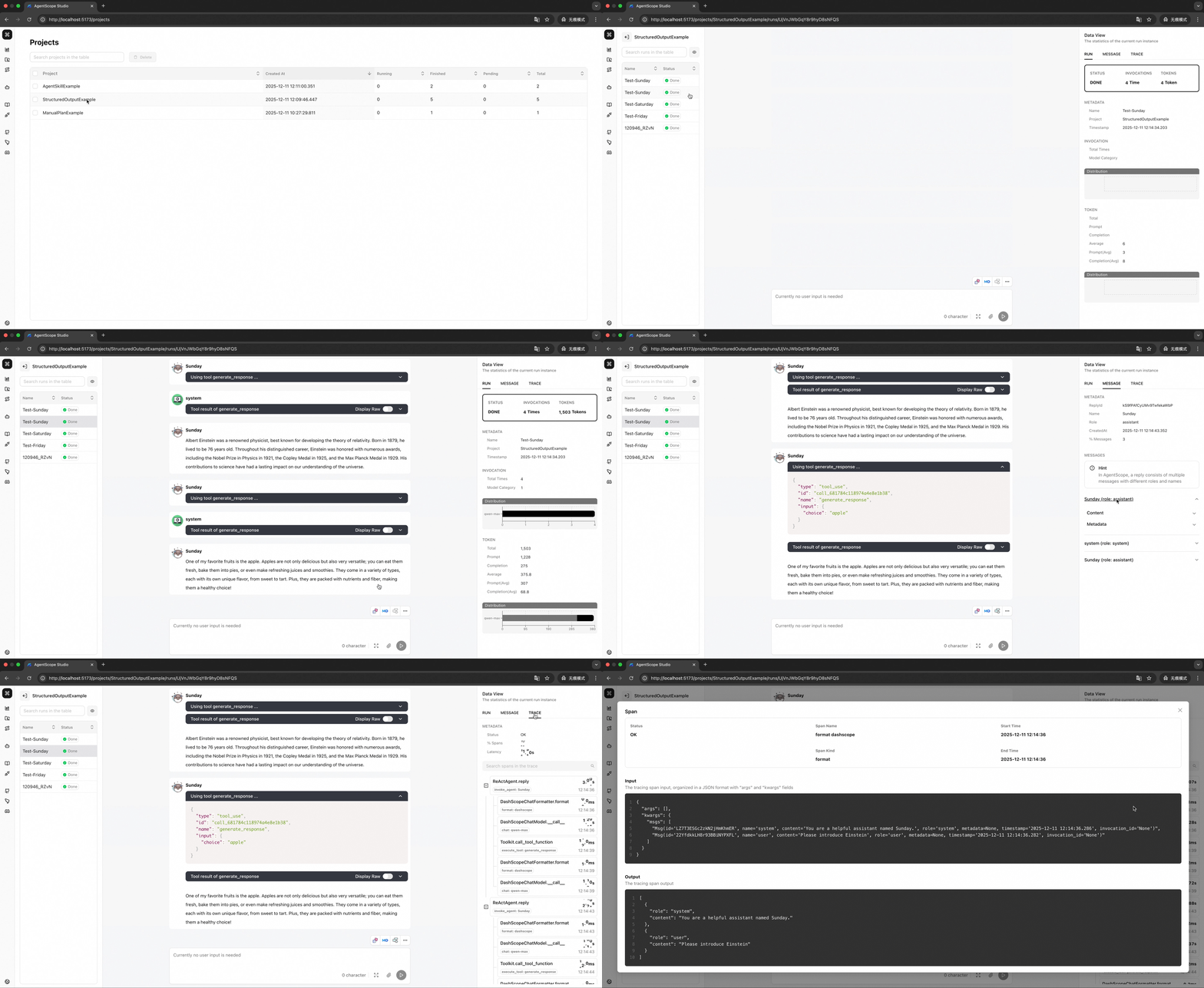
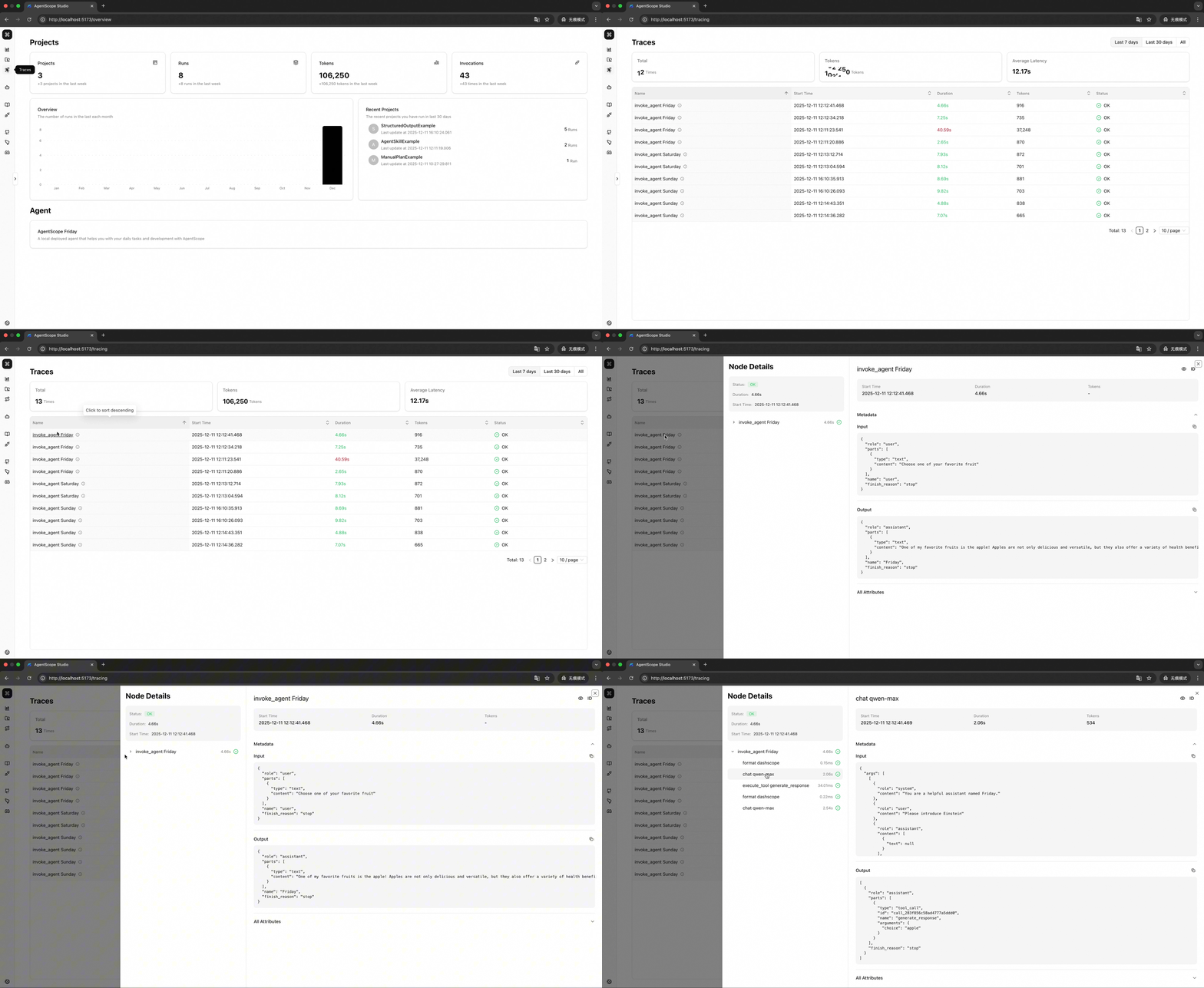
The concrete problem it addresses is the difficulty of seeing what a multi-agent application actually does while it runs. Rather than inspecting raw output, a developer gets a chatbot-style interface for real-time agent interaction, OpenTelemetry-based trace visualization covering LLM calls, token usage and agent invocations, and an organizational layer of Projects and Runs that makes results comparable from a statistical perspective. AgentScope Studio acted as the standalone visualization and debugging surface for AgentScope applications, and it is that standalone role which the built-in Web UI of AgentScope 2.0 now takes over.
Key capabilities
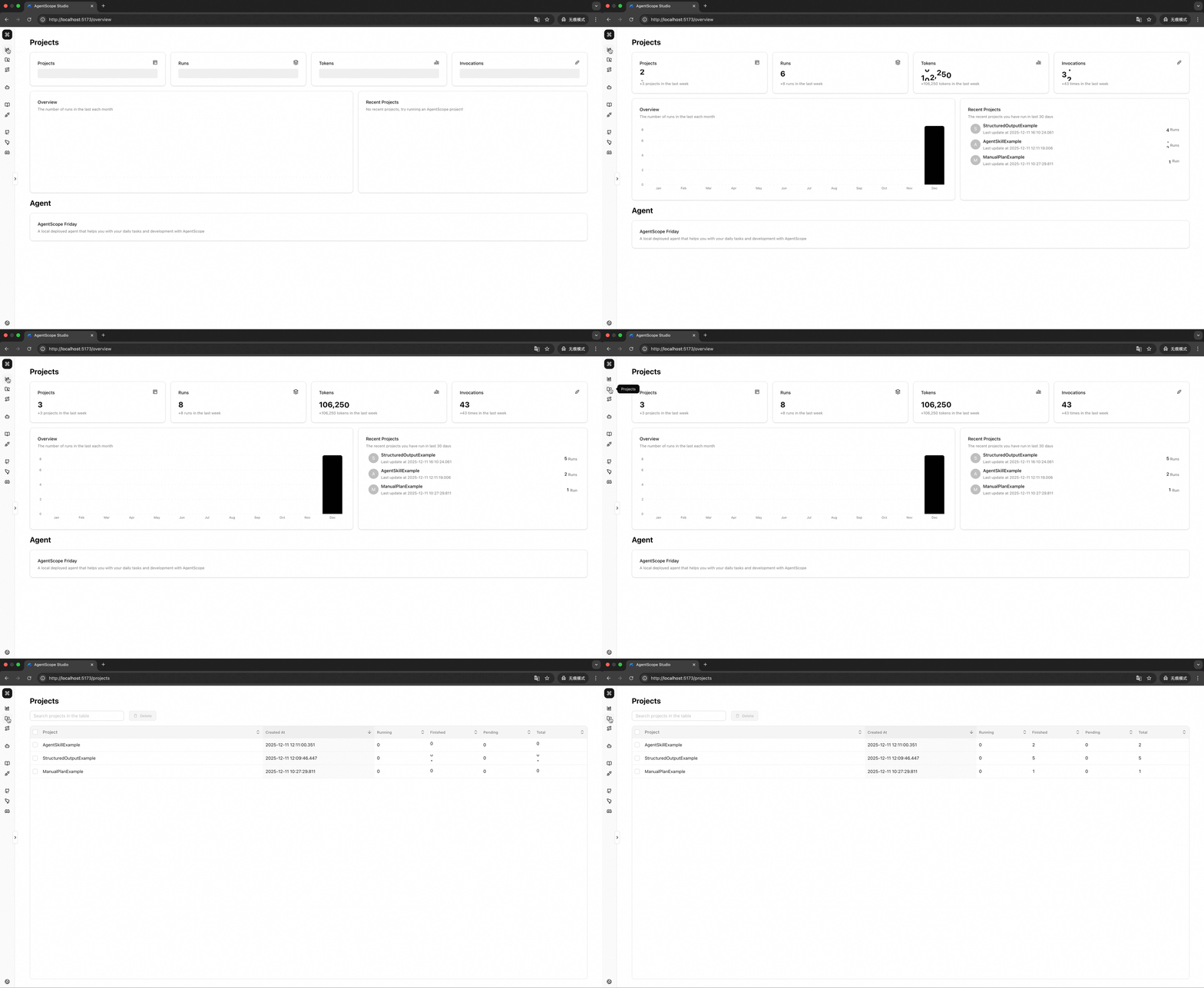
- Project Management organizes work into Projects and Runs so agent sessions can be grouped and revisited.
- Runtime Visualization provides a chatbot-style interface for real-time interaction with running agents.
- Tracing renders OpenTelemetry-based traces of LLM calls, token usage and agent invocations, with documented semantic conventions.
- Agent Evaluation performs evaluation-oriented analysis from a statistical perspective across runs.
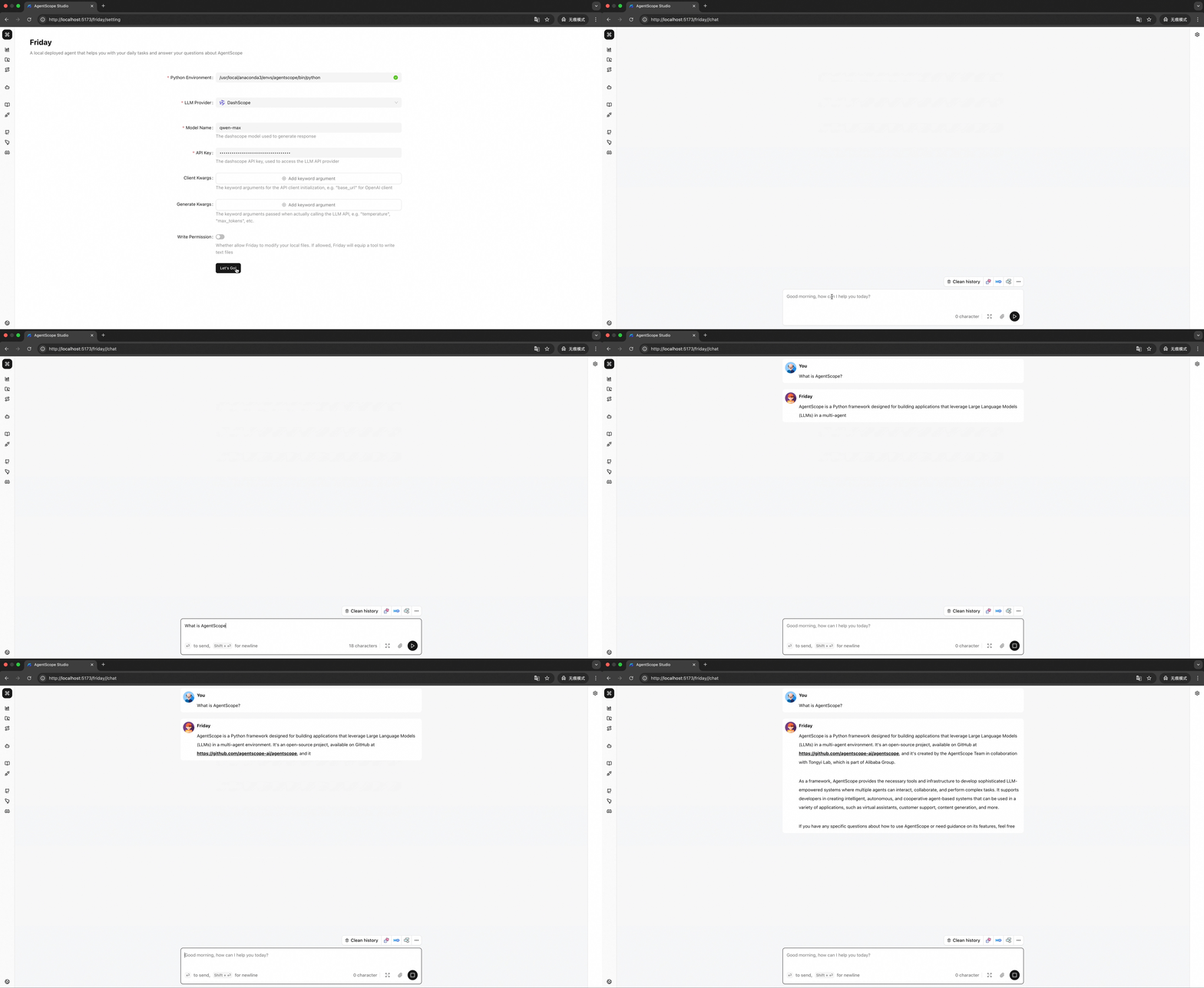
- The built-in Copilot, named Friday, acts as a development assistant, a playground for rapid secondary development and an integration hub for advanced features.
- Installation is available globally from npm via
npm install -g @agentscope/studio, started with the as_studio command.
- Docker deployment is supported separately, documented in
docker/README.md.
Who uses it and how
- Agent developers debugging multi-agent applications, who point their AgentScope code at the toolkit through the
studio_url field and watch runs live in the browser.
- Teams that need trace-level observability of LLM calls, token usage and agent invocations, using the OpenTelemetry integration and its semantic conventions.
- Developers comparing experimental runs, who rely on the Projects and Runs structure and the statistical evaluation view rather than ad-hoc reading of logs.
- Contributors and tinkerers doing secondary development through the Friday playground, which the README describes as a rapid-development surface.
- Self-hosters meeting the stated prerequisites of Node.js 20.0.0 or higher and npm 10.0.0 or higher, with Docker optional, running either the published package or a cloned source tree.
Getting started
Install globally from npm with npm install -g @agentscope/studio and start the interface with the as_studio command. Source installs follow git clone, npm install and npm run dev, while Docker users are directed to docker/README.md.
How it compares
The facts provided name no comparable third-party tools, so on this registry AgentScope Studio stands alone as a visualization surface for AgentScope. Its only counterpart named in the facts is the built-in Web UI of AgentScope 2.0, a FastAPI backend with a pre-built frontend under examples/web_ui, which supersedes it and adds multi-session isolation, Agent Team leader–worker orchestration, human-in-the-loop control, IM channels such as Feishu and Discord, MCP and Skill Hub management, session persistence and task scheduling.
When to use it — and when not to
A self-hoster must run Node.js 20.0.0 or higher and npm 10.0.0 or higher, or fall back to the optional Docker path, and must keep the service reachable at whatever studio_url their AgentScope code points to. New projects should not adopt it: the README carries an archive notice stating that the repository is read-only, will be archived soon, is no longer maintained as a standalone tool, and that all users should migrate to AgentScope 2.0 for continued updates, new features and community support. Anyone who only needs current functionality should choose that built-in Web UI instead.
project readme (upstream, from github) — read inline
[!IMPORTANT]
Archive Notice
AgentScope 2.0 now ships a built-in Web UI as part of its batteries-included Agent Service — a FastAPI backend paired with a pre-built frontend (examples/web_ui) for building, running and observing agents out of the box. Powered by a unified event stream, it visualizes agent reasoning, tool calls and multimodal content in real time, and offers multi-session isolation, Agent Team (leader–worker) orchestration with task planning, permission & human-in-the-loop control, IM channels (Feishu / Discord), MCP & Skill Hub management, session persistence and task scheduling.
With these capabilities built natively into AgentScope 2.0, AgentScope Studio is no longer maintained as a standalone tool. We recommend all users migrate to AgentScope 2.0 (https://github.com/agentscope-ai/agentscope) for continued updates, new features and community support. This repository will remain available in read-only mode for reference and will be archived soon.
Thank you to everyone who contributed to and used AgentScope Studio!

AgentScope Studio: Development-Oriented Visualization Toolkit






AgentScope Studio is a powerful local visualization toolkit designed for developers working with AgentScope. It provides a transparent, simple, and fun way to develop, debug, and evaluate agent-based applications.
Key Features
- Project Management: Organize and manage your AgentScope projects with Projects and Runs
- Runtime Visualization: Chatbot-style interface for real-time agent interaction
- Tracing: OpenTelemetry-based trace visualization for LLM calls, token usage, and agent invocations
- Agent Evaluation: Evaluation-oriented analysis from a statistical perspective
- Built-in Copilot (Friday): A development assistant, playground for rapid secondary development, and integration hub for advanced features
    alt="home"
/>
<img
src="https://img.alicdn.com/imgextra/i2/O1CN01pGHedL1L4ibmyPeiq_!!6000000001246-1-tps-1971-1080.gif"
    alt="runtime"
/>
<img
src="https://img.alicdn.com/imgextra/i1/O1CN01HfFhy928SSJAcWQ8c_!!6000000007931-1-tps-1971-1080.gif"
    alt="traces"
/>
<img
src="https://img.alicdn.com/imgextra/i1/O1CN01vovov821Arms9tEJ1_!!6000000006945-1-tps-1971-1080.gif"
    alt="friday"
/>
📢 News
- [2025-08] AgentScope Studio is now open-sourced! We will continue to improve it and welcome contributions from the community.
💻 Installation
Prerequisites
- Node.js >= 20.0.0
- npm >= 10.0.0
- Docker (optional, for Docker deployment)
💡 Tip: If you're using nvm, you can run nvm use to automatically switch to the required Node.js version.
# How to check your version
node --version  # Should show v20.x.x or higher
npm --version   # Should show 10.x.x or higher
From NPM (Recommended)
npm install -g @agentscope/studio

# Start AgentScope Studio
as_studio
From Source
git clone https://github.com/agentscope-ai/agentscope-studio
cd agentscope-studio
npm install

# Start in development mode
npm run dev
npm install -g @agentscope/studio  # or npm install @agentscope/studio

as_studio
Docker Deployment
Please refer to docker/README.md.
🚀 QuickStart
To connect AgentScope applications, you need to set the studio_url field in the AgentScope initializer as follows:
import agentscope

agentscope.init(
    # ...
    studio_url="http://localhost:3000"
)

# ...
📚 Documentation
For more details, please refer to our documentation:
⚖️ License
AgentScope Studio is released under Apache License 2.0.
✨ Contributors
All thanks to our contributors: