Zvec is an open-source, in-process vector database written in C++ and licensed under Apache-2.0, built to embed directly into applications so that vector search, full-text search, and hybrid retrieval run inside the developer's own process instead of behind a separate service.
What it is
Zvec is a lightweight, embeddable vector database that runs as a library wherever the host code runs: notebooks, servers, CLI tools, or edge devices. It is developed at Alibaba, where the README describes it as battle-tested in production, and it ships official SDKs for Python (pip install zvec), Node.js (@zvec/zvec), Go, Rust (zvec-rust on crates.io), and Dart/Flutter (zvec on pub.dev). Supported platforms are Linux on x86_64 and ARM64 with both glibc and musl (including Alpine Linux), macOS on ARM64 and x86_64, and Windows on x86_64, with prebuilt SDK binaries for Android and iOS published each release. Prebuilt dynamic libraries are slim: the macOS ARM64 C API library dropped from 37 MB to 22 MB, a 40 percent reduction. The project carries roughly 15,955 stars, 997 forks, and 56 open issues.
The concrete problem it solves is the operational weight of a standalone vector search server. Instead of deploying, configuring, and paying for a separate service, an application links Zvec and queries its own collections locally, with no server process and no network hop. It covers dense and sparse embeddings, multi-vector queries, a range of index types that scale from memory to disk, native full-text search over string fields, and hybrid queries that fuse vector similarity, keyword search, and structured filters. Persistence comes from write-ahead logging, so collections survive a process crash or power failure, and multiple processes may read the same collection concurrently while writes remain single-process exclusive. In the retrieval ecosystem it replaces the separately deployed vector store that RAG pipelines and agent-memory stacks usually run, and its companion zvec-grep (zg) CLI replaces ripgrep-only code search by unifying ripgrep, BM25, and vector search behind one command.
Key capabilities
- Dense and sparse vector support, multi-vector queries, and a choice of vector index types that scale from memory to disk.
- Native full-text search over string fields, queried with natural-language or structured expressions, now including an N-gram tokenizer for phrase, code, and short-text search.
- Hybrid search that fuses vector similarity, full-text search, and structured filters in a single query.
- Durable storage through write-ahead logging (WAL), so data survives process crashes and power failures.
- DiskANN with Linux ARM64 and macOS ARM64 support plus an io_uring async I/O backend, with automatic fallback to the best available I/O path.
- IVF-RaBitQ index and PQ-INT8 quantizer, where RaBitQ dispatches at runtime to AVX2 or AVX512 so one binary picks the best path per CPU.
DocIterator for streaming full-collection document traversal across C++, C, and Python, alongside schema objects such as zvec.CollectionSchema and zvec.VectorSchema.
Who uses it and how
- RAG applications that need retrieval inside the application process, keeping embeddings and indexes local to the service that owns them.
- Agent memory systems: as of v0.7.0, Zvec is a file store backend in ReMe, the memory management kit for agents, providing in-process HNSW ANN search.
- Local-first workspace search for humans and AI agents through
zvec-grep (zg), which unifies ripgrep, BM25, and vector search in one CLI; Zvec Studio browses data and debugs queries without code.
- Edge, mobile, and embedded deployments, since the library runs on Android, iOS, Linux ARM64, macOS ARM64, and musl-based Alpine images.
- Read-heavy services where several processes read the same collection while a single process owns writes.
Getting started
The fastest path is pip install zvec, which requires 64-bit Python 3.10 through 3.14. Equivalent entry points exist as npm install @zvec/zvec, cargo add zvec-rust, flutter pub add zvec, and Go bindings, with a Building from Source guide on zvec.org for platforms outside the prebuilt set.
How it compares
Zvec sits alongside ANN libraries such as faiss, which the project lists among its topics, but adds full-text search, hybrid query fusion, durable WAL storage, and a collection model on top of the approximate nearest neighbour core. Against search tools such as ripgrep, it does not replace the regex path but absorbs it: zg keeps ripgrep-style matching while adding BM25 and vector search over the same workspace.
When to use it — and when not to
Adoption is close to free in operational terms, since there is no server, database, or SMTP dependency to run; a self-hoster must only ship the correct platform binary, and musl/Alpine, ARM64, and mobile targets are covered by official builds. It is a poor fit for multi-writer or multi-tenant workloads, because writes are exclusive to a single process, and for teams that need a mature, frozen API, given the project is still pre-1.0 at v0.7.0. Platforms outside the published set require building from source.
project readme (upstream, from github) — read inline
English | 中文








🚀 Quickstart |
🏠 Home |
📚 Docs |
📊 Benchmarks |
🔎 DeepWiki |
🎮 Discord |
🐦 X (Twitter)
Zvec is an open-source, in-process vector database — lightweight, lightning-fast, and designed to embed directly into applications. Battle-tested within Alibaba Group, it delivers production-grade, low-latency and scalable similarity search with minimal setup.
[!Important]
🚀 v0.7.0 (August 24, 2026)
- zvec-grep (
zg): Local-first workspace search that unifies ripgrep, BM25, and vector search behind one CLI — built for humans and AI agents.
- ReMe integration: zvec is now a file store backend in ReMe, the memory management kit for agents, providing in-process HNSW ANN search.
- DiskANN productionization: Adds Linux ARM64 / macOS ARM64 support and an io_uring async I/O backend, with automatic fallback to the best available I/O option — no user intervention needed.
- Index optimization: New IVF-RaBitQ index and PQ-INT8 quantizer; RaBitQ supports runtime AVX2 / AVX512 dispatch, so the same binary automatically picks the best path on each CPU.
- Deployment experience improved: Prebuilt dynamic libraries slimmed significantly (macOS arm64 C API library 37→22 MB, -40%); new musl libc / Alpine Linux support; prebuilt SDK binaries for Linux (glibc/musl), macOS, Windows, Android, and iOS published with every release.
- DocIterator: New iterator for streaming full-collection document traversal across C++, C, and Python.
- Full-text search: New N-gram tokenizer, better suited for phrase, code, and short-text search.
👉 Read the Release Notes | View Roadmap 📍
💫 Features
- Blazing Fast: Searches billions of vectors in milliseconds.
- Simple, Just Works: Install and start searching in seconds. Pure local, no servers, no config, no fuss.
- Dense + Sparse Vectors: Support dense and sparse embeddings, multi-vector queries, and a rich selection of vector index types that scale from memory to disk.
- Full-Text Search (FTS): Native keyword-based full-text search — query string fields with natural-language or structured expressions.
- Hybrid Search: Fuse vector similarity, full-text search, and structured filters in a single query for precise results.
- Durable Storage: Write-ahead logging (WAL) guarantees persistence — data is never lost, even on process crash or power failure.
- Concurrent Access: Multiple processes can read the same collection simultaneously; writes are single-process exclusive.
- Runs Anywhere: As an in-process library, Zvec runs wherever your code runs — notebooks, servers, CLI tools, or even edge devices.
📦 Installation
Zvec offers official SDKs across multiple languages:
- Python:
pip install zvec (requires 64-bit Python 3.10–3.14)
- Node.js:
npm install @zvec/zvec
- Go: High-performance Go bindings.
- Rust:
cargo add zvec-rust
- Dart/Flutter:
flutter pub add zvec
Searching code or documents? Try zvec-grep (zg) — a local-first search CLI that unifies ripgrep, BM25, and vector search, built for humans and AI agents.
Prefer a visual tool? Try Zvec Studio to browse data and debug queries — no code required.
✅ Supported Platforms
- Linux (x86_64, ARM64; glibc & musl)
- macOS (ARM64, x86_64)
- Windows (x86_64)
🛠️ Building from Source
If you prefer to build Zvec from source, please check the Building from Source guide.
⚡ One-Minute Example
import zvec

# Define collection schema
schema = zvec.CollectionSchema(
    name="example",
    vectors=zvec.VectorSchema("embedding", zvec.DataType.VECTOR_FP32, 4),
)

# Create collection
collection = zvec.create_and_open(path="./zvec_example", schema=schema)

# Insert documents
collection.insert([
    zvec.Doc(id="doc_1", vectors={"embedding": [0.1, 0.2, 0.3, 0.4]}),
    zvec.Doc(id="doc_2", vectors={"embedding": [0.2, 0.3, 0.4, 0.1]}),
])

# Search by vector similarity
results = collection.query(
    zvec.Query(field_name="embedding", vector=[0.4, 0.3, 0.3, 0.1]),
    topk=10
)

# Results: list of {'id': str, 'score': float, ...}, sorted by relevance
print(results)
📈 Performance at Scale
Zvec delivers exceptional speed and efficiency, making it ideal for demanding production workloads.
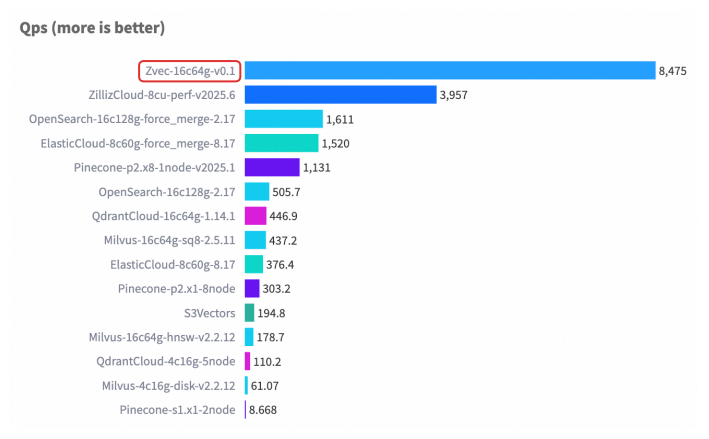
For detailed benchmark methodology, configurations, and complete results, please see our Benchmarks documentation.
🤝 Join Our Community
❤️ Contributing
We welcome and appreciate contributions from the community! Whether you're fixing a bug, adding a feature, or improving documentation, your help makes Zvec better for everyone.
Check out our Contributing Guide to get started!