ZKEACMS is a GPL-3.0 licensed, C# content management system built on ASP.NET Core MVC that lets teams design pages visually and place content in a browser instead of writing templates by hand.
What it is
ZKEACMS is an open-source content management system written in C# and built on ASP.NET Core MVC, distributed under the GPL-3.0 licence. Its defining trait is visual, WYSIWYG page composition: layouts, widgets, and content are assembled on screen rather than coded, with the result rendered by a Bootstrap-based front end. It lives squarely in the .NET ecosystem, and the topic list places it alongside MVC-oriented CMS frameworks through tags such as mvc-cms, cms-framework, and netcore-mvc. The registry metadata describes the project as built with .NET 8, while the README's own heading states .NET 9 and lists the .NET 9 SDK as the development requirement.
The concrete problem it solves is template authoring cost. In a conventional ASP.NET MVC CMS, changing a landing page means editing Razor views, rebuilding, and redeploying; ZKEACMS replaces that loop with drag-and-drop layout design and widget placement. Users compose a page from rows and columns on a Bootstrap3 grid, drop widgets into zones, and reorder them, with no code change and no build step. It also ships multi-tenant support, demonstrated at the hosted multi-tenant demo, which lets one installation serve more than one site.
Key capabilities
- Visual page design: pages are laid out on screen, with a recorded walkthrough of the page-design flow in the project's own GIF and video documentation.
- Layout composition on the Bootstrap3 Grid system: users drag "row" and "column" elements to define the zones of a page.
- Widget system: a widget is described as an
HTML Components; multiple widgets can be added to the same zone and sorted by drag and drop.
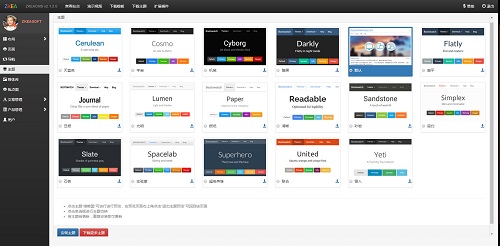
- Theming with LESS: themes are built on Bootstrap, and new themes come from changing LESS variables rather than rewriting stylesheets.
- Responsive output: pages adapt across PC, laptop, TV, tablet, and phone automatically.
- Localisation: the interface culture is switched by setting
Culture.Code to en-US in appsettings.json.
- Multi-tenant hosting, shown through the separate multi-tenant demo instance.
Who uses it and how
- Single-site publishers who want a marketing or content site without maintaining hand-written Razor views for every page.
- Multi-tenant operators running several sites from one deployment, as the project's own multi-tenant demo instance illustrates.
- .NET shops already standardised on ASP.NET Core MVC, since the codebase is C# and the topic tags target MVC and .NET Core developers.
- Teams that need both a visual editor for content editors and source-level control for developers, because themes and widgets are code artefacts while layout is a browser activity.
- Self-hosters who want database choice at deployment: Microsoft SQL Server 2016 or later, MySQL 5.6 or later, or SQLite 3.
Getting started
Install the publisher tool with dotnet tool install -g ZKEACMS.Publisher, then run ./src/ZKEACMS.WebHost/publish-zkeacms (or Publish.cmd / Publish.sh), optionally with a runtime identifier such as -r win-x64. Alternatively run the published image directly with docker run -d -p 5000:8080 zkeasoft/zkeacms:ent, or try the hosted demo before installing anything.
How it compares
This registry entry does not list any paid products that ZKEACMS is positioned to replace, and the supplied facts name no competing CMS projects either, so it stands alone in this registry rather than being presented as a swap for a named commercial system. The one commercial axis the facts do record is licensing: the code is GPL-3.0, and commercial users who need to keep their source private are directed to purchase a Commercial License or Enterprise Edition.
When to use it — and when not to
A self-hoster must supply the runtime themselves: the .NET SDK to build, one of SQL Server 2016+, MySQL 5.6+, or SQLite 3 as the database, and the .NET 9 SDK plus Visual Studio 2022 or Visual Studio Code for development work. Choose it if you want visual page composition inside the .NET stack and accept the GPL-3.0 terms; avoid it if you need a permissively licensed CMS for a closed-source commercial product without buying the Enterprise Edition. Two cautions are worth stating plainly: the registry metadata says .NET 8 while the README says .NET 9, so confirm the target framework before planning an upgrade, and the README is thin on operational detail beyond build, publish, and culture configuration, with community support channelled through the project's QQ groups and WeChat account.
project readme (upstream, from github) — read inline

ZKEACMS Build With .Net 9
ZKEACMS is a visual design, WYSIWYG Content Management System.
Page Design
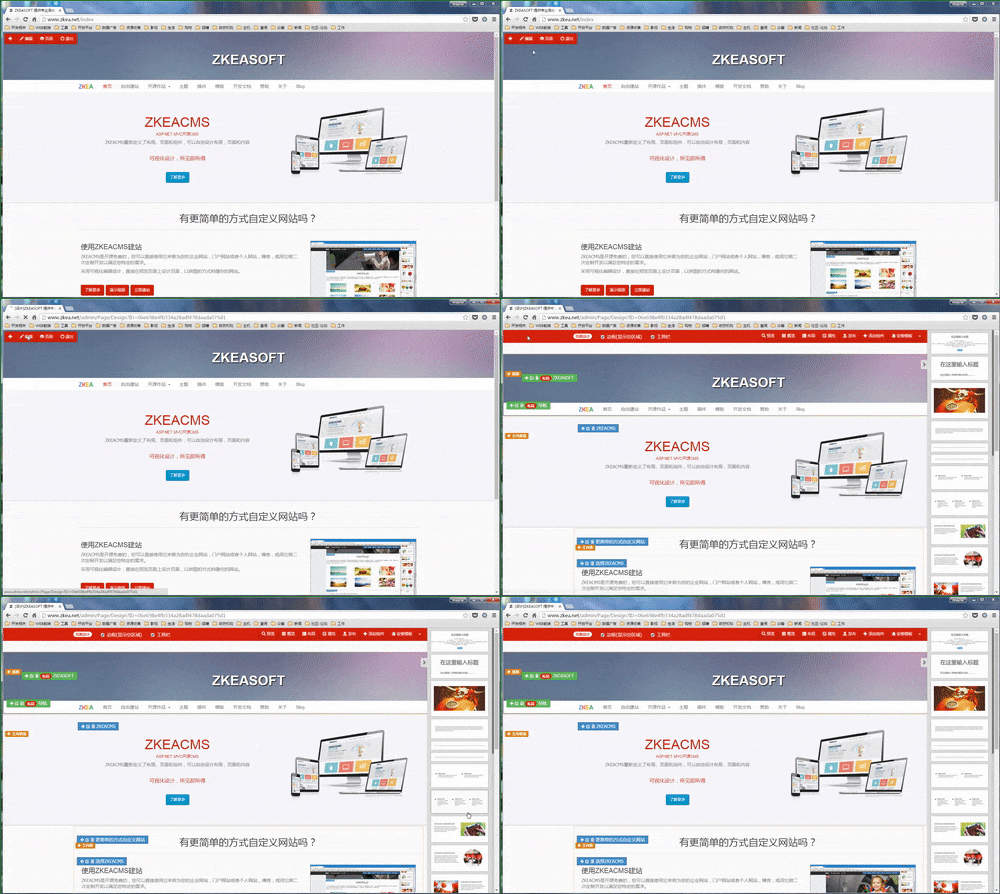
Add Content To Page
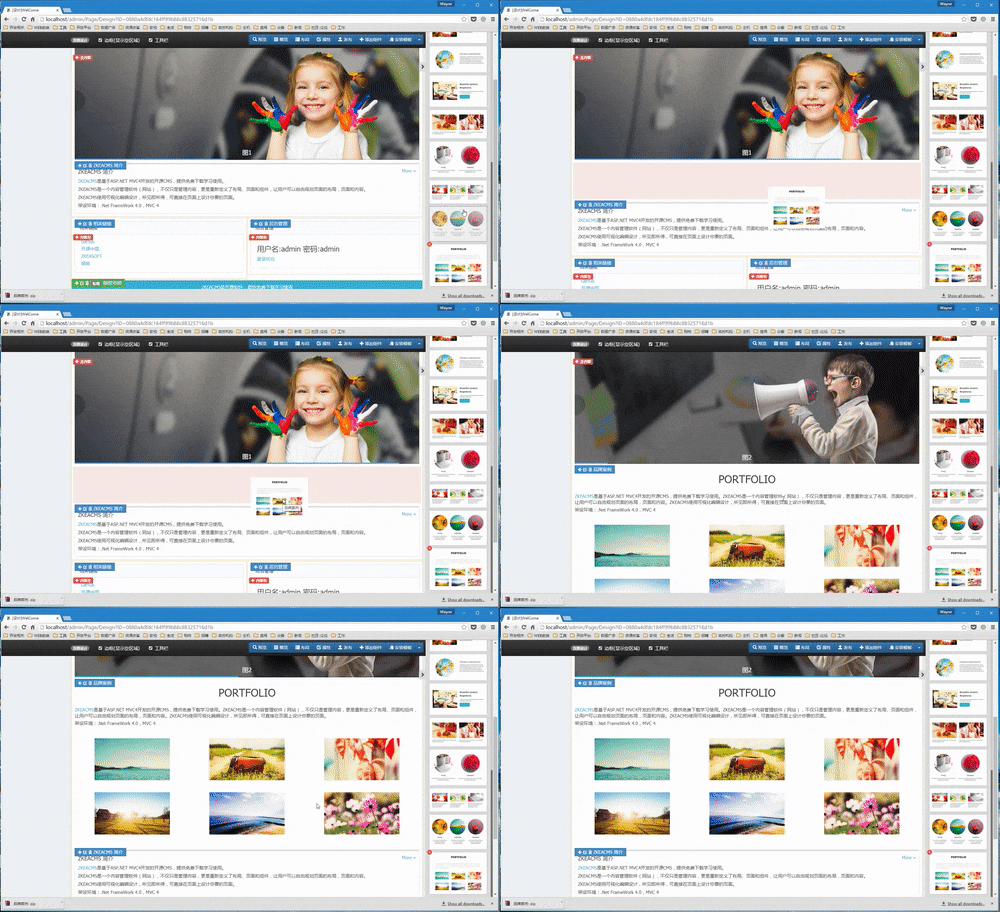
Get Started
http://www.zkea.net/zkeacms/videos/view/zkeacms-quick-start.html
Demo Site
Try it on our demo site:
http://demo.zkea.net
Create Page
How to create a new page:
http://www.zkea.net/zkeacms/videos/view/create-page.html
Multi-tenant demo
http://build.zkeasoft.com/
Culture
Change the culture code to en-US to use english in appsettings.json
"Culture": {
  "Code": "en-US"
}
Publish / Release
Use Publish.cmd or Publish.sh to publish the project.
You can also use the command line below to publish:
$ dotnet tool install -g ZKEACMS.Publisher
$ ./src/ZKEACMS.WebHost/publish-zkeacms
Publish width runtime
$ ./src/ZKEACMS.WebHost/publish-zkeacms -r win-x64
Run on Docker
https://hub.docker.com/r/zkeasoft/zkeacms
$ docker run -d -p 5000:8080 zkeasoft/zkeacms:ent
Development
- .Net 9 SDK
- Microsoft Sql Server 2016+ / MySql 5.6+ / SQLite 3
- Microsoft Visual Studio 2022 / Visual Studio Code
Responsive Design
ZKEACMS is featuring a modern responsive design that automatically adapts to different screen sizes and devices. From the PC, laptop, TV, tablet to the phone page will automatically adapt to adapt.
Layout Design
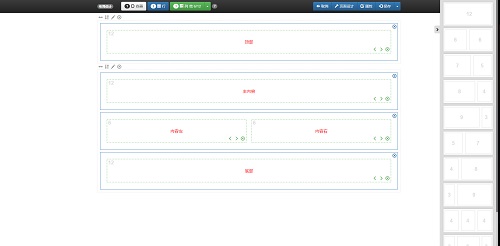
Layout is used to make a page of the zone, the user can drag the "row", "column" to design layout. The layout uses the Bootstrap3 Grid system.
Widgets
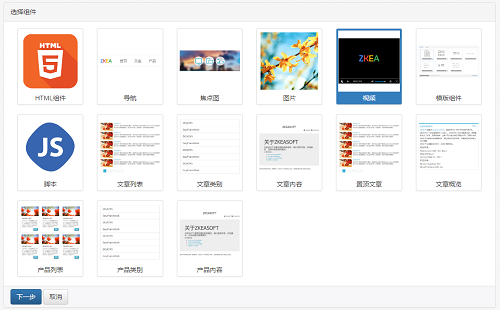
A widget is a HTML Components. Add different widget to build your page. Multiple widgets can be added to the same zone, and can be sorted by drag and drop.
Theme
Using LESS to create a theme, by modifying the variables, you can easily create a theme.
The theme is base on Boorstrap.
Videos
http://www.zkea.net/zkeacms/videos
Official Website
http://www.zkea.net
关注微信(ZKEASOFT)

QQ群
纸壳CMS 群1(493586356) 点击加群
纸壳CMS 群2(869382969)点击加群
纸壳CMS 群3(805495289)点击加群
License
For commercial, keep your source code private/proprietary by purchasing a Commercial License/Enterprise Edition.
对于商业用途,请通过购买企业版/Enterprise来私有化你的源代码。