What it is
Ziit is an open-source, self-hostable code time tracker written in TypeScript and released under the AGPL-3.0 license. It lives in the developer-productivity ecosystem as a drop-in alternative to WakaTime, and its own documentation describes it as "the Swiss army knife of code time tracking." A hosted instance is offered at ziit.app, but the project is designed so that a developer or a team can run the whole service on their own infrastructure instead, keeping coding data on a server they control. The dashboard is deliberately minimal and is inspired by Plausible Analytics, which is to say it favors a small number of clearly readable charts over a dense reporting suite.
The concrete problem it solves is ownership of activity data. Hosted time-tracking services require shipping editor telemetry to a third party, and that data reveals what a developer works on, in which repository, on which branch, and for how long. Ziit accepts the same kind of measurements — projects, languages, editors, files, branches, operating systems, and time spent coding — and stores them in a database the operator runs. It also avoids lock-in on the way in: existing history can be imported from WakaTime or from a WakAPI instance, so a migration does not start the record from zero.
Key capabilities
- Tracks coding time sent directly from VS Code to the Ziit instance of the operator's choice.
- Records the current project, operating system, editor, file, language, and git branch alongside elapsed time.
- Filters statistics by different time ranges.
- Supports login with GitHub or with an email address and password.
- Imports existing data from WakaTime or from a WakAPI instance.
- Generates badges that embed coding time for a project into a README.
- Publishes a public stats page for the whole instance and a public leaderboard ranking the most coding hours.
Who uses it and how
- Individual developers who want WakaTime-style statistics without sending activity to a hosted service, and who therefore deploy their own instance and point the extension at it.
- Developers migrating off WakaTime or WakAPI, who import their historical records and continue tracking on Ziit without losing prior data.
- Teams or communities running a shared instance, where the public stats page and the public leaderboard make aggregate coding hours visible to members.
- Maintainers who want a live coding-time badge in a project README, generated from their own instance rather than a third-party badge endpoint.
- Users of VS Code and its forks, or of JetBrains IDEs, who install the Ziit extension or plugin and sign in with GitHub or email.
Getting started
Setup starts either by deploying a self-hosted instance following the deployment documentation or by signing up on the public instance, after which the Ziit extension is installed from the IDE marketplace — the extension supports VS Code including all forks, and JetBrains, where it is listed as plugin 27391. Development requires Bun and TimescaleDB, plus a .env file created from .env.example; dependencies are installed with bun i, schema changes applied with bunx prisma migrate dev, and the server started with bun dev on http://localhost:3000.
When to use it — and when not to
Ziit
project readme (upstream, from github) — read inline

The Swiss army knife of code time tracking.
Docs
•
Stats
•
Leaderboard
•
Discord


[!IMPORTANT]
Upvote Ziit on AlternativeTo, ProductHunt, PeerPush to help me promote it.
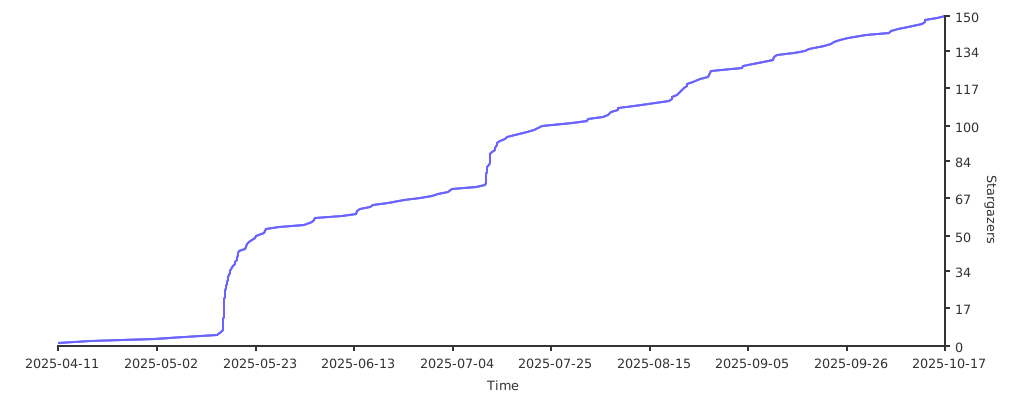
Star History
What is Ziit?
Ziit (pronounced 'tseet') is an open-source, self-hostable alternative to WakaTime. It provides a clean, minimal, and fast dashboard for displaying coding statistics, while ensuring privacy by keeping all data on your own server. Ziit tracks coding activity such as projects, languages, editors, files, branches, operating systems, and time spent coding all presented in a familiar interface inspired by Plausible Analytics.

Features
- Time tracking directly from VS Code to your Ziit instance of choice.
- Filtering using different time ranges.
- Clean & Minimal dashboard showing only the information needed.
- Login with GitHub or Email and Password.
- Import Data from Wakatime or a WakAPI Instance.
- Saves data about your current project, OS, editor, file, language and git branch.
- Badges to embed coding time for a project into a README.
- Public stats page to see information from the whole Ziit instance.
- Public leaderboard to see who has the most coding hours.
- More to come...
How to use Ziit
First setup an instance or sign up on the public one then install the extension by searching for "Ziit" in your favorite IDE.
Supported IDE's:
For more details on how to setup the IDE extensions checkout the docs.
Development
Prerequisites
Setup
Install dependencies:
bun i
Database Migrations:
Apply database schema changes.
bunx prisma migrate dev
Set the environment variables:
It is imporatnt that you make a .env using the .env.example as a template and set the correct values. All the instructions needed are in the example file.
Run the development server:
The server will start on http://localhost:3000.
bun dev