Zeal is an offline documentation browser: a personal reference library of API and language documentation that is searchable in an instant and available without a connection, built in C++ on Qt and released under the GPL-3.0.
What it is
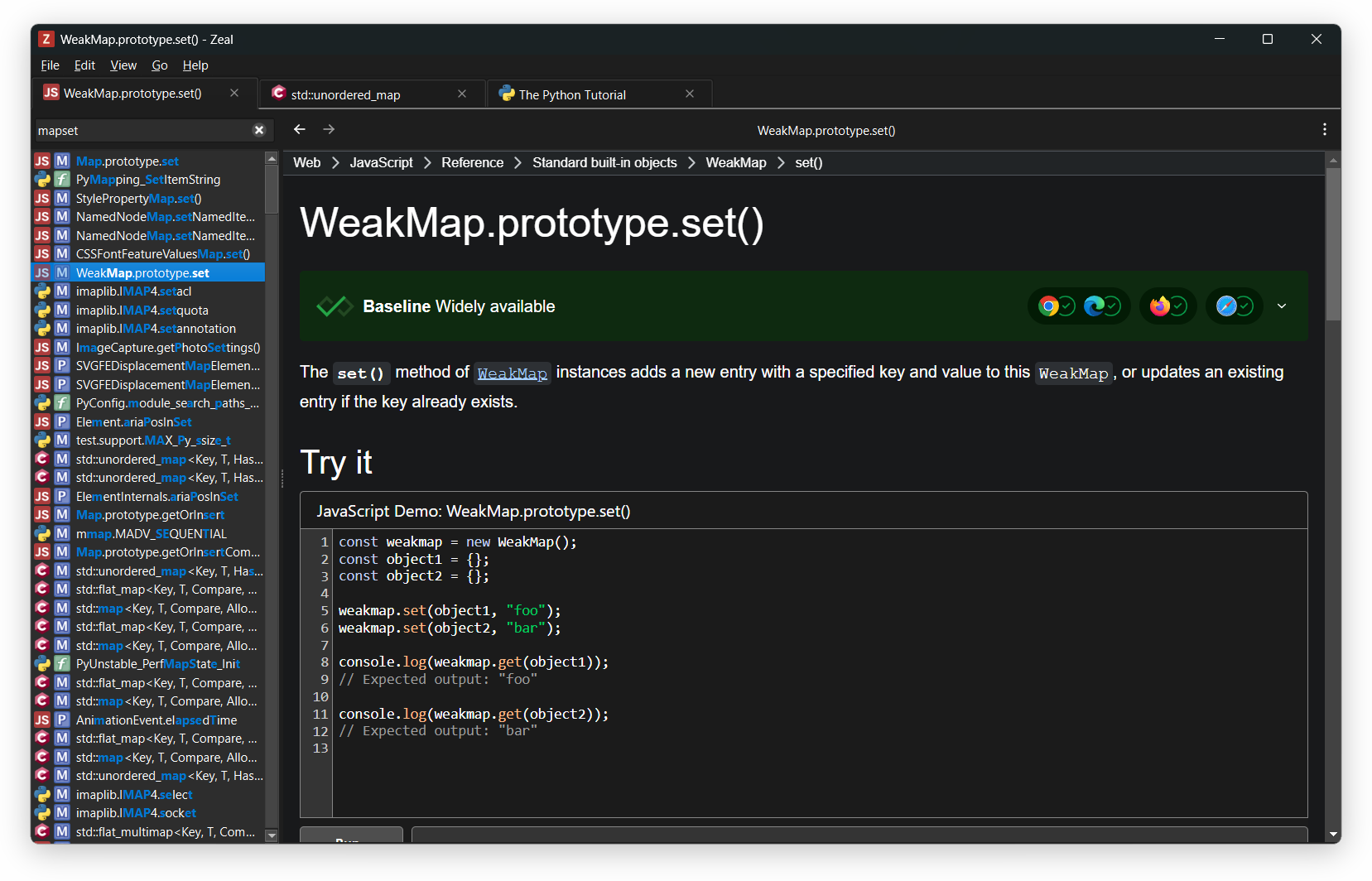
Zeal is a cross-platform desktop application that keeps documentation for programming languages, frameworks and APIs on the local machine rather than in a browser. Its content is organised into docsets, which are browsed and installed from File → Docset Library, where selecting a docset and clicking Download adds it to the local library. The interface is built with Qt 6.4.2 or later, uses WebEngine for rendering and SQLite for its index, and stores documentation in the docset format established by Dash. The project is written in C++, carries the desktop-application, documentation-tool, offline, docset, api-documentation and linux topics, and has accumulated roughly 12.8 thousand stars and 844 forks.
The concrete problem it solves is the cost of looking things up while working. Reference material normally lives on vendor websites that need a connection, a working search engine and a tab switch, and the result is often the wrong version of a page. Zeal replaces that round trip with a locally indexed search that responds immediately, including on machines that are offline or on restricted networks. Query filtering keeps the results narrow: prefixing a term with a docset name such as cpp:vector limits the search to that docset, and comma-separated names such as python,django:string search several at once.
Key capabilities
- In-application docset management through
File → Docset Library, with a Download button per docset.
- Scoped queries using the
docset:term syntax, for example cpp:vector.
- Multi-docset queries with comma-separated names, for example
python,django:string.
- Command-line invocation with a preloaded query, for example
zeal python:pprint.
- Compatibility with the Dash docset format, so docsets authored for Dash are readable directly.
- User-authored docsets, generated by following the Dash docset generation guide.
- Source builds driven by CMake presets:
cmake --preset release and cmake --build --preset release, producing build/release/zeal (zeal.exe on Windows).
Who uses it and how
- Developers working offline, on air-gapped machines or on networks where external documentation sites are slow or blocked, who need language and API references available at all times.
- Windows users who install a prebuilt binary from the download page; those builds require Windows 10 version 1809 or later.
- Linux, BSD and X11 users who compile from source, installing Qt Base plus Svg and WebEngine, libarchive, SQLite,
extra-cmake-modules on Linux/BSD, and libxkbcommon with xcb-util-keysyms on X11.
- Documentation authors who prepare their own docsets and need a free client that speaks the same format as Dash.
- Contributors, who follow
CONTRIBUTING.md and use GitHub issues and discussions, Discord, the Telegram channel, X or email for support and coordination.
Getting started
Prebuilt binaries, primarily for Windows, are offered at https://zealdocs.org/download; other platforms build from source after installing CMake, Ninja, Qt 6.4.2 with the Svg and WebEngine modules, libarchive and SQLite. After installation, docsets are added from File → Docset Library by selecting entries and clicking Download.
How it compares
Zeal takes its docset format from Dash and can therefore consume documentation packages prepared for that tool without conversion, which makes migration a matter of pointing Zeal at the same docsets. It is free software under the GPL-3.0 with the full source in the repository, so the client can be rebuilt, audited or patched by anyone who needs to, and no account or hosted service sits between the user and the documentation. Within this registry the facts name no other comparable documentation browser, so Zeal stands largely on its own as a desktop, offline reading client.
When to use it — and when not to
Use Zeal when documentation must remain available without a connection and a local, keyboard-driven search beats a browser. A self-hoster or source builder should expect to operate a full Qt 6.4.2 toolchain with WebEngine, libarchive and SQLite, and to fetch docsets separately from the application itself, which is more work than installing a single package. Those who want documentation served to a team from a central host, or who need browser-based access rather than a desktop client, should look elsewhere, and anyone judging project health should note the 107 open issues and the build-and-usage oriented README.
project readme (upstream, from github) — read inline
Zeal






Zeal is an offline documentation browser: your personal reference library, searchable in an instant and available
without a connection. Originally inspired by Dash, it supports the same docset format.
Download


Binary builds for Windows and other installation options are available on the
download page. Windows builds require Windows 10 version 1809 or later.
How to use
After installing Zeal, go to File → Docset Library, select the docsets you want, and click the Download button.
Query and filter docsets
Limit the search scope by prefixing your query with a docset name and a colon:
cpp:vector
To search multiple docsets, separate them with a comma:
python,django:string
Command line
You can also start Zeal with a query from the command line:
zeal python:pprint
How to compile
Detailed, up-to-date build instructions for each platform are available in the
wiki. The bare minimum is described below.
Build dependencies
- CMake and Ninja.
- Qt version 6.4.2 or later. Required modules besides Qt Base: Svg, WebEngine.
- libarchive.
- SQLite.
- Linux/BSD platforms:
extra-cmake-modules.
- X11 platforms only:
libxkbcommon, xcb-util-keysyms.
Build instructions
cmake --preset release
cmake --build --preset release
The resulting binary is build/release/zeal (zeal.exe on Windows).
Create your own docsets
Follow the instructions in the Dash docset generation guide.
Contributing
Contributions are welcome. See CONTRIBUTING.md for how to build Zeal, the conventions to follow,
and what to expect from review.
Contact and support
Ways to get help or reach the developers:
License
This software is licensed under the terms of the GNU General Public License version 3 (GPLv3) or later. Full text of
the license is available in the COPYING file and online.
Bundled third-party components are licensed under their respective terms; the repository is
REUSE-compliant, with all license texts available in the LICENSES directory.