


YaraHunter is a free, open source orchestration & scheduling project written in Go and released under Apache-2.0. It has 1,319 GitHub stars, 155 forks and 6 open issues, and was last pushed 6 months ago. On this registry it ranks #61 of 64 tracked projects in Orchestration & Scheduling, with 5 head-to-head comparisons available.

What is YaraHunter?

YaraHunter is an Apache-2.0 licensed, Go-based malware scanner from Deepfence that examines container images, running Docker containers, and filesystems for indicators of compromise using a YARA ruleset, and it is built for DevSecOps and security engineers who need the same malware check to run inside a CI/CD pipeline, before deployment, and against live containers.

What it is

YaraHunter lives in the cloud-native and container ecosystem and is distributed as a portable Docker container rather than as a host-installed agent. It scans container images, running Docker containers, and local filesystems, matching what it finds against the Deepfence YARA ruleset (github.com/deepfence/yara-rules) to identify resources that match known malware signatures. Matches are reported as indicators of compromise (IOCs) and may indicate that a container or filesystem has been compromised. The project is written in Go, published under the Apache-2.0 licence, documented at threatmapper.org/docs/yarahunter/, and hosted under the Deepfence organisation at deepfence.io.

The concrete problem is that container images and running containers can be compromised, for example by a cryptominer such as XMRig installed through an exploit, and a compromised image can be published or deployed without anyone noticing. YaraHunter addresses that by placing the same rule-based scan at four points: at build-and-test in the CI/CD pipeline, at rest against local container images before deployment, at runtime against running Docker containers when unusual network traffic or CPU activity is observed, and at any time against a local filesystem. The supplied facts do not name a specific product that YaraHunter replaces; the gap it fills is the absence of any malware-signature check on those artifacts.

Key capabilities

  • Scans container images at rest, running Docker containers, local filesystems, and build artifacts produced during CI/CD operations.
  • Matches scanned resources against the Deepfence YARA ruleset (github.com/deepfence/yara-rules) and reports the resulting indicators of compromise.
  • Runs from the published image quay.io/deepfenceio/deepfence_malware_scanner_ce:2.5.8, or is built from source with the make docker command.
  • Selects the scan target with the --image-name argument, as in --image-name metal3d/xmrig:latest.
  • Emits machine-readable findings with --output=json, including an IOC array whose entries carry the Matched Rule Name key; omitting the flag produces table-formatted output.
  • Caches YARA rules between runs with --rules-path=/tmp/rules, passed together with a mounted rules volume.
  • Fits automation directly: JSON written to a file can be filtered with jq '.IOC[] | ."Matched Rule Name"' to extract matched rule names.

Who uses it and how

  • DevSecOps and pipeline engineers scan build artifacts during CI/CD, matching the project's ci-cd, devsecops-pipeline, and devsecops-best-practices topics.
  • Platform and security teams scan local container images at rest before deployment to verify they contain no malware.
  • Incident responders scan running Docker containers at runtime after observing unusual network traffic or CPU activity, as in the documented XMRig case.
  • Threat hunters and forensic teams scan filesystems for indicators of compromise at any time, matching the ioc and threat-hunting topics.
  • Automation consumers parse saved JSON output, for example cat /tmp/xmrig-scan.json | jq '.IOC[] | ."Matched Rule Name"'.

Getting started

Pull the published image with docker pull quay.io/deepfenceio/deepfence_malware_scanner_ce:2.5.8 and run it via docker run, or clone the repository and run make docker to build the image from source. Full instructions live in the YaraHunter documentation at threatmapper.org/docs/yarahunter/.

How it compares

The supplied facts provide no list of paid products that YaraHunter replaces, and they name no comparable malware-scanning tools, so in this registry it stands alone. The nearest project named in the facts is ThreatMapper, the Deepfence threat discovery platform into which YaraHunter is planned to be integrated.

When to use it โ€” and when not to

A self-hoster must run Docker and grant the container the host Docker socket through -v /var/run/docker.sock:/var/run/docker.sock, plus a writable volume such as /tmp for output and, if rules caching is wanted, a rules path. The project describes itself as a work in progress with a public roadmap and issue list, so teams that need a finished, fully supported scanner with stability guarantees should look elsewhere, and anyone unable to mount the Docker socket cannot scan running containers this way. It remains a reasonable choice for teams that already run Docker and want YARA-based malware detection wired into a pipeline and into runtime checks.

project readme (upstream, from github) โ€” read inline

GitHub license GitHub stars GitHub issues Slack

YaraHunter

Deepfence YaraHunter scans container images, running Docker containers, and filesystems to find indicators of malware. It uses a YARA ruleset to identify resources that match known malware signatures, and may indicate that the container or filesystem has been compromised.

YaraHunter can be used in the following ways:

  • At build-and-test: scan build artifacts in the CI/CD pipeline, reporting on possible indicators of malware
  • At rest: scan local container images, for example, before they are deployed, to verify they do not contain malware
  • At runtime: scan running docker containers, for example, if you observe unusual network traffic or CPU activity
  • Against filesystems: at any time, YaraHunter can scan a local filesystems for indicators of compromise

Key capabilities:

  • Scan running and at-rest containers; scan filesystems; scan during CI/CD build operations
  • Run anywhere: highly-portable, docker container form factor
  • Designed for automation: easy-to-deploy, easy-to-parse JSON output

YaraHunter is a work-in-progress (check the Roadmap and issues list), and will be integrated into the ThreatMapper threat discovery platform. We welcome any contributions to help to improve this tool.

Quick Start

For full instructions, refer to the YaraHunter Documentation.
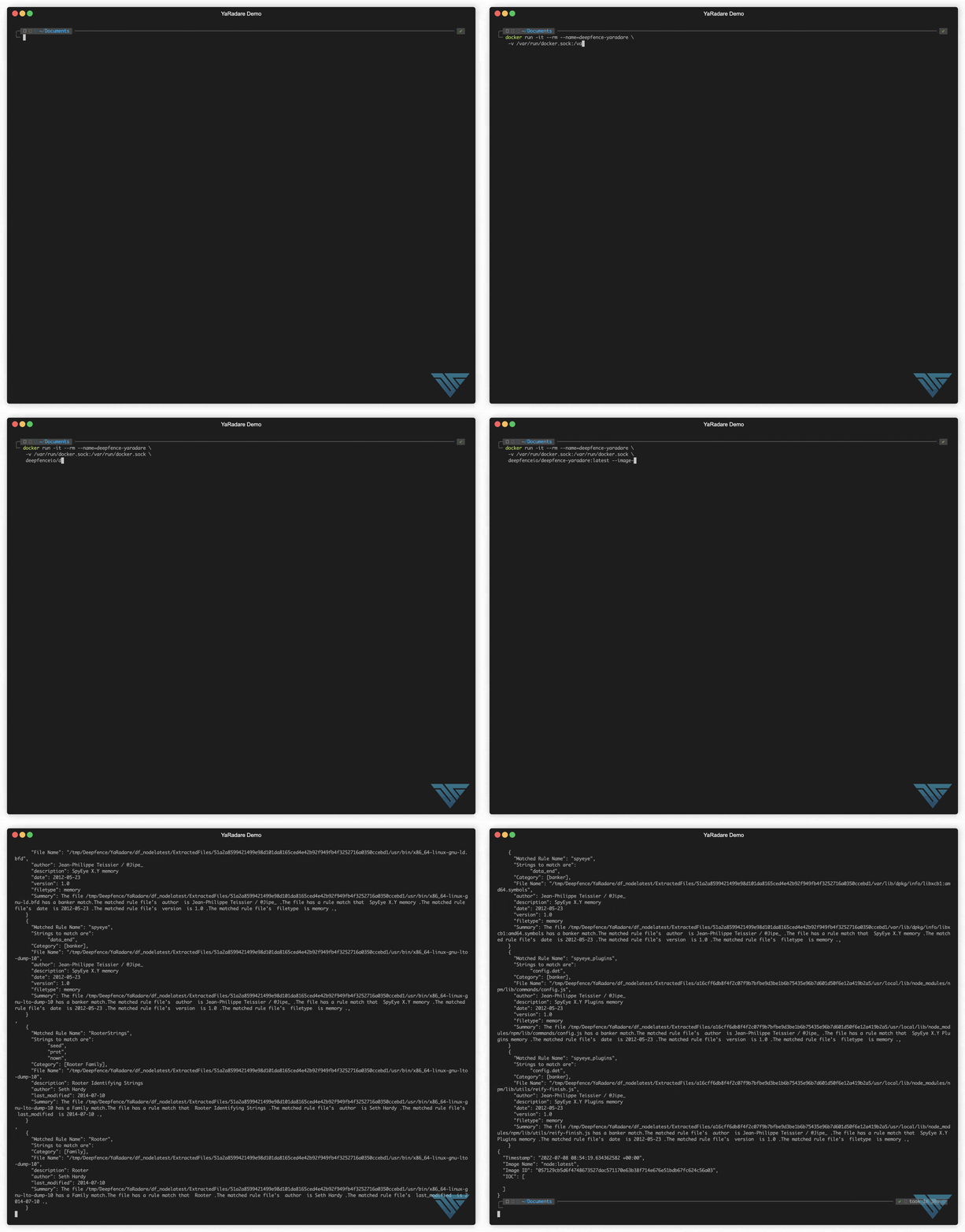
demo gif

Example: Finding Indicators of Compromise in a container image

Images may be compromised with the installation of a cryptominer such as XMRig. In the following example, we'll scan a legitimiate cryptominer image that contains the same xmrig software that is often installed through an exploit:

Pull the official yarahunter image:

docker pull quay.io/deepfenceio/deepfence_malware_scanner_ce:2.5.8

or Build it from source clone this repo and run below command

make docker

Scan

Pull the image that needs to be scanned for example metal3d/xmrig and scan it:

docker pull metal3d/xmrig

Scan the image:

docker run -i --rm --name=deepfence-yarahunter \
     -v /var/run/docker.sock:/var/run/docker.sock \
     -v /tmp:/home/deepfence/output \
     quay.io/deepfenceio/deepfence_malware_scanner_ce:2.5.8 \
     --image-name metal3d/xmrig:latest \
     --output=json > xmrig-scan.json

This returns, among other things, clear indication of the presence of XMRig. Note that we store the output (xmrig-scan.json) for quick and easy manipulation:

Rules can also be cached to use next run by mounting a separate path and passing rules-path argument

docker run -i --rm --name=deepfence-yarahunter \
     -v /var/run/docker.sock:/var/run/docker.sock \
     -v /tmp:/home/deepfence/output \
     -v /tmp/rules:/tmp/rules \
     quay.io/deepfenceio/deepfence_malware_scanner_ce:2.5.8 \
     --image-name metal3d/xmrig:latest \
     --output=json \
     --rules-path=/tmp/rules > xmrig-scan.json
# Extract the IOC array values.  From these, extract the values of the 'Matched Rule Name' key
cat /tmp/xmrig-scan.json | jq '.IOC[] | ."Matched Rule Name"'

This returns a list of the IOCs identified in the container we scanned.

To get table formatted output omit --output=json flag

Get in touch

Thank you for using YaraHunter.

  • Start with the documentation
  • Got a question, need some help? Find the Deepfence team on Slack
  • GitHub issues Got a feature request or found a bug? Raise an issue
  • productsecurity at deepfence dot io: Found a security issue? Share it in confidence

Security and Support

For any security-related issues in the YaraHunter project, contact productsecurity at deepfence dot io.

Please file GitHub issues as needed, and join the Deepfence Community Slack channel.

License

The Deepfence YaraHunter project (this repository) is offered under the Apache2 license.

Contributions to Deepfence YaraHunter project are similarly accepted under the Apache2 license, as per GitHub's inbound=outbound policy.

Disclaimer

This tool is not meant to be used for hacking. Please use it only for legitimate purposes like detecting indicator of compromise on the infrastructure you own, not on others' infrastructure. DEEPFENCE shall not be liable for loss of profit, loss of business, other financial loss, or any other loss or damage which may be caused, directly or indirectly, by the inadequacy of YaraHunter for any purpose or use thereof or by any defect or deficiency therein.

Frequently asked questions

Is YaraHunter free to use?

YaraHunter is open source under the Apache-2.0 licence. There is no licence fee and no seat count โ€” you can self-host it or, where the project offers one, pay a vendor for a managed version instead.

What does YaraHunter do?

๐Ÿ”๐Ÿ” Malware scanner for cloud-native, as part of CI/CD and at Runtime ๐Ÿ”๐Ÿ”

What is YaraHunter written in?

YaraHunter is primarily written in Go. Its source is publicly available at https://github.com/deepfence/YaraHunter, and it has 1,319 GitHub stars.