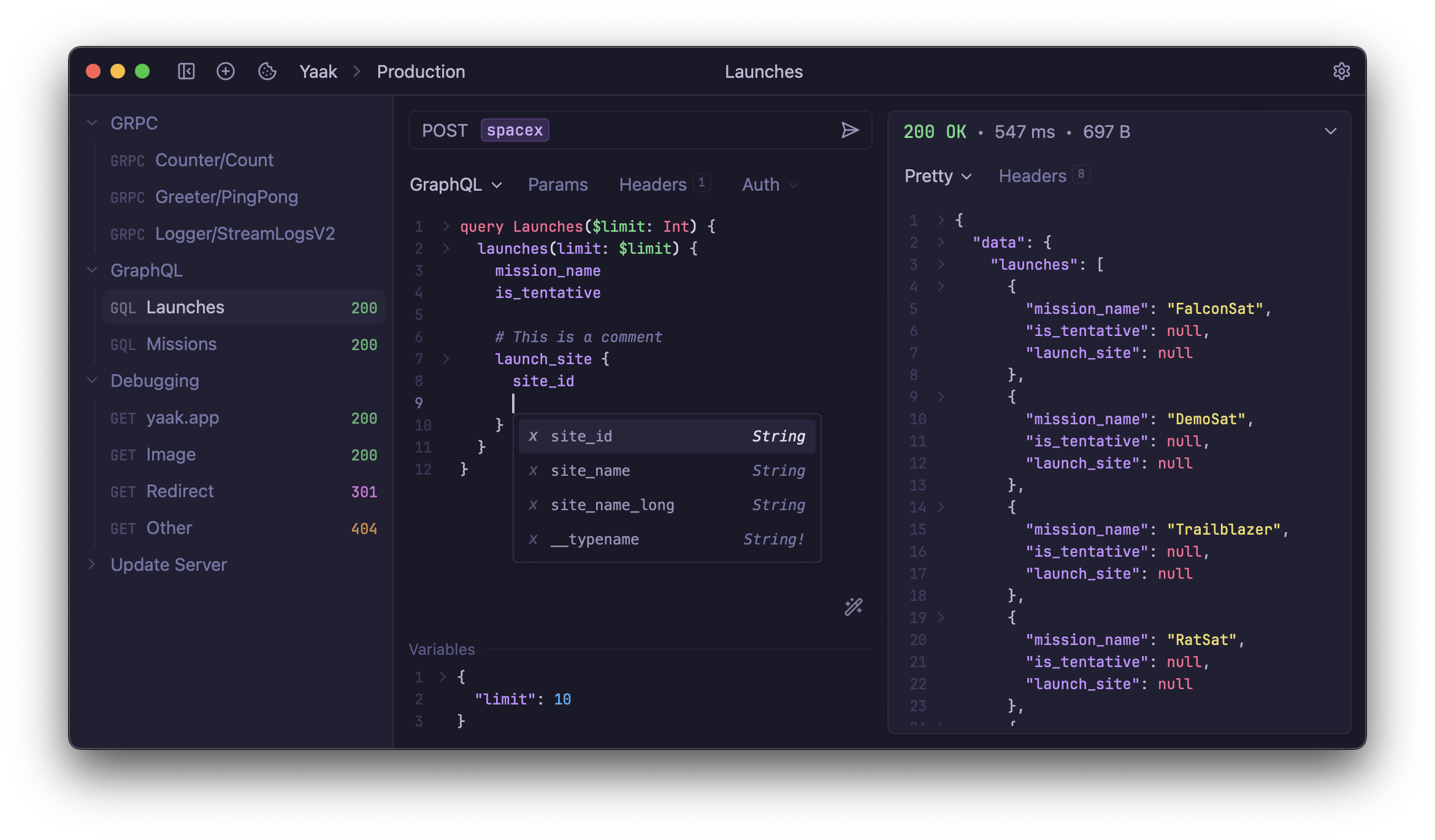
Yaak is a free, open source api development & testing project written in TypeScript and released under MIT. It has 19,224 GitHub stars, 813 forks and 19 open issues, and was last pushed 5 hours ago. On this registry it ranks #12 of 103 tracked projects in API Development & Testing, with 5 head-to-head comparisons available. It gained 14 stars over the last 6 tracked days.

What is Yaak?

What it is

Yaak is a desktop API client for REST, GraphQL, gRPC, WebSocket, and Server-Sent Events. It is built with Tauri, Rust, and React, and it lives in the developer tools ecosystem for API development and testing. The project presents itself as an offline-first, privacy-first alternative to Postman, Insomnia, and Bruno.

The concrete problem it solves is that API work often requires sending many kinds of requests, managing authentication, inspecting responses, and sharing or versioning request definitions without placing data in a cloud service. Yaak addresses this by keeping requests in local workspaces, supporting encrypted secrets and OS keychain storage, and mirroring workspaces to the filesystem so teams can use Git or file syncing. It also supports imports from Postman, Insomnia, OpenAPI, Swagger, and Curl, which helps users move existing API collections into a local workflow.

Key capabilities

  • Yaak sends REST, GraphQL, gRPC, WebSocket, and Server-Sent Events requests.
  • Yaak imports collections from Postman, Insomnia, OpenAPI, Swagger, and Curl.
  • Yaak supports OAuth 2.0, JWT, Basic Auth, and custom authentication plugins.
  • Yaak stores sensitive values as encrypted secrets in the OS keychain.
  • Yaak organizes requests into workspaces and nested folders, with environment variables for dev, staging, and prod.
  • Yaak filters and inspects responses with JSONPath or XPath.
  • Yaak allows template tags, built-in themes, and plugins for authentication, template tags, or UI.

Who uses it and how

  • API developers use Yaak as a local desktop client for testing HTTP, GraphQL, WebSocket, SSE, and gRPC requests.
  • Teams migrating from Postman or Insomnia import existing collections and reorganize them into workspaces and folders.
  • Developers use environment variables to switch between dev, staging, and prod configurations without editing each request.
  • Security-conscious users keep secrets encrypted in the OS keychain while using OAuth 2.0, JWT, or Basic Auth.
  • Users who need versioning mirror workspaces to the filesystem and manage them with Git or Dropbox.

Getting started

The README describes Yaak as a desktop API client built with Tauri, Rust, and React, and it links to documentation, but it does not mention a package manager, Docker image, hosted option, or install command. Users run Yaak as a local desktop application, following the project documentation for setup.

When to use it — and when not to

Yaak is useful when API testing must remain local, privacy-focused, and versionable through files and Git, especially for users replacing Postman, Insomnia, or Bruno. It is less suitable when a team needs a cloud collaboration platform, because the README emphasizes offline-first use and filesystem mirroring instead of cloud workspaces. The contribution policy limits community pull requests to bug fixes unless a maintainer grants permission, which may slow external feature work.

project readme (upstream, from github) — read inline

💫 Yaak ➟ Desktop API Client 💫

A fast, privacy-first API client for REST, GraphQL, SSE, WebSocket, and gRPC – built with Tauri, Rust, and React.

Development is funded by community-purchased licenses. You can also become a sponsor to have your logo appear below. 💖


Yaak API Client

Features

Yaak is an offline-first API client designed to stay out of your way while giving you everything you need when you need it. Built with Tauri, Rust, and React, it’s fast, lightweight, and private. No telemetry, no VC funding, and no cloud lock-in.

🌐 Work with any API

  • Import collections from Postman, Insomnia, OpenAPI, Swagger, or Curl.
  • Send requests via REST, GraphQL, gRPC, WebSocket, or Server-Sent Events.
  • Filter and inspect responses with JSONPath or XPath.

🔐 Stay secure

  • Use OAuth 2.0, JWT, Basic Auth, or custom plugins for authentication.
  • Secure sensitive values with encrypted secrets.
  • Store secrets in your OS keychain.

☁️ Organize & collaborate

  • Group requests into workspaces and nested folders.
  • Use environment variables to switch between dev, staging, and prod.
  • Mirror workspaces to your filesystem for versioning in Git or syncing with Dropbox.

🧩 Extend & customize

  • Insert dynamic values like UUIDs or timestamps with template tags.
  • Pick from built-in themes or build your own.
  • Create plugins to extend authentication, template tags, or the UI.

Contribution Policy

[!IMPORTANT] Community PRs are currently limited to bug fixes. If your PR is not a bug fix, link the feedback item where @gschier explicitly gave you permission to work on it. See CONTRIBUTING.md for policy details and DEVELOPMENT.md for local setup.

Useful Resources

Frequently asked questions

Is Yaak free to use?

Yaak is open source under the MIT licence. There is no licence fee and no seat count — you can self-host it or, where the project offers one, pay a vendor for a managed version instead.

What does Yaak do?

Fast, secure, offline API client with Git integration

What is Yaak written in?

Yaak is primarily written in TypeScript. Its source is publicly available at https://github.com/yaakapp/app, and it has 19,224 GitHub stars.