xc is a free, open source build & deployment project written in Go and released under MIT. It has 1,412 GitHub stars, 37 forks and 17 open issues, and was last pushed 2 months ago. On this registry it ranks #56 of 84 tracked projects in Build & Deployment, with 5 head-to-head comparisons available. It gained 10 stars over the last 30 tracked days.

What is xc?

xc is a Markdown-defined task runner, written in Go and released under the MIT licence, that lets a project's build and release commands live in the same document that explains the project.

What it is

xc is a task runner that reads task definitions from Markdown or org-mode files and executes them. Rather than keeping commands in a separate build file, xc treats ordinary project documentation as the source of truth: a fenced code block following a heading becomes a runnable task, and the heading supplies the task name and description. The project lives in the Go ecosystem, ships as the xc command, and keeps its source in the joerdav/xc repository. Its own README is itself a set of xc tasks, so the file works as both documentation and an executable task list.

The problem xc solves is that scripts and their documentation drift apart. A Makefile or a package.json gathers useful development commands such as test, lint, build and release, and the README.md then describes those commands for new contributors; because the two are maintained separately, adding or changing a script leaves the prose stale. xc replaces that separate script block by defining each command inline with its documentation, applying the literate-programming idea to build scripts. A side-effect is that a reader without xc installed can still copy the commands, because each one is plain shell inside a code block.

Key capabilities

  • Tasks defined in Markdown or org-mode files as code blocks.
  • A named task runs directly, for example xc tag, which prints each step and its output as it executes.
  • Task dependencies declared with Requires:, such as Requires: test, so dependent tasks run in order.
  • Parameters declared with Inputs:, such as VERSION in the tag task.
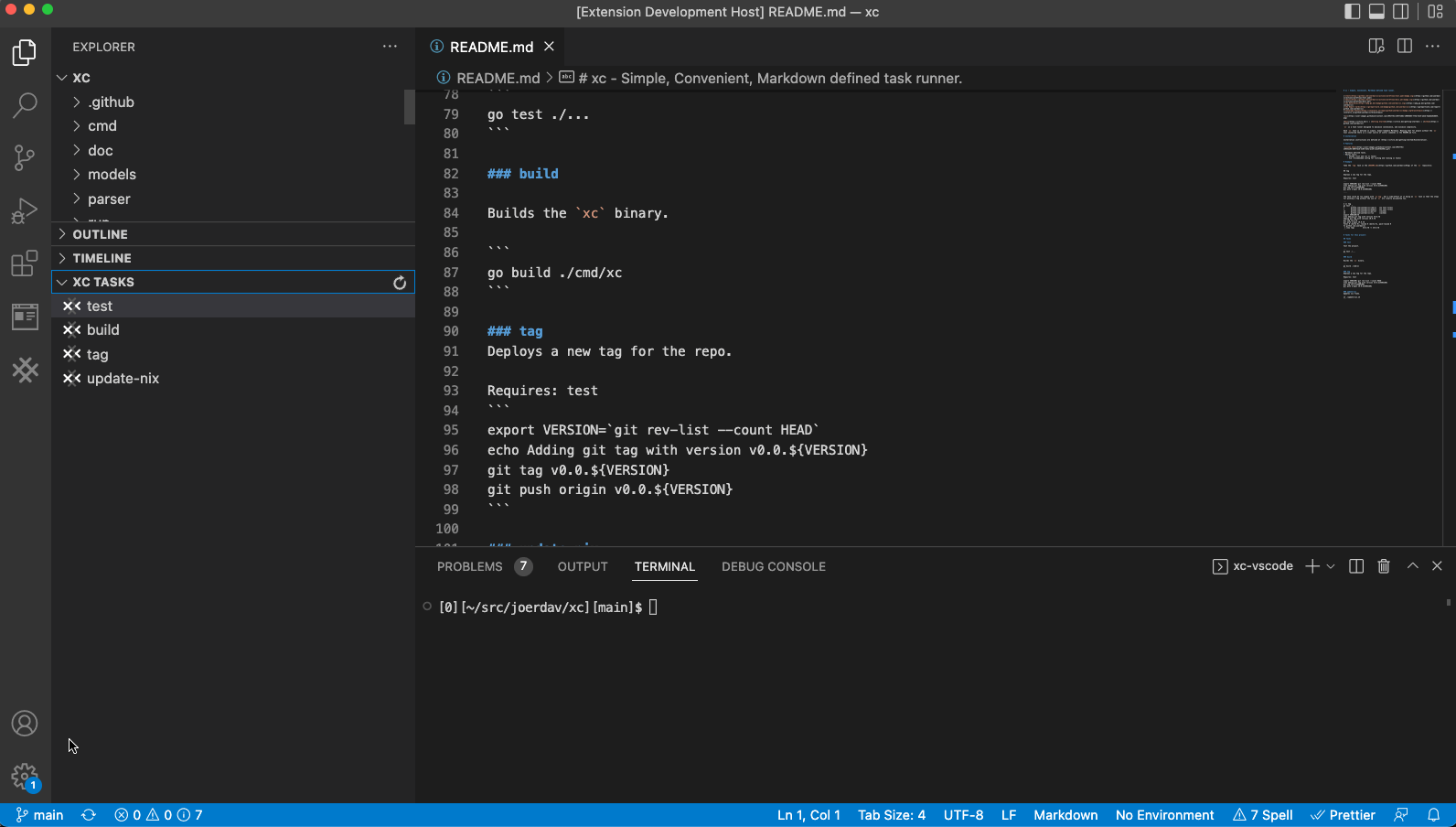
  • Editor integration: a VSCode extension that lists and runs xc tasks, a recommended Vim configuration, and an Emacs package, xc.el.
  • org-mode specific features beyond the Markdown dialect.
  • An "xc compatible" badge for signalling that a project uses xc.

Who uses it and how

  • Development teams working in Go, where the repository's own tasks cover test, lint, build and tag.
  • Maintainers publishing releases, using the tag task to derive a version with git rev-list --count HEAD and push a new git tag.
  • Contributors who read the README first: because tasks are documentation, the command list is discoverable before xc is installed.
  • Editor-centric workflows, with the VSCode extension or the Vim and Emacs configurations listing and launching tasks inside the editor.

Getting started

Installation is documented at the project's home, https://xcfile.dev/, which the README directs readers to. The project is also distributed as a Go command and referenced on pkg.go.dev as github.com/joerdav/xc.

How it compares

The README places xc alongside Make and npm run, the two tools it explicitly calls itself similar to, while aiming to be more discoverable and approachable. Where a Makefile or a package.json keeps scripts in a machine-oriented syntax separate from prose, xc keeps the same commands in human-readable Markdown or org-mode as fenced code blocks. The facts do not identify paid products that xc replaces; the contrast it draws is with those two sibling task runners and the documentation drift they permit.

When to use it — and when not to

xc needs only the single Go binary to run, so a team must install that binary and keep a Markdown or org-mode file as the task source; no database, storage service or SMTP setup is involved. Projects that already lean on Make's dependency graph, variables or non-Go workflows, or that prefer scripting syntax to prose-embedded commands, will not gain from the swap. The clearest weakness in the repository is documentation depth: the README's own Installation section is a stub pointing to the external site, so the in-repo guidance for getting started is thin.

project readme (upstream, from github) — read inline

xc - Simple, Convenient, Docs-based task runner.

xc Docs | Getting Started | GitHub

xc compatible test docs Go Reference Mentioned in Awesome Go Coverage Status

xc is a task runner similar to Make or npm run, that aims to be more discoverable and approachable.

The problem xc is intended to solve is scripts maintained separately from their documentation. Often a Makefile or a package.json will contain some useful scripts for developing on a project, then the README.md will surface and describe these scripts. In such a case, since the documentation is separate, it may not be updated when scripts are changed or added. xc aims to solve this by defining the scripts inline with the documentation.

xc is designed to maximise convenience, and minimise complexity. Each xc task is defined in simple, human-readable Markdown or org-mode. This means that even people without the xc tool installed can use the README (or whatever documentation file contains the tasks) as a source of useful commands for the project.

Installation

Installation instructions are described at .

Contributing

Find our guidelines & HOWTOs at CONTRIBUTING.md.

Features

  • Tasks defined in Markdown or org-mode files as code blocks.
  • Editor integration:
    • VSCode (list and run xc tasks) vscode demo
    • Vim (recommended config for listing and running xc tasks)
    • Emacs emacs demo
  • See also: org-mode specific features.

Example

Take the tag task in the README.md of the xc repository:

## tag

Deploys a new tag for the repo.

Requires: test

```

export VERSION=`git rev-list --count HEAD`
echo Adding git tag with version v0.0.${VERSION}
git tag v0.0.${VERSION}
git push origin v0.0.${VERSION}

```

The task could be run simply with xc tag, but a side-effect of it being an xc task is that the steps for pushing a tag without the use of xc are clearly documented too.


$ xc tag
+ go test ./...
?       github.com/joerdav/xc/cmd/xc   [no test files]
?       github.com/joerdav/xc/models   [no test files]
ok      github.com/joerdav/xc/parser   (cached)
ok      github.com/joerdav/xc/run      (cached)
+ export VERSION=78
+ echo Adding git tag with version v0.0.78
Adding git tag with version v0.0.78
+ git tag v0.0.78
+ git push origin v0.0.78 Total 0 (delta 0), reused 0 (delta 0), pack-reused 0
To github.com:joerdav/xc
 * [new tag]         v0.0.78 -> v0.0.78

Tasks

test

Test the project.


go test ./...

lint

Run linters.


golangci-lint run

build

Builds the xc binary.


go build ./cmd/xc

tag

Deploys a new tag for the repo.

Specify major/minor/patch with VERSION

Inputs: VERSION

Requires: test


## https://github.com/unegma/bash-functions/blob/main/update.sh

CURRENT_VERSION=`git describe --abbrev=0 --tags 2>/dev/null`
CURRENT_VERSION_PARTS=(${CURRENT_VERSION//./ })
VNUM1=${CURRENT_VERSION_PARTS[0]}
VNUM2=${CURRENT_VERSION_PARTS[1]}
VNUM3=${CURRENT_VERSION_PARTS[2]}

if [[ $VERSION == 'major' ]]
then
  VNUM1=$((VNUM1+1))
  VNUM2=0
  VNUM3=0
elif [[ $VERSION == 'minor' ]]
then
  VNUM2=$((VNUM2+1))
  VNUM3=0
elif [[ $VERSION == 'patch' ]]
then
  VNUM3=$((VNUM3+1))
else
  echo "Invalid version"
  exit 1
fi

NEW_TAG="$VNUM1.$VNUM2.$VNUM3"

echo Adding git tag with version ${NEW_TAG}
git tag ${NEW_TAG}
git push origin ${NEW_TAG}

update-nix

Updates nix flake.


sh ./update-nix.sh

install-hugo

Install hugo via go install.

go install github.com/gohugoio/hugo@latest

run-docs

Run the hugo development server.

Directory: doc

hugo serve

build-docs

Build production docs site.

Directory: doc

./build.sh

Frequently asked questions

Is xc free to use?

xc is open source under the MIT licence. There is no licence fee and no seat count — you can self-host it or, where the project offers one, pay a vendor for a managed version instead.

What does xc do?

Markdown defined task runner.

What is xc written in?

xc is primarily written in Go. Its source is publicly available at https://github.com/joerdav/xc, and it has 1,412 GitHub stars.