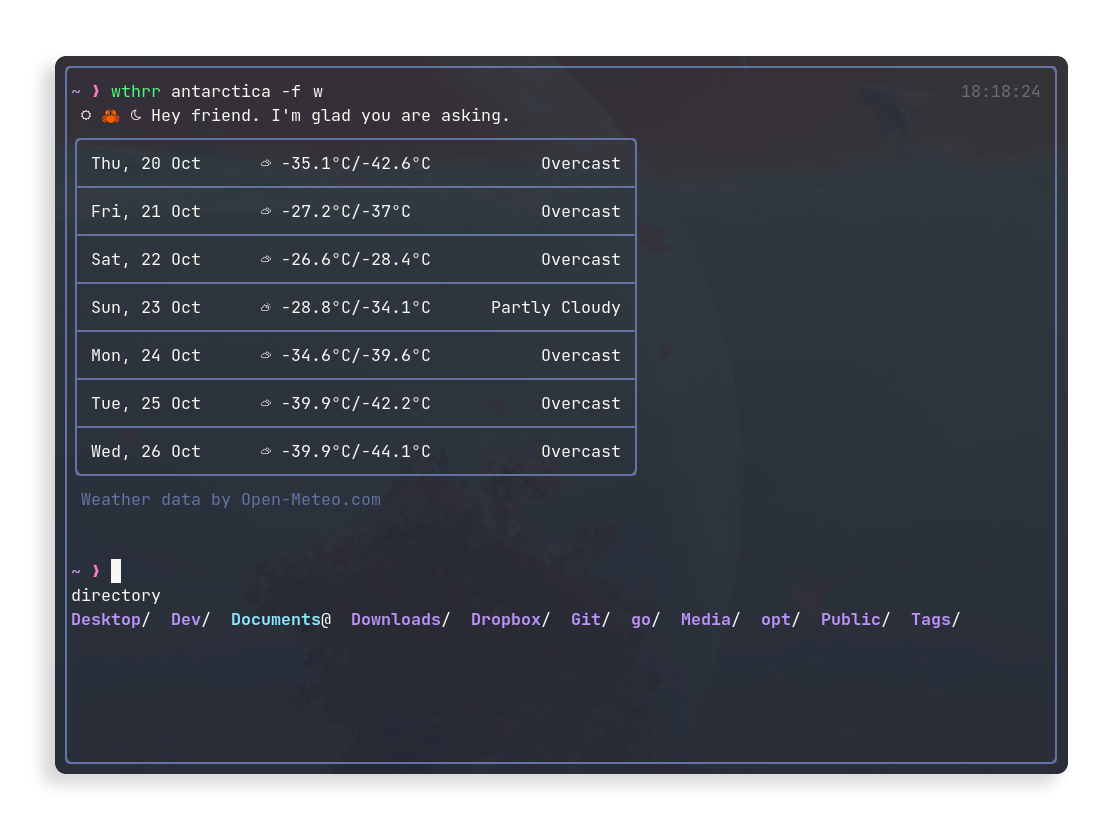
wthrr-the-weathercrab is a free, open source frameworks & platforms project written in Rust and released under MIT. It has 501 GitHub stars, 25 forks and 23 open issues, and was last pushed 4 days ago. On this registry it ranks #101 of 103 tracked projects in Frameworks & Platforms, with 5 head-to-head comparisons available.

What is wthrr-the-weathercrab?

wthrr-the-weathercrab is a Rust command-line weather companion that lives in your terminal, built for developers and TUI users who want forecasts without leaving their shell.

What it is

wthrr is an MIT-licensed Rust program published on crates.io as wthrr, and it belongs to the terminal/CLI ecosystem of developer tooling. The project describes it as a companion that "lives in your terminal" and whose "passion is meteorology," meaning that anyone who spends time in a TUI has a small program nearby that knows about the weather. It is invoked simply as wthrr, optionally followed by an address, and it renders forecasts directly in the current session.

The concrete problem it solves is the interruption of leaving your terminal to check a weather website or application before deciding what to do next. Instead of switching contexts, you call wthrr with an address such as wthrr melbourne, disambiguate places by writing melbourne,florida for the US city, and pass a hyphen or quotation marks for addresses containing spaces (new-york or "new york"). On a first run with nothing configured, it can search for a weather station near you and save that searched location as the default, so subsequent bare calls work without further arguments.

Key capabilities

  • Fetch a forecast for a specific place by passing an address argument, using hyphens or quotes for multi-word names to distinguish same-named cities.
  • Run wthrr auto to search explicitly for a weather station in the vicinity rather than a named address.
  • Select forecast content with -f/--forecast, taking values such as disable, (w)eek, to(d)ay, (t)omorrow, or individual weekdays like mo, tu, fr, with combined forms such as -f w,d and an hourly forecast for the day.
  • Retrieve past conditions with -F/--historical-weather, for example -F 2021-12-31.
  • Set units with -u/--units, covering (c)elsius/(f)ahrenheit, kmh, mph, (kn)ots, ms, 12h/24h time, %, and mm/(in)ch precipitation, as in wthrr -u f,mph -f d.
  • Choose the output language with -l/--language using codes such as en_US.
  • Persist choices with -s/--save, which writes them into the wthrr.ron config file, and wipe all configuration data with -r/--reset.

Who uses it and how

  • Terminal-dwelling developers and TUI users who want a quick check of current conditions and forecasts without opening a browser, as the README's framing suggests.
  • People working in graphical terminal emulators and editor panes such as kitty with nvim in toggleterm, or Yakuake/Konsole, where output colors and borders follow the terminal's theme and font.
  • Users on Linux, macOS, and Windows, since config storage locations are given for all three: ~/.config/weathercrab/, ~/Library/Application Support/weathercrab/, and %USERPROFILE%\AppData\Roaming\weathercrab\.
  • Readers of non-English locales and users with preferred units, who save an address, language, and forecast defaults once with -s and then rely on them for every plain wthrr call.
  • Anyone tracking multiple regions, distinguishing same-named cities in one invocation and querying historical dates for comparison.

Getting started

Install the package wthrr from crates.io, then run wthrr on its own to see the saved default location, or pass an address and flags such as wthrr -u f,mph -f d to fetch a specific forecast.

How it compares

No list of paid products this project replaces is given, and the README names no other comparable weather CLI tools; as such, it stands alone in this registry.

When to use it β€” and when not

It is a client rather than a service, so a user operates no database, storage, or SMTP, but it does require a working network connection and depends on a remote weather source acknowledged in the README's credits rather than local data. Output rendering and colors vary with the terminal's theme and font, so users on plain or limited terminals should expect inconsistent visuals, and the project currently carries 23 open issues. It suits someone who wants a lightweight personal lookup; it is a poor fit for anyone needing a graphical dashboard, alerts, or continuously updating displays.

project readme (upstream, from github) β€” read inline

πŸ¦€ wthrr-the-weathercrab

wthrr lives in your terminal and her passion is meteorology.

If you spend time in the TUI, you'll have a little companion nearby who knows about the weather.

Contents

How to use?

Just call

wthrr

Without having added an address or options, wthrr uses the config saved as default.
If you haven't configured anything as default yet, wthrr can try to search for a weather station near you and save the searched location as default.

It's always possible to specify an address. E.g.,

wthrr melbourne

Depending on the place you are looking for, you might need to be more specific. For example, the above call will get Melbourne in Australia. If you are aiming for Melbourne in the US, ask for melbourne,florida. If the address contains spaces, separate them with a hyphen or enclose them in quotation marks (e.g., new-york or "new york").

To search explicitly for a weather station in the vicinity, call

wthrr auto

As a final example, we instruct wthrr to use Fahrenheit and mph as units and add the hourly forecast for the day

wthrr -u f,mph -f d

Find further usage parameters in the help information

> wthrr -h

Usage: wthrr [OPTIONS] [ADDRESS]

Arguments:
  [ADDRESS]
          Address to check the weather

Options:
  -f, --forecast <FORECAST,...>
          [e.g.: -f w,d] [possible values: disable, (w)eek, to(d)ay, (t)omorrow, mo, tu, we, th, fr, sa, su]
  -F, --historical-weather <%Y-%m-%d,...>
          [e.g.: -F 2021-12-31]
  -u, --units <UNIT,...>
          [e.g.: -u f,12h,in] [possible values: (c)elsius, (f)ahrenheit, kmh, mph, (kn)ots, ms, 12h, 24h, %, mm, (in)ch]
  -l, --language <LANGUAGE>
          Output language [e.g.: en_US]
  -s, --save
          Save the supplied values as default
  -r, --reset
          Wipe wthrr's configuration data
  -h, --help
          Print help
  -V, --version
          Print version

Showcase

First Run Hourly Forecast
Week Forecast *Terminal Colors

*Rendering and colors are influenced by the terminal used and its theme and font.
E.g., the first of the above screenshots show wthrr in nvim(toggleterm) using kitty as terminal with a Dracula theme and JetBrainsMono Nerd font. The last screenshot shows wthrr in Yakuake/Konsole, also with a Dracula color scheme.

Config

The address, units and default forecast can be saved as default values in wthrr's config file by adding the -s flag to a run. This will save the config in wthrr.ron.

Platform locations:
Lin: ~/.config/weathercrab/
Mac: ~/Library/Application Support/weathercrab/
Win: %USERPROFILE%\AppData\Roaming\weathercrab\

Default values

(
    address: "", // Address to check the weather, e.g.: "Berlin,DE"
    language: "en_US", // Language code of the output language
    forecast: [], // Forecast to display without adding the `-f` option: `[day]` | `[week]` | `[day, week]`
    units: (
        temperature: celsius, // Temperature units: `celsius` | `fahrenheit`
        speed: kmh, // (Wind)speed units: `kmh` | `mph` | `knots` | `ms`
        time: military, // Time Format: `military` | `am_pm`
        precipitation: probability, // Precipitation units: `probability` | `mm` | `inch`
    ),
    gui: (
        border: rounded, // Border style: `rounded` | `single` | `solid` | `double`
        color: default, // Color: `default` | `plain`
        graph: (
            // Graph style: lines(solid) | lines(slim) | lines(dotted) | dotted | custom((char; 8))
            // `custom` takes exactly 8 chars. E.g. using a set of 4 chars: `custom(('β‘€','β‘€','β „','β „','β ‚','β ‚','⠁','⠁'))`,
            style: lines(solid),
            rowspan: double, // Graph height: `double` | `single`
            time_indicator: true, // Indication of the current time in the graph: `true` | `false`
        ),
        greeting: true, // Display greeting message: `true` | `false`
    ),
)

Installation

Use rusts package manger to install wthrr.

From crates.io

Version Command
release cargo install wthrr
development not available

From git source

Version Command
release cargo install --git https://github.com/ttytm/wthrr-the-weathercrab --tag v1.1.1
development cargo install --git https://github.com/ttytm/wthrr-the-weathercrab

Requirements and alternative, platform-specific installation instructions can be found in INSTALL.md.

Important To display symbols correctly, the used terminal must be configured to use a NerdFont.

Outlook

The issues section lists some of the features that are being worked on.

Contributions like πŸ›bug reports, ⭐️stars and πŸ’‘suggestions are welcome alike!

A simple changelog can be found on the releases page.

Contributors

Credits

  • The app uses the open-source weather API for non-commercial use provided by Open Meteo

Frequently asked questions

Is wthrr-the-weathercrab free to use?

wthrr-the-weathercrab is open source under the MIT licence. There is no licence fee and no seat count β€” you can self-host it or, where the project offers one, pay a vendor for a managed version instead.

What does wthrr-the-weathercrab do?

🌞 πŸ¦€ πŸŒ™ Weather companion for the terminal. Rust app.

What is wthrr-the-weathercrab written in?

wthrr-the-weathercrab is primarily written in Rust. Its source is publicly available at https://github.com/ttytm/wthrr-the-weathercrab, and it has 501 GitHub stars.