
WebTorrent
The streaming torrent client. For node.js and the web.




Sponsored by 

WebTorrent is a streaming torrent client for node.js and the browser. YEP, THAT'S RIGHT. THE BROWSER. It's written completely in JavaScript – the language of the web – so the same code works in both runtimes.
In node.js, this module is a simple torrent client, using TCP and UDP to talk to other torrent clients.
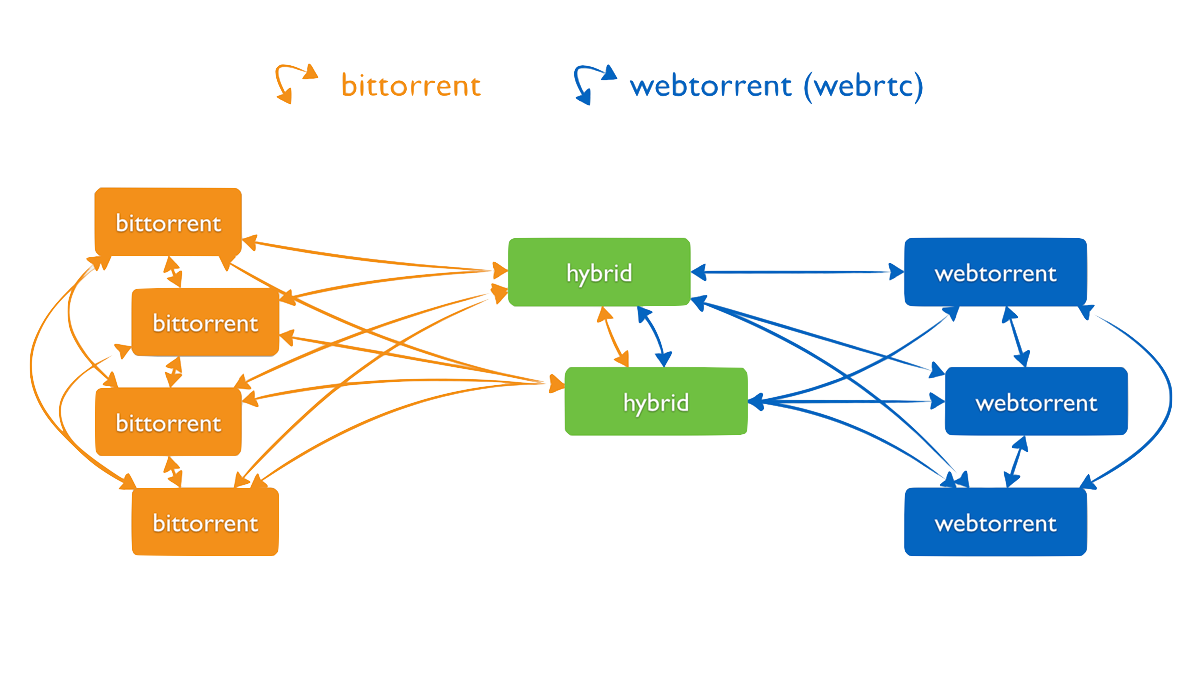
In the browser, WebTorrent uses WebRTC (data channels) for peer-to-peer transport. It can be used without browser plugins, extensions, or installations. It's Just JavaScript™. Note: WebTorrent does not support UDP/TCP peers in browser.
Simply include the
webtorrent.min.js script
on your page to start fetching files over WebRTC using the BitTorrent protocol, or
import WebTorrent from 'webtorrent' with browserify or webpack. See demo apps
and code examples below.
To make BitTorrent work over WebRTC (which is the only P2P transport that works on the web) we made some protocol changes. Therefore, a browser-based WebTorrent client or "web peer" can only connect to other clients that support WebTorrent/WebRTC.
To seed files to web peers, use a client that supports WebTorrent, e.g. WebTorrent Desktop, a desktop client with a familiar UI that can connect to web peers, webtorrent-hybrid, a command line program, or Instant.io, a website. Established torrent clients like Vuze have already added WebTorrent support so they can connect to both normal and web peers. We hope other clients will follow.
Features
- Torrent client for node.js & the browser (same npm package!)
- Insanely fast
- Download multiple torrents simultaneously, efficiently
- Pure Javascript (no native dependencies)
- Exposes files as streams
- Fetches pieces from the network on-demand so seeking is supported (even before torrent is finished)
- Seamlessly switches between sequential and rarest-first piece selection strategy
- Supports advanced torrent client features
- magnet uri support via ut_metadata
- peer discovery via dht, tracker, lsd, and ut_pex
- protocol extension api for adding new extensions
- Comprehensive test suite (runs completely offline, so it's reliable and fast)
- Check all the supported BEPs here
Browser/WebRTC environment features
- WebRTC data channels for lightweight peer-to-peer communication with no plugins
- No silos. WebTorrent is a P2P network for the entire web. WebTorrent clients running on one domain can connect to clients on any other domain.
- Stream video torrents into a `` tag (
webm, mkv, mp4, ogv, mov, etc (AV1, H264, HEVC*, VP8, VP9, AAC, FLAC, MP3, OPUS, Vorbis, etc)) - Supports Chrome, Firefox, Opera and Safari.
Install
To install WebTorrent for use in node or the browser with import WebTorrent from 'webtorrent', run:
npm install webtorrent
To install a webtorrent
command line program, run:
npm install webtorrent-cli -g
To install a WebTorrent desktop application for Mac, Windows, or Linux, see WebTorrent Desktop.
Ways to help
- Join us in Gitter or on freenode at
#webtorrentto help with development or to hang out with some mad science hackers :) - Create a new issue to report bugs
- Fix an issue. WebTorrent is an OPEN Open Source Project!
Who is using WebTorrent today?
WebTorrent API Documentation
Read the full API Documentation.
Usage
WebTorrent is the first BitTorrent client that works in the browser, using open web standards (no plugins, just HTML5 and WebRTC)! It's easy to get started!
In the browser
Downloading a file is simple:
import WebTorrent from 'webtorrent'

const client = new WebTorrent()
const magnetURI = '...'

client.add(magnetURI, torrent => {
  // Got torrent metadata!
  console.log('Client is downloading:', torrent.infoHash)

  for (const file of torrent.files) {
    document.body.append(file.name)
  }
})
Seeding a file is simple, too:
import dragDrop from 'drag-drop'
import WebTorrent from 'webtorrent'

const client = new WebTorrent()

// When user drops files on the browser, create a new torrent and start seeding it!
dragDrop('body', files => {
  client.seed(files, torrent => {
    console.log('Client is seeding:', torrent.infoHash)
  })
})
There are more examples in docs/get-started.md.
Browserify
WebTorrent works great with browserify, an npm package that lets you use node-style require() to organize your browser code and load modules installed by npm (as seen in the previous examples).
Webpack
WebTorrent also works with webpack, another module bundler. However, webpack requires extra configuration which you can find in the webpack bundle config used by webtorrent.
Or, you can just use the pre-built version via
import WebTorrent from 'webtorrent/dist/webtorrent.min.js' and skip the webpack configuration.
Script tag
WebTorrent is also available as a standalone script
(webtorrent.min.js) which exposes WebTorrent on the window
object, so it can be used with just a script tag:
<script type='module'>
  import WebTorrent from 'webtorrent.min.js'
</script>
The WebTorrent script is also hosted on fast, reliable CDN infrastructure for easy inclusion on your site:
<script type='module'>
  import WebTorrent from 'https://esm.sh/webtorrent/dist/webtorrent.min.js'
</script>
Chrome App
If you want to use WebTorrent in a Chrome App, you can include the following script:
<script type='module'>
  import WebTorrent from 'webtorrent.chromeapp.js'
</script>
Be sure to enable the chrome.sockets.udp and chrome.sockets.tcp permissions!
In Node.js
WebTorrent also works in node.js, using the same npm package! It's mad science!
NOTE: To connect to "web peers" (browsers) in addition to normal BitTorrent peers, use webtorrent-hybrid which includes WebRTC support for node.
As a command line app
WebTorrent is also available as a command line app. Here's how to use it:
$ npm install webtorrent-cli -g
$ webtorrent --help
To download a torrent:
$ webtorrent magnet_uri
To stream a torrent to a device like AirPlay or Chromecast, just pass a flag:
$ webtorrent magnet_uri --airplay
There are many supported streaming options:
--airplay               Apple TV
--chromecast            Chromecast
--mplayer               MPlayer
--mpv                   MPV
--omx [jack]            omx [default: hdmi]
--vlc                   VLC
--xbmc                  XBMC
--stdout                standard out [implies --quiet]
In addition to magnet uris, WebTorrent supports many ways to specify a torrent.
Talks about WebTorrent
- Sep 2017 - Nordic JS - Get Rich Quick With P2P Crypto Currency
- May 2017 - Char.la - WebTorrent and Peerify (Spanish)
- Nov 2016 - NodeConf Argentina - Real world Electron: Building Cross-platform desktop apps with JavaScript
- May 2016 - SIGNAL Conference - BitTorrent in the Browser
- May 2015 - Data Terra Nemo - WebTorrent: Mother of all demos
- May 2015 - Data Terra Nemo - WebRTC Everywhere
- Nov 2014 - JSConf Asia - How WebTorrent Works
- Sep 2014 - NodeConf EU - WebRTC Mad Science (first working WebTorrent demo)
- Apr 2014 - CraftConf - Bringing BitTorrent to the Web
- May 2014 - JS.LA - How I Built a BitTorrent Client in the Browser (progress update; node client working)
- Oct 2013 - RealtimeConf - WebRTC Black Magic (first mention of idea for WebTorrent)
Modules
Most of the active development is happening inside of small npm packages which are used by WebTorrent.
The Node Way™
"When applications are done well, they are just the really application-specific, brackish residue that can't be so easily abstracted away. All the nice, reusable components sublimate away onto github and npm where everybody can collaborate to advance the commons." — substack from "how I write modules"

Modules
These are the main modules that make up WebTorrent:
| module | tests | version | description |
|---|---|---|---|
| webtorrent |  |
|
torrent client (this module) |
| bittorrent-dht |  |
 |
distributed hash table client |
| bittorrent-peerid |  |
 |
identify client name/version |
| bittorrent-protocol |  |
 |
bittorrent protocol stream |
| bittorrent-tracker |  |
 |
bittorrent tracker server/client |
| bittorrent-lsd |  |
 |
bittorrent local service discovery |
| create-torrent |  |
 |
create .torrent files |
| magnet-uri |  |
 |
parse magnet uris |
| parse-torrent |  |
 |
parse torrent identifiers |
| torrent-discovery |  |
 |
find peers via dht, tracker, and lsd |
| ut_metadata |  |
 |
metadata for magnet uris (protocol extension) |
| ut_pex |  |
 |
peer discovery (protocol extension) |
Enable debug logs
In node, enable debug logs by setting the DEBUG environment variable to the name of the
module you want to debug (e.g. bittorrent-protocol, or * to print all logs).
DEBUG=* webtorrent
In the browser, enable debug logs by running this in the developer console:
localStorage.setItem('debug', '*')
Disable by running this:
localStorage.removeItem('debug')
License
MIT. Copyright (c) Feross Aboukhadijeh and WebTorrent, LLC.