English | 简体中文

webclaw
Turn websites into clean markdown, JSON, and LLM-ready context.
CLI, MCP server, REST API, and SDKs for AI agents and RAG pipelines.








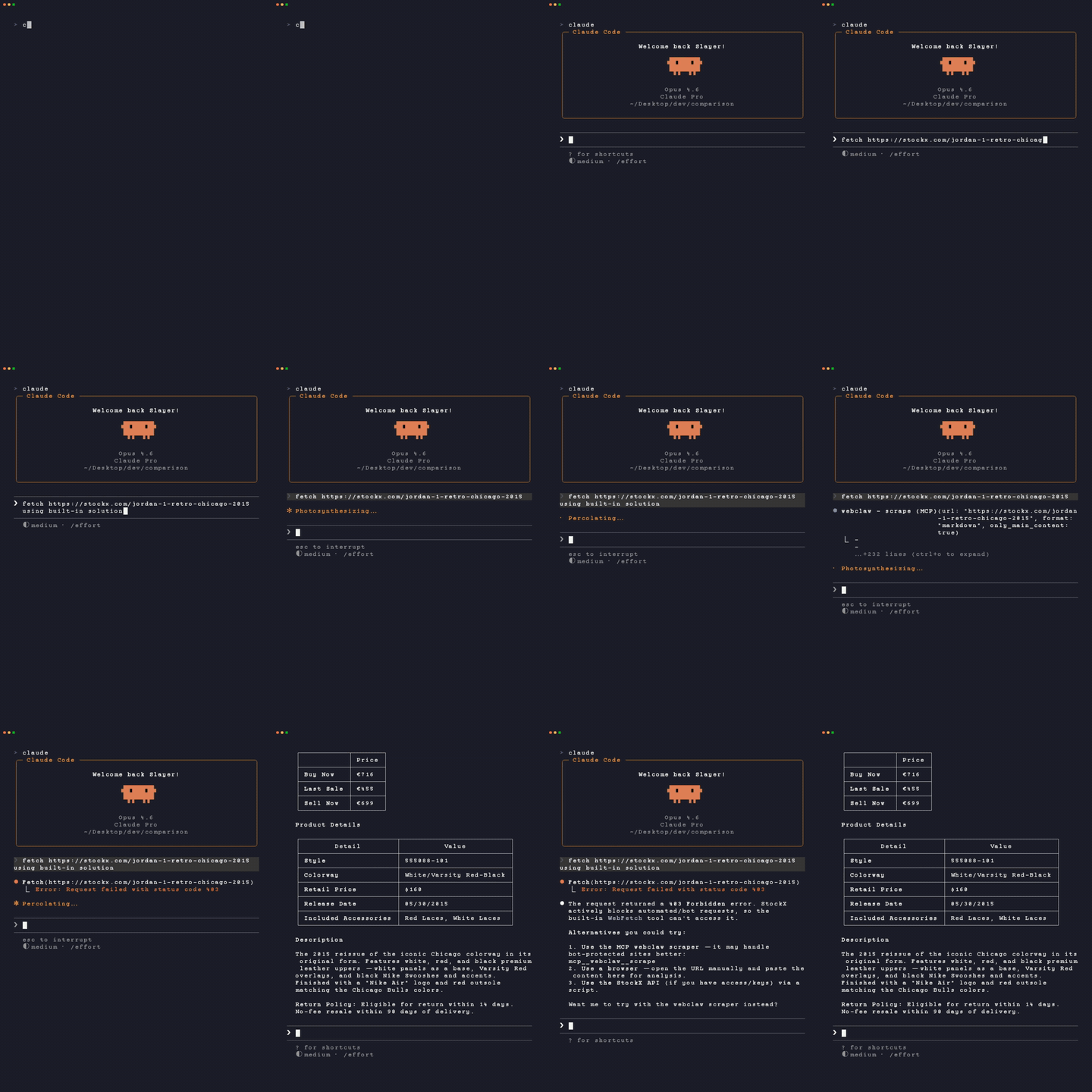
Most web scraping tools give your agent one of two bad outputs:
- a blocked page, login wall, or empty app shell
- raw HTML full of nav, scripts, styling, ads, and duplicated boilerplate
webclaw.io is the hosted web extraction API for webclaw. This repo contains the open-source CLI, MCP server, extraction engine, and self-hostable server.
webclaw turns a URL into clean content your tools can actually use.
webclaw https://example.com --format markdown
# Example Domain

This domain is for use in illustrative examples in documents.

You may use this domain in literature without prior coordination or asking for permission.
Use it from the terminal, wire it into Claude/Cursor through MCP, call the hosted API from your app, or self-host the OSS server.
Install
Agent setup
The fastest way to connect webclaw to Claude Code, Claude Desktop, Cursor, Windsurf, OpenCode, Codex CLI, and other MCP-compatible tools:
npx create-webclaw
The installer detects supported clients and configures the MCP server for you.
Homebrew
brew tap 0xMassi/webclaw
brew install webclaw
Prebuilt binaries
Download macOS, Linux, and Windows binaries from GitHub Releases.
Windows (x64)
The prebuilt ZIP is the easiest installation and does not require Rust. On the
v0.6.22 release page,
download webclaw-v0.6.22-x86_64-pc-windows-msvc.zip. Extract it in File Explorer,
open PowerShell in the extracted folder containing webclaw.exe, and run:
.\webclaw.exe --version
.\webclaw.exe https://example.com --format markdown
PowerShell requires the .\ prefix for programs in the current directory.
Add that directory to your user PATH only if you want to run webclaw from
other folders. If Windows reports a missing Visual C++ runtime DLL, install the
Microsoft Visual C++ Redistributable for x64. The ZIP contains x64 binaries;
Windows ARM64 is not covered by the native installation check.
To build from source on Windows, install Rust with the x86_64-pc-windows-msvc
toolchain, Visual Studio Build Tools with Desktop development with C++ and
the Windows SDK, Git, CMake 3.22 or newer, LLVM (including libclang.dll), and
NASM. Open a fresh Developer PowerShell for Visual Studio after installation.
Ensure CMake and NASM are on PATH and set LIBCLANG_PATH to your LLVM bin
directory if bindgen cannot find it, for example:
$env:LIBCLANG_PATH = "C:\Program Files\LLVM\bin"
cargo install --git https://github.com/0xMassi/webclaw.git --tag v0.6.22 --locked webclaw-cli
webclaw --version
The Cargo package is webclaw-cli; the executable is webclaw. These packages
are installed from Git, not crates.io. A first source build can take several
minutes. The Windows CI workflow checks the Git installation and published ZIP
on a hosted runner with preinstalled build tools; it does not model a clean PC.
Linux containers, including Docker on macOS, do not validate Windows support.
Docker
docker run --rm ghcr.io/0xmassi/webclaw https://example.com
Cargo
cargo install --git https://github.com/0xMassi/webclaw.git --tag v0.6.22 --locked webclaw-cli
cargo install --git https://github.com/0xMassi/webclaw.git --tag v0.6.22 --locked webclaw-mcp
If building from source fails because native build tools are missing, install the platform prerequisites:
| OS | Command |
|---|---|
| Debian / Ubuntu | sudo apt install -y pkg-config libssl-dev cmake clang git build-essential |
| Fedora / RHEL | sudo dnf install -y pkg-config openssl-devel cmake clang git make gcc |
| Arch | sudo pacman -S pkg-config openssl cmake clang git base-devel |
| macOS | xcode-select --install |
Quick Start
Scrape one page
webclaw https://stripe.com --format markdown
Return LLM-optimized text
webclaw https://docs.anthropic.com --format llm
Keep only the main content
webclaw https://example.com/blog/post --only-main-content
Include or exclude selectors
webclaw https://example.com \
  --include "article, main, .content" \
  --exclude "nav, footer, .sidebar, .ad"
Crawl a documentation site
webclaw https://docs.rust-lang.org --crawl --depth 2 --max-pages 50
Workflow examples
- HTML to Markdown for RAG
- Firecrawl-compatible API
- MCP web scraping
- Proxy-backed crawling with ColdProxy
- Cloudflare diagnostics
Extract brand assets
webclaw https://github.com --brand
Compare a page over time
webclaw https://example.com/pricing --format json > pricing-old.json
webclaw https://example.com/pricing --diff-with pricing-old.json
MCP Server
webclaw ships with an MCP server for AI agents.
Zero-install — point any MCP client at the npx launcher:
{
  "mcpServers": {
    "webclaw": {
      "command": "npx",
      "args": ["-y", "@webclaw/mcp"]
    }
  }
}
Or run npx create-webclaw to auto-detect your AI tools and write their configs for you.
Then ask your agent things like:
Scrape these competitor pricing pages and summarize the differences.
Crawl this documentation site and prepare clean context for a RAG index.
Extract the brand colors, fonts, and logos from this company website.
Use as an agent skill
Add webclaw to Claude Code, Cursor, Windsurf, and other MCP agents in one command:
npx skills add 0xMassi/webclaw-skill
Your agent gets scrape, crawl, map, extract, summarize, diff, brand, and search
as native tools. Most sites extract locally with no API key. Set WEBCLAW_API_KEY
to handle bot-protected and JavaScript-rendered pages.
Find it on skills.sh.
Tools
| Tool | What it does | Local |
|---|---|---|
scrape |
Extract one URL as markdown, text, JSON, LLM format, or HTML | Yes |
crawl |
Follow same-origin links and extract discovered pages | Yes |
map |
Discover URLs without extracting every page | Yes |
batch |
Scrape multiple URLs in parallel | Yes |
extract |
Convert page content into structured data | Yes, with local or configured LLM |
summarize |
Summarize a page | Yes, with local or configured LLM |
diff |
Compare page content snapshots | Yes |
brand |
Extract colors, fonts, logos, and metadata | Yes |
search |
Search the web and scrape results | Hosted API |
research |
Multi-source research workflow | Hosted API |
SDKs
npm install @webclaw/sdk
pip install webclaw
go get github.com/0xMassi/webclaw-go
TypeScript
import { Webclaw } from "@webclaw/sdk";

const client = new Webclaw({ apiKey: process.env.WEBCLAW_API_KEY! });

const page = await client.scrape({
  url: "https://example.com",
  formats: ["markdown"],
  only_main_content: true,
});

console.log(page.markdown);
Python
from webclaw import Webclaw

client = Webclaw(api_key="wc_your_key")

page = client.scrape(
    "https://example.com",
    formats=["markdown"],
    only_main_content=True,
)

print(page.markdown)
cURL
curl -X POST https://api.webclaw.io/v1/scrape \
  -H "Authorization: Bearer $WEBCLAW_API_KEY" \
  -H "Content-Type: application/json" \
  -d '{
    "url": "https://example.com",
    "formats": ["markdown"],
    "only_main_content": true
  }'
Output Formats
| Format | Use it when you need |
|---|---|
markdown |
Clean page content with structure preserved |
llm |
Compact context for agents and RAG pipelines |
text |
Plain text with minimal formatting |
json |
Structured metadata, links, images, and extracted fields |
html |
Cleaned HTML for custom processing |
Local First, Hosted When Needed
The CLI and MCP server work locally without an account for the core extraction path.
Use the hosted API at webclaw.io when you need:
- protected-site access without managing infrastructure
- JavaScript rendering
- async crawl and research jobs
- web search
- watches and production usage tracking
- SDKs for application code
export WEBCLAW_API_KEY=wc_your_key

webclaw https://example.com --cloud
What You Can Build
| Use case | Example |
|---|---|
| AI agent web access | Give Claude, Cursor, or another MCP client clean page context |
| RAG ingestion | Crawl docs, help centers, blogs, and knowledge bases |
| Competitor monitoring | Track pricing pages, changelogs, docs, and product pages |
| Structured extraction | Turn messy pages into typed JSON for automations |
| Research workflows | Search, scrape, summarize, and cite multiple sources |
| Brand intelligence | Extract logos, colors, fonts, and social metadata |
Architecture
webclaw/
  crates/
    webclaw-core     HTML to markdown, text, JSON, and LLM-ready output
    webclaw-fetch    Fetching, crawling, batching, and mapping
    webclaw-llm      Local and hosted LLM provider support
    webclaw-pdf      PDF text extraction
    webclaw-mcp      MCP server for AI agents
    webclaw-cli      Command-line interface
webclaw-core is pure extraction logic: no network I/O, small surface area, and usable independently from the fetching layer.
Configuration
| Variable | Description |
|---|---|
WEBCLAW_API_KEY |
Hosted API key |
OLLAMA_HOST |
Ollama URL for local LLM features |
OPENAI_API_KEY |
OpenAI-compatible LLM provider key |
OPENAI_BASE_URL |
OpenAI-compatible base URL |
ANTHROPIC_API_KEY |
Anthropic-compatible LLM provider key |
ANTHROPIC_BASE_URL |
Anthropic-compatible base URL |
ORCAROUTER_API_KEY |
OrcaRouter LLM provider key |
ORCAROUTER_BASE_URL |
OrcaRouter base URL (defaults to https://api.orcarouter.ai/v1) |
WEBCLAW_PROXY |
Single proxy URL |
WEBCLAW_PROXY_FILE |
Proxy pool file |
Contributing
The most useful contributions right now are practical and small:
- add examples for real agent and RAG workflows
- improve SDK snippets
- report pages that extract poorly
- add failing fixtures for messy HTML
- improve docs for MCP clients and local setup
- test the CLI on more Linux/macOS environments
Good first places to start:
If a page extracts badly, include:
URL:
Command or API request:
Expected output:
Actual output:
Format used: markdown / llm / text / json / html
CLI, MCP, SDK, or API:
Please remove secrets, cookies, private tokens, and customer data from logs before posting.
Strategic Partner
 |
| SerpApi, the Web Search API. Give real-time data to your AI agents and enhance their responses with SerpApi’s structured search engine results. SerpApi supports webclaw as a Strategic Partner. |
Infrastructure Partner
|
ColdProxy supports webclaw as an Infrastructure Partner, providing residential IPv4,
residential IPv6, and datacenter IPv6 proxy infrastructure across 195+ countries for public data
collection, regional testing, monitoring, and web scraping workflows. Explore
ColdProxy's latest plans and available offers directly on the website.
Use code webclaw8Off for 8% off your first payment.
See the proxy-backed crawling guide
for a hands-on walkthrough of wiring ColdProxy into webclaw.
|
Studio Partners
|
NodeMaven: The most efficient proxy provider for Web Scraping and Automation with the Highest Quality IP on the market.
Special codes for Webclaw users:
|
|
MangoProxy provides residential, ISP, datacenter, and mobile proxies across 200+ locations, backed by a 90M+ IP pool with HTTP and SOCKS5 support and high stability for web scraping and data collection at scale.
Use code 0XMASSI for 8% off ISP (Static) proxies at
mangoproxy.com.
|
|
Thordata: Premium Residential Proxies for Developers. Build reliable crawlers, AI agents, and automation workflows with clean residential IPs and stable proxy infrastructure.
Webclaw Special Offer: Free 3-Day Trial
|
Community Plugins
Third-party plugins that integrate webclaw with AI agent platforms:
| Plugin | Platform | What it does |
|---|---|---|
| openclaw-webclaw | OpenClaw | Native webclaw v1 API plugin with 9 tools: scrape, search, crawl, extract, summarize, diff, map, batch, brand |
| hermes-webclaw | Hermes Agent | Web search provider and 9 dedicated tools for the full v1 API surface. Install with hermes plugins install jal-co/hermes-webclaw |
Built a webclaw integration? Open a PR to add it here.
Contributors
Thanks to everyone improving webclaw through issues, examples, docs, bug reports, and pull requests.
Star History
