Wave is a free, open source design & prototyping project written in Swift and released under MIT. It has 2,398 GitHub stars, 72 forks and 11 open issues, and was last pushed 7 months ago. On this registry it ranks #65 of 99 tracked projects in Design & Prototyping, with 5 head-to-head comparisons available.

What is Wave?

Wave is a spring-based animation engine for iOS, iPadOS, and macOS that gives Swift developers fluid, interruptible, retargetable animations without external dependencies.

What it is

Wave is a Swift animation library, distributed under the MIT licence with no external dependencies, that can be dropped into existing UIKit, SwiftUI, or AppKit based projects and apps. It exposes two complementary APIs: a block-based API that resembles UIView.animateWithDuration(), which creates, manages, and executes the required spring animations under the hood for common UIView and CALayer properties, and a property-based API for cases where the block-based API does not cover what you need.

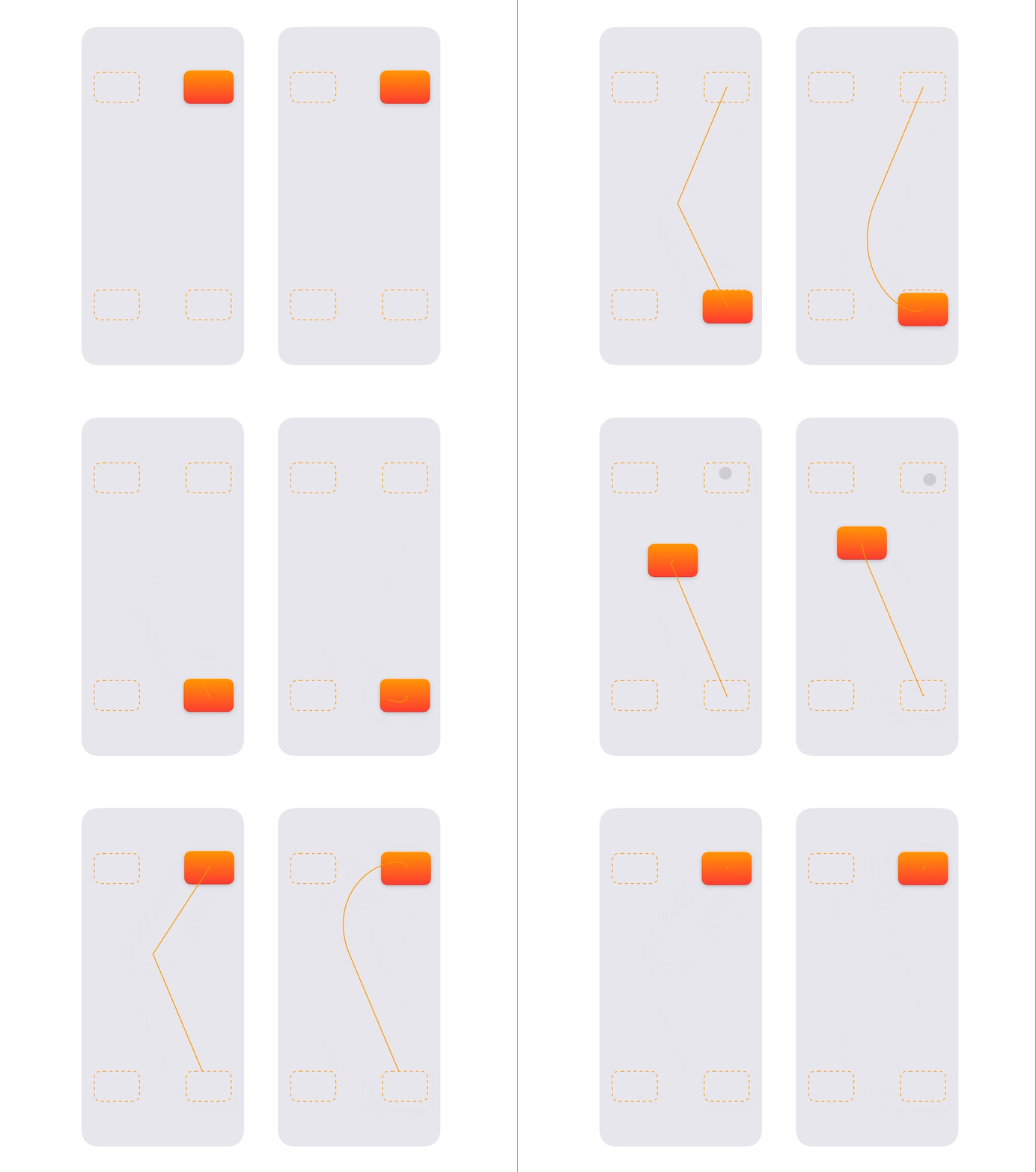
The concrete problem Wave solves is how an animation behaves when its destination changes mid-flight. Its core feature is that all animations are re-targetable: you can change an animation's destination value while it is running, and it gracefully redirects to the new value. At its core, retargeting is the process of preserving an animation's velocity even as its target changes, which Wave does automatically. The README's Picture-in-Picture comparison illustrates the difference — a Wave-based implementation fluidly arcs to its new destination where the standard UIKit animation feels stiff and jerky in comparison.

Key capabilities

  • Retargets in-flight animations, preserving the animation's velocity as its target changes rather than restarting from rest.
  • Block-based animation via Wave.animate(withSpring:gestureVelocity:), taking a Spring(dampingRatio:response:) and the gesture's lift-off velocity.
  • Animates these block-based properties: frame, bounds, center, origin, alpha, backgroundColor, cornerRadius, scale, translation, shadowColor/radius/offset/opacity, and borderColor/borderWidth.
  • A property-based animation API for properties the block-based API does not yet support, such as rotation, and for obtaining intermediate spring values to drive an animation yourself.
  • Interactive hand-off from gestures, by passing panGestureRecognizer.velocity(in:) into the Wave animation as gestureVelocity.
  • High frame-rate animation on ProMotion devices at 120 fps, enabled by setting the CADisableMinimumFrameDuration key to true in Info.plist.
  • Works across UIKit, SwiftUI, and AppKit projects, with a full documentation site for API and usage reference.

Who uses it and how

  • iOS and iPadOS app developers animating view properties during gesture-driven interactions such as a pan-recognised Picture-in-Picture view settling to its destination.
  • Developers who need interruption handling to feel right, replacing stiff UIKit interruption with animations that arc fluidly to a redirected target.
  • Teams working in AppKit on macOS who want the same spring behaviour as their iOS code.
  • Developers who need intermediate spring values to customise animation beyond the supported property list.
  • Anyone prototyping with the cloned repository's sample app, which contains interactive demos of what Wave provides.

Getting started

Add Wave to your app's Package.swift file as .package(url: "https://github.com/jtrivedi/Wave"), or choose File -> Add Packages in Xcode; cloning the repo lets you run the sample app with its interactive demos.

How it compares

Wave sits alongside Apple's own UIView.animateWithDuration() block animations, which it deliberately resembles, but it takes over spring creation and retargeting rather than handing that behaviour to UIKit. It fits among UIKit, SwiftUI, and AppKit as a drop-in layer for projects that already use those frameworks and want velocity-preserving springs rather than replacing their UI stack.

When to use it — and when not to

Because it has no external dependencies, there is no database, storage, or SMTP to operate — self-hosting here simply means linking the package, though you must remember the CADisableMinimumFrameDuration Info.plist entry to get anything above 60 fps on ProMotion hardware. Skip it if you need rotation in the block-based API today, since that property is still listed as upcoming and only the property-based route covers it; it is also less compelling if your animations never change target mid-flight. The project is MIT licensed and was pushed to recently, but carries 11 open issues and a block-based property list that remains incomplete.

project readme (upstream, from github) — read inline

Wave

Wave is a spring-based animation engine for iOS, iPadOS, and macOS. It makes it easy to create fluid, interactive, and interruptible animations that feel great.

Wave has no external dependencies, and can be easily dropped into existing UIKit, SwiftUI, or AppKit based projects and apps.

The core feature of Wave is that all animations are re-targetable, meaning that you can change an animation’s destination value in-flight, and the animation will gracefully redirect to that new value.

Understanding Retargeting

Consider these demos of the iOS Picture-in-Picture feature. The screen on the left is created with standard UIKit animations, and the one on the right is created with Wave.

Though both are “interruptible”, the Wave-based implementation handles the interruption much better, and fluidly arcs to its new destination. The UIKit animation feels stiff and jerky in comparison.

At its core, retargeting is the process of preserving an animation’s velocity even as its target changes, which Wave does automatically.
Demo

Installation

Add Wave to your app's Package.swift file, or selecting File -> Add Packages in Xcode:

.package(url: "https://github.com/jtrivedi/Wave")

If you clone the repo, you can run the sample app, which contains a few interactive demos to understand what Wave provides.

Note: To enable high frame-rate animations on ProMotion devices (i.e. 120 fps animation), you'll need to add a key/value pair in your Info.plist. Set the key CADisableMinimumFrameDuration to true. Without this entry, animations will be capped at 60 fps.

Documentation

There’s a full Wave documentation site available for full API and usage documentation.

Getting Started

There are two ways you can interact with Wave, depending on your needs: the block-based and property-based animations:

Block-Based Animation

The easiest way to get started is by using Wave’s block-based APIs that resemble the UIView.animateWithDuration() APIs.

This API lets you animate several common UIView and CALayer properties, like frame, center, scale, backgroundColor, and more.

For these supported properties, Wave will create, manage, and execute the required spring animations under-the-hood.

For example, animating the above PiP view to its final destination is extremely simple:

if panGestureRecognizer.state == .ended {

    // Create a spring with some bounciness. `response` affects the animation's duration.
    let animatedSpring = Spring(dampingRatio: 0.68, response: 0.80)

    // Get the gesture's lift-off velocity, and pass it into the Wave animation.
    let gestureVelocity = panGestureRecognizer.velocity(in: view)

    Wave.animate(withSpring: animatedSpring, gestureVelocity: gestureVelocity) {
        // Update animatable properties on the view's `animator` property, _not_ the view itself.
        pipView.animator.center = pipViewDestination     // Some target CGPoint that you calculate.
        pipView.animator.scale = CGPoint(x: 1.1, y: 1.1)
    }
}

Note that at any time, you can retarget the view’s center property to somewhere else, and it’ll gracefully animate.

Supported Animatable Properties

The block-based API currently supports animating the following properties. For other properties, you can use the property-based animation API below.

  • frame
  • bounds
  • center
  • origin
  • alpha
  • backgroundColor
  • cornerRadius
  • scale
  • translation
  • shadowColor/radius/offset/opacity
  • borderColor/borderWidth

Upcoming properties:

  • rotation
Property-Based Animation

While the block-based API is often most convenient, you may want to animate something that the block-based API doesn’t yet support (e.x. rotation). Or, you may want the flexibility of getting the intermediate spring values and driving an animation yourself (e.x. a progress value).

For example, to draw the orange path of the PiP demo, we need to know the value of every CGPoint from the view’s initial center, to its destination center:

// When the gesture ends, create a `CGPoint` animator from the PiP view's initial center, to its target.
// The `valueChanged` callback provides the intermediate locations of the callback, allowing us to draw the path.

let positionAnimator = SpringAnimator<CGPoint>(spring: animatedSpring)
positionAnimator.value = pipView.center       // The presentation value
positionAnimator.target = pipViewDestination  // The target value
positionAnimator.velocity = gestureVelocity

positionAnimator.valueChanged = { [weak self] location in
    self?.drawPathPoint(at: location)
}

positionAnimator.start()
Completion Blocks

Both the block-based and property-based APIs support completion blocks. If an animation completes fully, the completion block’s finished flag will be true.

However, if an animation’s target was changed in-flight (“retargeted”), finished will be false, while retargeted will be true.

Wave.animate(withSpring: Spring.defaultAnimated) {
    myView.animator.backgroundColor = .systemBlue
} completion: { finished, retargeted in
    print(finished, retargeted)
}

Example Code

Exploring the provided sample app is a great way to get started with Wave.

Simply open the Wave-Sample Xcode project and hit “Run”. The full source code for the Picture-in-Picture demo is available there, too!

Acknowledgements

Special thanks to Ben Oztalay for helping architect the underlying physics of Wave!

Frequently asked questions

Is Wave free to use?

Wave is open source under the MIT licence. There is no licence fee and no seat count — you can self-host it or, where the project offers one, pay a vendor for a managed version instead.

What does Wave do?

Wave is a spring-based animation engine for iOS and macOS that makes it easy to create fluid, interruptible animations that feel great.

What is Wave written in?

Wave is primarily written in Swift. Its source is publicly available at https://github.com/jtrivedi/Wave, and it has 2,398 GitHub stars.