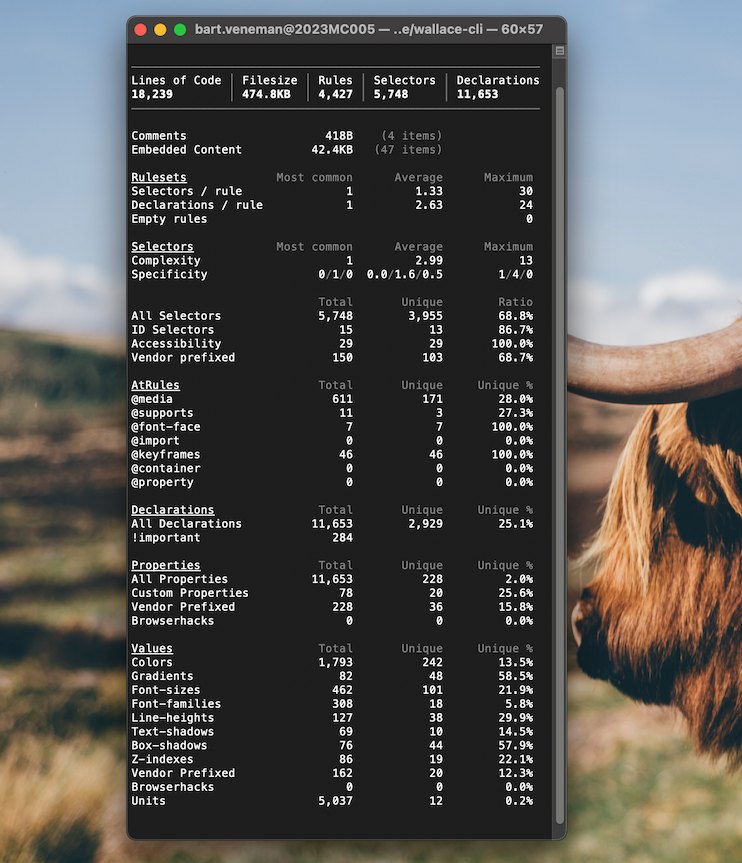
Wallace CLI is a command-line tool that prints pretty CSS analytics — metrics, statistics and complexity data about a stylesheet — directly in the terminal, and it is aimed at front-end developers, auditors and teams who want to inspect the health of their CSS without leaving the shell.
What it is
Wallace CLI is a TypeScript package published to npm as wallace-cli under the MIT licence. After installation it puts a single wallace command on the path, which accepts CSS from three sources: a file path, standard input, or the output of another command piped into it. By default it renders a human-readable table in the terminal, and the --json flag switches the same analytics into machine-readable JSON. Internally it is powered by the CSS Analyzer library maintained by the same project, and it belongs to the projectwallace family of open-source CSS tools.
The concrete problem it solves is that inspecting what a stylesheet actually contains normally requires either uploading it to a web service or reading thousands of lines by hand. Wallace CLI replaces that round trip with a local command: the stylesheet never has to leave the machine, the output arrives in the same terminal where the rest of the work happens, and the JSON mode means the numbers can be captured by scripts and build pipelines rather than only read by a person. The category listing places it under Business Software and Compliance & Risk Management, which reflects its role as an audit and reporting instrument rather than a build-time transform.
Key capabilities
- Runs stylesheet analysis from a file with
wallace path/to/styles.css, printing the report as a terminal table.
- Accepts CSS over standard input, so
cat style.css | wallace analyzes a local stylesheet without naming a path.
- Accepts CSS from a server, so
curl http://localhost/css/style.css | wallace audits remote or running-application stylesheets.
- Emits machine-readable output with the
--json flag, replacing the default table for use in scripts and tooling.
- Provides
--help and -h flags that print the usage summary and the documented examples.
- Reports the analytics generated by the CSS Analyzer project, covering the metrics, statistics, complexity and performance topics associated with the repository.
- Sits in a wider projectwallace toolchain alongside the Online CSS Analyzer, CSS Code Quality Analyzer and Format CSS.
Who uses it and how
- Front-end developers auditing a stylesheet locally, either by pointing
wallace at a file or piping it in, to see metrics and statistics before committing changes.
- Teams running audit and analysis steps in automation, consuming the
--json output instead of the table so the results can be recorded or compared.
- Anyone reviewing CSS that is already deployed, using the
curl pipeline to pull a served stylesheet and analyze it without downloading and inspecting the file by hand.
- Branding and consistency reviews, since branding and audit are among the topics the project targets, with the analytics used as evidence about what a stylesheet contains.
- Users of the broader toolchain who want the same analytics as the Online CSS Analyzer but delivered in the terminal rather than a browser.
Getting started
Install from npm with npm install wallace-cli, then run wallace path/to/styles.css, pipe CSS into wallace through standard input, or curl a stylesheet into it. A hosted, more visual version of the same analytics is available through the Online CSS Analyzer linked from the project's open-source homepage.
How it compares
Among the related tools named by the project, CSS Analyzer is the underlying library rather than a user-facing command, the Online CSS Analyzer presents comparable analytics in a visual and more detailed browser interface, CSS Code Quality Analyzer concentrates on maintainability, complexity and performance judgements, and Format CSS performs formatting rather than analytics. Wallace CLI occupies the terminal slot in that family: the same analysis surface, delivered as a command that fits into a shell pipeline.
When to use it — and when not to
A self-hoster needs a Node and npm environment to install and run the package, and nothing else is documented as required, since the README lists only installation and usage. The repository is small, with 643 stars, 15 forks and 5 open issues, and its README is deliberately sparse — installation, usage, one example of output and a list of related projects, with no extended documentation of the individual metrics it reports. Anyone who wants a visual, exploratory report, a formatting tool, or detailed written guidance on code quality should reach for the sibling projects instead; Wallace CLI is worth choosing when the requirement is a fast, scriptable analytics report in the terminal.