waku-agent is a free, open source ai interaction & interfaces project written in Python and released under MIT. It has 1,776 GitHub stars, 353 forks and 24 open issues, and was last pushed 5 hours ago. On this registry it ranks #65 of 76 tracked projects in AI Interaction & Interfaces, with 5 head-to-head comparisons available.

What is waku-agent?

waku-agent is a local-first, MIT-licensed Python AI agent harness for developers who want an assistant whose loop, memory and evaluation code they can read and own, rather than a hosted assistant that keeps those parts out of sight.

What it is

waku-agent is the implementation behind Waku, a local-first personal assistant that exposes the four pillars of a serious agent as ordinary, readable code: the Harness, the Loop, Memory, and Eval/LLM-Ops. The project lives in the Python ecosystem, in the AI & Machine Learning / AI Interaction & Interfaces category, and every architectural box maps to a file in the repository, documented in docs/architecture.md. The loop is roughly 95 lines of plain Python; the harness wraps it with gateways (terminal, dashboard, voice, Telegram, Discord, WhatsApp) and tools; memory is split into semantic, episodic and procedural layers; and evaluation ships in-tree rather than as an afterthought. Memory itself is a single SQLite file at .waku/state.db.

The concrete problem it solves is legibility in agent frameworks. The README states the goal directly: "No frameworks hiding the good parts." That is the thing it replaces — the black-box agent framework where the reasoning loop, the memory retention policy and the eval harness are library internals a developer can only observe through logs and configuration. waku-agent instead lets a developer step through the loop, open the memory file, and read the gate that decides whether something is remembered and the pass that decides what is kept. Provider access is abstracted into one dialect inside the loop, with a roughly 60-line adapter in waku/loop/models.py covering the rest.

Key capabilities

  • Local-first memory stored as one SQLite file, .waku/state.db, which can be opened and read directly.
  • Three memory types — semantic, episodic and procedural — with a gate that decides whether to remember and a pass that decides what to keep.
  • A reasoning loop of about 95 lines of plain Python that a developer can step through line by line.
  • A local dashboard cockpit that runs on localhost:7777 and lights up every message as it flows through the harness.
  • Built-in evaluation with deterministic tests and LLM-as-judge running side by side, gated into a release check.
  • Multiple gateways around one loop: terminal, dashboard, voice, Telegram, Discord and WhatsApp, including the "Waku Waku" wake word.
  • Provider portability through WAKU_PROVIDER=, with Anthropic as the default plus OpenAI, Gemini, DeepSeek, MiniMax, Kimi, GLM, OpenRouter, OpenCode Zen and OpenCode Go.

Who uses it and how

  • Developers who want to read rather than merely configure an agent clone the repository, create the environment with uv venv, install with uv pip install -e ., copy .env.example to .env, and run the loop locally with uv run waku.
  • Solo builders running a personal assistant on their own laptop point it at a model they already pay for by pasting a single key and setting WAKU_PROVIDER=.
  • People who keep memory across a session demonstrate the workflow in the README: say "Remember that Alex prefers morning meetings", quit, restart, then ask to book a catch-up with Alex on Friday and get a 9am slot.
  • Users who work across several agents — Claude Code, Codex, Grok Bot and Hermes are named — install waku-agent[mcp], run waku connect waku-memory, and share one memory through the hosted service at waku.one.
  • Skills can be carried outward with waku skill export --to claude,codex, so the same memory and skills follow the developer between agents.

Getting started

Install from PyPI with pip install waku-agent, then run waku for the terminal assistant or waku dashboard for the browser cockpit on localhost:7777; the first run reports which key to set. Contributors and readers clone the repository instead and use uv venv, uv pip install -e ., cp .env.example .env, and uv run waku.

How it compares

The facts name no paid products this project replaces, only the agents it interoperates with: Claude Code, Codex, Grok Bot and Hermes appear as integration targets rather than competitors. Where those tools are closed, hosted surfaces, waku-agent is MIT-licensed Python whose loop, memory and eval code sit in the repository, and its cross-agent story runs through Waku Memory at waku.one instead of through a single vendor's account. The distinction is ownership and composability: the developer supplies the model key, keeps the memory file locally, and exports skills to the other agents rather than migrating into one.

When to use it — and when not to

A self-hoster must operate a Python environment built with uv, a .env holding at least one provider API key, and the local SQLite state file, and sharing memory across agents additionally depends on the hosted Waku Memory service and a browser sign-in. Anyone who wants a zero-setup managed assistant, or who will not manage an environment and keys, should pick something else, because waku-agent assumes the operator does that work. The repository is also a single-authored project built by seanchen.io, with 24 open issues at last push on 2026-09-16, so the bus factor and the breadth of supported gateways are worth weighing before depending on it in production.

project readme (upstream, from github) — read inline

waku-agent

Your own AI assistant. On your laptop. In code you can read in an afternoon.

Meet Waku — a local-first personal assistant that shows the four pillars behind every serious agent: Harness · Loop · Memory · Eval/LLM-Ops. No frameworks hiding the good parts. Built by seanchen.io.

  • Local-first. Your memory is one SQLite file. Open it. Read it. It's yours.
  • Memory is the hero. Semantic + episodic + procedural — with a gate that decides whether to remember, and a pass that decides what to keep.
  • The loop is ~95 lines of plain Python. Step through it.
  • Watch it think. A local dashboard lights up every message as it flows through the harness.
  • Eval built in. Deterministic tests and LLM-as-judge, side by side, with a release gate.
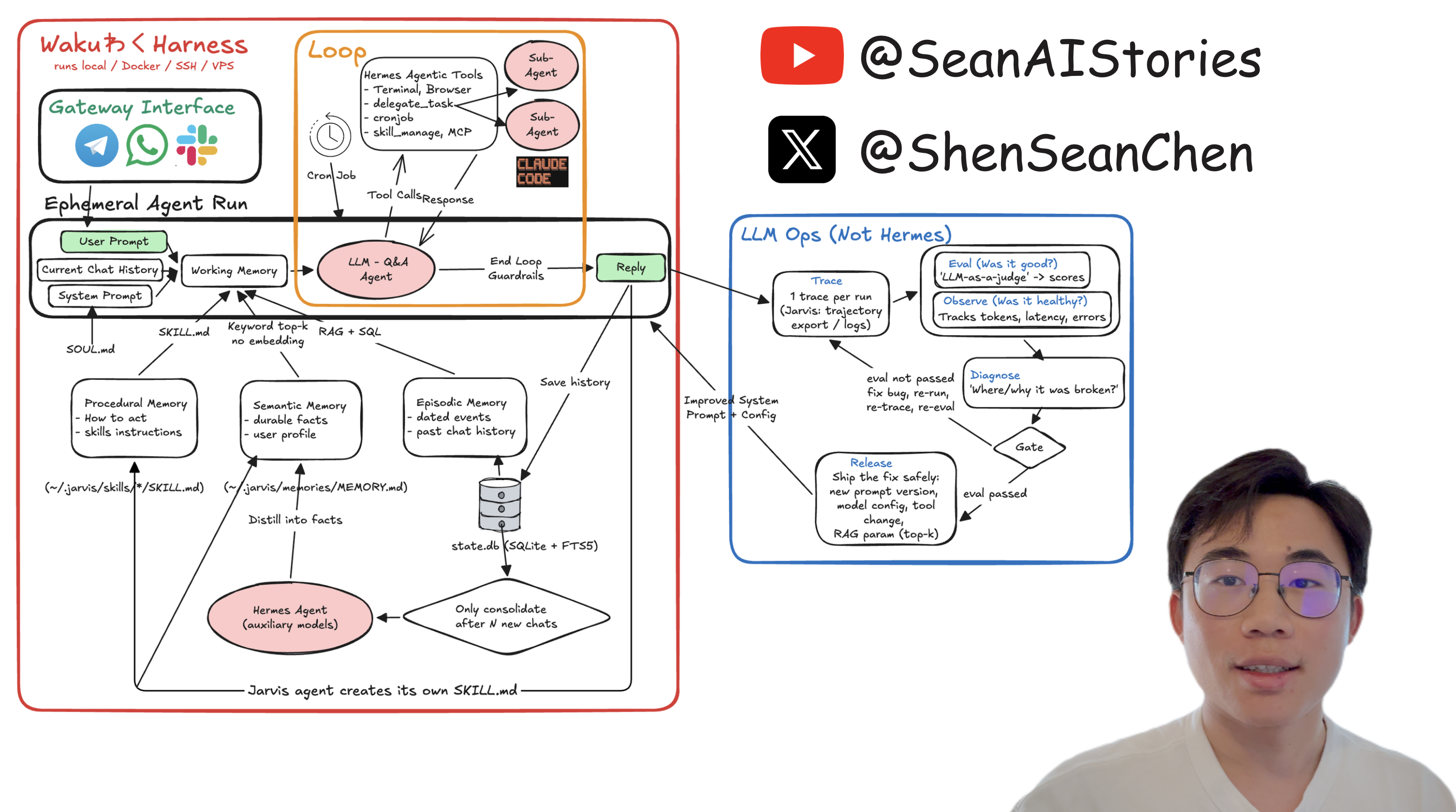
waku-agent architecture — the whiteboard

The system-design whiteboard from the series. Every box maps to a file — see the architecture.

Watch the 20-min code walkthrough — the loop, the memory pillars, the evals, the Telegram gateway and the "Waku Waku" wake word, live.

Waku Memory — the same memory in Claude Code, Codex, Grok Bot and this agent: waku.one · docs

YouTube · X · LinkedIn · Instagram · TikTok · Discord · 哔哩哔哩 · 小红书 · 抖音

Buy me a coffee — it keeps this repo (and the videos) coming

Quickstart

Just want to run it:

pip install waku-agent
waku                                    # talk to your Waku in the terminal
waku dashboard                          # …or the browser cockpit → localhost:7777

It will tell you which key to set the first time. Want to read the code (the point of this repo) or contribute — clone it instead:

git clone https://github.com/ShenSeanChen/waku-agent && cd waku-agent
uv venv && uv pip install -e .          # create the env + install the `waku` command
cp .env.example .env                    # pick a provider, paste ONE key
uv run waku                             # talk to your Waku in the terminal
uv run waku dashboard                   # …or the browser cockpit → localhost:7777

Now try it. "Remember that Alex prefers morning meetings." Quit. Restart. "Book a catch-up with Alex on Friday." → it remembers, and books 9am. Your memory is one file: .waku/state.db.

Use the model you already pay for. Anthropic (default), OpenAI, Gemini, DeepSeek, MiniMax, Kimi, GLM, OpenRouter (one key, hundreds of hosted models), OpenCode Zen, or OpenCode Go — set WAKU_PROVIDER=, paste the key, done. One dialect in the loop; a ~60-line adapter handles the rest.

New to it? Getting started walks the whole setup, with a check at the end of every step.

Connect Waku Memory

Waku's own memory is local. Waku Memory is the hosted memory you share across agents: save something in Claude Code, recall it here.

pip install 'waku-agent[mcp]'           # in a checkout: uv pip install -e '.[mcp]'
waku connect waku-memory                # or /connect waku-memory in the dashboard chat
waku skill export --to claude,codex     # carry Waku's skills to Claude Code and Codex too

Your browser opens once to sign in. To connect Claude Code, Codex, Hermes or Grok Bot to the same memory, see integrations.

What's inside

Pillar In one line Read more
Harness gateways (terminal, dashboard, voice, Telegram, Discord, WhatsApp) and tools around one loop architecture
Loop ~95 lines of plain Python: reason, act, repeat, with two ways to stop the tour
Memory semantic, episodic and procedural (skills); a gate decides whether to remember, consolidation decides what to keep the tour
Eval / LLM-Ops deterministic tests and LLM-as-judge side by side, a release gate, a trace for every turn evals

How is this different from ChatGPT or Claude Desktop? Those are products you use. This is a codebase you own: the loop, the memory schema, the gate and the eval harness are all yours to read and change. Versus the big open-source assistants (OpenClaw, Hermes)? Same architecture, 1/100th the code.

Docs

Read For
Getting started installing, the first run, connecting Waku Memory
The tour the dashboard, things to try, the loop, graph workflows, skills
Architecture every box on the whiteboard, and the file behind it
Integrations voice, Telegram, calendars, MCP servers, Waku Memory
Commands every waku and make command
Evals & tracing the two kinds of eval, the release gate, traces and spend
Roadmap what is live, what is still a skeleton, upgrade paths
Whiteboards the editable system-design charts from the videos
lab/ Waku meets other agents and models: the video experiments
AGENTS.md · CONTRIBUTING.md the rules, and how to send a PR

Community

Star the repo, join the Discord, and grab a good first issue — that link is the live list, so it's always current. Gateways, memory backends and community skills are all shaped to be first PRs; the easiest needs no Python at all (see contributing a skill).

Comment on an issue before you start and it gets assigned to you, so two people never build the same thing.

Also from me

  • launch-mvp-stripe-nextjs-supabase — NextJS + Supabase + Stripe, everything you need to ship a SaaS.
  • AutoManus.io — my AI startup: a sales lead manager for made-to-order products. It embeds where conversations already happen (WhatsApp, email, web chat) to capture inbound, automate follow-ups and kill CRM busywork. Pre-seed backed by Character VC. (AutoManus Discord)

Code is MIT — see LICENSE. The Waku name, mark and design system belong to AutoManus Technologies, Inc. and are not MIT — see LICENSE-BRAND. Built by @ShenSeanChen (YouTube · X).

Frequently asked questions

Is waku-agent free to use?

waku-agent is open source under the MIT licence. There is no licence fee and no seat count — you can self-host it or, where the project offers one, pay a vendor for a managed version instead.

What does waku-agent do?

Waku Waku! Waku Agent is a local-first AI agent harness you actually own, including loop, memory, eval, all in code built to stay legible as it grows.

What is waku-agent written in?

waku-agent is primarily written in Python. Its source is publicly available at https://github.com/ShenSeanChen/waku-agent, and it has 1,776 GitHub stars.